1. தயாரிப்பு முடிந்துவிட்டதுview
The CANMORE HG200 is a water-resistant handheld golf GPS device designed to provide essential golf course data and enhance your game. It features a full-color display and comes preloaded with over 41,000 golf courses worldwide.

Image: The CANMORE HG200 Handheld Golf GPS, showcasing its vibrant display with yardage to the green and hole information.
2. அமைப்பு மற்றும் ஆரம்ப பயன்பாடு
2.1. பெட்டியில் என்ன இருக்கிறது
- CANMORE HG200 Handheld Golf GPS
- விண்ட்ஷீல்ட் மவுண்ட்
- சக்திவாய்ந்த காந்தம்
- USB கேபிள்
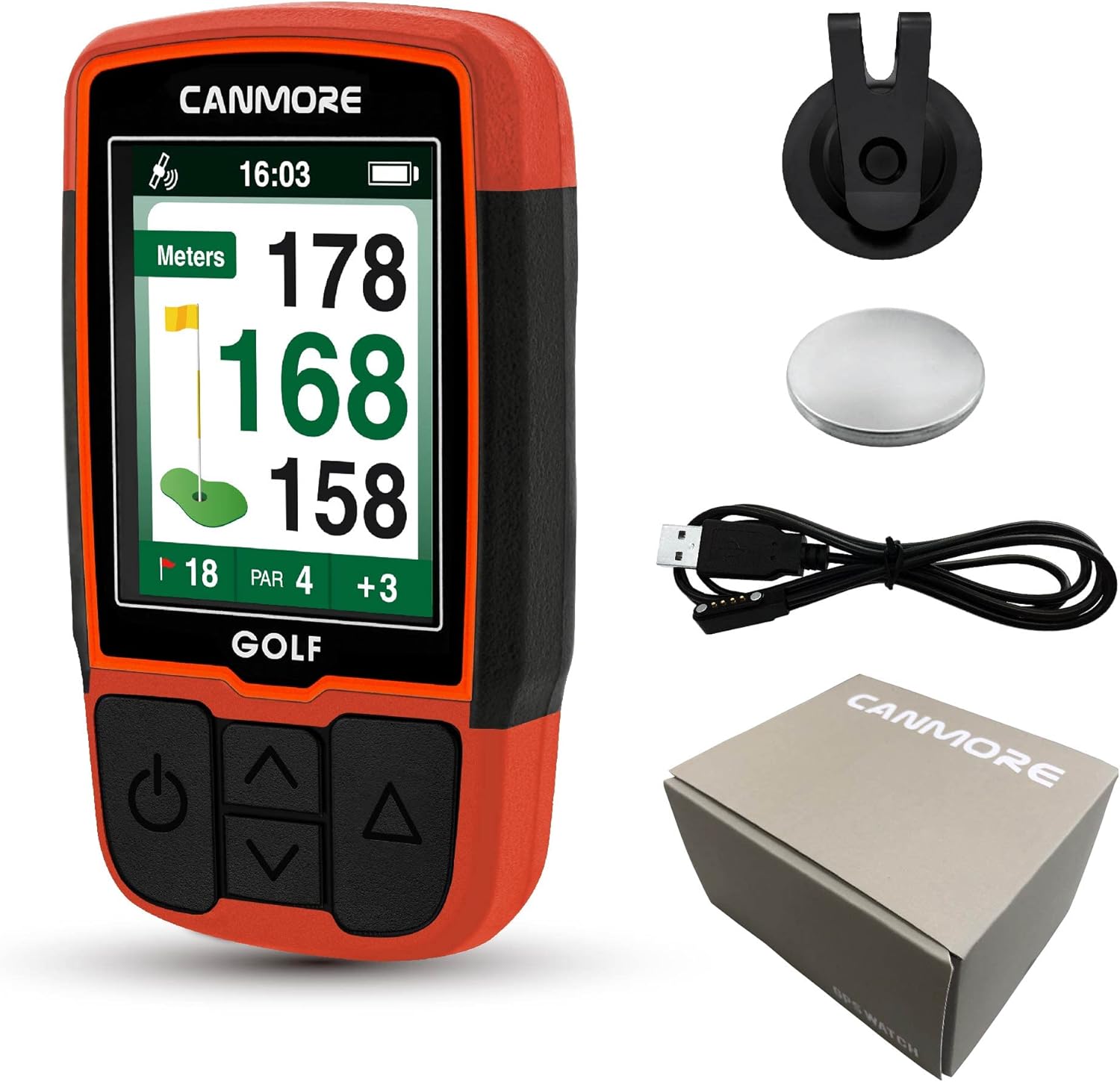
Image: The CANMORE HG200 device along with its included accessories: a windshield mount, a powerful magnet, and a USB charging cable.
2.2. சாதனத்தை சார்ஜ் செய்தல்
Before first use, fully charge your HG200 device. Use only a 5V USB power source to prevent battery damage. Regularly clean the charging port with brushes and cloth to remove sweat and dirt that may affect charging.
2.3. Firmware and Course Data Updates
For optimal GPS accuracy and the most current course data, it is recommended to regularly update the device firmware and course maps. Course data is updated every two weeks. Refer to the Quick Start Guide for detailed instructions on updating from the Canmore webதளம்.
Video: CANMORE Handheld Golf GPS HG200 - Quick Start Guide
Video: A quick start guide demonstrating the initial setup and basic functions of the CANMORE HG200 Handheld Golf GPS.
3. இயக்க வழிமுறைகள்
3.1. Playing Golf
To begin a round of golf, power on the device. The GPS will search for nearby courses. Select your desired course from the list. The device will automatically display distances to the front, middle, and back of the green.

Image: The CANMORE HG200 device showcasing its various functions, including shot distance measurement, hazard distance, and automatic hole advancement.
3.2. ஆட்டோ ஹோல் அட்வான்ஸ்
The HG200 features an auto hole advance function, which automatically updates your distance and hole number as you progress to the next hole on the course.
3.3. Distance to Green (F/M/B)
The device provides clear distances to the front (F), middle (M), and back (B) of the green, assisting with club selection.
3.4. ஆபத்து தூரங்கள்
Access distances to various hazards on the course to plan your shots effectively.

Image: The user-friendly interface of the CANMORE HG200, illustrating how to access features like hazard distances and shot distance tracking.
3.5. ஷாட் தூர அளவீடு
Measure the distance of your shots to track performance and improve your game.
3.6. Scorecard
Keep track of your score directly on the device with the integrated digital scorecard feature.
3.7. Changing Units (Yards/Meters)
The default display unit is yards. To change the unit to meters, navigate to "Setting > Unit" on the device and select your preference.
3.8. சாதனத்தை ஏற்றுதல்
The HG200 comes with a powerful magnet for easy attachment to metal surfaces, such as golf cart uprights, or can be clipped onto your belt or pants pocket.

Image: A golfer on the course with the CANMORE HG200 attached to their belt, demonstrating its convenient and accessible design.
4. பராமரிப்பு
4.1. சுத்தம் மற்றும் சேமிப்பு
The device is IPX7 rated waterproof. For best performance and longevity, store the product in a cool, dry place. Clean the device after exposure to sweat and dirt, especially around the charging connectors.
4.2. GPS Receiver
Do not cover the GPS receiver when locating. Any obstruction may affect the GPS signal. Ensure the device is in an open area with no hindrance during use for accurate positioning.
5. சரிசெய்தல்
5.1. Distance Measurement Displays "---"
If the distance measurement displays "---" instead of figures, connect the device to power to recharge. When in low battery level, the device initiates power reserve mode, which reduces GPS range and may prevent it from locating positions.
5.2. Inconsistent Yardages or Auto-Advance Issues
If you experience inconsistent yardages or issues with the auto-advance function, ensure your device's firmware and course maps are up to date. Refer to the Quick Start Guide or the official Canmore website for the latest updates and troubleshooting steps.
6. விவரக்குறிப்புகள்
- தயாரிப்பு பரிமாணங்கள்: 1.57"லி x 0.59"அங்குலம் x 2.19"அங்குலம்
- பொருளின் எடை: 2.65 அவுன்ஸ்
- பொருள் மாதிரி எண்: HG200-O
- பேட்டரிகள்: 1 லித்தியம் பாலிமர் பேட்டரி தேவை (சேர்க்கப்பட்டுள்ளது)
- OS: Windows (for connectivity)
- ரேம்: 64 எம்பி
- இணைப்பு தொழில்நுட்பம்: USB
- சிறப்பு அம்சம்: நீர்ப்புகா (IPX7 மதிப்பிடப்பட்டது)
- திரை அளவு: 2 அங்குலம்
- வரைபட வகை: Worldwide (41,000+ courses preloaded)
- உற்பத்தியாளர்: CANMORE
7. உத்தரவாதம் மற்றும் ஆதரவு
CANMORE offers a one-time purchase with lifetime service for the HG200. This includes free weekly course updates with no subscription fees, and troubleshooting assistance for GPS connection, charging, shutdown, and other issues. Regular firmware updates and the latest product information are available on the Canmore Official Webதளம்.
For any questions or support, please contact CANMORE customer service.


