1. அறிமுகம்
The LENSGO Wireless Lavalier Microphone System (Model 328C) is a professional-grade UHF wireless microphone system designed for clear, distortion-free audio recording. It features 99 selectable channels, TF card synchronous recording, and wide compatibility with various devices, making it ideal for video recording, interviewகள், வீடியோ பதிவு செய்தல் மற்றும் நேரடி ஒளிபரப்பு.
This system includes two transmitters (TX) and one receiver (RX), allowing for versatile dual-microphone setups. Its robust design and advanced features ensure reliable performance in diverse recording environments.
2. பெட்டியில் என்ன இருக்கிறது
தொகுப்பைத் திறந்தவுடன், பின்வரும் அனைத்து கூறுகளும் சேர்க்கப்பட்டுள்ளதா என்பதைச் சரிபார்க்கவும்:
- பரிசுப் பெட்டி
- TX Transmitter x 2
- RX Receiver x 1
- Windproof Sponge x 2
- மைக்ரோஃபோன் x 2
- Cold Shoe Seat x 1
- சேமிப்பு பை x 1
- Smartphone Cable x 1
- Camera Cable x 1
- Collar Clip x 2
- அறிவுறுத்தல் கையேடு x 1

Image: All components included in the LENSGO Wireless Lavalier Microphone System package.
3. கூறு முடிந்துவிட்டதுview
Familiarize yourself with the main parts of the transmitter (TX) and receiver (RX) units:
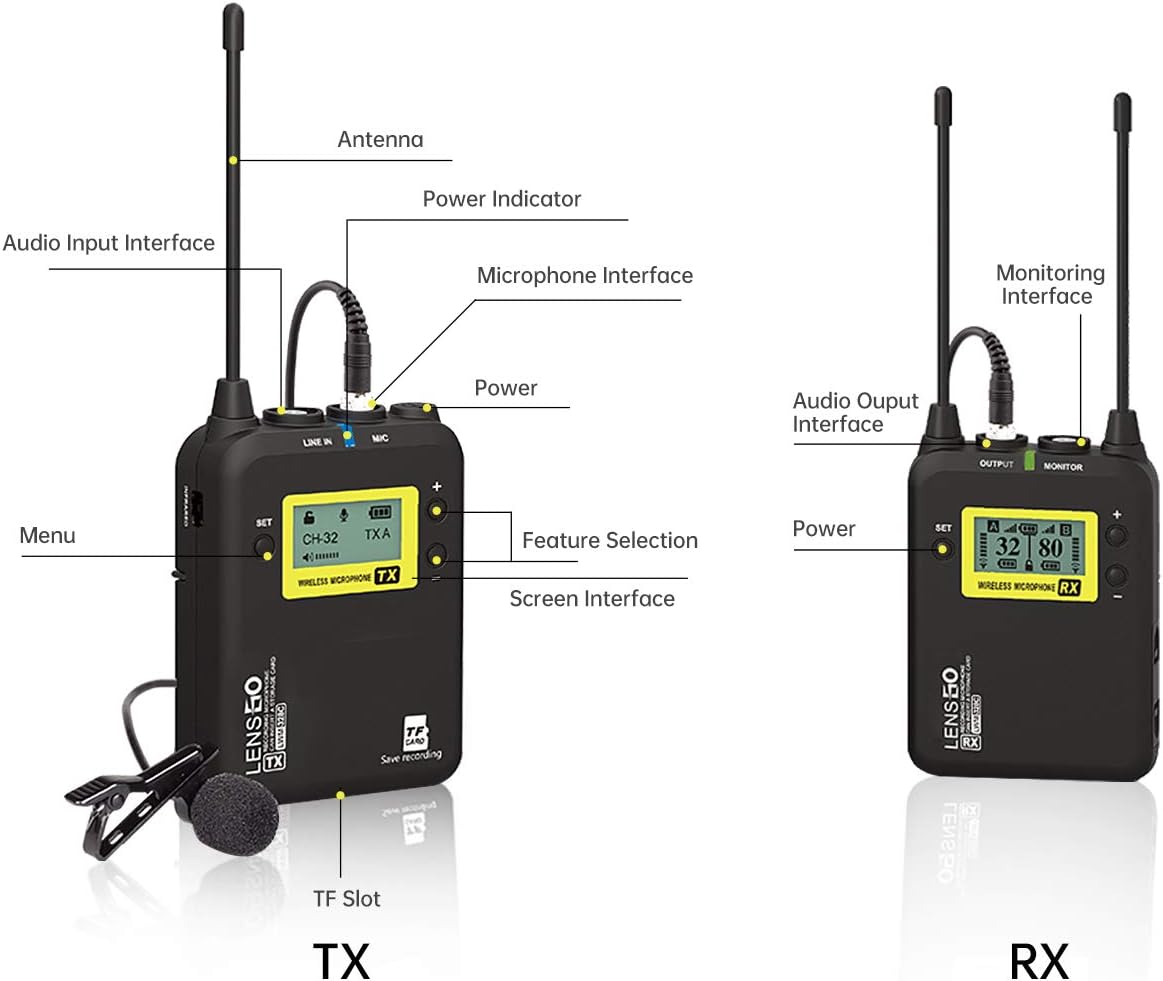
Image: Detailed diagram showing the various interfaces and controls on the TX (Transmitter) and RX (Receiver) units, including antenna, audio input/output, microphone interface, power indicator, screen, and TF slot.
- ஆண்டெனா: For wireless signal transmission and reception.
- Audio Input Interface (TX): Connects to the lavalier microphone.
- Microphone Interface (TX): Dedicated port for external microphone.
- சக்தி காட்டி: Shows battery status and power on/off.
- பவர் பட்டன்: யூனிட்டை ஆன்/ஆஃப் செய்கிறது.
- மெனு பட்டன்: கணினி அமைப்புகளை அணுகுகிறது.
- Feature Selection Buttons: Navigate and select options on the screen.
- திரை இடைமுகம்: Displays channel, battery, and other operational information.
- TF Slot (TX): For inserting a TF card for synchronous recording (up to 32GB, not included).
- Audio Output Interface (RX): Connects to camera, smartphone, or other recording devices.
- Monitoring Interface (RX): For real-time audio monitoring with headphones.
- டைப்-சி சார்ஜிங் போர்ட்: For charging the units.
- பேட்டரி ஸ்லாட்: Houses two AA batteries (not included) for power.
4. அமைவு வழிகாட்டி
4.1 அலகுகளுக்கு சக்தி அளித்தல்
Each transmitter (TX) and the receiver (RX) unit requires two AA batteries (not included). Open the battery slot cover and insert the batteries, ensuring correct polarity. Alternatively, the units can be powered via the Type-C charging port.

Image: Illustration of the battery slot for AA batteries and the Type-C charging port on the microphone unit.
4.2 பதிவு சாதனங்களுடன் இணைத்தல்
The LENSGO system offers wide compatibility with cameras, camcorders, PCs, and smartphones. Use the appropriate cable provided:
- For Cameras/Camcorders: Use the 3.5mm TRS Camera Cable. Connect one end to the RX unit's Audio Output and the other end to your camera's microphone input.
- ஸ்மார்ட்போன்களுக்கு: Use the 3.5mm TRRS Smartphone Cable. Connect one end to the RX unit's Audio Output and the other end to your smartphone's 3.5mm jack. For iPhones 7 and newer, a Lightning to 3.5mm adapter (not included) is required. For Android phones without a 3.5mm jack, a USB-C to 3.5mm adapter (not included) is required.

Image: Visual guide for connecting the LENSGO system to various devices, including cameras via TRS cable and smartphones via TRRS cable and adapters.
4.3 Automatic Pairing (IR Sync)
The system supports automatic scanning and IR synchronization for quick channel selection and pairing:
- Turn on the RX (receiver) unit.
- Enter the menu on the RX unit.
- Select 'IR SYNC' from the menu.
- Keep the RX and TX units close to each other (within a few inches) with their IR sensors aligned. The units will automatically scan and pair to the best available channel.

Image: Step-by-step visual guide for using the Auto-Scanning and IR Sync feature to pair the transmitter and receiver units.
5. இயக்க வழிமுறைகள்
5.1 Channel Selection (99 UHF Channels)
The system offers 99 UHF selectable channels to minimize interference. After IR Sync, the system will automatically select an optimal channel. You can manually change channels via the menu if needed, especially in environments with multiple wireless devices.
5.2 Adjustable RF Signal Strength
You can adjust the RF signal strength to optimize performance based on your recording distance:
- "MIDDLE" Mode: Recommended for distances within 0-100 meters to reduce power consumption.
- "HIGH" Mode: Recommended for distances between 100-150 meters to improve recording quality and range.
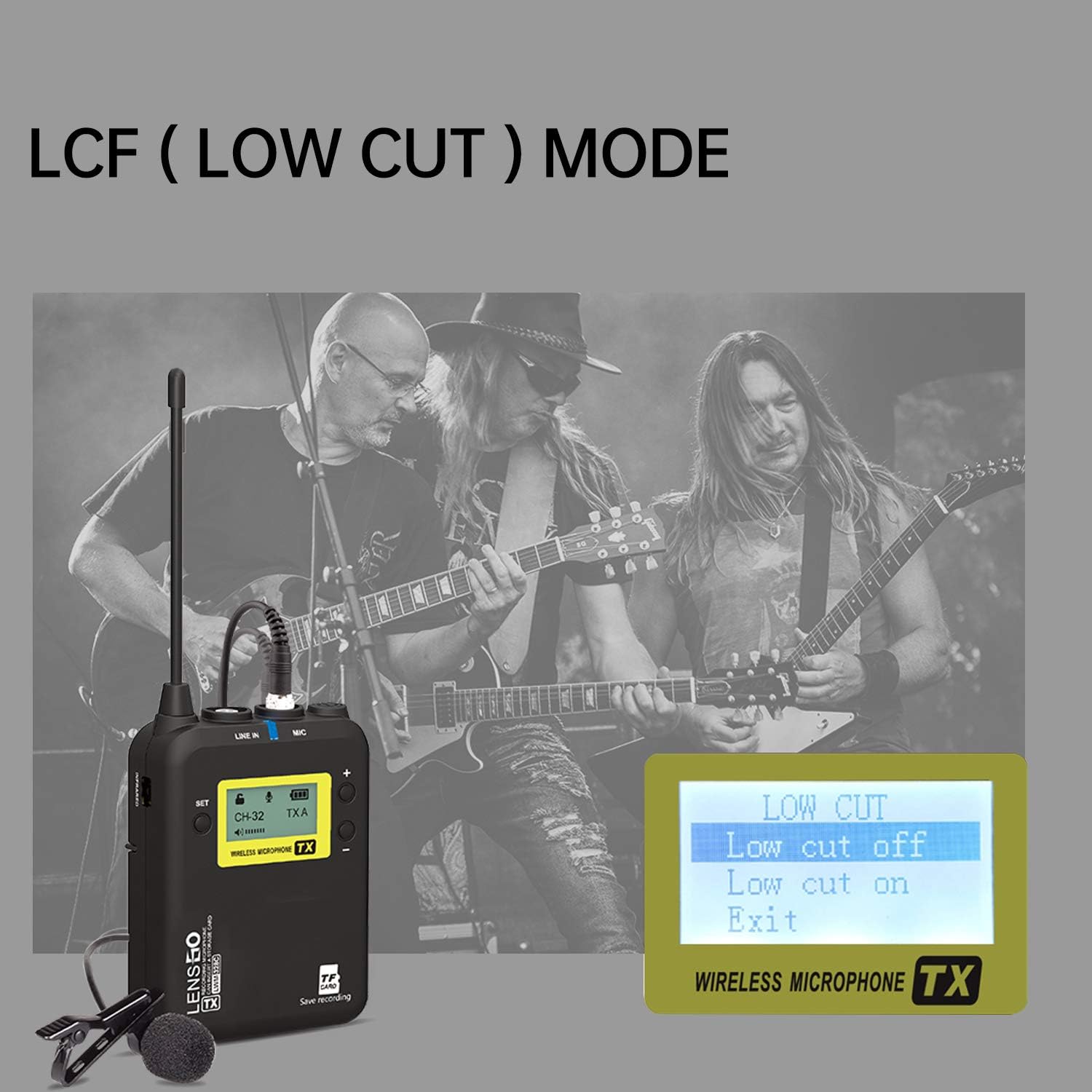
Image: Illustration of the adjustable RF signal strength feature, indicating 'MIDDLE' mode for shorter distances and 'HIGH' mode for longer distances up to 150 meters.
5.3 LCF (Low Cut Filter) Mode
The Low Cut Filter (LCF) function helps to reduce low-frequency noise such as wind, air conditioning hum, or traffic sounds, making your audio clearer. Access this setting through the transmitter's menu:
- Navigate to the 'Record Menu' on the TX unit.
- Select 'LCF' and choose 'Low cut on' to activate the filter, or 'Low cut off' to deactivate it.

Image: A close-up of the transmitter's screen showing the 'LOW CUT' menu option, allowing users to turn the low cut filter on or off.
5.4 TF Card Synchronous Recording
The transmitter (TX) unit features a TF card slot for synchronous audio recording. This provides a backup recording, preventing audio loss due to external channel interference or signal dropouts during real-time shooting.
- Insert a TF card (up to 32GB, not included) into the TF slot on the TX unit.
- In the 'Record Menu' on the TX unit, select 'Enable' for TF card recording.
- The audio will be recorded and saved directly onto the TF card in real-time.

படம்: ஒரு விரிவான view of the LENSGO transmitter highlighting the TF card slot, emphasizing its capability for real-time, synchronous audio recording.
5.5 நிகழ் நேர கண்காணிப்பு
The receiver (RX) unit includes a monitoring interface (3.5mm headphone jack) that allows you to listen to the audio being recorded in real-time. This feature is crucial for ensuring proper audio levels and quality during your recording sessions.
- Connect a pair of headphones to the 'MONITOR' port on the RX unit.
- Adjust the volume on your headphones or the RX unit as needed.

Image: A user monitoring audio through headphones connected to the receiver, which is mounted on a camera, demonstrating the real-time monitoring capability.
6. பராமரிப்பு
- சுத்தம்: அலகுகளை சுத்தம் செய்ய மென்மையான, உலர்ந்த துணியைப் பயன்படுத்தவும். கடுமையான இரசாயனங்கள் அல்லது சிராய்ப்புப் பொருட்களைப் பயன்படுத்துவதைத் தவிர்க்கவும்.
- சேமிப்பு: Store the microphone system in a cool, dry place away from direct sunlight and extreme temperatures. Use the provided storage bag for protection.
- பேட்டரி பராமரிப்பு: Remove batteries from the units if they will not be used for an extended period to prevent leakage.
- மைக்ரோஃபோன் பராமரிப்பு: Keep the lavalier microphones clean and free from dust. Use the windproof sponges to protect them from wind noise and minor impacts.
7. சரிசெய்தல்
| பிரச்சனை | சாத்தியமான காரணம் | தீர்வு |
|---|---|---|
| ஒலி வெளியீடு இல்லை | Low battery; Incorrect cable connection; Unpaired units; Muted microphone/receiver. | Replace batteries; Check all cable connections; Perform IR Sync again; Ensure units are not muted. |
| Interference/Noise | Other wireless devices on same frequency; Too far from receiver; Environmental interference. | Change channels using auto-scan or manual selection; Reduce distance between TX and RX; Activate LCF mode. |
| குறுகிய இயக்க வரம்பு | RF signal strength set to 'MIDDLE'; Obstructions; Environmental factors. | Switch RF signal strength to 'HIGH' mode; Ensure clear line of sight; Avoid dense environments. |
| TF card recording not working | TF card not inserted correctly; TF card full or corrupted; Recording not enabled in menu. | Reinsert TF card; Format or replace TF card; Enable recording in the TX unit's menu. |
8. விவரக்குறிப்புகள்
| அம்சம் | விவரம் |
|---|---|
| மாதிரி பெயர் | wireless microphone system (328C) |
| இணைப்பு தொழில்நுட்பம் | UHF |
| சேனல்களின் எண்ணிக்கை | 99 |
| அதிர்வெண் வரம்பு | 520-590MHz |
| அதிர்வெண் பதில் | 60 KHz |
| போலார் பேட்டர்ன் | சர்வ திசை |
| ஆடியோ உணர்திறன் | 60 டி.பி |
| சிக்னல்-டு-சத்தம் விகிதம் | 60 டி.பி |
| இரைச்சல் நிலை | 60 டி.பி |
| சக்தி ஆதாரம் | Battery Powered (2x AA batteries per unit) |
| செயல்படும் நேரம் | 5 மணி நேரம் வரை (AA பேட்டரிகளுடன்) |
| அதிகபட்ச செயல்பாட்டு வரம்பு | 500 ft (150 m) in open areas; Best within 246 ft (75 m) |
| பொருள் | பிளாஸ்டிக் |
| நிறம் | கருப்பு |
| பொருளின் எடை | 0.9 கிலோகிராம்கள் (1.98 பவுண்டுகள்) |
| தொகுப்பு பரிமாணங்கள் | 16.5 x 8.27 x 4.13 அங்குலம் |
| இணக்கமான சாதனங்கள் | Camcorder, Camera, Laptop, Personal Computer, Smartphone, Tablet |
| சிறப்பு அம்சம் | Volume Control, TF Card Sync Recording, LCF Low Cut Filtering, Auto-Scanning, IR Sync |
9. உத்தரவாதம் மற்றும் ஆதரவு
LENSGO is committed to providing excellent customer service. For any questions or assistance with your product, please contact LENSGO customer support. They offer:
- 24-hour consulting service.
- 60-day worry-free return policy.
- 12-month replacement availability.
- வாழ்நாள் முழுவதும் விற்பனைக்குப் பிந்தைய ஆலோசனை மற்றும் தொழில்நுட்ப ஆதரவு.


