1. அறிமுகம்
This manual provides detailed instructions for the Waveshare 2.13-inch E-Paper E-Ink Display Module (Model: Pico-ePaper-2.13). This module is designed for use with the Raspberry Pi Pico, offering a low-power, partial refresh display solution. E-paper displays are known for their paper-like effect and ability to retain content without continuous power.

Figure 1: Waveshare 2.13-inch E-Paper Display Module displaying example உள்ளடக்கம்.
2 முக்கிய அம்சங்கள்
- பின்னொளி இல்லை: The display retains its content indefinitely without power, making it highly energy-efficient.
- மிகக் குறைந்த மின் நுகர்வு: Power is primarily required only during content refresh cycles.
- SPI இடைமுகம்: Utilizes a Serial Peripheral Interface, requiring minimal I/O pins for communication.
- மேம்பாட்டு வளங்கள்: Includes comprehensive development resources and a manual with Raspberry Pi Pico C/C++ and MicroPython exampலெஸ்.
- Direct Raspberry Pi Pico Attachment: Features an onboard female pin header for direct connection to a Raspberry Pi Pico.

படம் 2: மேல்view of the 2.13-inch E-Paper Module's features and specifications.
3. தொழில்நுட்ப விவரக்குறிப்புகள்
| அம்சம் | மதிப்பு |
|---|---|
| இயக்க தொகுதிtage | 3.3V |
| கிரே ஸ்கேல் | 2 |
| இடைமுகம் | 3-கம்பி SPI, 4-கம்பி SPI |
| பகுதி புதுப்பிப்பு நேரம் | 0.3வி |
| அவுட்லைன் பரிமாணங்கள் | 65.00 × 30.50 மி.மீ. |
| முழு புதுப்பிப்பு நேரம் | 2s |
| காட்சி அளவு | 48.55 × 23.70 மி.மீ. |
| புதுப்பிக்கும் சக்தி | 26.4mW (வகை.) |
| டாட் பிட்ச் | 0.194 × 0.194 மி.மீ. |
| காத்திருப்பு மின்னோட்டம் | <0.01uA (கிட்டத்தட்ட எதுவும் இல்லை) |
| தீர்மானம் | 250×122 பிக்சல்கள் |
| Viewing கோணம் | >170° |
| காட்சி நிறம் | கருப்பு, வெள்ளை |

Figure 3: Detailed technical specifications of the E-Paper module.

Figure 4: Outline dimensions of the 2.13-inch E-Paper module in millimeters.
4. அமைவு மற்றும் இணைப்பு
The Waveshare Pico-ePaper-2.13 module is designed for direct attachment to a Raspberry Pi Pico. Follow these steps for proper setup:
- Prepare Raspberry Pi Pico: Ensure your Raspberry Pi Pico is ready for use, with necessary firmware or operating system installed if required for your project.
- Align and Connect: Carefully align the female pin header on the E-Paper module with the male pins on your Raspberry Pi Pico. Gently press them together until fully seated. Ensure correct orientation to prevent damage.
- மின்சாரம்: Once connected, power the Raspberry Pi Pico via its USB port or other designated power input. The E-Paper module draws power directly from the Pico.
- மென்பொருள் அமைப்பு: Refer to the provided development resources for specific C/C++ or MicroPython examples to initialize and control the display. This typically involves configuring the SPI interface on the Pico.

Figure 5: Raspberry Pi Pico securely connected to the E-Paper module. Note: Raspberry Pi Pico is not included with the display module.
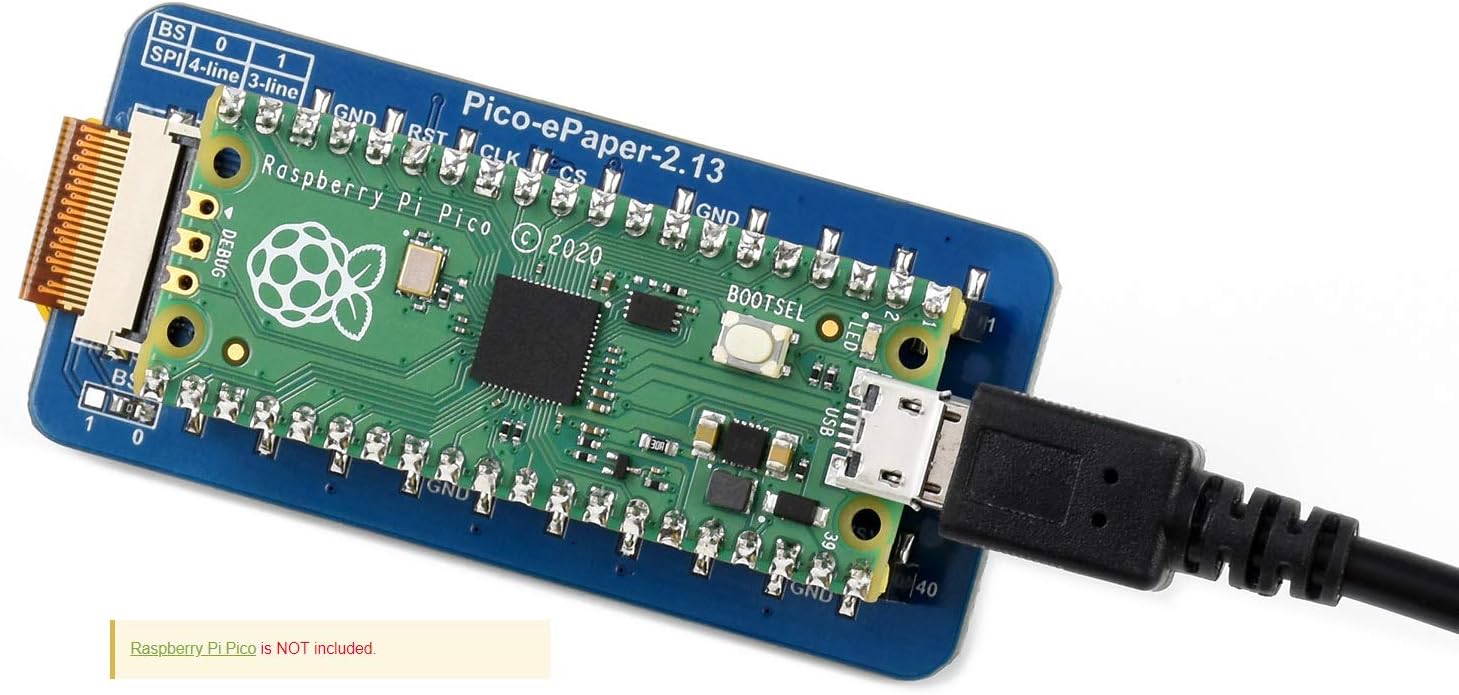
Figure 6: Raspberry Pi Pico with E-Paper module connected and powered via USB. Note: Raspberry Pi Pico is not included with the display module.
4.1 பின்அவுட் வரையறை
Understanding the pinout is crucial for advanced configurations or troubleshooting. The module uses an SPI interface.
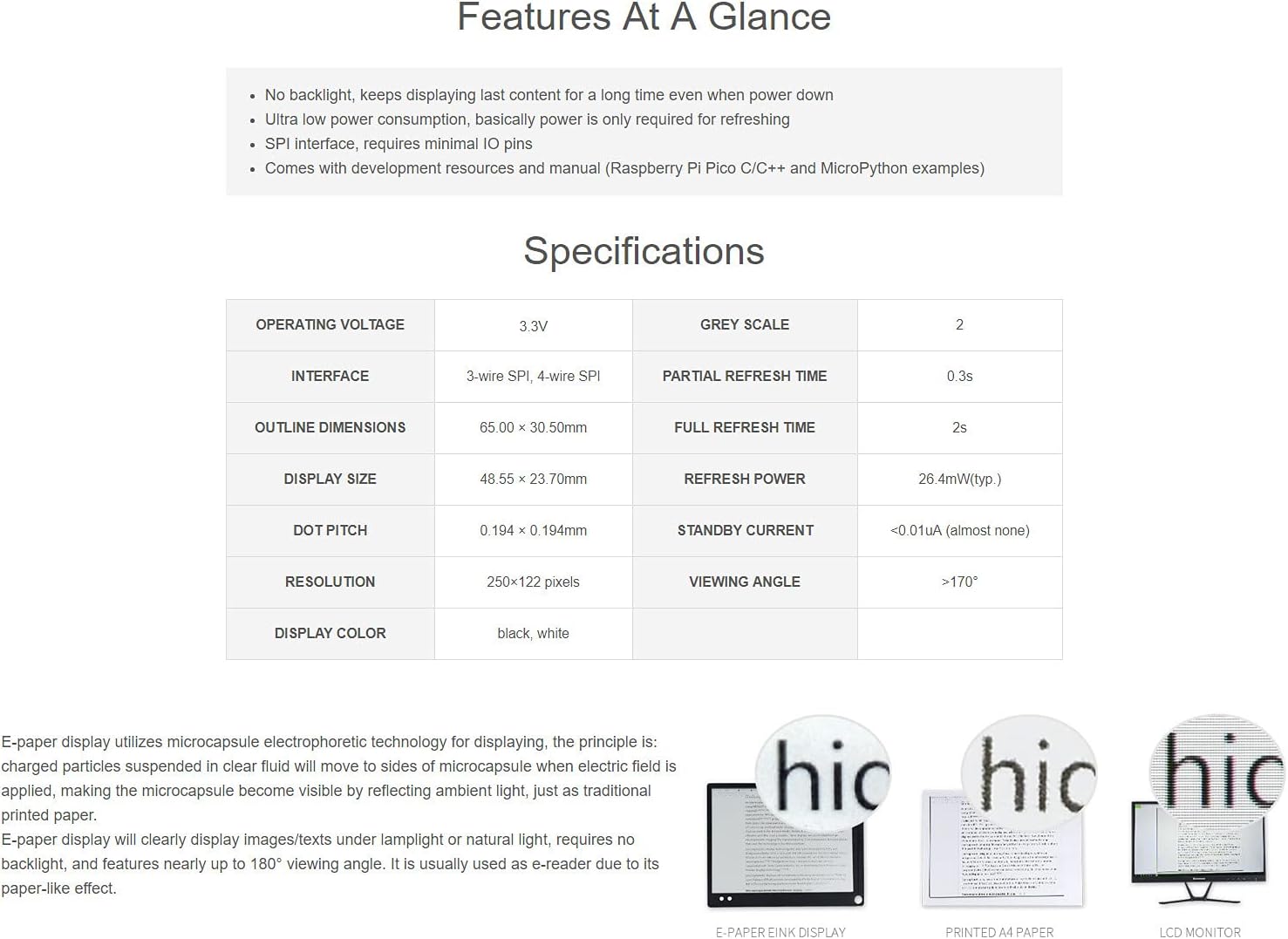
Figure 7: Pinout definition for the Waveshare Pico-ePaper-2.13 module, showing connections for SPI, power, and control pins.
| பின் பெயர் | விளக்கம் |
|---|---|
| வி.எஸ்.ஒய்.எஸ் | சக்தி உள்ளீடு |
| GND | மைதானம் |
| e-Paper_DC | தரவு/கட்டளை கட்டுப்பாட்டு முள் (தரவுக்கு அதிகமாகவும், கட்டளைக்கு குறைவாகவும்) |
| e-Paper_CS | SPI chip select (low active) |
| e-Paper_CLK | SPI SCK பின் |
| e-Paper_DIN | SPI MOSI பின் |
| e-Paper_RST | External reset (low active) |
| e-Paper_BUSY | Busy status output |
5. செயல்பாட்டு வழிகாட்டி
Operating the Waveshare 2.13-inch E-Paper module involves programming your Raspberry Pi Pico to send display data via the SPI interface. Waveshare provides example code and libraries to facilitate this process.
5.1 Programming the Display
- Access Development Resources: Visit the official Waveshare product page or documentation portal for the Pico-ePaper-2.13 module. Here you will find example code in C/C++ and MicroPython.
- நூலகங்களை நிறுவவும்: Download and install any necessary libraries or drivers for your chosen programming language (e.g., MicroPython libraries for e-paper displays).
- எக்ஸ்-ஐ ஏற்றவும்ample குறியீடு: Upload the provided example code to your Raspberry Pi Pico. These examples typically demonstrate basic functions like displaying text, images, or performing partial/full refreshes.
- உள்ளடக்கத்தைத் தனிப்பயனாக்கு: Modify the example code to display your desired content. Pay attention to the display resolution (250x122 pixels) and color depth (black/white, 2 grey scales).
- Refresh Cycles: Understand the difference between full refresh (approx. 2 seconds) and partial refresh (approx. 0.3 seconds). Partial refresh is faster and consumes less power but may leave ghosting artifacts over time, requiring an occasional full refresh.
5.2 விண்ணப்பம் Exampலெஸ்
The E-Paper module is versatile and suitable for various applications due to its low power consumption and persistent display capabilities.

படம் 8: எ.காamples of potential applications for the E-Paper module, such as price tags, shelf labels, and information displays in various environments.
6. பராமரிப்பு மற்றும் பராமரிப்பு
To ensure the longevity and optimal performance of your Waveshare E-Paper display module, follow these maintenance guidelines:
- கவனத்துடன் கையாளவும்: E-paper displays are delicate. Avoid applying excessive pressure or bending the module, especially the flexible FPC cable.
- சுத்தம்: Use a soft, dry, lint-free cloth to gently wipe the display surface. Do not use liquid cleaners, solvents, or abrasive materials, as these can damage the screen.
- சுற்றுச்சூழல் நிலைமைகள்: Operate and store the module within its specified temperature and humidity ranges. Avoid extreme temperatures, direct sunlight for prolonged periods, and high humidity.
- சக்தி மேலாண்மை: While the display retains content without power, ensure proper power-down sequences for the Raspberry Pi Pico to prevent data corruption or unexpected behavior.
- நிலையான மின்சாரம்: Take precautions against electrostatic discharge (ESD) when handling the module, as electronic components can be sensitive to static.
7. சரிசெய்தல்
If you encounter issues with your E-Paper display module, consider the following troubleshooting steps:
- Display Not Refreshing/Blank:
- Check all connections between the E-Paper module and the Raspberry Pi Pico. Ensure they are secure and correctly oriented.
- Verify the power supply to the Raspberry Pi Pico.
- Review your code for display initialization and refresh commands. Ensure the SPI interface is correctly configured.
- Confirm that the correct libraries for the Pico-ePaper-2.13 are installed and imported in your code.
- Ghosting or Image Retention:
- Ghosting is common with partial refreshes. Perform a full refresh periodically to clear the display completely.
- Ensure your refresh cycles are correctly implemented in your code.
- தவறான காட்சி நோக்குநிலை:
- The display typically operates in portrait mode by default. If you require landscape orientation, check if your chosen library or example code supports rotation and how to implement it.
- Module Not Detected by Pico:
- Double-check the pin connections against the pinout diagram (Figure 7).
- Ensure the Raspberry Pi Pico is functioning correctly independently.
For further assistance, refer to the official Waveshare documentation and community forums.
8. ஆதரவு மற்றும் உத்தரவாதம்
For technical support, additional resources, and the latest documentation, please visit the official Waveshare website. You can typically find detailed product wikis, example code, and community forums there.
உற்பத்தியாளர்: அலை பகிர்வு
Webதளம்: www.waveshare.com
Information regarding product warranty is typically available on the Waveshare website or included with your purchase documentation. Please retain your proof of purchase for warranty claims.


