1. அறிமுகம்
Welcome to the user manual for your new Cheerlux C50 Projector. This guide provides essential information on setting up, operating, maintaining, and troubleshooting your device. Please read this manual thoroughly before using the projector to ensure optimal performance and safety. Keep this manual for future reference.
2. பாதுகாப்பு வழிமுறைகள்
தீ, மின்சார அதிர்ச்சி அல்லது காயம் ஏற்படாமல் தடுக்க, பின்வரும் பாதுகாப்பு முன்னெச்சரிக்கை நடவடிக்கைகளைக் கவனியுங்கள்:
- காற்றோட்ட திறப்புகளை அடைக்காதீர்கள். சரியான காற்றோட்டத்திற்காக ப்ரொஜெக்டரைச் சுற்றி போதுமான இடத்தை உறுதி செய்யுங்கள்.
- புரொஜெக்டரை மழை அல்லது ஈரப்பதத்திற்கு ஆளாக்க வேண்டாம். புரொஜெக்டரில் குவளைகள் போன்ற திரவங்களால் நிரப்பப்பட்ட பொருட்களை வைப்பதைத் தவிர்க்கவும்.
- ப்ரொஜெக்டரைத் திறக்க வேண்டாம் casing. அனைத்து சேவைகளையும் தகுதிவாய்ந்த சேவை பணியாளர்களிடம் பரிந்துரைக்கவும்.
- ப்ரொஜெக்டருடன் வழங்கப்பட்ட பவர் அடாப்டரை மட்டும் பயன்படுத்தவும்.
- ப்ரொஜெக்டர் லென்ஸை நேரடியாகப் பார்ப்பதைத் தவிர்க்கவும்amp பிரகாசமான ஒளி உங்கள் கண்களைப் பாதிக்கக்கூடும் என்பதால், இயக்கத்தில் உள்ளது.
- ப்ரொஜெக்டரை விழாமல் இருக்க ஒரு நிலையான, சமமான மேற்பரப்பில் வைக்கவும்.
- Unplug the projector from the power outlet during lightning storms or when unused for long periods.
3. தொகுப்பு உள்ளடக்கங்கள்
அனைத்து பொருட்களும் உள்ளனவா மற்றும் நல்ல நிலையில் உள்ளனவா என்பதை சரிபார்க்கவும்:
- Cheerlux C50 புரொஜெக்டர்
- ரிமோட் கண்ட்ரோல்
- பவர் கேபிள்
- HDMI கேபிள்
- ஏ.வி கேபிள்
- பயனர் கையேடு
4. தயாரிப்பு முடிந்துவிட்டதுview
Familiarize yourself with the components and ports of your Cheerlux C50 Projector.

This image displays the Cheerlux C50 Projector from a front-top angle, highlighting its lens, focus ring, and control panel buttons on the top surface. The projector features a white and grey casing.
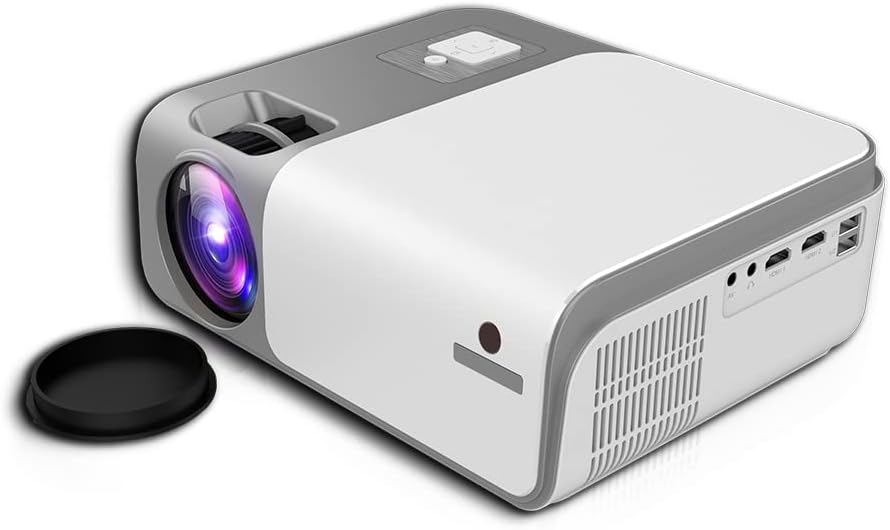
This image shows the rear and side of the Cheerlux C50 Projector, revealing various input/output ports such as HDMI, USB, and AV, along with ventilation grilles. A lens cap is visible next to the lens.
4.1. முன் குழு
- ப்ரொஜெக்ஷன் லென்ஸ்: படத்தை வெளியிடுகிறது.
- ஃபோகஸ் ரிங்: படத்தின் கூர்மையை சரிசெய்கிறது.
4.2. சிறந்த குழு
- கட்டுப்பாட்டு பொத்தான்கள்: Power, Menu, Source, Navigation (Up/Down/Left/Right), OK.
4.3. பின்புற பேனல்
- ஆற்றல் உள்ளீடு: Connects to the power cable.
- HDMI போர்ட்கள் (x2): Connect to HDMI-enabled devices (laptops, gaming consoles, Blu-ray players).
- USB போர்ட்கள் (x2): மீடியா பிளேபேக்கிற்கு USB டிரைவ்களை இணைக்கவும்.
- ஏவி போர்ட்: AV கேபிளைப் பயன்படுத்தி பழைய சாதனங்களுடன் இணைக்கவும்.
- ஆடியோ அவுட் (3.5மிமீ): வெளிப்புற ஸ்பீக்கர்கள் அல்லது ஹெட்ஃபோன்களை இணைக்கவும்.
- ஐஆர் ரிசீவர்: ரிமோட் கண்ட்ரோல் சிக்னல்களுக்கு.
5 அமைவு
5.1. மின் இணைப்பு
- ப்ரொஜெக்டரின் பவர் உள்ளீட்டு போர்ட்டுடன் பவர் கேபிளை இணைக்கவும்.
- மின் கேபிளின் மறுமுனையை ஒரு சுவர் கடையில் செருகவும்.
- ப்ரொஜெக்டரில் உள்ள பவர் இன்டிகேட்டர் லைட் ஒளிரும்.
5.2. வேலை வாய்ப்பு
Position the projector on a stable, flat surface. The ideal projection distance for the Cheerlux C50 is between 1.5 to 6 meters, depending on the desired screen size. Ensure the projector is centered with your projection screen or wall.
5.3. ஃபோகஸ் மற்றும் கீஸ்டோன் திருத்தம்
- கவனம் சரிசெய்தல்: Turn the focus ring on the front of the projector until the projected image appears sharp and clear.
- Keystone Correction (4P): If the projected image appears trapezoidal (wider at the top or bottom), use the 4P keystone correction function. This can typically be accessed via the projector's menu or dedicated buttons on the remote control. Adjust each of the four corners independently to achieve a perfectly rectangular image.
6. இயங்குகிறது
6.1. பவர் ஆன்/ஆஃப்
- பவர் ஆன்: Press the power button on the projector or the remote control. The projector will start up, and the lamp ஒளிரச் செய்யும்.
- பவர் ஆஃப்: Press the power button again. Confirm shutdown if prompted. Allow the projector to cool down before unplugging it.
6.2. Input Sources
Connect your desired device to the projector using the appropriate cable (HDMI, AV, USB). Then, press the 'Source' button on the projector or remote control to select the corresponding input source.
- , HDMI: For high-definition video and audio from laptops, game consoles, etc.
- USB: மீடியாவை விளையாடுவதற்கு files (photos, videos, music) directly from a USB flash drive.
- ஏ.வி: For standard definition video and audio from older devices like DVD players.
6.3. வயர்லெஸ் இணைப்பு (வைஃபை & ப்ளூடூத்)
The Cheerlux C50 Projector features built-in WiFi and Bluetooth for enhanced connectivity.
- வைஃபை இணைப்பு: Navigate to the 'Settings' menu, select 'Network' or 'WiFi Settings'. Choose your desired WiFi network from the list and enter the password.
- புளூடூத் இணைப்பு: In the 'Settings' menu, select 'Bluetooth'. Turn on Bluetooth and pair with your Bluetooth-enabled speakers or headphones.
6.4. ஸ்கிரீன் மிரரிங்
The projector supports wireless screen mirroring from compatible smartphones and tablets.

This image illustrates the Cheerlux C50 Projector wirelessly connected to a smartphone. The phone's screen, displaying a movie scene, is being mirrored to the projector, indicated by a Wi-Fi signal icon between the devices.
- Ensure both your projector and mobile device are connected to the same WiFi network.
- On the projector, select the 'Screen Mirroring' or 'Wireless Display' option from the main menu.
- On your mobile device, activate its screen mirroring feature (e.g., 'Smart View' for Samsung, 'Screen Mirroring' for Android, 'AirPlay' for iOS).
- Select the projector's name from the list of available devices on your phone.
- The mobile device's screen content will now be projected.
6.5. மெனு வழிசெலுத்தல்
Use the navigation buttons (Up, Down, Left, Right) and 'OK' button on the projector or remote control to browse through the on-screen menu. The 'Menu' button typically opens the main settings, and the 'Return' or 'Exit' button closes menus.
7. பராமரிப்பு
7.1. சுத்தம் செய்தல்
- லென்ஸ்: ஆப்டிகல் லென்ஸ்களுக்காக பிரத்யேகமாக வடிவமைக்கப்பட்ட மென்மையான, பஞ்சு இல்லாத துணியைப் பயன்படுத்தவும். சிராய்ப்பு கிளீனர்களைப் பயன்படுத்த வேண்டாம்.
- Casing: ப்ரொஜெக்டரின் வெளிப்புறத்தை மென்மையான, உலர்ந்த துணியால் துடைக்கவும். பிடிவாதமான அழுக்குகளுக்கு, சிறிது dampதண்ணீர் கொண்டு துணி en.
- காற்றோட்டம் துவாரங்கள்: Periodically clean the vents with a soft brush or compressed air to prevent dust buildup, which can affect cooling.
7.2. சேமிப்பு
When not in use for extended periods, store the projector in a cool, dry place, away from direct sunlight and extreme temperatures. Cover the lens with its cap to protect it from dust and scratches.
8. சரிசெய்தல்
உங்கள் ப்ரொஜெக்டரில் சிக்கல்கள் ஏற்பட்டால், பின்வரும் பொதுவான சிக்கல்கள் மற்றும் தீர்வுகளைப் பார்க்கவும்:
| பிரச்சனை | சாத்தியமான காரணம் | தீர்வு |
|---|---|---|
| எந்தப் படமும் வெளியிடப்படவில்லை. | Power cable loose, incorrect input source, device not connected. | Check power connection, select correct input source, ensure source device is on and connected. |
| படம் மங்கலாக உள்ளது | Focus not adjusted, projector too close/far. | Adjust the focus ring. Reposition the projector within the recommended distance. |
| படம் ட்ரெப்சாய்டல் ஆகும் | ப்ரொஜெக்டர் திரைக்கு செங்குத்தாக இல்லை. | Use the 4P keystone correction function in the menu. |
| ஒலி இல்லை | Volume too low, external speakers not connected, source device muted. | Increase projector volume, check external speaker connection, unmute source device. |
| ரிமோட் கண்ட்ரோல் வேலை செய்யவில்லை | Batteries dead, obstruction, not pointing at IR receiver. | Replace batteries, remove obstructions, point remote directly at the projector's IR receiver. |
9. விவரக்குறிப்புகள்
Technical specifications for the Cheerlux C50 Projector:
| அம்சம் | விவரக்குறிப்பு |
|---|---|
| பிராண்ட் பெயர் | Generic (Cheerlux C50) |
| இணைப்பு தொழில்நுட்பம் | வைஃபை, புளூடூத் |
| நேட்டிவ் ரெசல்யூஷன் | 1920 x 1080 |
| பிரகாசம் | 4000 லுமேன் |
| படிவம் காரணி | போர்ட்டபிள் |
| மவுண்டிங் வகை | டேப்லெட் மவுண்ட் |
| கட்டுப்படுத்தி வகை | ரிமோட் கண்ட்ரோல் |
| அதிகபட்ச வீசுதல் தூரம் | 6 மீட்டர் |
| வாட்tage | 3 வாட்ஸ் |
| சிறப்பு அம்சங்கள் | Built In Wi Fi, Portable, Wireless, 4P Keystone Correction |
10. உத்தரவாதம் மற்றும் ஆதரவு
The Cheerlux C50 Projector comes with a standard manufacturer's warranty. Please refer to the warranty card included in your package for specific terms and conditions, including warranty period and coverage details. For technical support, service, or further inquiries, please contact your retailer or the manufacturer's customer service department.
உத்தரவாதக் கோரிக்கைகளுக்கான வாங்கியதற்கான சான்றாக உங்கள் கொள்முதல் ரசீதை வைத்திருங்கள்.


