
1. அறிமுகம்
நன்றி, நன்றி.asing the Dcolor DVB-S/S2 Sat Receiver TV Stick. This compact and versatile device allows you to receive DVB-S/S2 satellite channels in Full HD 1080P, record your favorite shows, and play multimedia files. Its discreet design allows it to be hidden behind your TV, providing a clean setup. This manual provides essential information for setting up, operating, maintaining, and troubleshooting your new device.
பெட்டியில் என்ன இருக்கிறது:
- DVB-S2 HDMI TV Stick
- ரிமோட் கண்ட்ரோல்
- ஐஆர் ரிசீவர்
- DC 12V Power Cable
- பயனர் கையேடு

Figure 1.1: Dcolor DVB-S/S2 Sat Receiver TV Stick and included remote control.

Figure 1.2: The Dcolor Sat Receiver provides Full HD 1080P and can be discreetly hidden behind your television.
2 அமைவு
Follow these steps to set up your Dcolor DVB-S/S2 Sat Receiver TV Stick:
- டிவியுடன் இணைக்கவும்: Plug the HDMI connector of the TV Stick directly into an available HDMI port on your television. The device is designed to be hidden behind the TV.
- ஐஆர் பெறுநரை இணைக்கவும்: Plug the IR receiver cable into the 'IR' port on the TV Stick. Position the IR receiver in a location where it has a clear line of sight to your remote control.
- பவர் இணைக்கவும்: Connect the DC 12V power cable to the 'DC' port on the TV Stick and plug the other end into a power outlet.
- ஆண்டெனாவை இணைக்கவும்: Connect your satellite antenna cable to the DVB-S/S2 tuner port on the TV Stick.
- உள்ளீட்டைத் தேர்ந்தெடுக்கவும்: Turn on your TV and select the correct HDMI input source to which the Dcolor TV Stick is connected.
- ஆரம்ப ஸ்கேன்: Upon first use, the device may prompt you to perform an initial channel scan. Follow the on-screen instructions to scan for available satellite channels. The device comes with Astra and Hotbird signals pre-installed for convenience.
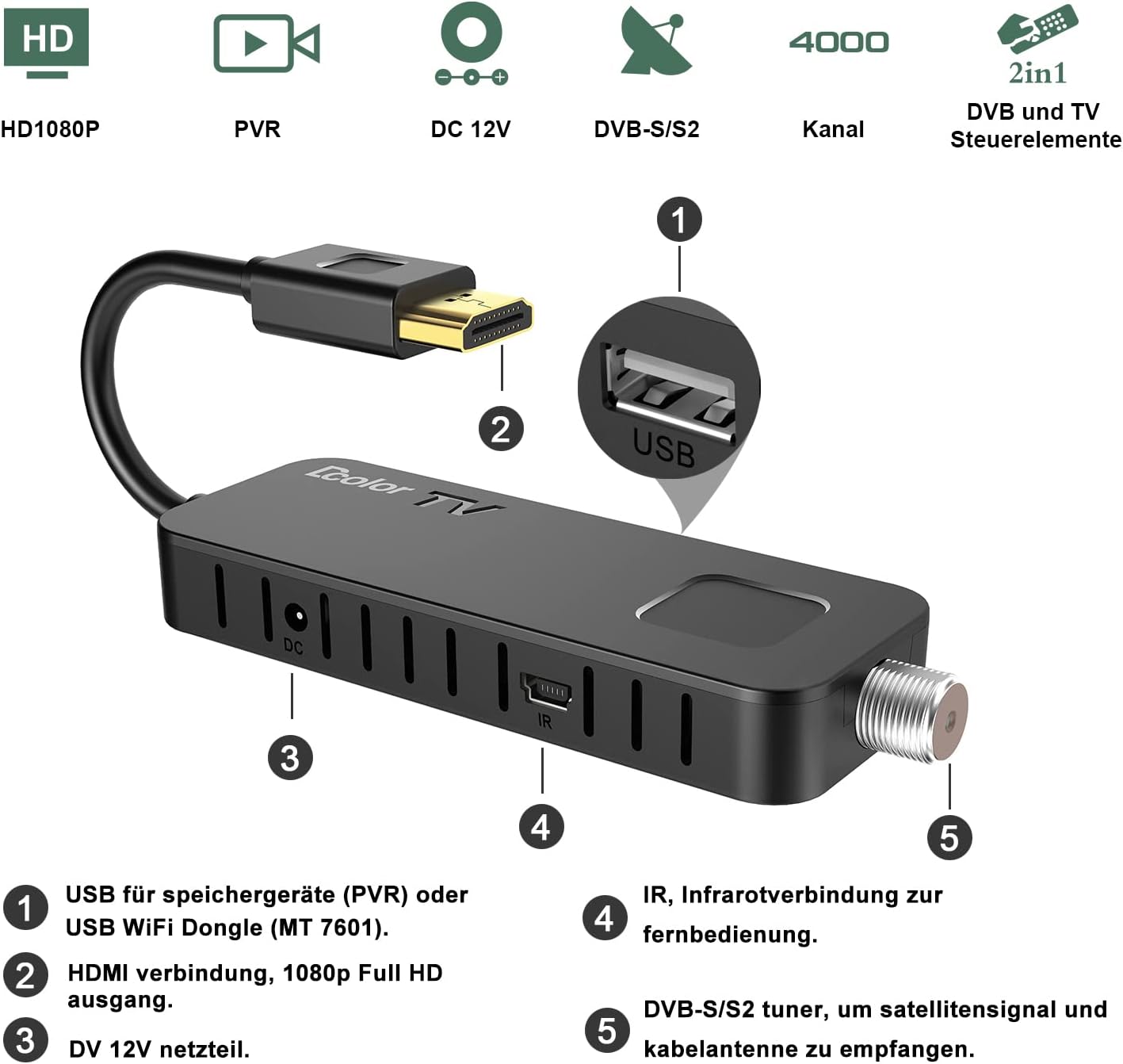
படம் 2.1: மேல்view of the Dcolor TV Stick's ports: USB, HDMI, DC 12V, IR, and DVB-S/S2 tuner.

Figure 2.2: The compact design allows the TV Stick to be discreetly installed behind your television.

Figure 2.3: Step-by-step guide for connecting the Dcolor TV Stick to your HDTV, power, IR receiver, and antenna.
3. இயக்க வழிமுறைகள்
3.1 அடிப்படை செயல்பாடுகள்
- பவர் ஆன்/ஆஃப்: அழுத்தவும் சக்தி ரிமோட் கண்ட்ரோலில் உள்ள பொத்தான்.
- சேனல் வழிசெலுத்தல்: பயன்படுத்தவும் CH + / CH- buttons to change channels. You can also enter channel numbers directly using the numeric keypad.
- ஒலியளவு கட்டுப்பாடு: பயன்படுத்தவும் VOL + / VOL- ஒலி அளவை சரிசெய்ய பொத்தான்கள்.
- மெனு: அழுத்தவும் மெனு button to access the main menu for settings, channel management, and other features.
- சரி: அழுத்தவும் OK button to confirm selections or view சேனல் தகவல்.
3.2 PVR Function (Recording)
The Dcolor TV Stick supports PVR (Personal Video Recorder) functionality, allowing you to record live TV shows. A USB storage device (up to 4TB, formatted as FAT32) is required for recording.
- Connect USB Storage: Insert a FAT32 formatted USB hard drive or flash drive into the USB 2.0 port on the TV Stick.
- உடனடி பதிவு: While watching a channel, press the REC button on the remote control to start recording immediately. Press நிறுத்து பதிவை முடிக்க.
- திட்டமிடப்பட்ட பதிவு (டைமர்): Access the menu, navigate to the 'Timer' or 'PVR' section, and set a schedule for future recordings. You can specify the channel, start time, end time, and frequency.
- பதிவுகளை அணுகவும்: பதிவு செய்யப்பட்டது files can be found and played back through the 'Media Player' or 'PVR' section in the main menu.
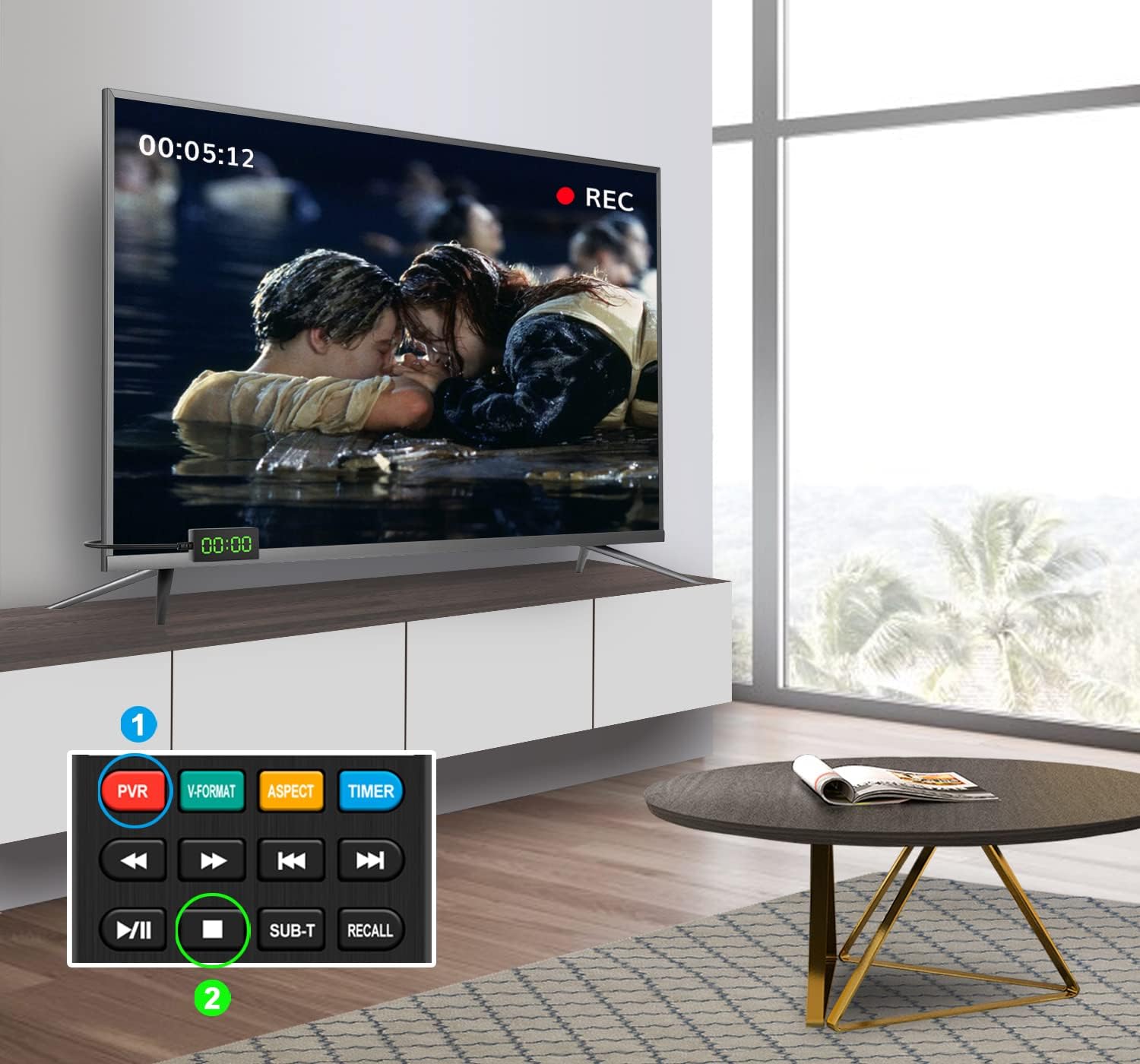
Figure 3.1: Illustrates the PVR recording function, allowing you to capture live television content.
3.3 USB 2.0 Media Player
The built-in USB 2.0 Media Player allows you to enjoy various multimedia files (MP4 video, MP3 music, JPG images) from your USB storage device.
- Connect USB Storage: Ensure your USB device is connected to the USB 2.0 port.
- Access Media Player: From the main menu, select the 'Media Player' option.
- உலாவவும் Files: Navigate through your USB device's folders to find the desired video, music, or image files.
- பின்னணி: ஒரு தேர்ந்தெடுக்கவும் file மற்றும் அழுத்தவும் OK to start playback. Use the remote control's playback buttons (Play, Pause, Stop, Fast Forward, Rewind) as needed.

Figure 3.2: The Dcolor TV Stick supports USB multimedia playback, allowing you to enjoy various media files.
3.4 ரிமோட் கண்ட்ரோல் அம்சங்கள்
The included 2-in-1 remote control is designed for both the Dcolor TV Stick and basic TV functions. It features self-learning capabilities for TV control.

Figure 3.3: Detailed layout of the Dcolor TV Stick remote control, highlighting key function buttons.

Figure 3.4: The 2-in-1 self-learning remote control can be programmed to operate both the receiver and your TV.
For detailed instructions on programming the self-learning functions (e.g., TV Power, TV/AV, Volume +/-), please refer to the specific section in the full user manual or contact customer support.
4. பராமரிப்பு
To ensure the longevity and optimal performance of your Dcolor DVB-S/S2 Sat Receiver TV Stick, follow these maintenance guidelines:
- சுத்தம்: Use a soft, dry cloth to clean the device. Do not use liquid cleaners or aerosols, as they may damage the components.
- காற்றோட்டம்: Ensure the device has adequate ventilation. Do not cover the ventilation holes or place it in an enclosed space that could lead to overheating.
- பயன்பாட்டில் இல்லாத போது பவர் ஆஃப்: If you plan not to use the device for an extended period, it is advisable to unplug it from the power outlet.
- மென்பொருள் புதுப்பிப்புகள்: உற்பத்தியாளரின் website for any available software or firmware updates. Updates can improve performance, add new features, or fix bugs.
5. சரிசெய்தல்
If you encounter issues with your Dcolor DVB-S/S2 Sat Receiver TV Stick, refer to the following common problems and solutions:
| பிரச்சனை | சாத்தியமான காரணம் | தீர்வு |
|---|---|---|
| படம் அல்லது ஒலி இல்லை | Incorrect TV input selected; Loose HDMI connection; No power to device. | Ensure your TV is on the correct HDMI input. Check that the HDMI cable is securely connected. Verify the power cable is properly connected and the device is powered on. |
| சேனல்களைக் கண்டுபிடிக்க முடியவில்லை | Antenna not connected or misaligned; Incorrect satellite settings; Signal strength too low. | Check your satellite antenna connection and ensure it is properly aligned. Verify the correct satellite (e.g., Astra, Hotbird) is selected in the settings. Perform a new channel scan. |
| ரிமோட் கண்ட்ரோல் வேலை செய்யவில்லை | Batteries are dead or inserted incorrectly; IR receiver is blocked or not connected. | Replace batteries with new ones, ensuring correct polarity. Check that the IR receiver is securely plugged into the TV Stick and has a clear line of sight to the remote. |
| PVR recording not working | USB drive not connected or not FAT32 formatted; Insufficient storage space. | Ensure the USB drive is connected and formatted to FAT32. Check for available storage space on the USB drive. |
If the problem persists after trying these solutions, please contact Dcolor customer support for further assistance.
6. விவரக்குறிப்புகள்
| அம்சம் | விவரம் |
|---|---|
| மாதிரி எண் | H.264 DVB-S/S2 |
| தயாரிப்பு பரிமாணங்கள் | 10.6 x 3.8 x 1.5 செமீ; 270 கிராம் |
| உற்பத்தியாளர் | DCOLOR |
| இணைப்பு தொழில்நுட்பம் | HDMI |
| மொத்த USB போர்ட்கள் | 1 |
| ஆடியோ வெளியீட்டு முறை | சுற்றிவளைக்கவும் |
| Storage Capacity (USB) | Up to 4 TB (FAT32 format recommended) |
| பிறப்பிடமான நாடு | சீனா |
| Amazon.de இல் இருந்து கிடைக்கிறது | 28 ஏப்ரல் 2022 |
7. உத்தரவாதம் மற்றும் ஆதரவு
Dcolor products are designed for reliability and performance. For any questions, technical support, or warranty inquiries, please refer to the contact information provided with your purchase or visit the official Dcolor support webதளம்.
If you cannot find the user manual or require further assistance, please do not hesitate to contact Dcolor customer service. They are available to help with setup, operation, and troubleshooting.
உத்தரவாத நோக்கங்களுக்காக உங்கள் கொள்முதல் ஆதாரத்தை வைத்திருங்கள்.


