அறிமுகம்
The CAD Audio WX1000HH is a frequency agile UHF wireless handheld microphone system designed for clear and reliable audio transmission. Operating in the 510-570mHz frequency band, it offers 100 selectable channels to ensure optimal signal clarity and minimize interference. This system features convenient auto-scan and IR sync functions for quick setup and channel changes. Built with durable all-metal construction, the WX1000HH is suitable for various demanding environments. This manual provides essential information for setting up, operating, and maintaining your wireless microphone system.
தொகுப்பு உள்ளடக்கங்கள்
கீழே பட்டியலிடப்பட்டுள்ள அனைத்து பொருட்களும் உங்கள் தொகுப்பில் சேர்க்கப்பட்டுள்ளதா என்பதை சரிபார்க்கவும்:
- WX1000HH Handheld Microphone Transmitter
- WX1000 UHF Wireless Receiver
- Power Adapter for Receiver
- மைக்ரோஃபோன் கிளிப்
- Rack Mount Hardware
- Antenna Relocation Kit
- Audio Cable (likely 1/4" TS to 1/4" TS or XLR to 1/4" TS)
- பயனர் கையேடு (இந்த ஆவணம்)

படம் 1: All components of the CAD Audio WX1000HH system, including the handheld microphone, receiver, power adapter, microphone clip, rack mount hardware, antenna relocation kit, and an audio cable.
அமைவு
1. பெறுநர் அமைப்பு
- இடம்: Position the WX1000 receiver on a stable, flat surface or install it into a standard equipment rack using the included rack mount hardware. Ensure adequate ventilation around the unit.
- ஆண்டெனா இணைப்பு: Connect the included antennas to the ANT connectors on the rear panel of the receiver. If rack-mounting, use the antenna relocation kit to position the antennas for optimal reception.
- மின் இணைப்பு: Connect the supplied power adapter to the DC INPUT on the rear of the receiver and then plug it into a suitable AC power outlet.
- ஆடியோ வெளியீடு: Connect the receiver's audio output (Balanced XLR or Unbalanced 1/4" TS) to your mixer, amplifier, or PA system using an appropriate audio cable.

படம் 2: The WX1000 UHF Wireless Receiver shown with rack mount ears attached, ready for installation into an equipment rack.

படம் 3: Rear panel of the WX1000 receiver, showing the ANT connectors, Balanced XLR output, Unbalanced 1/4" TS output, and DC INPUT for power.
2. Handheld Microphone Setup
- பேட்டரி நிறுவல்: Unscrew the bottom cap of the handheld microphone. Insert two fresh AA batteries, observing the correct polarity (+/-) as indicated inside the battery compartment.
- பாதுகாப்பான தொப்பி: Screw the bottom cap back onto the microphone securely.

படம் 4: The CAD Audio WX1000HH handheld microphone with its bottom cap removed, revealing the battery compartment for two AA batteries.
இயக்க வழிமுறைகள்
1. ஆன் / ஆஃப் செய்தல்
- பெறுபவர்: Press the Power button on the front panel of the receiver. The display will illuminate.
- கையடக்க ஒலிவாங்கி: Press and hold the power button on the microphone body until the display illuminates.
2. Channel Selection and Synchronization (IR Sync)
The WX1000HH system features 100 switchable UHF frequencies and an auto-scan function to find clear channels. Up to 20 systems can be used simultaneously.
- தானியங்கி ஸ்கேன்: On the receiver, press the "SET" button to initiate an auto-scan. The receiver will search for and select an available, interference-free frequency.
- IR ஒத்திசைவு: Once the receiver has selected a frequency, align the IR window on the handheld microphone with the IR sensor on the receiver (usually near the display). Press the "IR Sync" or "SET" button on the receiver (refer to receiver display for specific prompt). The frequency information will be transmitted to the microphone, synchronizing the two units.
- சரிபார்ப்பு: Confirm that the frequency displayed on the microphone matches the frequency on the receiver.
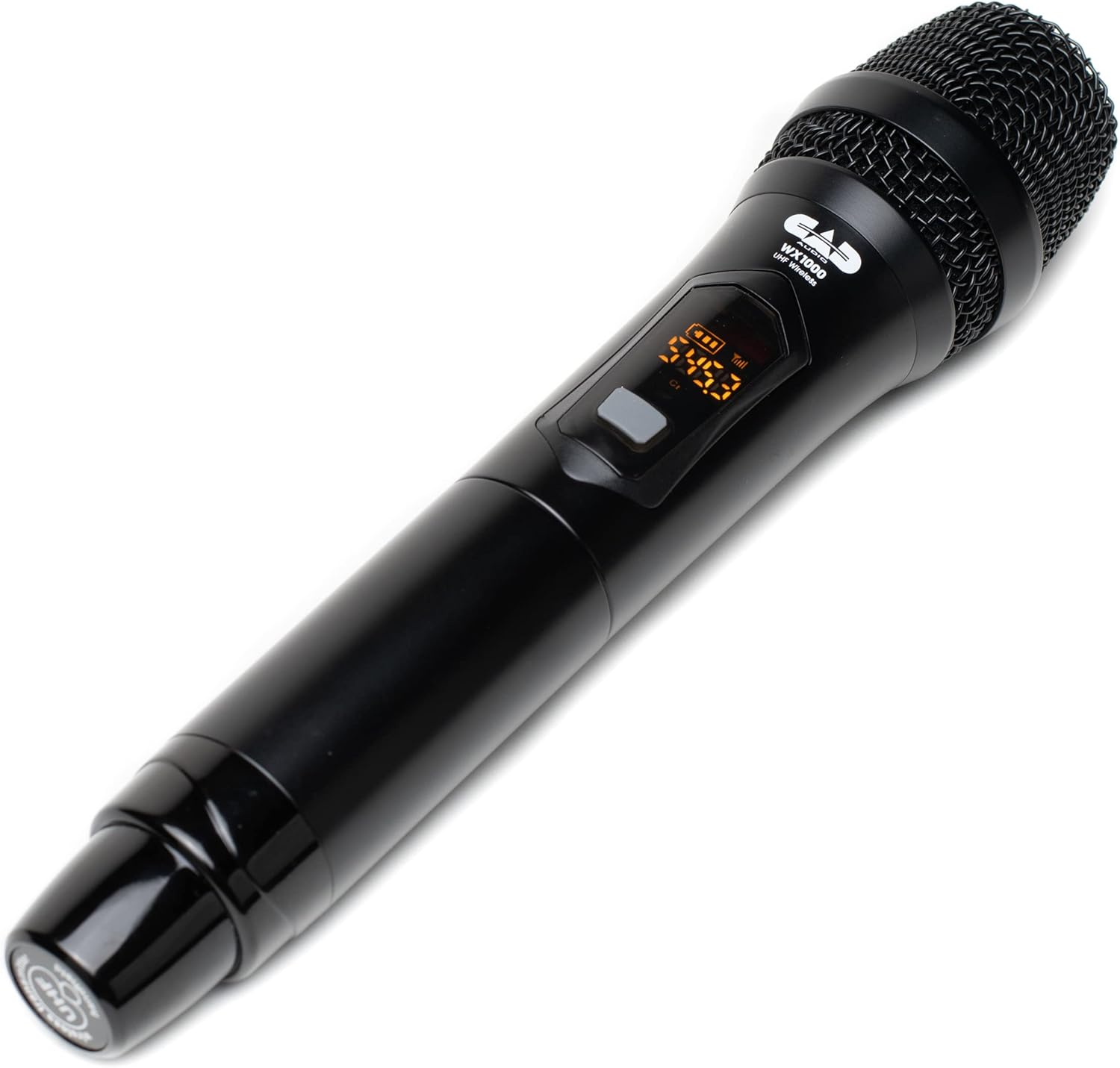
படம் 5: Close-up of the CAD Audio WX1000HH handheld microphone's display, showing frequency and battery level indicators.
3. பேட்டரி நிலை குறிகாட்டிகள்
Both the handheld microphone transmitter and the receiver feature battery level indicators. Monitor these indicators to ensure uninterrupted operation. The handheld microphone provides over 12 hours of operation with two AA batteries.
4 செயல்பாட்டு வரம்பு
The system offers an operating range of up to 295 feet (90 meters) between the transmitter and receiver under optimal conditions. Environmental factors, obstacles, and other wireless devices can affect this range.
5. Recommended Uses
This system is suitable for various applications including singing, speech, and karaoke.
பராமரிப்பு
- சுத்தம்: Use a soft, dry cloth to clean the exterior of the receiver and microphone. Do not use liquid cleaners or solvents.
- பேட்டரி மாற்று: Replace AA batteries in the handheld microphone when the low battery indicator appears. Always use fresh, high-quality batteries. Remove batteries if the microphone will not be used for an extended period.
- சேமிப்பு: நேரடி சூரிய ஒளி மற்றும் தீவிர வெப்பநிலையிலிருந்து விலகி, குளிர்ந்த, உலர்ந்த இடத்தில் அமைப்பைச் சேமிக்கவும்.
சரிசெய்தல்
| பிரச்சனை | சாத்தியமான காரணம் | தீர்வு |
|---|---|---|
| மைக்ரோஃபோனில் இருந்து ஒலி இல்லை |
|
|
| குறுக்கீடு அல்லது நிலையானது |
|
|
| குறுகிய இயக்க வரம்பு |
|
|
விவரக்குறிப்புகள்
| மாதிரி | WX1000HH |
| மைக்ரோஃபோன் படிவ காரணி | கையடக்கமானது |
| அதிர்வெண் பேண்ட் | யுஎச்எஃப் (510-570 மெகா ஹெர்ட்ஸ்) |
| சேனல்களின் எண்ணிக்கை | 100 (Frequency Agile) |
| செயல்பாட்டு வரம்பு | 295 அடி (90 மீட்டர்) வரை |
| Microphone Power Source | 2 x AA பேட்டரிகள் |
| மைக்ரோஃபோன் பேட்டரி ஆயுள் | >12 மணிநேரம் |
| பொருள் | Metal (Receiver), Metal (Microphone) |
| சிக்னல்-டு-சத்தம் விகிதம் | 75 டி.பி |
| இணைப்பு தொழில்நுட்பம் | XLR (Balanced), 1/4" TS (Unbalanced) |
| தயாரிப்பு பரிமாணங்கள் (பெறுநர்) | 12.1 x 2.8 x 16 அங்குலம் (L x W x H) |
| பொருளின் எடை | 4 பவுண்டுகள் (சிஸ்டம்) |
| UPC | 631922109757 |
உத்தரவாதம் மற்றும் ஆதரவு
For warranty information and technical support, please refer to the official CAD Audio webதளத்தில் அல்லது அவர்களின் வாடிக்கையாளர் சேவையை நேரடியாகத் தொடர்பு கொள்ளவும். எந்தவொரு உத்தரவாதக் கோரிக்கைகளுக்கும் வாங்கியதற்கான சான்றாக உங்கள் கொள்முதல் ரசீதை வைத்திருங்கள்.
CAD Audio Official Webதளம்: www.cadaudio.com


