1. அறிமுகம்
This manual provides essential instructions for the safe and efficient operation of your Motorola Six-Pocket Multi-Unit Charger. This charger is designed to simultaneously charge up to six compatible Motorola radios or batteries, ensuring your communication devices are always ready for use. Please read this manual thoroughly before using the charger.
2. பாதுகாப்பு தகவல்
Always observe the following safety precautions to prevent injury or damage to the charger or connected devices:
- Use only the power supply provided with the charger.
- மழை அல்லது ஈரப்பதத்திற்கு சார்ஜரை வெளிப்படுத்த வேண்டாம்.
- சார்ஜருக்கு ஏதேனும் சேதம் ஏற்பட்டால் அதை இயக்க வேண்டாம்.
- செயல்பாட்டின் போது சார்ஜரைச் சுற்றி சரியான காற்றோட்டத்தை உறுதிப்படுத்தவும்.
- சார்ஜரைப் பிரிக்கவோ மாற்றவோ முயற்சிக்காதீர்கள்.
- குழந்தைகளுக்கு எட்டாத இடத்தில் வைக்கவும்.
3. தொகுப்பு உள்ளடக்கங்கள்
உங்கள் தொகுப்பில் பின்வரும் உருப்படிகள் உள்ளதா என்பதைச் சரிபார்க்கவும்:
- Motorola Six-Pocket Multi-Unit Charger (PMLN7101A / PMLN7101 / PMLN8569)
- US/NA Power Supply
4 அமைவு
- Place the multi-unit charger on a flat, stable surface in a well-ventilated area.
- Connect the provided US/NA power supply to the charger's power input port.
- Plug the power supply into a standard electrical outlet. The charger is now ready for use.
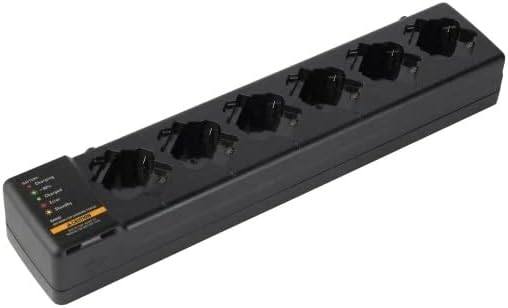
படம் 4.1: ஒரு மேல்நிலை செலவு view of the Motorola Six-Pocket Multi-Unit Charger, showing six charging pockets and an indicator panel on the left side.
5. இயக்க வழிமுறைகள்
The charger is designed for use with compatible Motorola radios and batteries, including models SL300, TLK100, SL500, SL500E, and SLN1000.
5.1 Charging Radios or Batteries
- சார்ஜர் இயக்கப்பட்டிருப்பதை உறுதிசெய்யவும்.
- Insert a compatible radio or battery into one of the six charging pockets. Ensure it is seated correctly.
- Observe the LED indicator for the corresponding pocket to determine the charging status.
5.2 LED காட்டி நிலை
Each charging pocket features an LED indicator to provide real-time status:
- சிவப்பு (திடமானது): பேட்டரி சார்ஜ் ஆகிறது.
- பச்சை (திட): பேட்டரி முழுமையாக சார்ஜ் செய்யப்பட்டுள்ளது.
- Amber (Solid): Battery is charging to 90% capacity.
- சிவப்பு (ஒளிரும்): Error condition (e.g., battery fault, temperature issue). Remove the battery and reinsert. If the error persists, refer to the Troubleshooting section.
- ஒளி இல்லை: Standby mode or no battery/radio inserted.
The indicator panel on the left side of the charger provides a legend for these LED statuses.
6. பராமரிப்பு
To ensure optimal performance and longevity of your charger:
- சார்ஜரை சுத்தமாகவும், தூசி மற்றும் குப்பைகள் இல்லாமல் வைத்திருக்கவும். சுத்தம் செய்ய மென்மையான, உலர்ந்த துணியைப் பயன்படுத்தவும்.
- கடுமையான இரசாயனங்கள் அல்லது சிராய்ப்பு கிளீனர்களைப் பயன்படுத்த வேண்டாம்.
- பயன்படுத்தாத போது சார்ஜரை குளிர்ந்த, உலர்ந்த இடத்தில் சேமிக்கவும்.
- மின் கம்பியில் ஏதேனும் சேதம் ஏற்பட்டுள்ளதா என அவ்வப்போது ஆய்வு செய்யவும்.
7. சரிசெய்தல்
| பிரச்சனை | சாத்தியமான காரணம் | தீர்வு |
|---|---|---|
| சார்ஜர் இயக்கப்படவில்லை. | No power to the outlet; power supply not connected; faulty power supply. | Check outlet with another device; ensure power supply is securely connected; try a different power supply if available. |
| LED indicator flashing red. | Battery fault; incorrect battery type; temperature outside operating range. | Remove and reinsert the battery; ensure battery is compatible; move charger to a room temperature environment. |
| பேட்டரி சார்ஜ் ஆகவில்லை. | Battery not properly seated; dirty contacts; faulty battery. | Ensure battery is fully inserted; clean battery and charger contacts; try a different battery. |
8. விவரக்குறிப்புகள்
| அம்சம் | விவரம் |
|---|---|
| மாதிரி எண்கள் | PMLN7101A, PMLN7101, PMLN8569 |
| பிராண்ட் | மோட்டோரோலா தீர்வுகள் |
| தயாரிப்பு பரிமாணங்கள் | 3 x 4 x 15 அங்குலம் (7.62 x 10.16 x 38.1 செமீ) |
| பொருளின் எடை | 3.29 பவுண்டுகள் (1.49 கிலோ) |
| நிறம் | கருப்பு |
| உள்ளீடு தொகுதிtage | 240 வோல்ட் |
| வெளியீடு தொகுதிtage | 7.4 வோல்ட் |
| இணக்கமான ரேடியோக்கள் | SL300, TLK100, SL500, SL500E, SLN1000 |
9. உத்தரவாதம் மற்றும் ஆதரவு
Specific warranty information for this product was not provided in the available data. For detailed warranty terms and conditions, please refer to the documentation included with your purchase or visit the official Motorola Solutions website. For technical support or service inquiries, please contact Motorola Solutions customer service.


