1. அறிமுகம்
The Zyxel USGFLEX200H ZyWALL High Speed Cyber Security Firewall is designed to provide robust network security and high performance for small to medium-sized businesses. This manual provides essential information for setting up, operating, maintaining, and troubleshooting your device to ensure optimal performance and protection.

Figure 1: Zyxel USG FLEX H Series Firewall, a solution for SMBs.
2. தயாரிப்பு முடிந்துவிட்டதுview
2.1 முக்கிய அம்சங்கள்
- Security Focused Networking: High-performance Multi-Gig network security firewall with 1-Year UTM Gold security services included, recommended for small to mid-size offices with internet speeds up to 1000 Mbps.
- உயர் செயல்திறன்: Max Throughput: 5000 Mbps SPI Firewall, 1500 Mbps UTM (AV+IDP), 1200 Mbps VPN, 600k Sessions (Results may vary based upon testing method).
- நெகிழ்வான துறைமுகங்கள்: High throughput Multi-Gig 2x 2.5Gbps and 6x Configurable GbE for flexible configuration and fast local network connectivity.
- Complete Security Bundle: Includes 1 year Gold Security sandboxing, DNS reputation, anti-malware, ransomware blocking, web filtering, application control and IDP security services and Nebula cloud Pro management.
- Unparalleled Management: Use Zyxel's award-winning Nebula Cloud Management solution to easily manage, monitor and configure network security.
2.2 Physical Description and Ports
The USGFLEX200H features a robust design with clearly labeled ports for easy connectivity.

Figure 2: Front panel of the Zyxel USGFLEX200H. Features include Status LEDs, 1x USB 3.0 port, 2x 2.5G Ethernet ports, 6x 1G Ethernet ports, and 1x Console (RJ45) port.

Figure 3: Rear panel of the Zyxel USGFLEX200H. Includes the 12V-2A power input and a grounding screw.

Figure 4: Flexible Ports with Multi-Gig and PoE+ capabilities.
2.3 தொகுப்பு உள்ளடக்கம்
உங்கள் தொகுப்பில் பின்வரும் உருப்படிகள் உள்ளதா என்பதைச் சரிபார்க்கவும்:
- Zyxel USGFLEX200H Firewall Unit
- பவர் அடாப்டர்
- கன்சோல் கேபிள் (RJ45 முதல் DB9 வரை)
- மவுண்டிங் பிராக்கெட்டுகள் (ரேக் அல்லது சுவர் மவுண்டிங்கிற்கு)
- Power Plug Adapters (various regions)
- விரைவு தொடக்க வழிகாட்டி

Figure 5: Included accessories with the Zyxel USGFLEX200H.
Video 1: Unboxing of the USGFLEX200H, showing the contents of the package.
3 அமைவு
Follow these steps to set up your Zyxel USGFLEX200H firewall:
- உடல் இணைப்பு: Connect your internet service provider's modem to one of the WAN ports on the firewall. Connect your internal network devices (switches, computers) to the LAN ports.
- பவர் ஆன்: Connect the power adapter to the firewall and plug it into a power outlet. The device will power on automatically.
- ஆரம்ப கட்டமைப்பு: சாதனத்தை அணுகவும் web-based management interface using a connected computer. Refer to the Quick Start Guide for default IP address and login credentials.
- Nebula Cloud Setup: For simplified management, register your device with Zyxel Nebula Cloud. This allows for remote configuration and monitoring.
Video 2: Learn how to get up and running quickly with the Nebula App for Zyxel devices.
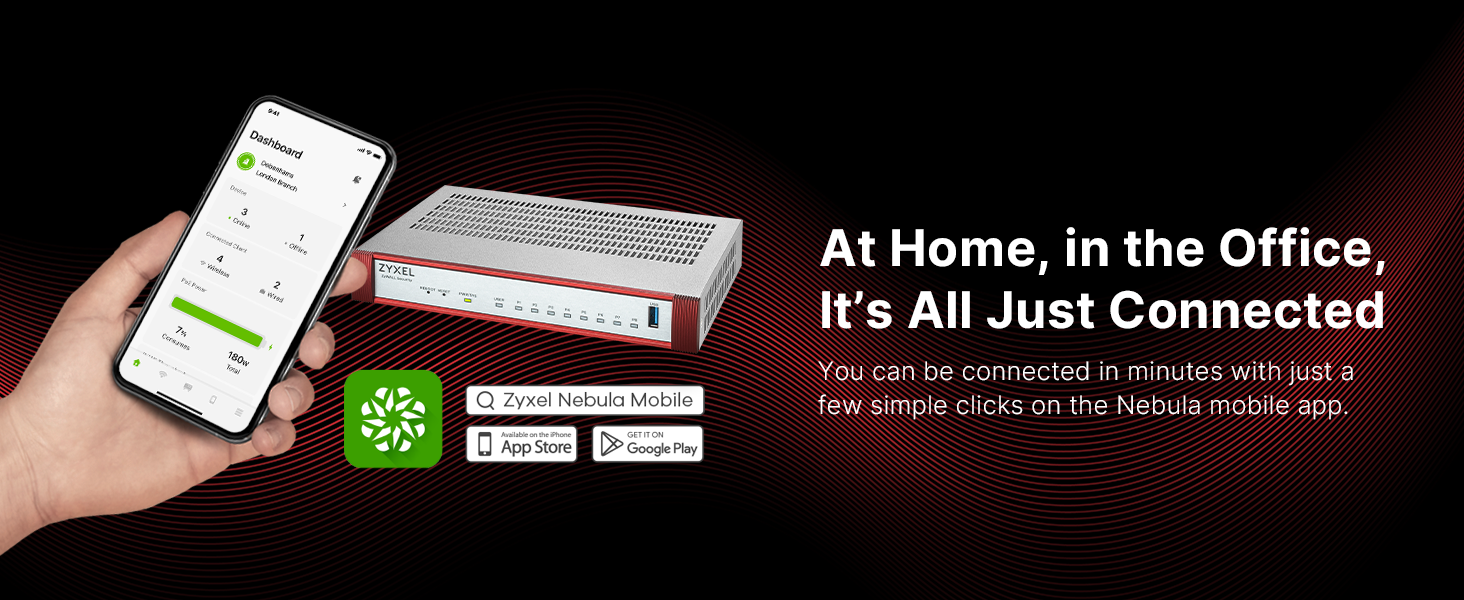
Figure 6: Manage your network from anywhere with the Nebula Mobile app.
4. இயக்க வழிமுறைகள்
The Zyxel USGFLEX200H provides comprehensive security and networking features. Utilize the web interface or Nebula Cloud for detailed configuration.
4.1 பாதுகாப்பு அம்சங்கள்
- UTM (Unified Threat Management): Activate and configure services like Anti-Malware, IDP (Intrusion Detection and Prevention), Web Filtering, and Application Control for multi-layered protection.
- VPN (மெய்நிகர் தனியார் நெட்வொர்க்): Set up VPN tunnels for secure remote access and site-to-site connectivity.
- ஃபயர்வால் விதிகள்: Define granular firewall rules to control network traffic based on your organization's security policies.
- Sandboxing: Leverage cloud-based sandboxing for advanced threat detection against unknown malware.

Figure 7: AI-Powered Cloud Cybersecurity for robust protection.
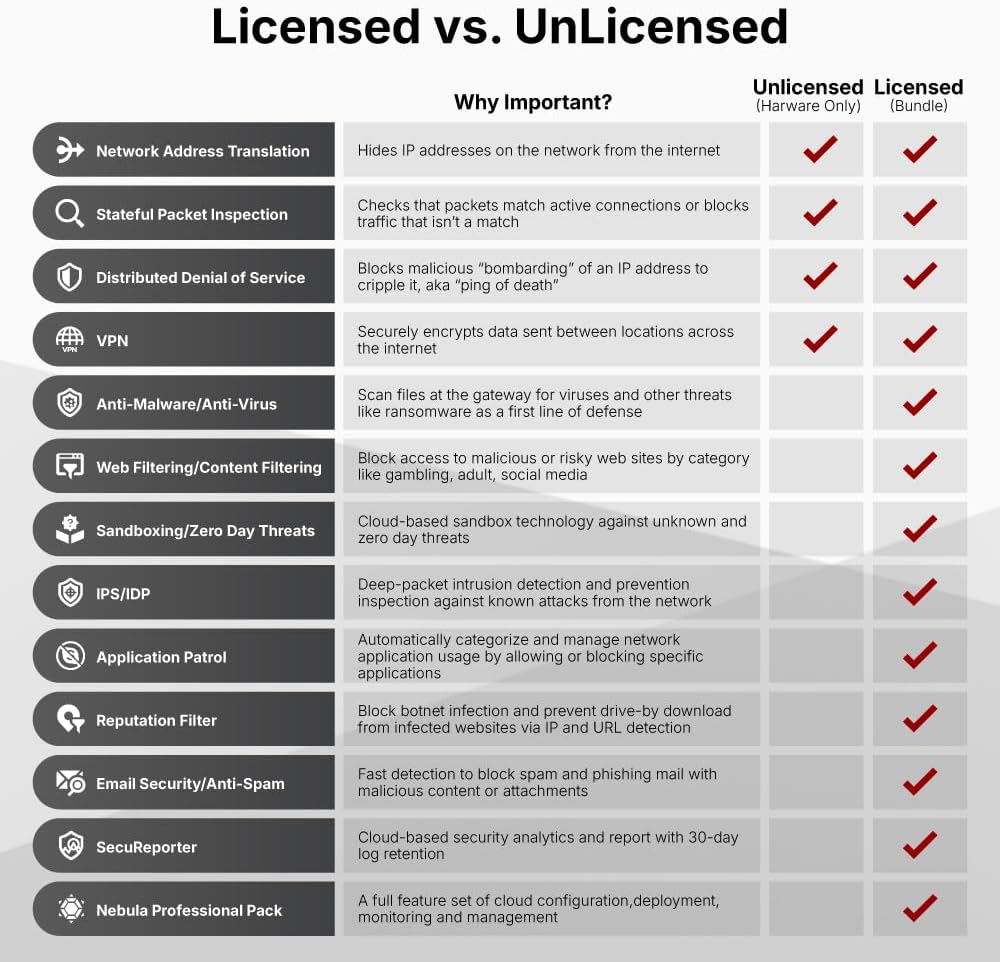
Figure 8: Licensed vs. Unlicensed features comparison.

Figure 9: License Comparison for security services.
4.2 பிணைய மேலாண்மை
- Nebula Cloud Management: Centralize management of multiple Zyxel devices, including firewalls, access points, and switches, through a single cloud platform.
- VLANகள்: Configure Virtual Local Area Networks to segment your network for improved security and performance.
- ரூட்டிங்: Manage static and dynamic routing protocols to optimize network traffic flow.
காணொளி 3: முடிந்ததுview of the USG FLEX H Firewall Series.
Video 4: Detailed features of Zyxel USGFLEX H Series Firewalls.

Figure 10: Highlighting performance and flexible management of the USG FLEX H series.
5. பராமரிப்பு
Regular maintenance ensures the longevity and optimal performance of your firewall.
- நிலைபொருள் புதுப்பிப்புகள்: Regularly check for and install the latest firmware updates from the Zyxel support portal to ensure your device has the most current security patches and features.
- உள்ளமைவு காப்புப்பிரதி: Periodically back up your device configuration. This allows for quick restoration in case of unexpected issues.
- உடல் பரிசோதனை: Ensure the device is placed in a well-ventilated area and free from dust accumulation.
6. சரிசெய்தல்
If you encounter issues with your USGFLEX200H, consider the following troubleshooting steps:
- சக்தி இல்லை: Check the power adapter connection and the power outlet. Ensure the power LED on the front panel is illuminated.
- இணைய அணுகல் இல்லை: Verify that your modem is working correctly. Check the WAN port connection and ensure the link/activity LEDs are active. Review your firewall's WAN settings.
- நெட்வொர்க் இணைப்பு சிக்கல்கள்: Check LAN port connections and corresponding LEDs. Ensure IP addresses are correctly assigned to devices on your network.
- சாதனம் பதிலளிக்கவில்லை: If the device is unresponsive, press the 'REBOOT' button on the front panel. If the issue persists, use the 'RESET' button (requires a paperclip) to restore factory default settings (note: this will erase your configuration).
- மெதுவான செயல்திறன்: Check network utilization through the management interface. Ensure your UTM services are not causing excessive overhead. Refer to the product matrix for throughput limits.
7. விவரக்குறிப்புகள்
| பண்பு | மதிப்பு |
|---|---|
| தயாரிப்பு பரிமாணங்கள் | 11 x 7 x 1 அங்குலம் |
| பொருளின் எடை | 0.634 அவுன்ஸ் |
| பொருள் மாதிரி எண் | USGFLEX200H |
| பிராண்ட் | ZYXEL |
| சிறப்பு அம்சம் | இணைய பாதுகாப்பு |
| அதிர்வெண் பேண்ட் வகுப்பு | இரட்டை இசைக்குழு |
| வயர்லெஸ் தொடர்பு தரநிலை | 802.11x |
| இணக்கமான சாதனங்கள் | Personal Computer, Security Camera, Smartphone |
| தயாரிப்புக்கான பரிந்துரைக்கப்பட்ட பயன்பாடுகள் | வணிகம் |
| இணைப்பு தொழில்நுட்பம் | ஈதர்நெட் |
| நிறம் | வெள்ளை |
| துறைமுகங்களின் எண்ணிக்கை | 4 |
| கட்டுப்பாட்டு முறை | தொடவும் |
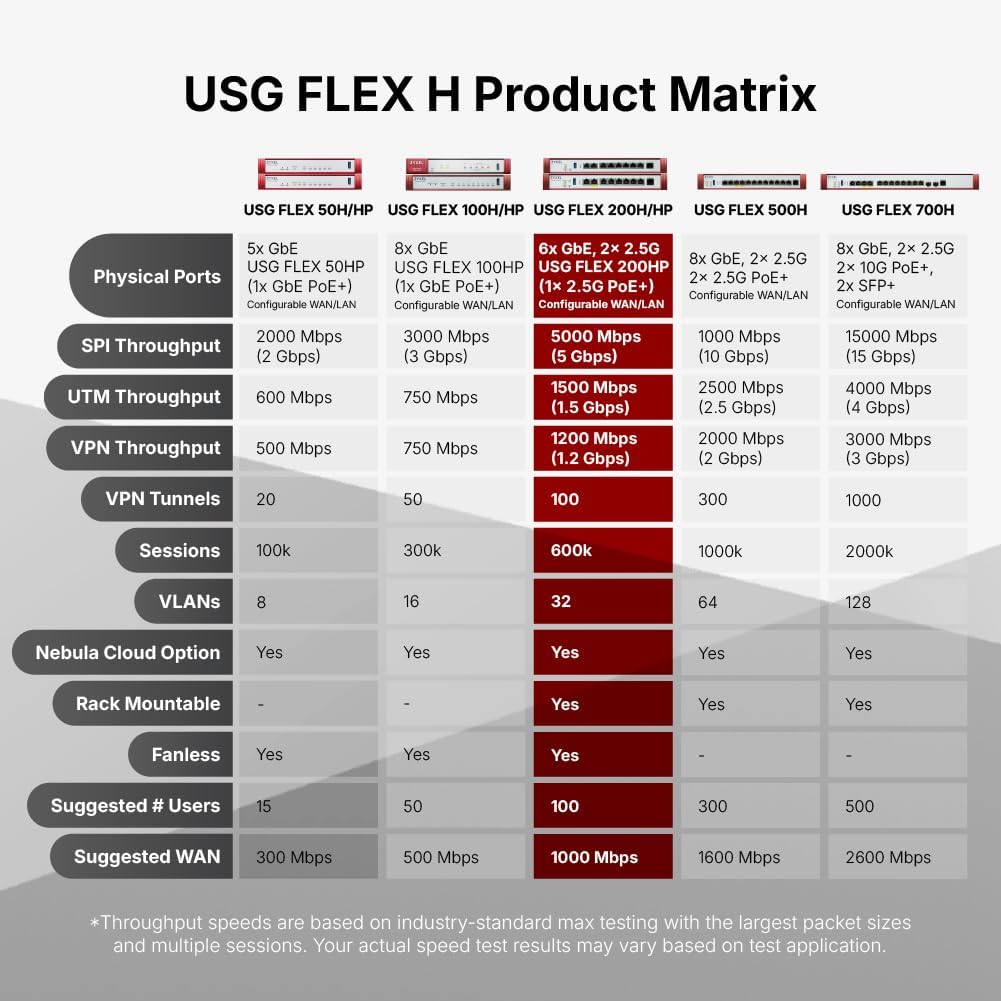
Figure 11: USG FLEX H Product Matrix for model comparison.
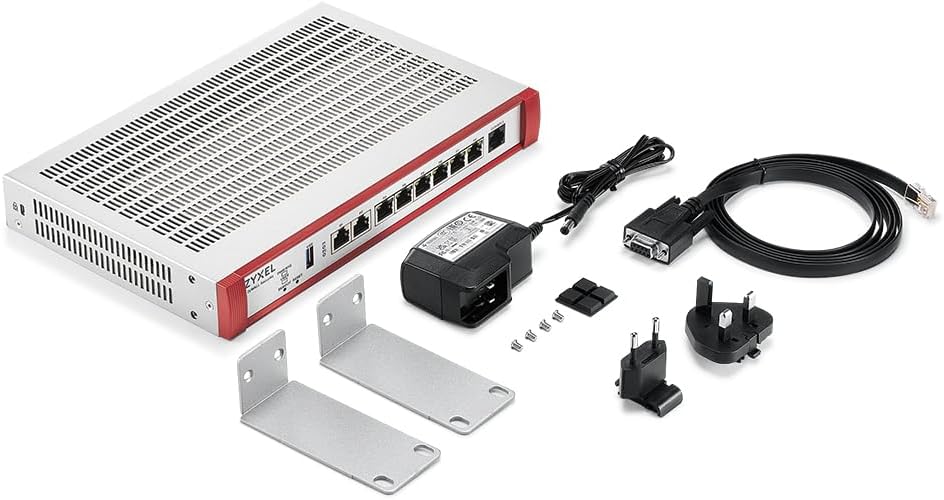
Figure 12: Comparison of USG FLEX 200 (Prior Generation) vs. USG FLEX 200 H/HP (New Generation).
8. உத்தரவாதம் மற்றும் ஆதரவு
For warranty information, technical support, and additional resources, please visit the official Zyxel Networks webதளத்தில் அல்லது அவர்களின் வாடிக்கையாளர் சேவையைத் தொடர்பு கொள்ளவும். உத்தரவாதக் கோரிக்கைகளுக்கு உங்கள் கொள்முதல் ரசீதை வைத்திருங்கள்.
நீங்கள் கூடுதல் தகவல்களையும் ஆதரவையும் இங்கே காணலாம் அமேசானில் ZYXEL ஸ்டோர்.