முக்கியமான பாதுகாப்பு தகவல்
Please read and understand all safety instructions before assembling or operating your KAER 10-12 Gun Safe. Failure to follow these instructions may result in injury or damage.
- Always keep firearms unloaded and pointed in a safe direction.
- Use proper installation techniques to prevent tipping.
- Be cautious of pinch points during assembly and use.
- Always follow local laws and regulations regarding firearm storage and safety.
- Keep keys and digital codes in a secure location, away from children and unauthorized individuals.
தயாரிப்பு முடிந்துவிட்டதுview
The KAER 10-12 Gun Safe is designed to provide secure storage for your firearms and valuables. It features a robust alloy steel construction, a digital keypad, and adjustable internal storage options.

Image: The KAER 10-12 Gun Safe in grey, shown both closed and with its main door open, revealing internal storage for multiple rifles and a separate top compartment.
கூறுகள் சேர்க்கப்பட்டுள்ளன
- 1 x Rifle Gun Safe Cabinet
- 2 x Backup Keys (for main door)
- 2 x Keys (for top compartment)
- 4 x Anchor Bolts (for mounting)
- 1 x Emergency Battery Pack
- 1 x அறிவுறுத்தல் கையேடு
- 18 x சுய-தட்டுதல் திருகுகள்
- 10 x Cross Head Screws
- 6 x Rivets
- 4 x ஃபிக்சிங் திருகுகள்
- 3 x Gun Mounts
- 3 x Gun Stocks
- 1 x ஸ்க்ரூடிரைவர்
- 1 x ஜோடி கையுறைகள்
- 1 x Pile Blanket (for base)
தயாரிப்பு பரிமாணங்கள்
The external dimensions of the KAER 10-12 Gun Safe are approximately 14.96 inches (D) x 18.1 inches (W) x 56.96 inches (H).

Image: A detailed diagram illustrating the external and internal measurements of the gun safe, alongside an organized display of all included accessories for assembly and use.
அமைப்பு மற்றும் சட்டசபை
The KAER 10-12 Gun Safe is designed for quick assembly. Follow these steps carefully to ensure proper setup.

Image: An 8-step visual guide detailing the assembly process of the gun safe, from connecting the main panels to installing internal components like shelves and gun racks.
சட்டசபை படிகள்
- Attach Side Panels to Back Plate: Connect the two side panels to the back plate using the provided self-tapping screws. Ensure all tabs and slots align correctly.
- கதவு சட்டத்தை இணைக்கவும்: Secure the door frame to the assembled side and back panels using cross head screws.
- Install Top Plate: Place the top plate onto the assembled structure and secure it with self-tapping screws.
- கீழ் தட்டு நிறுவவும்: Insert the bottom plate into the base of the safe, ensuring it sits flush. Secure with fixing screws.
- Install Internal Shelves and Panels: Insert the main shelf and the back mesh panel into their designated slots. Secure the back mesh panel with self-tapping screws.
- Install Side Mesh Panels: Place the two side mesh panels into the interior of the main compartment. Secure them with self-tapping screws.
- Attach Gun Racks: Secure the gun mounts and gun stocks to the interior mesh panels using the provided rivets. Adjust their positions as needed for your firearms.
- Place Pile Blanket: Lay the pile blanket on the bottom of the main compartment to protect your firearms.
பாதுகாப்பை ஏற்றுதல்
For added security, it is recommended to mount the safe to a wall or floor using the provided anchor bolts. Locate suitable studs in your wall or a solid floor surface. Drill pilot holes and secure the safe firmly.
இயக்க வழிமுறைகள்
Locking System Overview
The KAER 10-12 Gun Safe offers multiple methods for access and security:
- Digital Keypad + Knob
- Key + Knob
- Emergency Battery Box + Knob (for power failure)
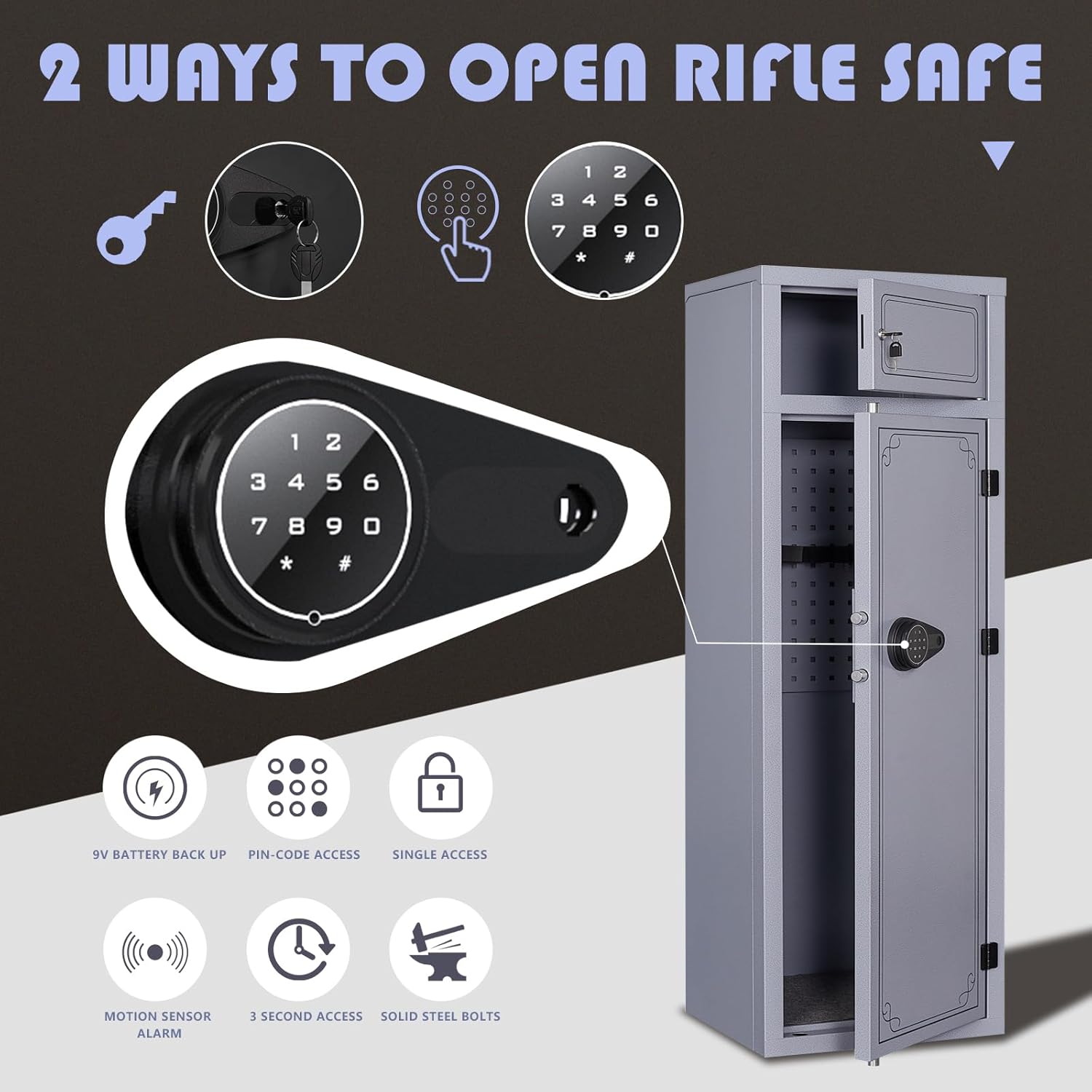
Image: A visual representation of the safe's dual-access system, showing both key and digital keypad options, along with key security features.
Setting the Electronic Password
Before first use, you must set your personal digital password.

Image: A step-by-step guide on setting the electronic password, including battery insertion and keypad programming.
- பேட்டரிகளைச் செருகவும்: Open the battery compartment on the inside of the door and insert 4*AA alkaline batteries.
- Press Set Button: With the door open, locate and press the red 'SET' button inside the battery compartment. You will hear a 'di' sound, and the keypad light will turn on.
- புதிய கடவுச்சொல்லை உள்ளிடவும்: On the digital keypad, press the '#' key, then enter your desired 1-8 digit password. Press the '#' key again.
- கடவுச்சொல்லை உறுதிப்படுத்தவும்: Re-enter the same 1-8 digit password and press the '#' key one more time. You will hear a long 'di~~~' sound, indicating the electronic password has been successfully set.
Opening the Safe with Digital Keypad
- Wake Up Keypad: Press the '#' key to activate the keypad.
- கடவுச்சொல்லை உள்ளிடவும்: Enter your previously set 1-8 digit password.
- உறுதிப்படுத்தவும்: Press the '#' key. If the password is correct, you will hear a 'di' sound and the green light will illuminate.
- குமிழியைச் சுழற்று: Within 5 seconds, rotate the knob clockwise to open the safe door.
விசையுடன் பாதுகாப்பைத் திறக்கிறது
- சாவியைச் செருகு: Insert the backup key into the keyhole located on the digital keypad.
- Turn Key: விசையை கடிகார திசையில் திருப்பவும்.
- குமிழியைச் சுழற்று: Simultaneously rotate the knob clockwise to open the safe door.
Using the Emergency Battery Box
In case of battery depletion, the emergency battery box can be used to power the keypad temporarily.
- Connect Emergency Box: Plug the emergency battery box into the port located on the digital keypad.
- கடவுச்சொல்லை உள்ளிடவும்: Use the digital keypad as usual to enter your password and open the safe.
- பேட்டரிகளை மாற்றவும்: Once the safe is open, replace the internal AA batteries immediately.
சைலண்ட் மோட் ஆக்டிவேஷன்
To operate the safe silently, long press the '*' (star) button on the digital keypad. This will disable keypad sounds for quiet access.
பூட்டுதல் அம்சம்
For security, if an incorrect password is entered 5 consecutive times, the gun safe will enter a lockout mode, preventing further attempts for a short period.
பராமரிப்பு
Regular maintenance ensures the longevity and proper functioning of your gun safe.
- பேட்டரி மாற்று: Replace the 4*AA alkaline batteries in the digital keypad annually, or immediately if the low battery indicator appears.
- சுத்தம்: Clean the exterior and interior of the safe with a soft, dry cloth. Avoid abrasive cleaners or solvents that could damage the finish.
- ஆய்வு: Periodically check all locking mechanisms, hinges, and mounting bolts for any signs of wear or loosening. Ensure the door closes and locks smoothly.
சரிசெய்தல்
If you encounter issues with your KAER 10-12 Gun Safe, refer to the following common problems and solutions:
- Safe not opening with digital code
- Ensure batteries are fresh and correctly installed. Use the emergency battery box if needed.
- Verify you are entering the correct 1-8 digit password followed by the '#' key.
- Check if the safe is in lockout mode due to multiple incorrect entries. Wait for the lockout period to expire.
- விசைகள் வேலை செய்யவில்லை
- Ensure you are using the correct key for the main door or top compartment.
- Check for any obstructions in the keyhole.
- If the key turns but the door doesn't open, ensure the digital keypad knob is also turned correctly.
- எதிர்பாராத விதமாக அலாரம் ஒலிக்கிறது.
- The safe has a motion sensor alarm. Ensure the safe is stable and not being disturbed.
- Check if the lockout feature has been triggered.
- Door does not close or latch properly
- Ensure no items inside the safe are obstructing the door's closing path.
- Check if the safe is on a level surface. Adjust the feet if necessary.
- Inspect the locking bolts for any damage or misalignment.
விவரக்குறிப்புகள்
| அம்சம் | விவரம் |
|---|---|
| பிராண்ட் | KAER |
| மாதிரி | 10-12 Gun Safe |
| நிறம் | சாம்பல் |
| தயாரிப்பு பரிமாணங்கள் | 14.96"டி x 18.1"அடி x 56.96"ஹெட் |
| பொருளின் எடை | 78 பவுண்டுகள் |
| பொருள் | அலாய் ஸ்டீல் |
| பூட்டு வகை | மின்னணு, சாவி |
| அலமாரிகளின் எண்ணிக்கை | 2 (சரிசெய்யக்கூடியது) |
| மவுண்டிங் வகை | மாடி மவுண்ட் |
| சட்டசபை தேவை | ஆம் |
உத்தரவாதம் மற்றும் ஆதரவு
For specific warranty details, product support, or any questions regarding your KAER 10-12 Gun Safe, please contact KAER customer service directly. Our team is dedicated to providing a satisfying solution for you.


