1. அறிமுகம்
This manual provides comprehensive instructions for the installation, operation, and maintenance of the Teltonika RUT241 Industrial Cellular Router. The RUT241 is designed for reliable 4G LTE and 3G connectivity, featuring Wi-Fi and two Ethernet ports, along with automatic WAN failover for continuous connection. Its robust industrial design and compact size make it suitable for various IoT and M2M applications, particularly in North America, with compatibility across Verizon, AT&T, and T-Mobile networks.
2. பாதுகாப்பு தகவல்
- Ensure the device is powered by the specified 9-30 VDC power supply. Using an incorrect power source may damage the device and void the warranty.
- சாதனத்தை ஈரப்பதம், தீவிர வெப்பநிலை அல்லது நேரடி சூரிய ஒளியில் வெளிப்படுத்த வேண்டாம்.
- Avoid placing the device near heat sources or in poorly ventilated areas.
- Only use accessories and antennas approved by Teltonika.
- சாதனத்தைத் திறக்கவோ அல்லது மாற்றவோ முயற்சிக்காதீர்கள். அனைத்து சேவைகளையும் தகுதிவாய்ந்த பணியாளர்களிடம் பரிந்துரைக்கவும்.
- உள்ளூர் விதிமுறைகளின்படி மின்னணு கழிவுகளை பொறுப்புடன் அப்புறப்படுத்துங்கள்.
3. தொகுப்பு உள்ளடக்கங்கள்
தொகுப்பில் அனைத்து பொருட்களும் உள்ளதா என சரிபார்க்கவும்:
- Teltonika RUT241 Router
- 9 W Power Supply Unit (PSU)
- 2 x LTE Antennas (swivel, SMA male)
- 1 x Wi-Fi Antenna (swivel, RP-SMA male)
- ஈதர்நெட் கேபிள் (1.5 மீ)
- SIM Adapter Kit
- விரைவு தொடக்க வழிகாட்டி (QSG)
4. சாதனம் முடிந்ததுview
The Teltonika RUT241 router features various ports, indicators, and connectors for its operation. Familiarize yourself with the device's layout before proceeding with installation.

படம் 4.1: முன் view of the RUT241 router, displaying the model number, Teltonika branding, power input specifications (9-30 VDC), and the default IP address (192.168.1.1).

படம் 4.2: கோணல் view of the RUT241, highlighting the WAN and LAN Ethernet ports, the 4-pin industrial DC power socket, and LED indicators for signal strength and network status.

படம் 4.3: மற்றொரு கோணம் view of the RUT241, showing the SMA male connectors for LTE antennas, the RP-SMA male connector for the Wi-Fi antenna, and the recessed reset button.
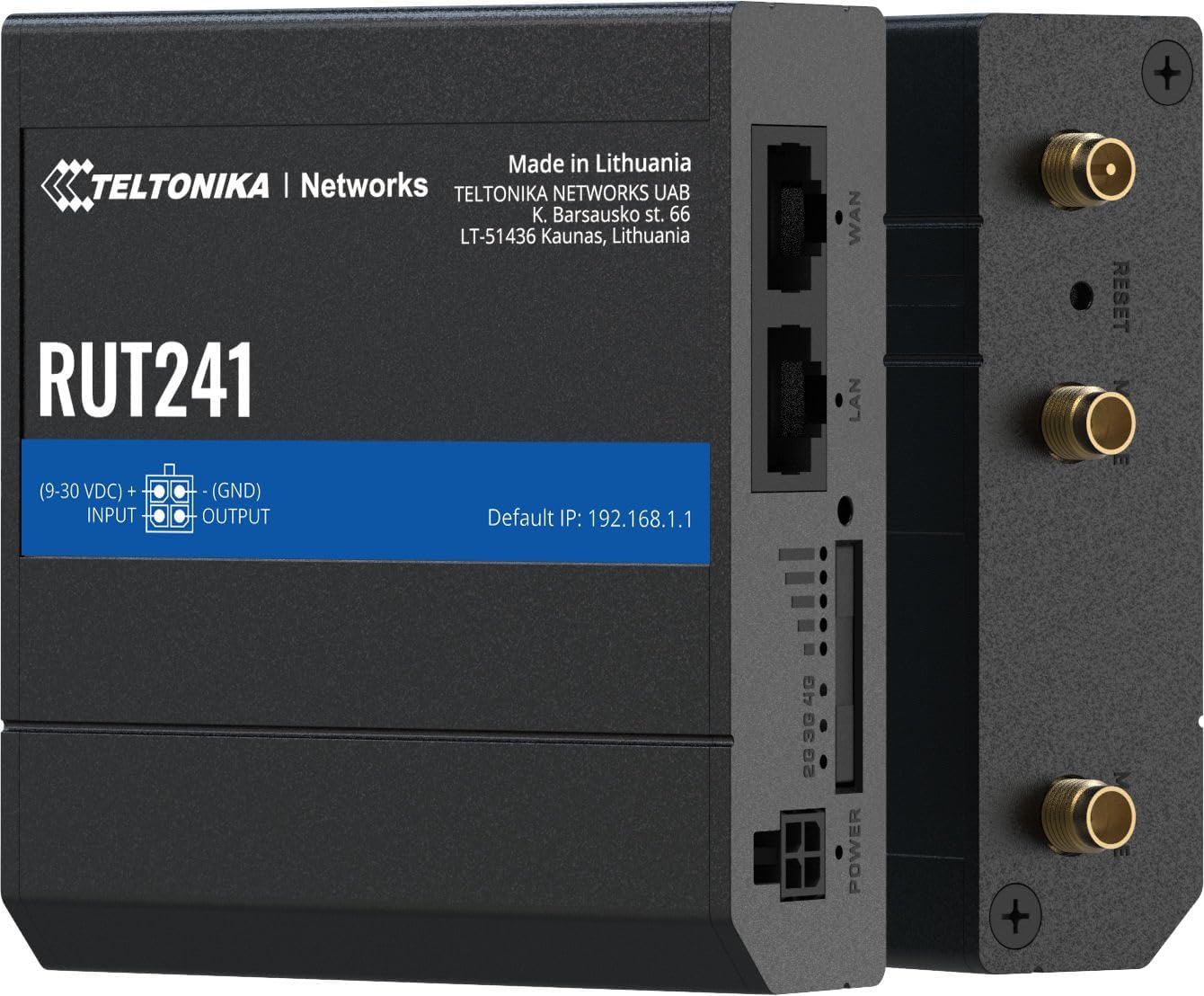
படம் 4.4: பக்கம் view of the RUT241, providing a clear look at the WAN and LAN ports, power input, signal strength LEDs, and antenna connectors.

படம் 4.5: கீழே view of the RUT241, showing the SIM card slot cover and mounting screw points for industrial installations.

படம் 4.6: மேல் view of the RUT241, detailing the Wi-Fi, Reset, and Mobile antenna connectors.
5 அமைவு
5.1. சிம் கார்டு நிறுவல்
- திசைவி அணைக்கப்பட்டுள்ளதா என்பதை உறுதிப்படுத்தவும்.
- Locate the SIM card slot on the bottom of the device (refer to Figure 4.5).
- Use the provided SIM adapter kit if your SIM card is not standard size.
- Insert the prepared SIM card into the slot until it clicks into place.
- Replace the SIM card slot cover securely.
5.2. ஆண்டெனா இணைப்பு
- Connect the two LTE antennas to the SMA male connectors labeled "MOBILE" on the device (refer to Figure 4.6).
- Connect the Wi-Fi antenna to the RP-SMA male connector labeled "WIFI" (refer to Figure 4.6).
- உகந்த சமிக்ஞை வரவேற்புக்காக ஆண்டெனாக்களை நிலைநிறுத்தவும்.
5.3. மின் இணைப்பு
- Connect the 9 W PSU to the 4-pin industrial DC power socket on the router.
- Plug the PSU into a suitable power outlet. The router will power on automatically.
5.4. ஆரம்ப அணுகல்
- Connect your computer to the router's LAN port using the provided Ethernet cable.
- திற a web உலாவியில் சென்று இயல்புநிலை ஐபி முகவரிக்கு செல்லவும்: 192.168.1.1.
- Follow the on-screen instructions to complete the initial configuration, including setting up a new password.
6. இயக்க வழிமுறைகள்
6.1. Mobile Connectivity
The RUT241 supports 4G LTE (Cat 4) and 3G connectivity. Once the SIM card is installed and the device is powered on, it will automatically attempt to establish a mobile connection. The signal strength LEDs on the device indicate the current mobile signal quality.
6.2. WAN Failover
The router is equipped with WAN failover functionality, ensuring continuous internet access. If the primary WAN connection (e.g., Ethernet WAN) fails, the router will automatically switch to the available backup connection (e.g., cellular 4G LTE) to maintain network uptime.
6.3. வைஃபை ஹாட்ஸ்பாட்
The RUT241 functions as a wireless access point, providing Wi-Fi connectivity for up to 50 simultaneous users. Default Wi-Fi credentials can be found on the device label or in the Quick Start Guide. It is recommended to change the default Wi-Fi password during initial setup for security.
6.4. Remote Management and VPN
For advanced management and secure access, the RUT241 supports Teltonika Remote Management System (RMS) and various VPN services. Refer to the Teltonika Networks Wiki for detailed configuration guides on these features.
7. பராமரிப்பு
- நிலைபொருள் புதுப்பிப்புகள்: Regularly check the Teltonika Networks website for the latest firmware updates to ensure optimal performance, security, and access to new features.
- சுத்தம்: சாதனத்தை சுத்தம் செய்ய மென்மையான, உலர்ந்த துணியைப் பயன்படுத்தவும். திரவ கிளீனர்கள் அல்லது ஏரோசோல்களைப் பயன்படுத்த வேண்டாம்.
- சுற்றுச்சூழல் நிலைமைகள்: Ensure the router operates within its specified temperature and humidity ranges to prevent damage.
- காப்புப்பிரதி உள்ளமைவு: Periodically back up your router's configuration settings through the web interface to facilitate quick restoration if needed.
8. சரிசெய்தல்
8.1. சக்தி இல்லை
- Verify that the 9 W PSU is correctly connected to the router and a working power outlet.
- மின் கேபிளில் ஏதேனும் சேதம் உள்ளதா என சரிபார்க்கவும்.
- உள்ளீடு தொகுதியை உறுதி செய்யவும்tage is within the 9-30 VDC range if using an alternative power source.
8.2. No Internet Connection (Mobile)
- Confirm the SIM card is correctly inserted and activated with a data plan.
- Check the mobile signal strength LEDs on the router. If signal is weak, reposition antennas or the router.
- Verify APN settings in the router's web interface. The default is "Auto", but some carriers may require specific settings.
- Ensure the cellular network is available in your location and compatible with the RUT241 (Verizon, AT&T, T-Mobile in North America).
8.3. No Wi-Fi Connectivity
- Ensure the Wi-Fi antenna is securely connected.
- Check if Wi-Fi is enabled in the router's web இடைமுகம்.
- Verify Wi-Fi network name (SSID) and password.
8.4. அணுக முடியாது Web இடைமுகம்
- Ensure your computer is connected to the router's LAN port or Wi-Fi network.
- Verify your computer's IP settings are set to obtain an IP address automatically (DHCP).
- Confirm you are using the correct default IP address: 192.168.1.1.
- If you have changed the router's IP address, use the new address.
- If the issue persists, perform a factory reset by pressing and holding the reset button for approximately 10 seconds while the device is powered on. எச்சரிக்கை: இது அனைத்து தனிப்பயன் உள்ளமைவுகளையும் அழிக்கும்.
9. விவரக்குறிப்புகள்
| வகை | அம்சம் | விவரம் |
|---|---|---|
| மொபைல் | மொபைல் தொகுதி | 4G (LTE) - Cat 4 up to 150 Mbps, 3G - Up to 42 Mbps |
| APN | ஆட்டோ | |
| வயர்லெஸ் | வயர்லெஸ் பயன்முறை | IEEE 802.11b/g/n, அணுகல் புள்ளி (AP), நிலையம் (STA) |
| WiFi Users | ஒரே நேரத்தில் 50 இணைப்புகள் வரை | |
| ஈதர்நெட் | WAN போர்ட் | 1 x WAN port 10/100 Mbps |
| லேன் போர்ட் | 1 x LAN port, 10/100 Mbps | |
| நெட்வொர்க் | ரூட்டிங் | Static routing, Dynamic routing (BGP, OSPF v2, RIP v1/v2, NHRP) |
| DHCP | நிலையான மற்றும் மாறும் IP ஒதுக்கீடு, DHCP ரிலே, ரிலேட் | |
| அமைப்பு | CPU | Mediatek MIPS 24Kc 580 MHz |
| ரேம் | 128 எம்பி, டி.டி.ஆர் 2 | |
| ஃப்ளாஷ் சேமிப்பு | 16 எம்பி, எஸ்பிஐ ஃபிளாஷ் | |
| சக்தி | இணைப்பான் | 4-முள் தொழில்துறை DC பவர் சாக்கெட் |
| உள்ளீடு தொகுதிtagமின் வரம்பு | 9 - 30 VDC | |
| PoE (செயலற்ற) | Passive PoE over spare pairs. 9-30 VDC | |
| உடல் | Casing பொருள் | அலுமினியம் |
| பரிமாணங்கள் (WxHxD) | 3.26 x 0.98 x 2.91 அங்குலம் (82.8 x 24.9 x 73.9 மிமீ) | |
| எடை | 0.27 பவுண்டுகள் (122.5 கிராம்) | |
| நிறம் | கருப்பு |
10. உத்தரவாதம் மற்றும் ஆதரவு
For warranty information and technical support, please refer to the official Teltonika Networks website or contact your authorized Teltonika Networks reseller. Detailed documentation, firmware updates, and support resources are available online.
Teltonika Networks Official Webதளம்: teltonika-networks.com


