1. அறிமுகம்
The SMSL DO400 is a high-performance Digital-to-Analog Converter (DAC) and Headphone Amplifier designed to deliver exceptional audio fidelity. It features advanced components and versatile connectivity options, making it suitable for a wide range of audio setups. This manual provides detailed instructions for setting up, operating, and maintaining your DO400 unit.
2. தயாரிப்பு அம்சங்கள்
- உயர்நிலை ஆடியோ தரம்: Equipped with the ES9039MSPRO DAC chip, supporting 32-bit/768kHz PCM and DSD512 for ultra-high resolution audio playback.
- பல்துறை இணைப்பு: Offers six input options including USB, IIS, AES, Optical, and Coaxial. Features multiple headphone outputs (4.4mm, 6.35mm, 4-XLR) and two line outputs (RCA, XLR) for diverse audio configurations.
- Enhanced Signal Processing: Incorporates the 3rd-generation XMOS XU-316 chip and PLFC ultra-low distortion circuitry for exceptional sound clarity and depth.
- MQA டிகோடிங்: Provides full MQA decoder support, preserving studio-grade sound quality and handling MQA-CDs.
- பயனர் நட்பு வடிவமைப்பு: Features a suspended display window, a retro control knob, and a full-featured remote control. Customizable tone modes and dimming settings are available.
3. தொகுப்பு உள்ளடக்கங்கள்
Upon unpacking your SMSL DO400, please ensure all the following items are present:
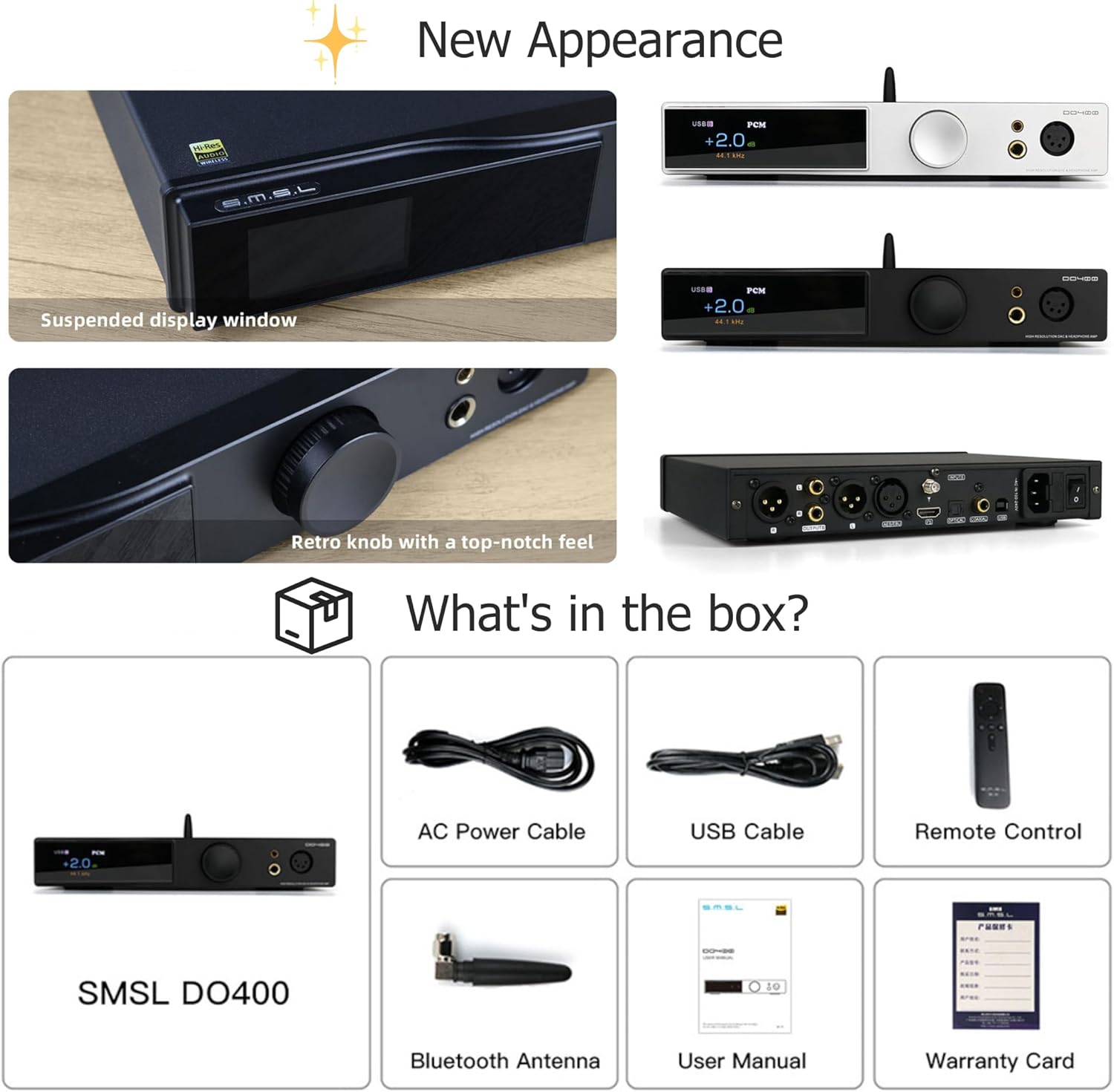
Image: SMSL DO400 unit with its accessories including power cable, USB cable, remote, Bluetooth antenna, user manual, and product card.
- SMSL DO400 Unit
- ஏசி பவர் கேபிள்
- USB கேபிள்
- ரிமோட் கண்ட்ரோல்
- புளூடூத் ஆண்டெனா
- பயனர் கையேடு
- Product Card (Warranty Card)
4. கட்டுப்பாடுகள் மற்றும் இணைப்புகள்

Image: Front and rear panel layout of the SMSL DO400, highlighting all physical controls and connection ports.
4.1 முன் குழு
- காட்சி: தற்போதைய உள்ளீட்டைக் காட்டுகிறது, sample rate, volume level, and other settings.
- கண்ட்ரோல் நாப்: Used for volume adjustment, menu navigation, and selection.
- ஹெட்ஃபோன் வெளியீடுகள்: Includes 6.35mm single-ended, 4.4mm balanced, and 4-pin XLR balanced headphone jacks.
4.2 பின்புற பேனல்
- அனலாக் வெளியீடுகள்: Balanced XLR and unbalanced RCA stereo outputs.
- டிஜிட்டல் உள்ளீடுகள்: USB, IIS (HDMI), AES/EBU, Optical, and Coaxial inputs.
- புளூடூத் ஆண்டெனா போர்ட்: சேர்க்கப்பட்ட புளூடூத் ஆண்டெனாவை இணைப்பதற்கு.
- ஏசி பவர் உள்ளீடு: மின் கேபிளை இணைப்பதற்காக.
- மின்விசை மாற்றும் குமிழ்: யூனிட்டை ஆன் அல்லது ஆஃப் செய்ய.
5 அமைவு
Follow these steps to set up your SMSL DO400:
- பவர் இணைக்கவும்: Connect the AC power cable to the DO400's rear panel and then to a power outlet.
- புளூடூத் ஆண்டெனாவை இணைக்கவும்: வழங்கப்பட்ட புளூடூத் ஆண்டெனாவை பின்புற பேனலில் அதன் நியமிக்கப்பட்ட போர்ட்டில் திருகவும்.
- ஆடியோ மூலத்தை இணைக்கவும்: Choose your desired input method (e.g., USB, Optical, Coaxial) and connect your audio source device (e.g., computer, CD player, streamer) to the corresponding input port on the DO400. For USB connection to a computer, you may need to install specific drivers. Refer to the official SMSL webசமீபத்திய இயக்கிகளுக்கான தளம்.
- Connect Output Device: Connect your headphones to one of the front panel headphone outputs (6.35mm, 4.4mm, or 4-pin XLR). Alternatively, connect the RCA or XLR line outputs to an external ampலைஃபையர் அல்லது இயங்கும் ஸ்பீக்கர்கள்.
- பவர் ஆன்: Flip the power switch on the rear panel to turn on the DO400.
6. ஆபரேஷன்
6.1 அடிப்படை செயல்பாடுகள்
- ஒலியளவு கட்டுப்பாடு: Rotate the front panel knob or use the volume buttons on the remote control to adjust the output volume.
- உள்ளீடு தேர்வு: Press the input selection button on the remote or navigate through the menu using the knob to select your desired audio input source.
6.2 மெனு வழிசெலுத்தல்
Press the front panel knob to enter the menu. Rotate the knob to scroll through options and press again to select. The remote control also provides basic navigation and function keys.
மெனு விருப்பங்கள்:
- உள்ளீடுகள்: Select between USB, Bluetooth, Optical, Coaxial, AES/EBU, and I2S (HDMI).
- வெளியீடுகள்: Configure output mode (All Line Out, Headphone Out, Balanced, Unbalanced).
- பிசிஎம் வடிகட்டி: Choose from various digital filters (Off, Minimum Phase, Apodizing, Fast Linear, Slow Linear, Fast Minimum, Slow Minimum, Low Dispersion).
- டி.எஸ்.டி வடிகட்டி: Select DSD filter settings.
- HPA Gain: Adjust headphone amplifier gain (Low, High) for different headphone impedances.
- Sound Color: Apply different sound characteristics (Standard, Rich 1/2/3, Tube 1/2/3, Crystal 1/2/3).
- முன்amp பயன்முறை: Set the volume control behavior (Variable for adjustable volume, Fixed for maximum output level).
- FN விசை: Assign a custom function to the FN button on the remote (e.g., Line/Headphone output toggle, Bluetooth, Phase).
- DPLL: Adjust Digital Phase-Locked Loop settings (15 levels) to mitigate jitter, especially with low-quality audio sources.
- I2S Mode: Configure I2S signal phase (Normal, Inverted).
- Audio Phase: Adjust overall audio phase (Normal, Inverted).
- மங்கலானது: Set the display auto-off time (5-60 seconds).
- பிரகாசம்: காட்சி பிரகாசத்தை சரிசெய்யவும்.
- தொழிற்சாலை மீட்டமைப்பு: Restore all settings to their default values.
7. புளூடூத் இணைப்பு
The SMSL DO400 features Bluetooth 5.1 for wireless audio streaming. It supports high-quality codecs including LDAC (24bit/96kHz), APTX/HD (24bit/48kHz), SBC, and AAC.
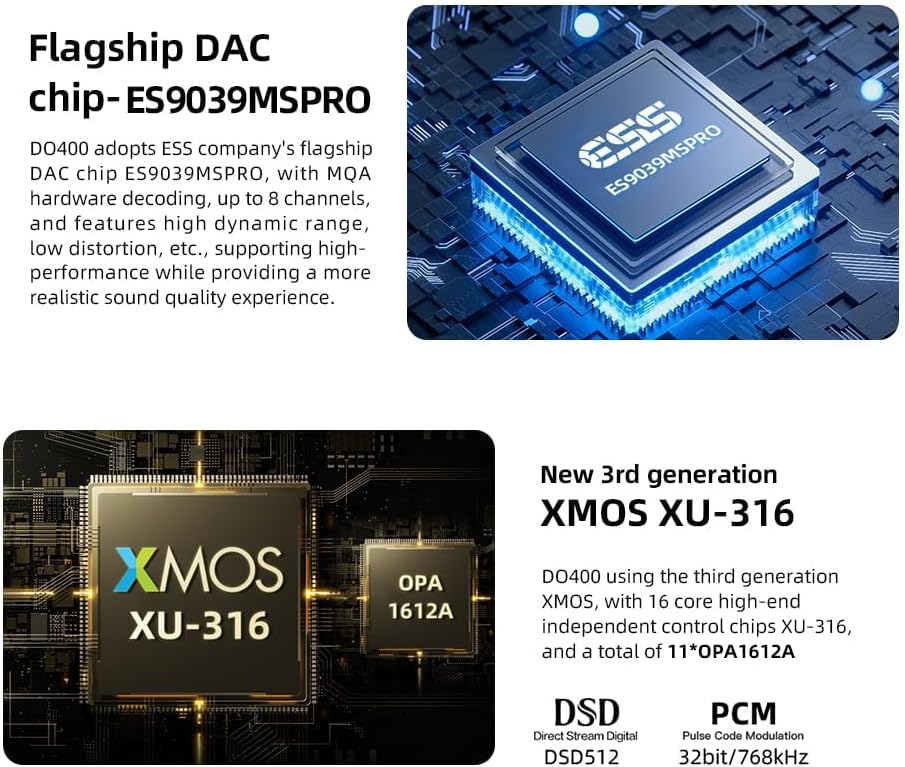
Image: The SMSL DO400 wirelessly connected to a smartphone via Bluetooth, illustrating its Bluetooth 5.1 capabilities and supported audio codecs.
புளூடூத் மூலம் இணைக்க:
- Ensure the Bluetooth antenna is connected to the DO400.
- Select 'Bluetooth' as the input source on the DO400.
- Enable Bluetooth on your smartphone or other transmitting device and search for 'SMSL DO400'.
- Pair with the device. Once connected, audio will stream wirelessly to the DO400.
8. MQA Decoding
The SMSL DO400 supports MQA (Master Quality Authenticated) full decoding, allowing for playback of high-resolution audio files as intended by the artist. It also supports MQA-CD playback via Coaxial, AES, and Optical inputs.

Image: Visual representation of MQA-CD support through Coaxial, AES, and Optical inputs, highlighting the advanced encoding technology.
When playing MQA content, the DO400 will automatically detect and decode the MQA stream, indicated on the display. For MQA-CDs, ensure the played disc is a genuine MQA-CD and that the fiber optic or coaxial signal output by the CD player is unprocessed source code.
9. விவரக்குறிப்புகள்
Below are the technical specifications for the SMSL DO400:

Image: Detailed product specifications and parameters for the SMSL DO400.
| அம்சம் | விவரக்குறிப்பு |
|---|---|
| மாதிரி | SMSL DO400 |
| டிஏசி சிப் | ES9039MSPRO |
| யூ.எஸ்.பி செயலி | XMOS XU-316 (3rd Gen) |
| உள்ளீடுகள் | USB, Optical, Coaxial, Bluetooth, IIS, AES |
| வெளியீடுகள் | RCA, XLR, 4.4mm Headphone, 6.35mm Headphone, 4-Pin XLR Headphone |
| USB பரிமாற்றம் | USB2.0 (Asynchronization) |
| USB இணக்கத்தன்மை | Windows 7/8/8.1/10/11 (Needs Driver), Mac OSX10.6 or later (Driverless), Linux (Driverless) |
| Sampling Rate & Bit Width (USB) | PCM: 44.1-768kHz (32bit), DSD: 2.8224-22.5792MHz (1bit) |
| Sampling Rate & Bit Width (Opt/Coax) | PCM: 44.1-192kHz (24bit), DoP: DoP64 |
| MQA குறிவிலக்கி | USB / ஆப்டிகல் / கோஆக்சியல் / AES |
| MQA-CD டிகோடர் | ஆப்டிகல் / கோஆக்சியல் / ஏஇஎஸ் |
| புளூடூத் விவரக்குறிப்பு | 5.1 (Support SBC, AAC, aptX, aptX HD, LDAC) |
| லைன் அவுட் Amplitude (XLR) | 5.2 வி.ஆர்.எம் |
| லைன் அவுட் Amplitude (RCA) | 2.5 வி.ஆர்.எம் |
| ஹெட்ஃபோன் வெளியீட்டு சக்தி (16Ω) | 6000 மெகாவாட் x 2 |
| ஹெட்ஃபோன் வெளியீட்டு சக்தி (32Ω) | 3000 மெகாவாட் x 2 |
| ஹெட்ஃபோன் வெளியீட்டு சக்தி (300Ω) | 700 மெகாவாட் x 2 |
| ஹெட்ஃபோன் வெளியீட்டு சக்தி (600Ω) | 350 மெகாவாட் x 2 |
| THD+N (XLR) | 0.00006% (-123dB, WTDI) |
| THD+N (RCA) | 0.00006% (-123dB, WTDI) |
| THD+N (HPA) | 0.00009% (-120dB, WTDI) |
| Dynamic Range (XLR) | 133dB |
| Dynamic Range (RCA) | 128dB |
| Dynamic Range (HPA) | 128dB |
| SNR (XLR) | 133dB |
| SNR (RCA) | 128dB |
| SNR (HPA) | 128dB |
| வெளியீட்டு மின்மறுப்பு | 0Ω அருகில் |
| HPA Gain (Balanced) | +20dB |
| HPA Gain (Unbalanced) | +14dB |
| மின் நுகர்வு | <40W |
| காத்திருப்பு சக்தி | <0.5W |
| பரிமாணங்கள் (L x W x H) | 245 x 186 x 42 மிமீ |
| எடை | 1.45 கிலோ (3.20 பவுண்ட்) |
10. சரிசெய்தல்
If you encounter issues with your SMSL DO400, refer to the following common problems and solutions:
- ஒலி வெளியீடு இல்லை:
- Verify that the correct input source is selected on the DO400.
- Check the volume level; ensure it is not muted or set too low.
- Confirm that your headphones or speakers are properly connected and functional.
- For USB input, ensure the necessary drivers are installed on your computer and the DO400 is recognized as an audio device.
- வெடிக்கும் அல்லது உறுத்தும் ஒலிகள்:
- Update the DO400 firmware to the latest version. Instructions for firmware updates are typically available on the SMSL official webதளம்.
- For Windows users, consider uninstalling specific XMOS drivers if crackling persists, as some users have reported improved stability with generic drivers or specific driver versions.
- Adjust the DPLL setting in the menu to a higher value to reduce jitter, especially with lower quality audio sources.
- அனைத்து கேபிள்களும் பாதுகாப்பாக இணைக்கப்பட்டுள்ளதா என்பதையும், சேதமடையாமல் இருப்பதையும் உறுதிசெய்யவும்.
- USB Connection Issues (Device Not Recognized/Unstable):
- Reinstall the USB drivers from the SMSL webதளம்.
- உங்கள் கணினியில் வேறு USB போர்ட்டை முயற்சிக்கவும்.
- வேறு USB கேபிளைப் பயன்படுத்தவும்.
- Perform a factory reset on the DO400.
- I2S (HDMI) Input Not Receiving Signal:
- Ensure your source device (TV, PC) is configured to output audio in PCM format via HDMI, rather than 'Auto' or bitstream formats, as the DO400's IIS input expects a specific signal.
- Try different HDMI cables.
11. பராமரிப்பு
To ensure the longevity and optimal performance of your SMSL DO400, follow these maintenance guidelines:
- சுத்தம்: Use a soft, dry cloth to clean the exterior of the unit. Avoid using abrasive cleaners, solvents, or chemical sprays, as these can damage the finish.
- காற்றோட்டம்: Ensure the unit has adequate ventilation. Do not block any ventilation openings.
- சுற்றுச்சூழல்: Operate the DO400 in a clean, dry environment, away from direct sunlight, excessive heat, humidity, and dust.
- பவர் ஆஃப்: Always power off the unit before disconnecting cables or moving it.
12. உத்தரவாதம் மற்றும் ஆதரவு
The SMSL DO400 comes with a standard manufacturer's warranty. Please refer to the included Product Card or contact your retailer for specific warranty terms and conditions. For technical support, firmware updates, or service inquiries, please visit the official SMSL webதளம் அல்லது அவர்களின் வாடிக்கையாளர் சேவைத் துறையைத் தொடர்புகொள்ளவும்.


