1. அறிமுகம்
This manual provides instructions for the safe and effective use of your UrbanX Bluetooth Speaker FM0190. Please read this manual thoroughly before operating the device and retain it for future reference.
The UrbanX Bluetooth Speaker FM0190 is a portable audio device designed for high-quality sound reproduction. It features Bluetooth V5.2 connectivity, IPX7 waterproofing, and True Wireless Stereo (TWS) pairing capabilities for an enhanced audio experience.

Image: The UrbanX speaker demonstrating its IPX7 waterproof capability in a wet environment.

Image: The UrbanX speaker in a beach setting, showcasing அதன் சிறிய மற்றும் எடுத்துச் செல்லக்கூடிய வடிவமைப்பு.
2. தொகுப்பு உள்ளடக்கங்கள்
உங்கள் தொகுப்பில் அனைத்து பொருட்களும் உள்ளதா என சரிபார்க்கவும்:
- UrbanX Bluetooth Speaker FM0190
- யூ.எஸ்.பி டைப்-சி சார்ஜிங் கேபிள்
- பயனர் கையேடு
- Accessory Kit (e.g., lanyard)
3. தயாரிப்பு முடிந்துவிட்டதுview
பேச்சாளரின் கூறுகள் மற்றும் கட்டுப்பாடுகளுடன் உங்களைப் பழக்கப்படுத்திக் கொள்ளுங்கள்.

படம்: முன்பக்கம் view of the UrbanX Bluetooth Speaker, highlighting its waterproof design and control buttons.
3.1 Control Buttons and Ports
- பவர் பட்டன்: Press and hold to power on/off. Short press to play/pause.
- வால்யூம் அப் (+): Short press to increase volume. Long press for next track.
- ஒலியை குறை (-): Short press to decrease volume. Long press for previous track.
- ஒலிவாங்கி: ஹேண்ட்ஸ்-ஃப்ரீ அழைப்பிற்கு.
- வகை-சி சார்ஜிங் போர்ட்: ஸ்பீக்கரை சார்ஜ் செய்வதற்கு.
- SD/TF கார்டு ஸ்லாட்: For direct music playback from a memory card.
- AUX உள்ளீட்டு போர்ட்: For wired audio connection.
4 அமைவு
4.1 ஸ்பீக்கரை சார்ஜ் செய்தல்
- கொடுக்கப்பட்டுள்ள USB டைப்-சி சார்ஜிங் கேபிளை ஸ்பீக்கரின் டைப்-சி போர்ட்டுடன் இணைக்கவும்.
- கேபிளின் மறுமுனையை USB பவர் அடாப்டருடன் (சேர்க்கப்படவில்லை) அல்லது கணினியின் USB போர்ட்டுடன் இணைக்கவும்.
- சார்ஜ் செய்யும் போது சார்ஜிங் இண்டிகேட்டர் லைட் ஒளிரும்.
- Charging typically takes 3-4 hours for a full charge. The indicator light will change or turn off once fully charged.
Note: Ensure the speaker is fully charged before first use to maximize battery life.
5. இயக்க வழிமுறைகள்
5.1 பவர் ஆன்/ஆஃப்
- பவர் ஆன் செய்ய: Press and hold the Power button for approximately 2-3 seconds until you hear an audible prompt and the indicator light flashes.
- பவர் ஆஃப் செய்ய: Press and hold the Power button for approximately 2-3 seconds until you hear an audible prompt and the indicator light turns off.
5.2 ப்ளூடூத் இணைத்தல்
- Ensure the speaker is powered on and in Bluetooth pairing mode (indicator light will flash rapidly).
- உங்கள் மொபைல் சாதனத்தில், புளூடூத்தை இயக்கி, கிடைக்கும் சாதனங்களைத் தேடவும்.
- Select "UrbanX FM0190" from the list of devices.
- இணைக்கப்பட்டதும், உறுதிப்படுத்தல் ஒலியைக் கேட்பீர்கள், மேலும் காட்டி விளக்கு திடமாக இருக்கும்.
- The speaker will automatically reconnect to the last paired device when powered on, if within range.
5.3 உண்மையான வயர்லெஸ் ஸ்டீரியோ (TWS) இணைத்தல்
TWS allows two UrbanX FM0190 speakers to connect wirelessly for a stereo sound experience.

Image: Two UrbanX speakers demonstrating True Wireless Stereo pairing for immersive sound.
- Ensure both UrbanX FM0190 speakers are powered on and not connected to any Bluetooth device.
- On one speaker (this will be the primary speaker), double-press the Power button (or a dedicated TWS button if present). The speaker will enter TWS pairing mode.
- The two speakers will automatically search and connect to each other. You will hear a confirmation tone once connected.
- Once TWS paired, connect your mobile device to the primary speaker via Bluetooth as described in section 5.2.
Note: TWS pairing requires two identical UrbanX FM0190 speakers.
5.4 இசை பின்னணி
- விளையாடு/இடைநிறுத்தம்: Short press the Power button.
- வால்யூம் அப்: Short press the "+" button.
- வால்யூம் டவுன்: Short press the "-" button.
- அடுத்த ட்ராக்: Long press the "+" button.
- முந்தைய ட்ராக்: Long press the "-" button.
5.5 ஹேண்ட்ஸ்-ஃப்ரீ அழைப்பு
புளூடூத் வழியாக இணைக்கப்படும்போது, ஸ்பீக்கரை ஹேண்ட்ஸ்-ஃப்ரீ அழைப்புகளுக்குப் பயன்படுத்தலாம்.
- பதில் அழைப்பு: Short press the Power button.
- அழைப்பை முடிக்கவும்: Short press the Power button during a call.
- அழைப்பை நிராகரி: Long press the Power button.
5.6 AUX உள்ளீட்டு முறை
Connect an audio device directly using a 3.5mm audio cable (not included).
- Connect one end of a 3.5mm audio cable to the speaker's AUX input port.
- மறுமுனையை உங்கள் சாதனத்தின் ஆடியோ வெளியீட்டில் இணைக்கவும்.
- The speaker should automatically switch to AUX mode, or you may need to short press a Mode button (if available) to select AUX.
5.7 SD/TF Card Playback
Insert a microSD (TF) card with music fileநேரடி இயக்கத்திற்கான கள்.
- Insert a formatted SD/TF card (up to 32GB) into the card slot with the contacts facing down.
- The speaker will automatically switch to SD/TF card mode and begin playing music, or you may need to short press a Mode button (if available).

Image: The UrbanX speaker attached to a scooter, illustrating its ultra-compact and lightweight design for on-the-go use.
6. பராமரிப்பு
- சுத்தம் செய்தல்: ஸ்பீக்கரை மென்மையால் துடைக்கவும், டிamp துணி. சிராய்ப்பு கிளீனர்கள் அல்லது கரைப்பான்களைப் பயன்படுத்த வேண்டாம்.
- சேமிப்பு: Store the speaker in a cool, dry place away from direct sunlight and extreme temperatures.
- பேட்டரி பராமரிப்பு: To prolong battery life, fully charge the speaker at least once every three months if not in regular use.
- நீர் வெளிப்பாடு: While IPX7 waterproof, ensure the charging port cover is securely closed before exposing the speaker to water. After exposure to saltwater, rinse with fresh water and dry thoroughly.
7. சரிசெய்தல்
| பிரச்சனை | சாத்தியமான காரணம் | தீர்வு |
|---|---|---|
| ஸ்பீக்கர் இயக்கப்படவில்லை. | குறைந்த பேட்டரி. | Charge the speaker for 3-4 hours. |
| புளூடூத் வழியாக இணைக்க முடியாது. | ஸ்பீக்கர் இணைத்தல் பயன்முறையில் இல்லை; சாதன புளூடூத் முடக்கப்பட்டுள்ளது; ஸ்பீக்கரிலிருந்து வெகு தொலைவில் உள்ளது. | Ensure speaker is in pairing mode. Turn Bluetooth on/off on device. Move device closer to speaker (within 10m). |
| ஒலி இல்லை. | ஒலி அளவு மிகக் குறைவு; தவறான உள்ளீட்டு முறை; சாதனம் இயங்கவில்லை. | Increase speaker and device volume. Check input mode (Bluetooth, AUX, SD/TF). Ensure music is playing on the source device. |
| TWS இணைத்தல் தோல்வியடைகிறது. | Speakers already paired to another device; not identical models. | Disconnect speakers from any other Bluetooth devices. Ensure both are UrbanX FM0190 models. Repeat TWS pairing steps. |
| மோசமான ஒலி தரம். | Interference; low battery; source audio quality. | Move speaker away from other electronic devices. Charge speaker. Try a different audio source. |
8. விவரக்குறிப்புகள்
| மாதிரி பெயர் | நீர்ப்புகா ப்ளூடூத் சபாநாயகர் |
| மாதிரி எண் | FM0190 |
| பிராண்ட் | அர்பன்எக்ஸ் |
| இணைப்பு தொழில்நுட்பம் | புளூடூத் V5.2 |
| வயர்லெஸ் வீச்சு | 10 மீட்டர் (33 அடி) வரை |
| நீர்ப்புகா மதிப்பீடு | IPX7 (submersible up to 1 meter for 30 minutes) |
| பேட்டரி திறன் | 1800mAh லித்தியம்-அயன் |
| பின்னணி நேரம் | 20 மணிநேரம் வரை (50% அளவு) |
| சார்ஜிங் நேரம் | 3-4 மணி நேரம் |
| சார்ஜிங் போர்ட் | USB வகை-C |
| பரிமாணங்கள் (L x W x H) | 5.4 x 3.76 x 3.82 அங்குலம் (13.7 x 9.55 x 9.7 செமீ) |
| எடை | 11.8 அவுன்ஸ் (334.5 கிராம்) |
| பொருள் | ABS plastic, nylon fabric, rubber oil, metal |
| ஆதரிக்கப்படும் ஊடகம் | Bluetooth, AUX, SD/TF Card (up to 32GB) |
| UPC | 788951095404 |
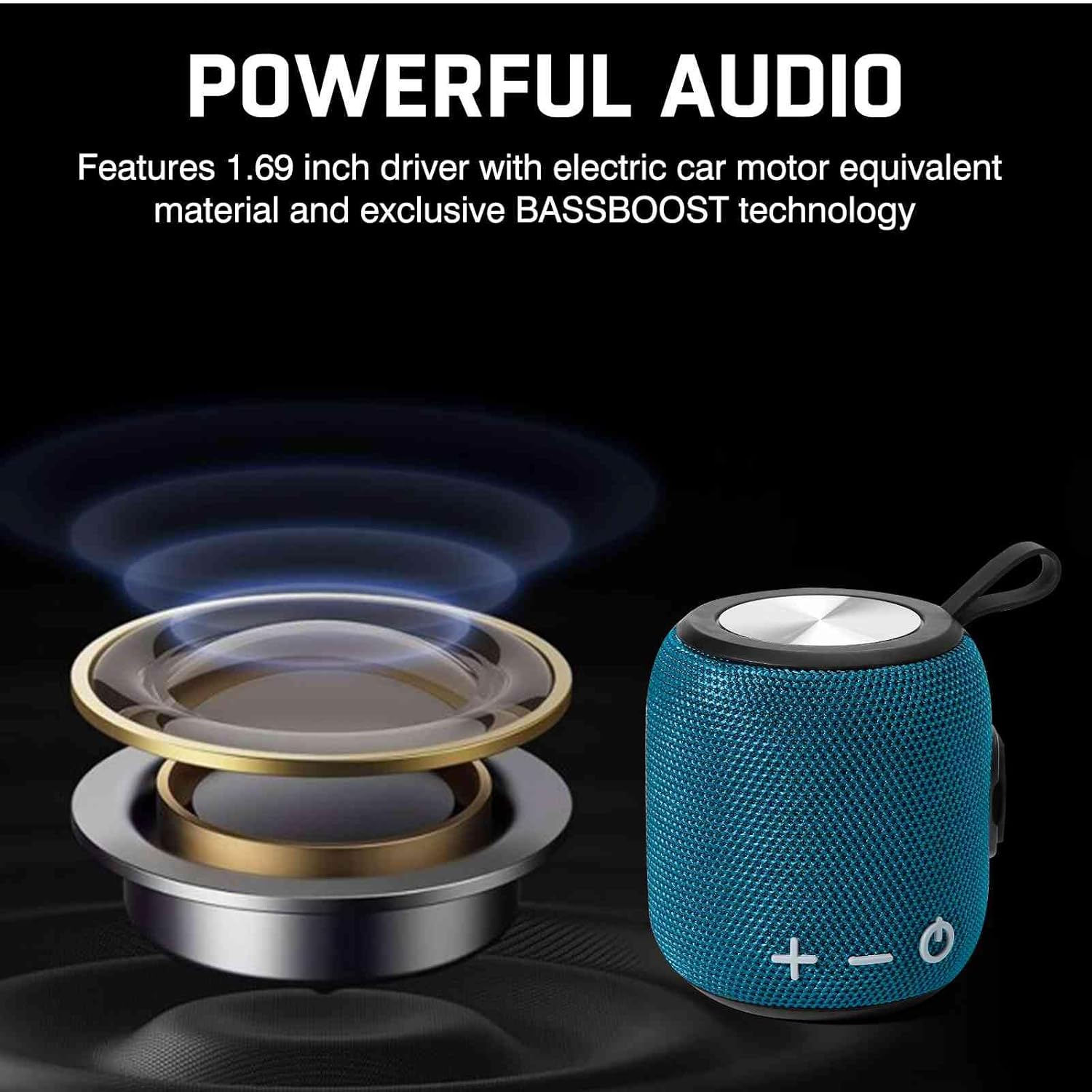
Image: Illustration of the speaker's internal audio components, emphasizing powerful sound output.
9. பாதுகாப்பு தகவல்
- Do not disassemble, repair, or modify the speaker. This may void the warranty and cause damage.
- தீவிர வெப்பநிலை, நேரடி சூரிய ஒளி மற்றும் திறந்த தீப்பிழம்புகளிலிருந்து ஸ்பீக்கரை விலக்கி வைக்கவும்.
- Do not expose the speaker to corrosive liquids.
- சார்ஜ் செய்வதற்கு முன் சார்ஜிங் போர்ட் உலர்ந்திருப்பதை உறுதி செய்யவும்.
- Use only the provided charging cable or a certified Type-C cable.
- செவிப்புலன் பாதிப்பைத் தடுக்க நீண்ட காலத்திற்கு அதிக ஒலிகளைக் கேட்பதைத் தவிர்க்கவும்.
10. உத்தரவாதம் மற்றும் ஆதரவு
UrbanX products come with a standard manufacturer's warranty. For specific warranty terms and conditions, please refer to the warranty card included in your package or visit the official UrbanX webதளம்.
For technical support, troubleshooting assistance, or warranty claims, please contact UrbanX customer service through the following channels:
- Webதளம்: Visit the UrbanX Store on Amazon
- மின்னஞ்சல்: Refer to your product packaging or warranty card for contact email.
Please have your model number (FM0190) and proof of purchase ready when contacting support.
