1. அறிமுகம்
This manual provides essential instructions for the safe and efficient operation of your SHARP SMC1169KS Countertop Microwave Oven. Please read all instructions thoroughly before using the appliance and retain this manual for future reference. This microwave oven features a 1.1 cubic feet capacity, 1000 watts of cooking power, and is compatible with Alexa for voice control. It also includes a removable 12.4-inch carousel turntable and a child lock function.
2. முக்கியமான பாதுகாப்பு தகவல்
மின் சாதனங்களைப் பயன்படுத்தும் போது, பின்வருபவை உட்பட அடிப்படை பாதுகாப்பு முன்னெச்சரிக்கைகள் பின்பற்றப்பட வேண்டும்:
- பயன்படுத்துவதற்கு முன் அனைத்து வழிமுறைகளையும் படிக்கவும்.
- அடுப்பு சேதமடைந்தாலோ அல்லது செயலிழந்தாலோ அதை இயக்க வேண்டாம்.
- மைக்ரோவேவைச் சுற்றி சரியான காற்றோட்டத்தை உறுதி செய்யுங்கள்.
- சீல் செய்யப்பட்ட கொள்கலன்களை சூடாக்க வேண்டாம், ஏனெனில் அவை வெடிக்கக்கூடும்.
- இந்த சாதனத்தில் அரிக்கும் இரசாயனங்கள் அல்லது நீராவிகளைப் பயன்படுத்த வேண்டாம்.
- மைக்ரோவேவ் பயன்பாட்டில் இருக்கும்போது குழந்தைகளை உன்னிப்பாகக் கண்காணிக்கவும்.
- அடுப்பை நீங்களே சர்வீஸ் செய்யவோ அல்லது பழுதுபார்க்கவோ முயற்சிக்காதீர்கள். தகுதிவாய்ந்த சேவை பணியாளர்களைத் தொடர்பு கொள்ளவும்.
- எப்போதும் மைக்ரோவேவ்-பாதுகாப்பான சமையல் பாத்திரங்களைப் பயன்படுத்துங்கள்.
- Liquids heated in a microwave oven can boil over unexpectedly. Exercise caution when removing containers.
3. தயாரிப்பு முடிந்துவிட்டதுview
The SHARP SMC1169KS is a stainless steel countertop microwave oven designed for convenient food preparation. Key features include:
- திறன்: 1.1 கன அடி
- சக்தி வெளியீடு: 1000 வாட்ஸ்
- டர்ன்டபிள்: Removable 12.4-inch glass carousel for even cooking
- கட்டுப்பாடு: Digital display with touch controls and Alexa voice compatibility
- உட்புறம்: Gray interior with LED lighting
- பாதுகாப்பு: Child Safety Lock function
- சமையல் செயல்பாடுகள்: 10 power levels, 2-stage cooking, Auto Cook menus, Weight and Time Defrost, Express Cook, +30 seconds key.

முன் view of the SHARP SMC1169KS Countertop Microwave Oven, showcasing அதன் துருப்பிடிக்காத எஃகு பூச்சு மற்றும் கட்டுப்பாட்டு பலகம்.
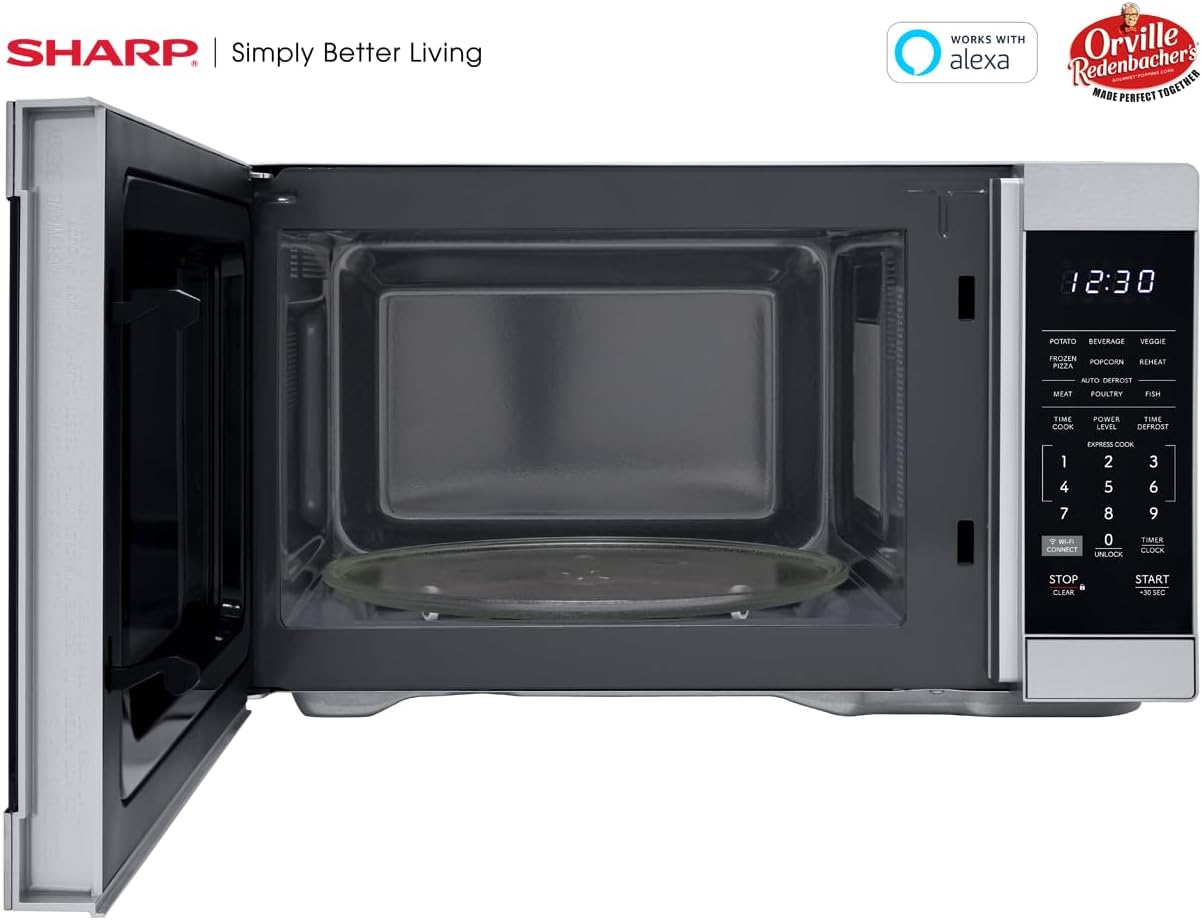
உள்துறை view of the SHARP SMC1169KS microwave oven, highlighting the removable glass carousel turntable for uniform heating.

Close-up of the SHARP SMC1169KS microwave oven control panel, featuring the digital display, number pad, and dedicated function buttons.
4 அமைவு
4.1 பேக்கிங் மற்றும் பிளேஸ்மெண்ட்
- Remove all packing materials from inside and outside the microwave oven.
- Place the microwave on a flat, stable surface that is strong enough to hold the oven and the food being cooked.
- Ensure there is at least 4 inches (10 cm) of space on the top, back, and sides for proper ventilation. Do not block any ventilation openings.
- மைக்ரோவேவை வெப்ப மூலங்கள் மற்றும் வலுவான காந்தப்புலங்களிலிருந்து விலக்கி வைக்கவும்.
4.2 திருப்பக்கூடிய நிறுவல்
- Place the turntable ring inside the microwave cavity.
- Position the glass turntable plate securely on top of the turntable ring. Ensure it is centered and sits properly on the coupler.
4.3 மின் இணைப்பு
பவர் கார்டை ஒரு நிலையான 3-முனை, 120V AC, 60Hz தரையிறக்கப்பட்ட மின் அவுட்லெட்டில் செருகவும். நீட்டிப்பு கம்பி அல்லது அடாப்டரைப் பயன்படுத்த வேண்டாம்.
4.4 Initial Setup (Clock & Wi-Fi/Alexa)
- கடிகாரத்தை அமைத்தல்: அழுத்தவும் டைமர்/கடிகாரம் button once. Use the number pad to enter the current time. Press டைமர்/கடிகாரம் மீண்டும் உறுதிப்படுத்த.
- Connecting to Wi-Fi/Alexa: Refer to the separate Alexa setup guide or the Sharp Home Appliances app for detailed instructions on connecting your microwave to your home Wi-Fi network and linking it with your Amazon Alexa account. Press the WI-FI இணைப்பு button to initiate pairing mode.
5. இயக்க வழிமுறைகள்
5.1 Basic Microwave Cooking (Time Cook)
- டர்ன்டேபிளில் மைக்ரோவேவ்-பாதுகாப்பான கொள்கலனில் உணவை வைக்கவும்.
- கதவை மூடு.
- அழுத்தவும் டைம் குக் பொத்தான்.
- எண் அட்டையைப் பயன்படுத்தி விரும்பிய சமையல் நேரத்தை உள்ளிடவும்.
- அழுத்தவும் START/+30 SEC.
5.2 சக்தி அளவை சரிசெய்தல்
- After entering cooking time (Step 3 of Basic Cooking), press சக்தி நிலை.
- Enter the desired power level from 1 to 10 (10 being 100% power).
- அழுத்தவும் START/+30 SEC.
5.3 எக்ஸ்பிரஸ் குக்
For quick cooking at 100% power, simply press the number pad (1-6) for 1 to 6 minutes of cooking time. The oven will start immediately.
5.4 ஆட்டோ குக் மெனுக்கள்
The microwave includes preset cooking options for common food items:
- POTATO: உருளைக்கிழங்கு சுடுவதற்கு.
- பானம்: சூடான பானங்களுக்கு.
- VEGGIE: காய்கறிகளை சமைப்பதற்கு.
- உறைந்த பிஸ்ஸா: For heating frozen pizza.
- பாப்கார்ன்: Optimized for Orville Redenbacher's popcorn (3.3 oz Classic or 1.16 oz Mini Bag).
- மீண்டும்: For reheating various foods.
- MEAT, POULTRY, FISH: For specific meat types.
To use an Auto Cook menu: Press the desired menu button, then follow the display prompts (e.g., enter quantity) and press START/+30 SEC.
5.5 உறைதல்
மைக்ரோவேவ் அடுப்பு இரண்டு பனி நீக்க முறைகளை வழங்குகிறது:
- எடை குறைப்பு: அழுத்தவும் நேரம் அழிக்கப்பட்டது, உணவின் எடையை உள்ளிட்டு, பின்னர் அழுத்தவும் START/+30 SEC.
- டைம் டிஃப்ராஸ்ட்: அழுத்தவும் நேரம் அழிக்கப்பட்டது twice, enter the desired defrosting time, then press START/+30 SEC.
5.6 குழந்தை பூட்டு செயல்பாடு
குழந்தை பூட்டை செயல்படுத்த:
- அழுத்திப் பிடிக்கவும் நிறுத்து/தெளிவு button for 3 seconds. The lock indicator will appear on the display.
குழந்தை பூட்டை செயலிழக்கச் செய்ய:
- அழுத்திப் பிடிக்கவும் திறக்கவும் button (0) for 3 seconds. The lock indicator will disappear.
5.7 அலெக்சா குரல் கட்டுப்பாடு
Once connected to Alexa, you can use voice commands for various functions. Exampஇதில் அடங்கும்:
- "Alexa, microwave for 1 minute."
- "Alexa, defrost 1 pound of chicken."
- "Alexa, microwave Classic Popcorn."
Refer to the Alexa app or Sharp's online resources for a comprehensive list of voice commands.
6. பராமரிப்பு
6.1 உட்புறத்தை சுத்தம் செய்தல்
Regularly clean the interior of the oven to prevent food particles from accumulating. Use a mild detergent and a soft cloth. For stubborn stains, place a cup of water with lemon juice in the microwave and heat for 2-3 minutes, then wipe clean.
6.2 வெளிப்புறத்தை சுத்தம் செய்தல்
வெளிப்புற மேற்பரப்புகளை ஒரு மென்மையான, டி மூலம் துடைக்கவும்amp துணி. துருப்பிடிக்காத எஃகு பூச்சு கீறக்கூடிய சிராய்ப்பு கிளீனர்கள் அல்லது தேய்த்தல் பட்டைகளைத் தவிர்க்கவும்.
6.3 டர்ன்டேபிள் பராமரிப்பு
கண்ணாடி டர்ன்டேபிள் மற்றும் டர்ன்டேபிள் வளையத்தை அகற்றி, வெதுவெதுப்பான, சோப்பு நீரில் அல்லது பாத்திரங்கழுவி இயந்திரத்தில் கழுவலாம். அவற்றை மீண்டும் அடுப்பில் வைப்பதற்கு முன் அவை முற்றிலும் உலர்ந்திருப்பதை உறுதிசெய்து கொள்ளுங்கள்.
7. சரிசெய்தல்
உங்கள் மைக்ரோவேவில் சிக்கல்கள் ஏற்பட்டால், பொதுவான சிக்கல்கள் மற்றும் தீர்வுகளுக்கு கீழே உள்ள அட்டவணையைப் பார்க்கவும்.
| பிரச்சனை | சாத்தியமான காரணம் | தீர்வு |
|---|---|---|
| அடுப்பு தொடங்கவில்லை | கதவு சரியாக மூடப்படவில்லை; மின் கம்பி துண்டிக்கப்பட்டுள்ளது; ஊதப்பட்ட ஃபியூஸ்/டிரிப் செய்யப்பட்ட சர்க்யூட் பிரேக்கர். | Ensure door is securely closed; Check power cord connection; Check household fuse/circuit breaker. |
| உணவு சமமாக சமைக்கப்படவில்லை | உணவைக் கிளறவோ/சுழற்றவோ கூடாது; சுழலும் மேசை சுழலக்கூடாது. | Stir or rearrange food during cooking; Ensure turntable and ring are correctly placed and free of obstructions. |
| காட்சி "LOCK" என்பதைக் காட்டுகிறது. | சைல்டு லாக் இயக்கப்பட்டது. | அழுத்திப் பிடிக்கவும் திறக்கவும் button (0) for 3 seconds to deactivate. |
| அலெக்சா கட்டளைகள் வேலை செய்யவில்லை. | No Wi-Fi connection; Microwave not linked to Alexa; Incorrect command. | Check Wi-Fi connection; Re-link microwave in Alexa app; Use correct voice commands. |
இந்த தீர்வுகளை முயற்சித்த பிறகும் சிக்கல் தொடர்ந்தால், வாடிக்கையாளர் ஆதரவைத் தொடர்பு கொள்ளவும்.
8. விவரக்குறிப்புகள்
| அம்சம் | விவரக்குறிப்பு |
|---|---|
| மாதிரி எண் | SMC1169KS |
| திறன் | 1.1 கன அடி |
| வாட்tage | 1000 வாட்ஸ் |
| தொகுதிtage | 120 வோல்ட் |
| தயாரிப்பு பரிமாணங்கள் (அளவு x அளவு x அளவு) | 14.7" x 20.6" x 11.8" |
| பொருளின் எடை | 34.9 பவுண்டுகள் |
| பொருள் | துருப்பிடிக்காத எஃகு |
| சிறப்பு அம்சம் | Child Safety Lock, Alexa Compatible |

Dimensional diagram of the SHARP SMC1169KS microwave oven.
9. உத்தரவாதத் தகவல்
SHARP products are manufactured to high-quality standards. For specific warranty details, including coverage period and terms, please refer to the warranty card included with your product or visit the official Sharp webஉத்தரவாதக் கோரிக்கைகளுக்கான வாங்கியதற்கான சான்றாக உங்கள் கொள்முதல் ரசீதை வைத்திருங்கள்.
10. வாடிக்கையாளர் ஆதரவு
For further assistance, technical support, or service inquiries, please visit the official Sharp webதளத்தில் அல்லது அவர்களின் வாடிக்கையாளர் சேவைத் துறையைத் தொடர்பு கொள்ளவும். தொடர்புத் தகவலை பொதுவாக உற்பத்தியாளரின் முகவரியில் காணலாம் webதளம் அல்லது தயாரிப்பு பேக்கேஜிங்கில்.


