1. தயாரிப்பு முடிந்துவிட்டதுview
The Hantek DSO4084B is a versatile 4-channel digital storage oscilloscope designed for precise electrical testing and measurement. It offers a bandwidth of 80MHz, a minimum range of 500µV/div, and a 1GS/s sample rate, making it suitable for a wide array of applications.
முக்கிய அம்சங்கள் அடங்கும்:
- 4 channels with EXT and DVM auto-range function.
- Over 32 types of automatic measurement functions.
- Advanced digital trigger system with high sensitivity.
- More than 14 types of trigger functions, including edge, overtime, pulse, pattern, and interval.
- Serial bus triggering and decoding for intuitive protocol information display.
- Integrated USB Host/Device for PC communication and U-stick storage/system updates.
- Support for SCPI remote control commands.
- Optional RS232 and LAN ports for enhanced connectivity.
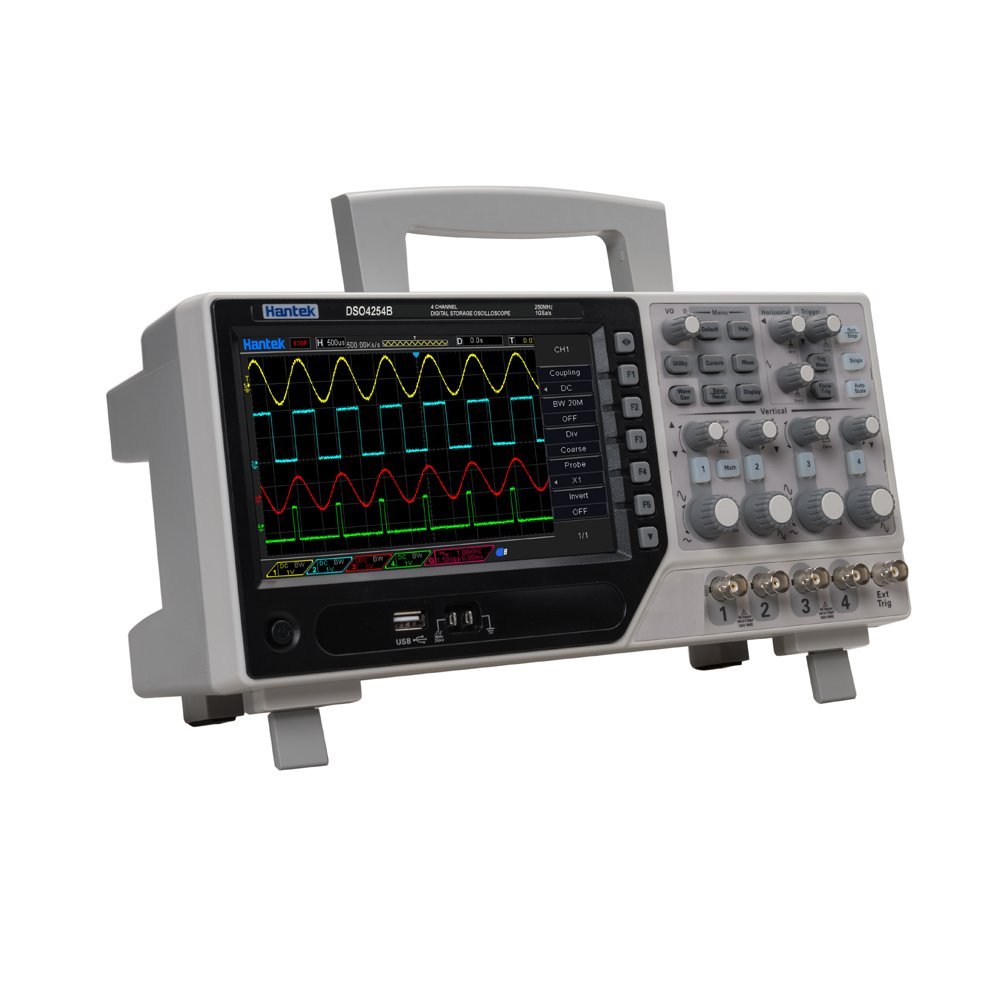
Figure 1: Hantek DSO4084B 4-Channel Digital Storage Oscilloscope with its display and control panel.
2. அமைவு வழிகாட்டி
Follow these steps to set up your Hantek DSO4084B oscilloscope:
- பேக்கிங்: Carefully remove the oscilloscope and all accessories from the packaging. Verify all components are present against the packing list.
- மின் இணைப்பு: Connect the power adapter to the oscilloscope's power input and then to a suitable power outlet.
- ஆய்வு இணைப்பு: Connect the oscilloscope probes to the BNC input channels (CH1, CH2, CH3, CH4) as needed for your measurements. Ensure a secure connection.
- பவர் ஆன்: Press the power button located on the front panel to turn on the oscilloscope. The device will perform a self-test and display the Hantek logo.
- தொடக்கக் காட்சி: Upon startup, Channel 1 (CH1) will typically be active, displaying a horizontal line.
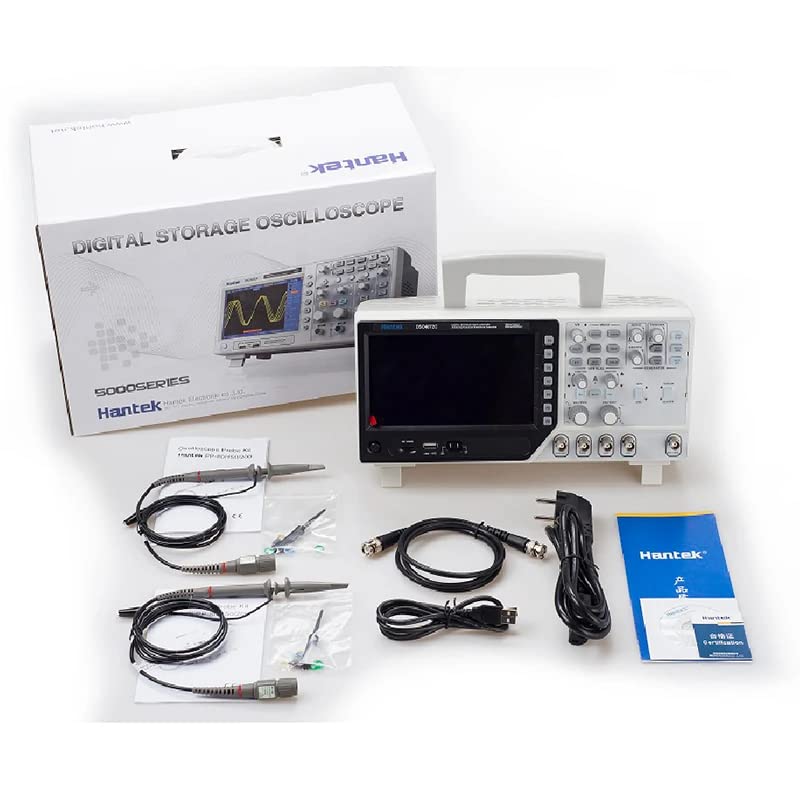
Figure 2: The Hantek DSO4084B oscilloscope shown with its packaging and various accessories, including probes and cables.

படம் 3: ஒரு விரிவான view of the Hantek DSO4084B oscilloscope and its complete set of accessories, including multiple probes and power cables.
Video 1: This video demonstrates the initial setup and basic operation of a Hantek DSO4000B series oscilloscope, including connecting power, turning on the device, adjusting channel settings, using auto-setup, performing automatic measurements, and adjusting coupling and time base.
3. இயக்க வழிமுறைகள்
The Hantek DSO4084B offers intuitive controls for various measurement tasks.
3.1. Basic Waveform Adjustment
- சரிசெய்தல் தொகுதிtage: Use the vertical scale knobs (labeled "Vertical") for each channel to adjust the voltage per division (V/div). The button next to the knob allows for fine-tuning the voltage.
- Adjusting Waveform Position: Use the position knobs for each channel to move the waveform vertically on the screen.
- Enabling Multiple Channels: All four channels can be activated simultaneously. Use the dedicated buttons for each channel (CH1, CH2, CH3, CH4) to toggle them on or off. Adjust voltage and position for each active channel independently.
- தானியங்கு அமைவு: அழுத்தவும் ஆட்டோ button to automatically adjust the oscilloscope settings for a stable waveform display. For example, when measuring a DC 5V signal, the auto function might set the display to 2V per division.
3.2. அளவீட்டு செயல்பாடுகள்
The oscilloscope provides extensive measurement capabilities:
- தானியங்கி அளவீடுகள்: Access over 32 types of automatic measurements by pressing the MEAS button. This displays parameters like Vpp (peak-to-peak voltage), Vmax, Vmin, frequency, period, and more. Pressing MEAS again will hide the measurement results.
- தூண்டுதல் அமைப்பு: Utilize the advanced digital trigger system with over 14 types of trigger functions (edge, overtime, pulse, pattern, interval, etc.) to capture specific events.
- Serial Bus Decoding: For serial bus protocols, the device can quickly and intuitively display bus protocol information in table form.
3.3. Coupling Settings (DC/AC)
To accurately measure different signal types, adjust the coupling setting:
- DC Coupling: Select DC coupling (usually via a menu accessed by a function button like F1) to measure both AC and DC components of a signal.
- ஏசி இணைப்பு: Select AC coupling to block the DC component and only display the AC component of a signal. This is useful for observing small AC signals superimposed on a large DC offset.
- அலைவரிசை வரம்பு: The oscilloscope features a 20MHz bandwidth limit option (e.g., BW 20M). Activating this can help remove high-frequency noise or unwanted signals above 20MHz, providing a cleaner waveform for analysis.
- Adjusting Time Base: Use the horizontal scale knob (labeled "Horizontal") to adjust the time per division (s/div) to view more or less of the waveform horizontally.
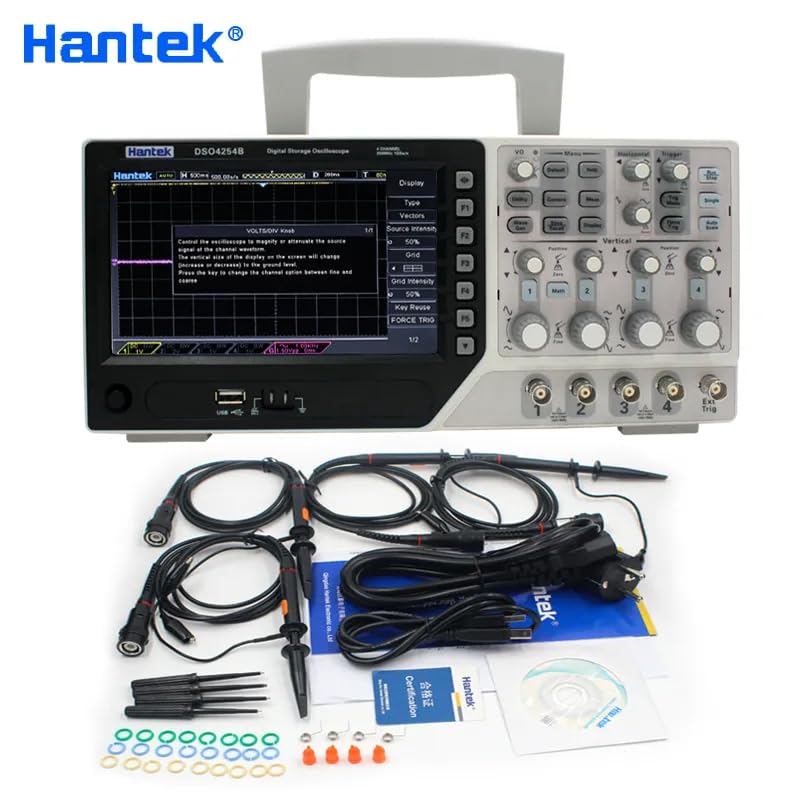
Figure 4: The oscilloscope display showing multiple active channels with distinct waveforms, demonstrating its multi-channel capability.
4. பராமரிப்பு
Proper maintenance ensures the longevity and accuracy of your Hantek DSO4084B oscilloscope:
- சுத்தம்: Regularly clean the exterior of the oscilloscope with a soft, dry cloth. For stubborn dirt, use a slightly damp cloth with mild detergent. Avoid abrasive cleaners or solvents.
- திரை பராமரிப்பு: Use a soft, lint-free cloth specifically designed for electronics screens to clean the display. Do not press hard or use harsh chemicals.
- காற்றோட்டம்: அதிக வெப்பமடைவதைத் தடுக்க காற்றோட்டத் திறப்புகள் தூசி மற்றும் தடைகள் இல்லாமல் இருப்பதை உறுதி செய்யவும்.
- சேமிப்பு: When not in use, store the oscilloscope in a clean, dry environment away from direct sunlight, extreme temperatures, and excessive humidity.
- ஆய்வு பராமரிப்பு: Handle probes carefully. Avoid bending or stressing the cables. Store them properly to prevent damage to the tips and connectors.
- அளவுத்திருத்தம்: For critical measurements, periodic calibration by a qualified service center is recommended to maintain accuracy.
5. சரிசெய்தல்
நீங்கள் சந்திக்கும் பொதுவான பிரச்சினைகளுக்கான தீர்வுகளை இந்தப் பிரிவு வழங்குகிறது:
| பிரச்சனை | சாத்தியமான காரணம் | தீர்வு |
|---|---|---|
| சக்தி இல்லை | Power cable not connected, power outlet faulty, power switch off. | Check power cable connection, try a different outlet, ensure power switch is on. |
| அலைவடிவம் எதுவும் காட்டப்படவில்லை. | Input signal absent, probe not connected, channel off, incorrect vertical/horizontal settings. | Verify signal source, check probe connection, activate channel, use AUTO button or manually adjust V/div and s/div. |
| நிலையற்ற அலைவடிவம் | Incorrect trigger settings, noisy signal. | Adjust trigger level and mode. Consider using the 20MHz bandwidth limit to reduce noise. |
| தவறான அளவீடுகள் | Improper probe attenuation setting, uncalibrated device. | Ensure probe attenuation (e.g., 1X, 10X) matches the oscilloscope setting. Consider professional calibration. |
6. விவரக்குறிப்புகள்
Below are the detailed specifications for the Hantek DSO4084B oscilloscope:
- மாதிரி: DSO4084B
- சேனல்கள்: 4
- அலைவரிசை: 80MHz
- Sample விகிதம்: 1GS/வி
- குறைந்தபட்ச வரம்பு: 500µV/div
- Auto Measurement Functions: Over 32 types
- Trigger Functions: Over 14 types (edge, overtime, pulse, pattern, interval, etc.)
- இணைப்பு: Integrated USB Host/Device, optional RS232 port, LAN port
- காட்சி: 7-inch 64K Color TFT
- தயாரிப்பு பரிமாணங்கள்: 8.27 x 4.33 x 6.3 அங்குலம்
- பொருளின் எடை: 3.3 பவுண்டுகள்
- பேட்டரிகள்: 1 லித்தியம் மெட்டல் பேட்டரி தேவை (சேர்க்கப்பட்டுள்ளது)
- உற்பத்தியாளர்: Hantek Qingdao
- முதல் தேதி கிடைக்கும்: பிப்ரவரி 26, 2024
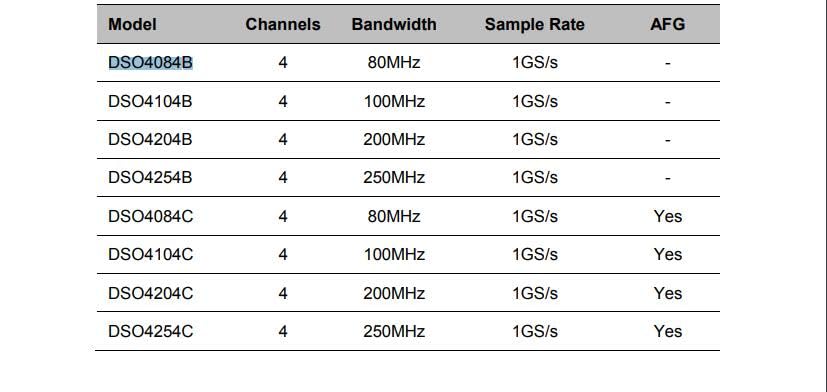
Figure 5: A table detailing the different models within the Hantek DOS4000B series, including their channels, bandwidth, sample rate, and AFG capabilities.
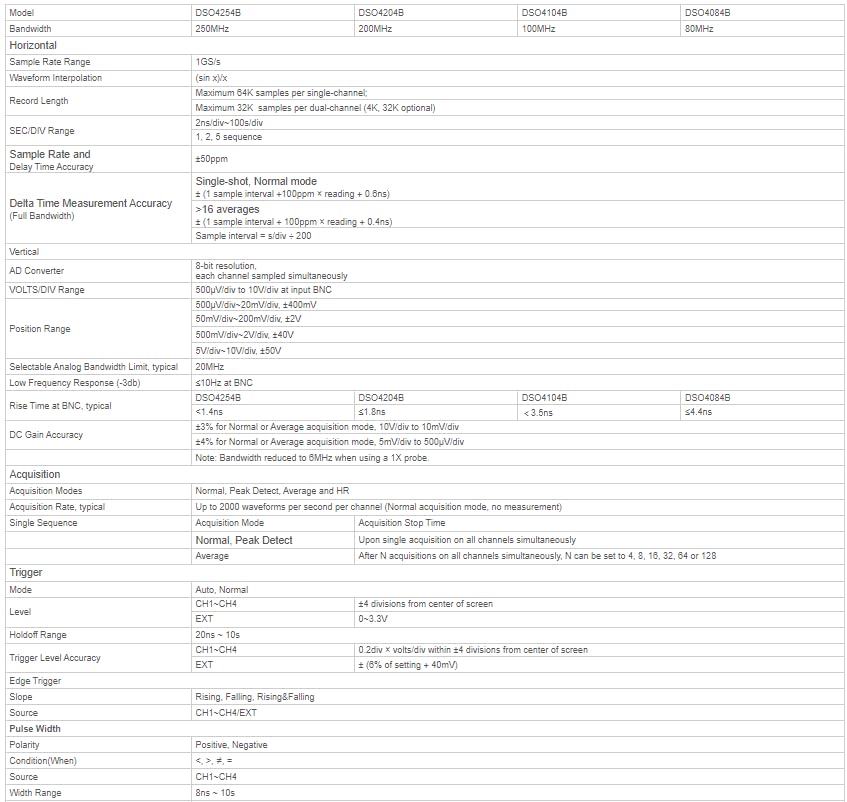
Figure 6: A comprehensive table outlining the detailed technical specifications for various Hantek DOS4000B series oscilloscopes, covering aspects like vertical, horizontal, and trigger settings.
7. உத்தரவாதம் மற்றும் ஆதரவு
For warranty information and technical support, please refer to the official Hantek webதளத்தில் அல்லது உங்கள் அங்கீகரிக்கப்பட்ட டீலரைத் தொடர்பு கொள்ளவும். உத்தரவாதக் கோரிக்கைகளுக்கு வாங்கியதற்கான சான்றாக உங்கள் கொள்முதல் ரசீதை வைத்திருங்கள்.
Additional protection plans may be available for extended coverage. Please check with your retailer for details.


