அறிமுகம்
Thank you for choosing the Mastech MS8233D Digital Multimeter. This manual provides essential information for the safe and effective operation, maintenance, and troubleshooting of your device. Please read this manual thoroughly before use and keep it for future reference.
பாதுகாப்பு தகவல்
WARNING: To avoid electric shock or personal injury, read and understand all safety information before using this product.
- அளவீடுகளைச் செய்வதற்கு முன், மல்டிமீட்டர் சரியான செயல்பாடு மற்றும் வரம்பில் இருப்பதை எப்போதும் உறுதிப்படுத்திக் கொள்ளுங்கள்.
- மதிப்பிடப்பட்ட தொகுதியை விட அதிகமாக விண்ணப்பிக்க வேண்டாம்tage, as marked on the meter, between terminals or between any terminal and earth ground. The MS8233D has a Safety Rating of CATII 600V.
- தொகுதியுடன் பணிபுரியும் போது எச்சரிக்கையுடன் பயன்படுத்தவும்tag30V AC RMS, 42V பீக் அல்லது 60V DC க்கு மேல். அத்தகைய தொகுதிtagஒரு அதிர்ச்சி ஆபத்தை ஏற்படுத்துகிறது.
- Keep your fingers behind the probe barriers during measurements.
- Do not use the meter if it is damaged or if the case is open. Inspect the meter and test leads before use.
- துல்லியமான அளவீடுகளை உறுதிசெய்ய, குறைந்த பேட்டரி காட்டி தோன்றும்போது உடனடியாக பேட்டரியை மாற்றவும்.
- வெடிக்கும் வாயு, நீராவி அல்லது தூசி நிறைந்த சூழல்களில் மீட்டரை இயக்க வேண்டாம்.
முக்கிய அம்சங்கள்
The Mastech MS8233D Digital Multimeter offers a range of functionalities for various electrical measurements:
- காட்சி: துல்லியமான அளவீடுகளுக்கு 2000 கணக்கிடப்படுகிறது.
- வரம்பு: Auto and Manual Ranging capabilities.
- டையோடு சோதனை: Features a Diode Open Voltag1.5V இன் மின்
- தொடர் சோதனை: Audible buzzer for resistance less than 60Ω.
- டேட்டா ஹோல்ட்: வசதிக்காக காட்டப்படும் வாசிப்பை உறைய வைக்கிறது.
- ஆட்டோ பவர் ஆஃப்: பேட்டரி ஆயுளைச் சேமிக்கிறது.
- தொடர்பு இல்லாத தொகுதிtagஇ கண்டறிதல் (NCV): For identifying live wires without direct contact.
- அதிகபட்ச அளவீடு: Records the highest value measured.
- பின்னொளியைக் காண்பி: குறைந்த ஒளி நிலைகளில் பார்வைக்கு.
- Low Battery Display: Indicates when battery replacement is needed.
- மின்சாரம்: Operates on 1x 9V 6F22 Battery.
- சான்றிதழ்கள்: RoHS இணக்கமானது.
- பாதுகாப்பு மதிப்பீடு: CATII 600V.
படம் 1: முன் view of the Mastech MS8233D Digital Multimeter, highlighting the display, rotary function switch, and input terminals.
தயாரிப்பு முடிந்துவிட்டதுview மற்றும் கூறுகள்
The MS8233D multimeter is designed for ease of use and durability. Familiarize yourself with its main parts:

படம் 2: மேல்view of the MS8233D Digital Multimeter, illustrating its physical dimensions, power supply, and typical applications in domestic, industrial, and electronics settings.
- LCD காட்சி: அளவீட்டு அளவீடுகள், அலகுகள் மற்றும் செயல்பாட்டு குறிகாட்டிகளைக் காட்டுகிறது.
- செயல்பாடு ரோட்டரி சுவிட்ச்: Used to select the desired measurement function (e.g., ACV, DCV, Resistance, Diode, Continuity, Temperature, NCV).
- உள்ளீட்டு ஜாக்ஸ்: Terminals for connecting test leads.
- COM ஜாக்: Common (negative) input terminal for all measurements.
- வாமா ஜாக்: தொகுதிக்கான நேர்மறை உள்ளீட்டு முனையம்tage, resistance, diode, continuity, and small current measurements.
- 10A ஜாக்: Positive input terminal for high current (up to 10A) measurements.
- செயல்பாட்டு பொத்தான்கள்: For features like Data Hold, Backlight, and Range selection.
அமைவு
பேட்டரி நிறுவல்
The MS8233D requires one 9V 6F22 battery for operation. To install or replace the battery:
- Ensure the multimeter is turned off and disconnect all test leads from the input terminals.
- மீட்டரின் பின்புறத்தில் பேட்டரி பெட்டி அட்டையைக் கண்டறியவும்.
- பேட்டரி கவரில் உள்ள திருகு(களை) தளர்த்தி, கவரை அகற்ற ஒரு ஸ்க்ரூடிரைவரைப் பயன்படுத்தவும்.
- Connect the new 9V battery to the battery clips, observing the correct polarity.
- பேட்டரியை பெட்டியில் வைத்து, அட்டையை மாற்றி, திருகுகளால் அதைப் பாதுகாக்கவும்.
குறிப்பு: The meter includes a low battery indicator. Replace the battery promptly when this indicator appears to maintain measurement accuracy.
இயக்க வழிமுறைகள்
Before making any measurement, ensure the test leads are properly connected and the function switch is set to the desired range.
DC தொகுதியை அளவிடுதல்tagஇ (DCV)
- Insert the red test lead into the VΩmA jack and the black test lead into the COM jack.
- Set the rotary switch to the desired DCV range (e.g., 200mV, 2V, 20V, 200V, 600V). If unsure, start with the highest range or use auto-ranging if available.
- Connect the test probes across the component or circuit to be measured, observing polarity.
- தொகுதியைப் படியுங்கள்tagஎல்சிடி டிஸ்ப்ளேவில் மின் மதிப்பு.
AC தொகுதியை அளவிடுதல்tagஇ (ஏசிவி)
- Insert the red test lead into the VΩmA jack and the black test lead into the COM jack.
- Set the rotary switch to the desired ACV range (e.g., 2V, 20V, 200V, 600V).
- அளவிடப்பட வேண்டிய கூறு அல்லது சுற்று முழுவதும் சோதனை ஆய்வுகளை இணைக்கவும்.
- தொகுதியைப் படியுங்கள்tagஎல்சிடி டிஸ்ப்ளேவில் மின் மதிப்பு.
Measuring DC/AC Current (DCA/ACA)
எச்சரிக்கை: ஒரு மின்னழுத்தத்திற்கு இணையாக மீட்டரை ஒருபோதும் இணைக்க வேண்டாம்.tage source when measuring current. This can damage the meter and the circuit.
- For currents up to 200mA, insert the red test lead into the VΩmA jack. For currents up to 10A, insert the red test lead into the 10A jack. Insert the black test lead into the COM jack.
- Set the rotary switch to the desired DC or AC current range (e.g., 200µA, 2000µA, 20mA, 200mA, 10A).
- Open the circuit where current is to be measured and connect the meter in series with the load.
- எல்சிடி டிஸ்ப்ளேவில் தற்போதைய மதிப்பைப் படிக்கவும்.
Measuring Resistance (Ω)
- Insert the red test lead into the VΩmA jack and the black test lead into the COM jack.
- Set the rotary switch to the desired Resistance range (e.g., 200Ω, 2kΩ, 20kΩ, 200kΩ, 2MΩ, 20MΩ).
- மின்தடையை அளவிடுவதற்கு முன் சுற்று அல்லது கூறு சக்தியற்றதா என்பதை உறுதிப்படுத்திக் கொள்ளுங்கள்.
- கூறு முழுவதும் சோதனை ஆய்வுகளை இணைக்கவும்.
- LCD டிஸ்ப்ளேவில் மின்தடை மதிப்பைப் படியுங்கள்.
டையோடு சோதனை
- Insert the red test lead into the VΩmA jack and the black test lead into the COM jack.
- Set the rotary switch to the Diode symbol (usually shared with Continuity).
- சிவப்பு ஆய்வை டையோடின் அனோடுடனும், கருப்பு ஆய்வை கேத்தோடுடனும் இணைக்கவும்.
- காட்சி முன்னோக்கி தொகுதியைக் காண்பிக்கும்tage drop. Reverse the probes; the display should show 'OL' (Open Loop) for a good diode.
தொடர்ச்சி சோதனை
- Insert the red test lead into the VΩmA jack and the black test lead into the COM jack.
- Set the rotary switch to the Continuity symbol (usually shared with Diode).
- சுற்று அல்லது கூறு முழுவதும் சோதனை ஆய்வுகளை இணைக்கவும்.
- If the resistance is below approximately 60Ω, the buzzer will sound, indicating continuity. The display will also show the resistance value.
தொடர்பு இல்லாத தொகுதிtagஇ (NCV) கண்டறிதல்
- Set the rotary switch to the NCV function.
- Move the top part of the meter (NCV sensor area) close to the conductor suspected of having AC voltage.
- மீட்டர் ஒரு கேட்கக்கூடிய பீப்பை வெளியிடும், மேலும் ஏசி மின்னழுத்தம் அதிகரித்தால் NCV காட்டி ஒளிரும்.tage கண்டறியப்பட்டது.
தரவு ஹோல்ட் செயல்பாடு
Press the 'HOLD' button to freeze the current reading on the display. Press it again to release the hold and resume live measurements.
பின்னொளி செயல்பாடு
Press the 'LIGHT' button to turn on the display backlight. Press it again to turn it off. The backlight may automatically turn off after a short period to conserve battery.
பராமரிப்பு
சுத்தம் செய்தல்
விளம்பரத்துடன் மீட்டரின் உறையைத் துடைக்கவும்.amp துணி மற்றும் லேசான சோப்பு. சிராய்ப்புப் பொருட்கள் அல்லது கரைப்பான்களைப் பயன்படுத்த வேண்டாம். பயன்படுத்துவதற்கு முன்பு மீட்டர் முழுமையாக உலர்ந்திருப்பதை உறுதிசெய்யவும்.
பேட்டரி மாற்று
Refer to the 'Battery Installation' section under 'Setup' for instructions on replacing the 9V battery. Always replace the battery when the low battery indicator is displayed to ensure accurate readings and proper operation.
உருகி மாற்று
The MS8233D is equipped with internal fuses to protect against overcurrent. If the current measurement function stops working, the fuse may need replacement. Fuse replacement should only be performed by qualified personnel. Use only fuses of the specified type and rating (e.g., F200mA/250V for mA range, F10A/250V for 10A range).
சரிசெய்தல்
| பிரச்சனை | சாத்தியமான காரணம் | தீர்வு |
|---|---|---|
| காட்சி இல்லை அல்லது மங்கலான காட்சி இல்லை | இறந்த அல்லது குறைந்த பேட்டரி | 9V பேட்டரியை மாற்றவும். |
| தவறான வாசிப்புகள் | Incorrect function/range selected; poor test lead connection; low battery | Verify function and range; check test lead connections; replace battery. |
| மின்னோட்ட அளவீடு வேலை செய்யவில்லை | ஊதப்பட்ட உருகி | Replace the appropriate fuse (refer to Maintenance section). |
| 'OL' (ஓவர்லோட்) காட்டப்பட்டுள்ளது | Measurement exceeds selected range; open circuit (for continuity/resistance) | Select a higher range; check for open circuit. |
| தொடர்ச்சி பீப் இல்லை | Resistance too high; open circuit | Check for continuity; ensure resistance is below 60Ω. |
விவரக்குறிப்புகள்
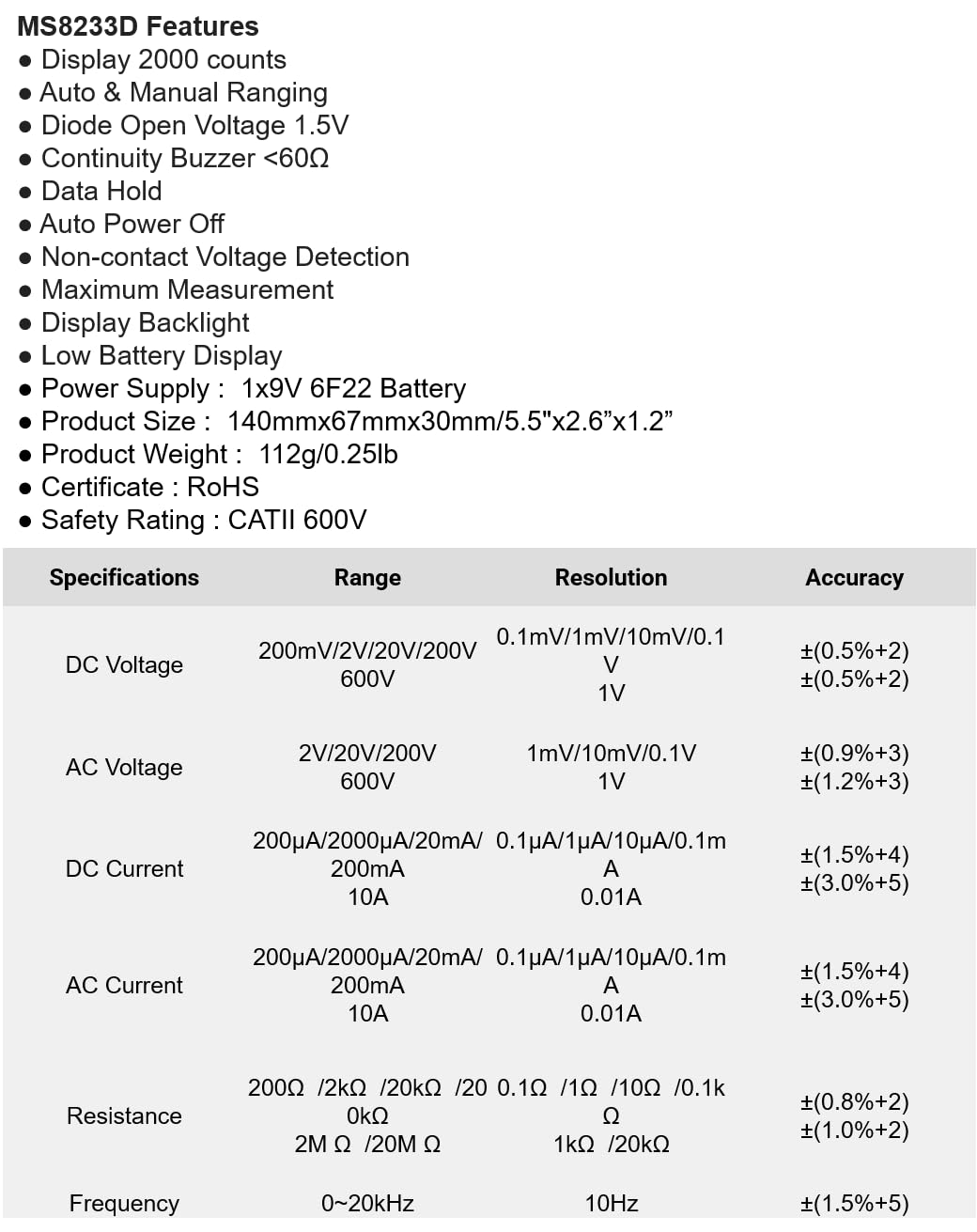
The following table details the measurement ranges, resolutions, and accuracies for the Mastech MS8233D Digital Multimeter:

Figure 3: Comprehensive specifications for the MS8233D, outlining measurement capabilities and precision.
| அம்சம் | விவரக்குறிப்பு |
|---|---|
| காட்சி | 2000 எண்ணிக்கைகள் |
| டிசி தொகுதிtage | 200mV / 2V / 20V / 200V / 600V |
| ஏசி தொகுதிtage | 2V / 20V / 200V / 600V |
| DC மின்னோட்டம் | 200µA / 2000µA / 20mA / 200mA / 10A |
| ஏசி நடப்பு | 200µA / 2000µA / 20mA / 200mA / 10A |
| எதிர்ப்பு | 200Ω / 2kΩ / 20kΩ / 200kΩ / 2MΩ / 20MΩ |
| அதிர்வெண் | 0-20kHz |
| டையோடு திறந்த தொகுதிtage | 1.5V |
| தொடர்ச்சியான பஸர் | <60Ω |
| பவர் சப்ளை | 1x 9V 6F22 பேட்டரி |
| தயாரிப்பு பரிமாணங்கள் | 140 மிமீ x 67 மிமீ x 30 மிமீ (5.5" x 2.6" x 1.2") |
| தயாரிப்பு எடை | 112 கிராம் (0.25 பவுண்ட்) |
| பாதுகாப்பு மதிப்பீடு | CATII 600V |
| சான்றிதழ்கள் | CE, RoHS |
உத்தரவாதம் மற்றும் ஆதரவு
For warranty information and technical support, please refer to the documentation provided with your purchase or contact the seller/manufacturer directly. Keep your purchase receipt as proof of purchase for any warranty claims.


