1. அறிமுகம்
This manual provides essential information for the safe and effective operation of your Mecpow Laser Engraver, covering both the X3 5W and X5 Pro 33W models. Please read this manual thoroughly before using the device to ensure proper setup, operation, and maintenance.
2. பாதுகாப்பு தகவல்
எச்சரிக்கை: Laser engravers are powerful tools that can cause serious injury if not handled properly. Always follow safety guidelines.
- இயந்திரத்தை இயக்கும்போது எப்போதும் பொருத்தமான லேசர் பாதுகாப்பு கண்ணாடிகளை அணியுங்கள்.
- Ensure proper ventilation to dissipate fumes and smoke generated during engraving/cutting.
- செயல்பாட்டின் போது இயந்திரத்தை கவனிக்காமல் விட்டுவிடாதீர்கள்.
- அருகில் தீயை அணைக்கும் கருவியை வைத்திருங்கள்.
- Do not engrave or cut unknown materials, as some may produce toxic fumes or catch fire easily.
- குழந்தைகள் மற்றும் செல்லப்பிராணிகளை இயக்க பகுதியிலிருந்து விலக்கி வைக்கவும்.
- The Mecpow laser engraving machine is equipped with advanced safety features, including a flame detector, gyroscope, emergency stop button, and limit switches. Familiarize yourself with these features.
3. தயாரிப்பு முடிந்துவிட்டதுview
3.1 Key Features (Mecpow X5 Pro 33W)
- Powerful 33W Output Diode Laser: The X5 Pro features a 33W output diode laser with 192W machine power, enabling efficient engraving and cutting.
- அதிக வெட்டு வேகம்: Operates at an ultra-fast cutting speed of up to 28,000 mm/min.
- Fivefold Safety Protection: Includes flame detector, gyroscope, emergency stop button, limit switches, and a safety lock.
- பரந்த இணக்கத்தன்மை: Compatible with popular engraving software such as LightBurn (for experienced users) and LaserGRBL (for new users).
- Ultra-fine Focus Spot: Features a 0.05*0.07mm focus spot for detailed and vivid engraving.
- Built-in Air Duct Design: Air assist efficiently clears debris and fumes, ensuring smooth and clean engraving.
- Larger Engraving Area: The X5 Pro offers a 600x600mm (23.6x23.6 inch) engraving area, providing 50% more area compared to standard 400x400mm models.
- நெகிழ்வான இணைப்பு விருப்பங்கள்: Supports WiFi, USB Cable, and Micro SD Card connections.
3.2 தயாரிப்பு படங்கள்

Figure 1: Mecpow X3 5W (bottom) and X5 Pro 33W (top) laser engravers, showcasing their respective power outputs and engraving areas.

படம் 2: நெருக்கமான காட்சி view of the Mecpow X5 Pro 33W laser engraver, highlighting its 600x600mm work area and external power supply.

Figure 3: The Mecpow X3 5W laser engraver, demonstrating its compact design and 5W laser module.

Figure 4: Illustration of the Mecpow X5 Pro 33W's cutting power, showing its ability to cut 15mm wood, 12mm acrylic, and 0.1mm stainless steel in a single pass.
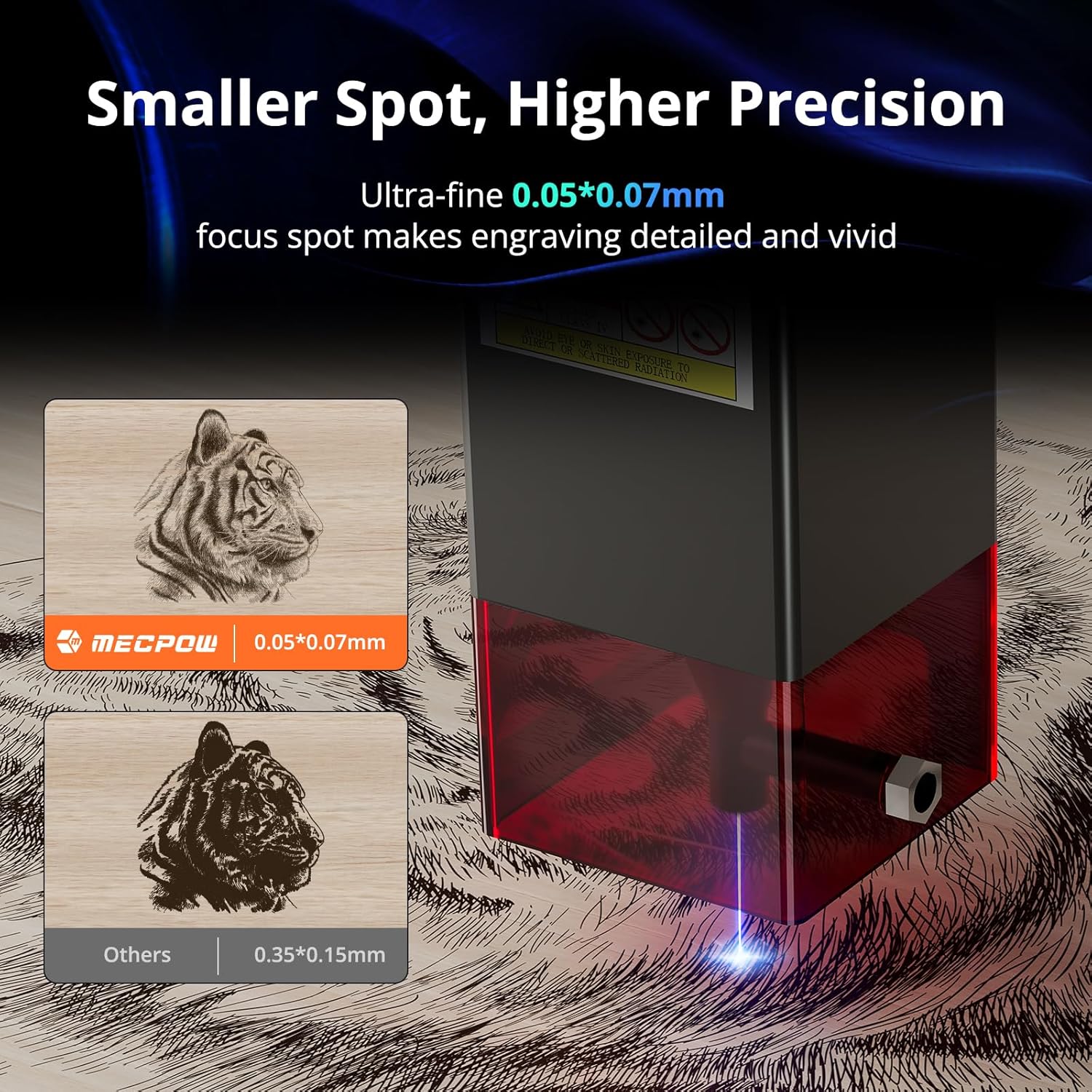
Figure 5: Visual comparison demonstrating the ultra-fine 0.05*0.07mm focus spot of the Mecpow engraver, resulting in higher precision and more detailed engravings compared to other models.

Figure 6: Depiction of the flexible connection options available for the Mecpow laser engraver, including WiFi, USB Cable, and Micro SD Card, with a smartphone displaying the control app.
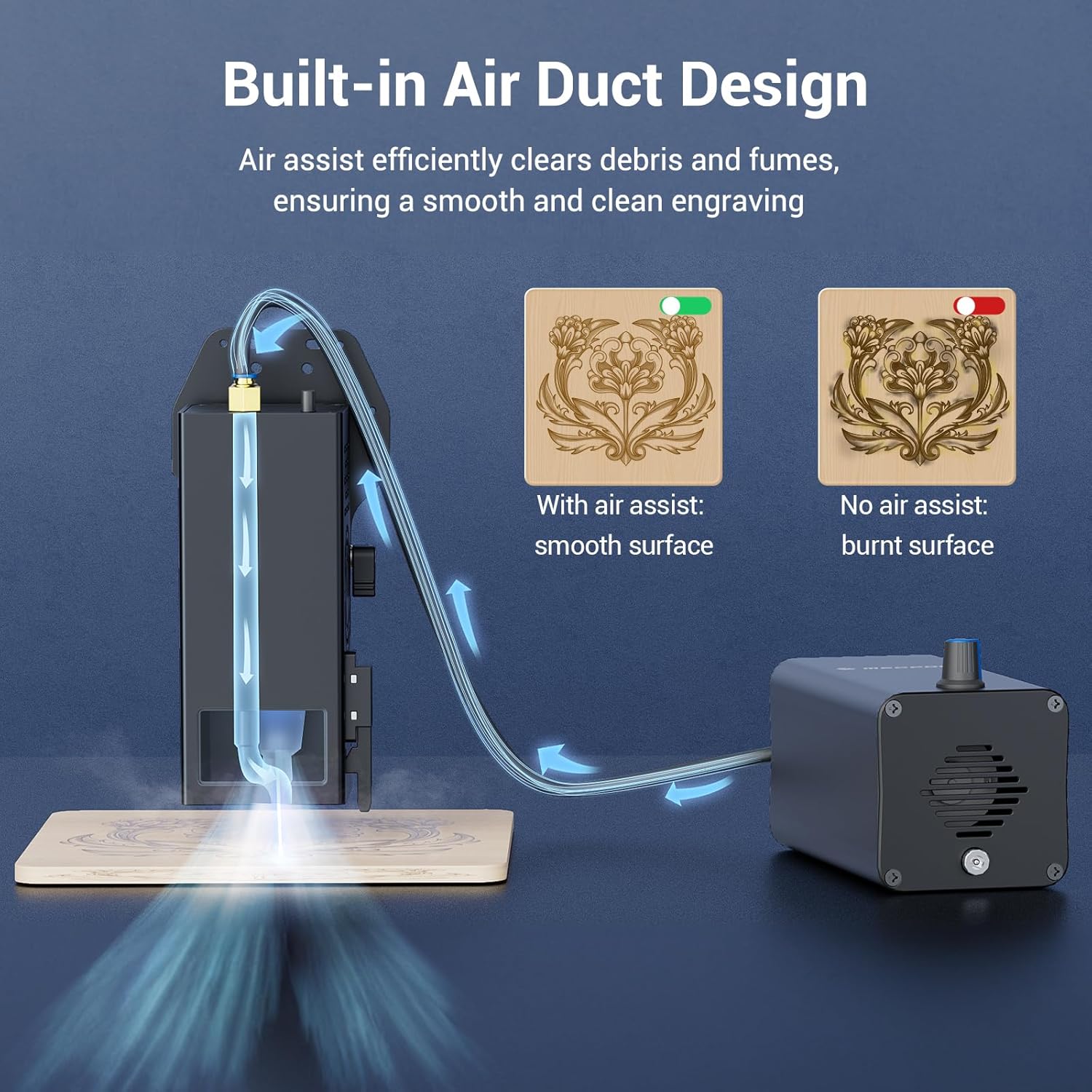
Figure 7: Diagram illustrating the built-in air duct design of the Mecpow engraver, showing how air assist clears debris and fumes for a smoother, cleaner engraving result compared to no air assist.

Figure 8: Comparison highlighting the larger 600x600mm engraving area of the Mecpow X5 Pro, offering significantly more creative space than standard 400x400mm engravers.

Figure 9: A collection of various items demonstrating the versatility of the Mecpow laser engraver, including engraved wood, acrylic, and metal, as well as cut wooden models.
4. அமைப்பு மற்றும் அசெம்பிளி
Detailed assembly instructions are typically provided in a separate quick-start guide or assembly video. Please refer to those resources for step-by-step guidance.
4.1 ஆரம்ப இணைப்பு
- Place the engraver on a stable, level, and fire-resistant surface.
- பவர் அடாப்டரை என்க்ரேவருடன் இணைக்கவும், பின்னர் பொருத்தமான பவர் அவுட்லெட்டுடன் இணைக்கவும்.
- For initial setup, connect the engraver to your computer via USB cable.
- Alternatively, for wireless control, ensure your device is connected to the same Wi-Fi network as the engraver after initial setup.
- Insert a Micro SD card if you plan to operate without a direct computer connection.
5. இயக்க வழிமுறைகள்
5.1 மென்பொருள் நிறுவல்
The Mecpow laser engraver is compatible with LightBurn and LaserGRBL software. Download the latest versions from their official webதளங்கள்.
- லைட் பர்ன்: Recommended for experienced users, offering advanced features for design and control.
- லேசர்ஜிஆர்பிஎல்: Ideal for new users, providing a simpler interface for basic engraving tasks.
For smartphone control, search for "Laser Explorer" or "MKSLaser" in your device's app store (Google Play / App Store).
5.2 அடிப்படை செயல்பாட்டு படிகள்
- பொருள் தயார்: வேலை செய்யும் மேற்பரப்பில் பொறிக்கப்பட வேண்டிய அல்லது வெட்டப்பட வேண்டிய பொருளை வைக்கவும். அது தட்டையாகவும் பாதுகாப்பாகவும் நிலைநிறுத்தப்பட்டுள்ளதா என்பதை உறுதிப்படுத்தவும்.
- லேசரை மையப்படுத்தவும்: Adjust the laser module height to achieve the optimal focus spot on your material. Refer to the quick-start guide for specific focusing methods.
- Design and Import: Create or import your design into the chosen software (LightBurn/LaserGRBL).
- அளவுருக்களை அமைக்கவும்: Configure engraving/cutting parameters such as power, speed, and passes based on the material type and desired outcome.
- முன்view and Frame: மென்பொருளின் ஃப்ரேமிங் செயல்பாட்டைப் பயன்படுத்தி முன்view the working area and ensure the design fits correctly on your material.
- வேலைப்பாடு/வெட்டுதலைத் தொடங்குங்கள்: Press the start button in the software and on the machine (if applicable) to begin the operation.
- முன்னேற்றத்தைக் கண்காணிக்கவும்: Continuously monitor the machine during operation. Be prepared to press the emergency stop button if any issues arise.
6. பராமரிப்பு
- லென்ஸை சுத்தம் செய்யுங்கள்: Regularly clean the laser lens with a soft, lint-free cloth and lens cleaning solution to maintain optimal laser performance.
- வேலைப் பகுதியை சுத்தம் செய்யவும்: Remove debris and dust from the engraving bed and rails after each use to prevent interference with movement.
- லூப்ரிகேட் தண்டவாளங்கள்: லேசர் தொகுதியின் சீரான இயக்கத்தை உறுதிசெய்ய, வழிகாட்டி தண்டவாளங்களில் அவ்வப்போது சிறிதளவு மசகு எண்ணெயைப் பயன்படுத்துங்கள்.
- இணைப்புகளைச் சரிபார்க்கவும்: Ensure all cables and connections are secure before each operation.
- Air Assist Maintenance: If using an external air assist pump, ensure its filter is clean and the hose is free of blockages.
7. சரிசெய்தல்
| பிரச்சனை | சாத்தியமான காரணம் | தீர்வு |
|---|---|---|
| லேசர் சுடவில்லை அல்லது பலவீனமான வெளியீடு. | Incorrect focus; dirty lens; low power setting; loose connection. | Re-focus the laser; clean the lens; increase power setting in software; check all cables. |
| Machine not moving or erratic movement. | Loose belts; obstructed rails; software connection issue; motor fault. | Check and tighten belts; clear obstructions; restart software/computer; contact support if motor fault suspected. |
| Engraving quality is poor (blurry, uneven). | Incorrect focus; material not flat; wrong speed/power settings; dirty lens. | Ensure proper focus; secure material; adjust settings; clean lens. |
| Emergency stop activated unexpectedly. | Flame detected; machine tilted (gyroscope); accidental button press. | Check for flames/smoke; ensure machine is stable; reset emergency stop button. |
8. விவரக்குறிப்புகள்
- மாதிரி: Mecpow X3 5W & X5 Pro 33W
- Laser Output Power (X5 Pro): 33W டையோடு லேசர்
- Machine Power (X5 Pro): 192W
- Engraving Area (X5 Pro): 600 x 600 மிமீ (23.6 x 23.6 அங்குலங்கள்)
- Cutting Speed (X5 Pro): 28,000 மிமீ/நிமிடம் வரை
- Focus Spot Size (X5 Pro): 0.05 x 0.07 மிமீ
- இணைப்பு: WiFi, USB Cable, Micro SD Card
- இணக்கமான மென்பொருள்: லைட்பர்ன், லேசர்ஜிஆர்பிஎல்
- பாதுகாப்பு அம்சங்கள்: Flame detector, Gyroscope, Emergency Stop Button, Limit Switches, Safety Lock
- ASIN: B0D1FRHVRN
- முதல் தேதி கிடைக்கும்: ஏப்ரல் 11, 2024
9. உத்தரவாதம் மற்றும் ஆதரவு
Mecpow products are designed for quality and reliability. For specific warranty terms and conditions, please refer to the warranty card included with your product or visit the official Mecpow webதளம்.
For technical support, troubleshooting assistance, or spare parts, please contact Mecpow customer service through their official channels. Provide your product model and serial number for faster service.
Visit the Mecpow Store: Mecpow Supreme Selection


