1. முக்கியமான பாதுகாப்பு வழிமுறைகள்
சாதனத்தை இயக்குவதற்கு முன் இந்த கையேட்டை கவனமாகப் படித்து, எதிர்கால குறிப்புக்காக அதை வைத்திருங்கள். இந்த வழிமுறைகளைப் பின்பற்றத் தவறினால் மின்சார அதிர்ச்சி, தீ அல்லது கடுமையான காயம் ஏற்படலாம்.
- Always connect the dehumidifier to a grounded power outlet.
- சேதமடைந்த மின் கம்பி அல்லது பிளக் மூலம் யூனிட்டை இயக்க வேண்டாம்.
- சாதனத்தை தண்ணீர் மற்றும் பிற திரவங்களிலிருந்து விலக்கி வைக்கவும். அதை மூழ்கடிக்க வேண்டாம்.
- அலகு சுற்றி சரியான காற்றோட்டத்தை உறுதி செய்யவும். காற்று நுழைவாயில்கள் அல்லது வெளியேற்றங்களைத் தடுக்க வேண்டாம்.
- சுத்தம் செய்வதற்கு முன் அல்லது பராமரிப்பு செய்வதற்கு முன் ஈரப்பதமூட்டியை துண்டிக்கவும்.
- இந்த சாதனம் அவர்களின் பாதுகாப்பிற்குப் பொறுப்பான ஒருவரால் உபகரணத்தைப் பயன்படுத்துவது தொடர்பான மேற்பார்வை அல்லது அறிவுறுத்தல் வழங்கப்படாவிட்டால், குறைந்த உடல், உணர்ச்சி அல்லது மன திறன்கள் அல்லது அனுபவம் மற்றும் அறிவு இல்லாமை கொண்ட நபர்கள் (குழந்தைகள் உட்பட) பயன்படுத்துவதை நோக்கமாகக் கொண்டிருக்கவில்லை.
- Do not use the appliance in areas where flammable gases or vapors are present.
- Operate the unit within the specified temperature range of 5-32 °C.
2. தயாரிப்பு முடிந்துவிட்டதுview
The SENCOR SDH 3028WH is a portable smart dehumidifier designed to efficiently remove excess moisture from your indoor environment. It features Wi-Fi connectivity for app control, multiple operating modes, and a large water tank capacity.
முக்கிய அம்சங்கள்:
- Dehumidification Capacity: 30 liters per day (at 30 °C, 80% Relative Humidity).
- Water Tank Capacity: 6 liters.
- Control: Wi-Fi enabled with Sencor HOME app (iOS and Android).
- Dehumidification Settings: Adjustable from 35% to 85% Relative Humidity, or Continuous operation.
- Operating Modes: Dehumidification, Fan, Laundry Drying.
- Fan Speeds: High and Low.
- Display: Precise humidity indication.
- Timer: 0-24 hours.
- Safety Features: Full tank indicator, Child safety lock, Automatic defrost function, Automatic restart function.
- Convenience: Removable and washable filter, Integrated handles and wheels for easy portability, 1-meter drain hose for continuous drainage.
- Quiet Operation: Noise level 43/41 dB.
- Suitable Room Size: 30 to 89 m².
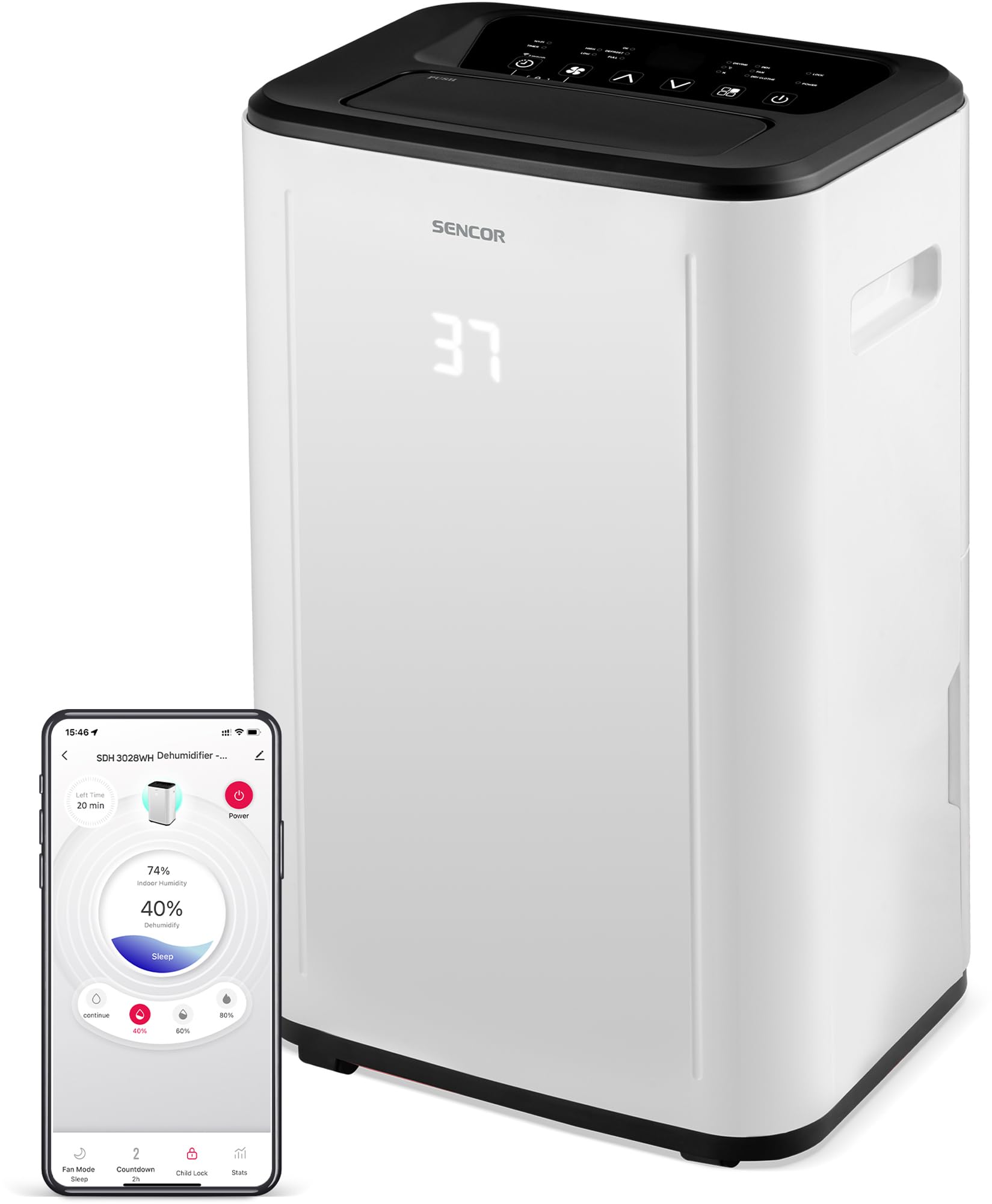
படம் 1: முன் view of the SENCOR SDH 3028WH Portable Dehumidifier.
3. தொகுப்பு உள்ளடக்கங்கள்
பிரித்தெடுத்தவுடன், அனைத்து பொருட்களும் இருப்பதையும் நல்ல நிலையில் இருப்பதையும் உறுதிசெய்யவும்:
- SENCOR SDH 3028WH Portable Dehumidifier
- அறிவுறுத்தல் கையேடு
- Drain Hose (1 meter)

Figure 2: Packaging of the SENCOR SDH 3028WH, illustrating key features.
4 அமைவு
4.1 வேலை வாய்ப்பு
Place the dehumidifier on a firm, level surface in the area where dehumidification is desired. Ensure there is at least 20 cm (8 inches) of clear space around the air inlets and outlets for optimal airflow.
4.2 மின் இணைப்பு
Plug the power cord into a suitable grounded electrical outlet (220-240V, 50Hz). The unit will enter standby mode.
4.3 Wi-Fi Setup (Sencor HOME App)
- Download the Sencor HOME app from the App Store (iOS) or Google Play Store (Android).
- ஒரு கணக்கை உருவாக்கவும் அல்லது உள்நுழையவும்.
- Follow the in-app instructions to add your SDH 3028WH dehumidifier. This typically involves putting the dehumidifier into pairing mode (refer to the app or device display for specific instructions) and connecting it to your home Wi-Fi network.
- Once connected, you can control the dehumidifier remotely and monitor its status via the app.
5. இயக்க வழிமுறைகள்
5.1 கண்ட்ரோல் பேனல்
The control panel on top of the unit allows you to manage all functions. The digital display shows the current humidity level or timer settings.
5.2 பவர் ஆன்/ஆஃப்
அழுத்தவும் சக்தி யூனிட்டை ஆன் அல்லது ஆஃப் செய்ய பொத்தான்.
5.3 விரும்பிய ஈரப்பதத்தை அமைத்தல்
- அழுத்தவும் ஈரப்பதம் பொத்தான்.
- பயன்படுத்தவும் மேல்/கீழ் arrows to adjust the desired humidity level between 35% and 85% RH in 5% increments.
- நிர்ணயிக்கப்பட்ட ஈரப்பத அளவை அடையும் வரை இந்த அலகு செயல்படும், பின்னர் அதைப் பராமரிக்க சுழற்சி முறையில் ஆன் மற்றும் ஆஃப் செய்யப்படும்.
- To enable continuous dehumidification, select the 'Continuous' setting (usually indicated by 'CO' or similar on the display).
5.4 இயக்க முறைகள்
அழுத்தவும் பயன்முறை கிடைக்கக்கூடிய முறைகளில் சுழற்சி செய்ய பொத்தானை அழுத்தவும்:
- ஈரப்பதம் நீக்கும் முறை: Standard operation to remove moisture.
- ரசிகர் பயன்முறை: Circulates air without dehumidifying.
- சலவை உலர்த்தும் முறை: Optimized for drying clothes faster by continuously running the fan and dehumidifier.
5.5 விசிறி வேகம்
அழுத்தவும் மின்விசிறி வேகம் அதிக மற்றும் குறைந்த விசிறி வேகங்களுக்கு இடையில் மாற பொத்தான்.
5.6 டைமர் செயல்பாடு
- அழுத்தவும் டைமர் பொத்தான்.
- பயன்படுத்தவும் மேல்/கீழ் arrows to set the desired operating duration from 0 to 24 hours.
- The unit will automatically turn off or on after the set time.
5.7 குழந்தை பூட்டு
குழந்தை பூட்டை செயல்படுத்த, அழுத்திப் பிடிக்கவும் குழந்தை பூட்டு button (or a combination of buttons as indicated on the control panel) for a few seconds. This prevents accidental changes to settings. Repeat the action to deactivate.
6. பராமரிப்பு
வழக்கமான பராமரிப்பு உகந்த செயல்திறனை உறுதிசெய்து உங்கள் ஈரப்பதமூட்டியின் ஆயுளை நீட்டிக்கிறது.
6.1 தண்ணீர் தொட்டியை காலி செய்தல்
- When the water tank is full, the unit will stop operating, and the 'Full Tank' indicator will illuminate.
- Carefully pull out the water tank from the back or side of the unit.
- சேகரிக்கப்பட்ட தண்ணீரை காலி செய்யவும்.
- Reinsert the empty tank firmly into its position. The unit will resume operation.
6.2 தொடர்ச்சியான வடிகால்
For continuous operation without needing to empty the tank, you can use the included drain hose.
- Locate the continuous drain outlet on the back of the dehumidifier.
- ரப்பர் தடுப்பான் (ஏதேனும் இருந்தால்) அகற்றவும்.
- Connect one end of the 1-meter drain hose to the outlet.
- Direct the other end of the hose to a suitable drain or larger container, ensuring it is lower than the dehumidifier's drain outlet for gravity flow.
6.3 காற்று வடிகட்டியை சுத்தம் செய்தல்
- It is recommended to clean the air filter every two weeks or more frequently depending on usage.
- டிஹைமிடிஃபையரை அணைத்து, அவிழ்த்து விடுங்கள்.
- காற்று வடிகட்டியைக் கண்டுபிடித்து அகற்றவும் (பொதுவாக பின்புறம் அல்லது பக்கத்தில்).
- வடிகட்டியை வெதுவெதுப்பான நீர் மற்றும் லேசான சோப்பு கொண்டு கழுவவும். நன்கு துவைக்கவும்.
- வடிகட்டியை மீண்டும் அலகில் செருகுவதற்கு முன் காற்றில் முழுமையாக உலர விடுங்கள். உலர்த்தி அல்லது நேரடி வெப்பத்தைப் பயன்படுத்த வேண்டாம்.
6.4 வெளிப்புறத்தை சுத்தம் செய்தல்
அலகின் வெளிப்புறத்தை மென்மையான, d துணியால் துடைக்கவும்.amp cloth. Do not use harsh chemicals, abrasive cleaners, or solvents.
7. சரிசெய்தல்
வாடிக்கையாளர் ஆதரவைத் தொடர்புகொள்வதற்கு முன், பின்வரும் பொதுவான சிக்கல்கள் மற்றும் தீர்வுகளைப் பார்க்கவும்:
| பிரச்சனை | சாத்தியமான காரணம் | தீர்வு |
|---|---|---|
| அலகு இயக்கப்படவில்லை. | மின்சாரம் இல்லை. மின் கம்பி சரியாக இணைக்கப்படவில்லை. | சாதனம் வேலை செய்யும் கடையில் செருகப்பட்டுள்ளதா எனச் சரிபார்க்கவும். மின் கம்பி பாதுகாப்பாக இணைக்கப்பட்டுள்ளதா என்பதை உறுதிப்படுத்தவும். |
| ஈரப்பதமூட்டி தண்ணீரை சேகரிக்கவில்லை. | காற்று வடிகட்டி அடைக்கப்பட்டுள்ளது. Room temperature is too low (below 5°C). ஈரப்பதம் அமைப்பு மிக அதிகமாக உள்ளது. தண்ணீர் தொட்டி சரியாக செருகப்படவில்லை. | காற்று வடிகட்டியை சுத்தம் செய்யவும். Ensure room temperature is within 5-32°C. விரும்பிய ஈரப்பத அளவைக் குறைக்கவும். Reinsert the water tank correctly. |
| Unit is noisy or vibrating excessively. | அலகு ஒரு சீரற்ற மேற்பரப்பில் உள்ளது. காற்று வடிகட்டி அடைக்கப்பட்டுள்ளது. | அலகு ஒரு தட்டையான, நிலையான மேற்பரப்பில் வைக்கவும். காற்று வடிகட்டியை சுத்தம் செய்யவும். |
| "முழு தொட்டி" காட்டி இயக்கத்தில் உள்ளது, ஆனால் தொட்டி நிரம்பவில்லை. | தண்ணீர் தொட்டி சரியாக வைக்கப்படவில்லை. Float switch is stuck. | தண்ணீர் தொட்டியை அகற்றி மீண்டும் உறுதியாக செருகவும். Check the float switch inside the tank for obstructions. |
| வைஃபை இணைப்புச் சிக்கல்கள். | தவறான Wi-Fi கடவுச்சொல். Dehumidifier too far from router. ரூட்டர் சிக்கல்கள். | வைஃபை கடவுச்சொல்லைச் சரிபார்க்கவும். Move dehumidifier closer to the router. Restart your Wi-Fi router. Re-attempt pairing process. |
8. விவரக்குறிப்புகள்
| அம்சம் | விவரம் |
|---|---|
| பிராண்ட் | சென்சார் |
| மாதிரி எண் | SDH 3028WH |
| டிஹைமிடிஃபிகேஷன் திறன் | 30 Liters/day (at 30 °C, 80% RH) |
| தண்ணீர் தொட்டி கொள்ளளவு | 6 லிட்டர் |
| மின் நுகர்வு | 420 வாட்ஸ் |
| இயக்க வெப்பநிலை வரம்பு | 5-32 °C |
| பரிந்துரைக்கப்பட்ட அறை அளவு | 30-89 m² |
| இரைச்சல் நிலை | 43/41 dB |
| பரிமாணங்கள் (L x W x H) | 26 x 33.5 x 53 செ.மீ |
| எடை | 15.3 கிலோ |
| பொருள் | பிளாஸ்டிக் |
| சிறப்பு அம்சங்கள் | Digital display, Automatic defrost, Timer, Portable, Wi-Fi control, Child lock, Auto restart |
| குழாய் நீளத்தை வடிகட்டவும் | 1 மீட்டர் |
9. உத்தரவாதம் மற்றும் ஆதரவு
SENCOR products are manufactured to the highest quality standards. For warranty information, please refer to the warranty card included with your product or visit the official SENCOR website. For technical support or service inquiries, please contact SENCOR customer service through their official channels.
உதிரி பாகங்கள் கிடைக்கும் தன்மை: 5 ஆண்டுகள்.


