அறிமுகம்
This manual provides instructions for the safe and effective use of the ZOYI ZT-S6+ Digital Multimeter. The ZT-S6+ is a versatile tool designed for measuring AC/DC voltage, resistance, capacitance, continuity, and diode functions. It features automatic identification and auto-ranging capabilities, making it suitable for electronics enthusiasts, DIY hobbyists, car owners, and homeowners.

Image: A person holding the ZOYI ZT-S6+ Digital Multimeter, demonstrating its portable design.
பாதுகாப்பு தகவல்
Always adhere to safety precautions when using electrical testing equipment. The ZT-S6+ Multimeter is designed with overload protection and complies with relevant electrical safety certification standards. To ensure your safety and prevent damage to the device:
- தொகுதியை அளவிட முயற்சிக்காதீர்கள்tages அல்லது குறிப்பிட்ட அதிகபட்ச வரம்புகளை மீறும் மின்னோட்டங்கள்.
- Ensure test leads are properly connected to the correct input jacks for the desired measurement.
- Inspect test leads for damage before each use. Replace if insulation is compromised.
- Do not operate the multimeter if it appears damaged or is not functioning correctly.
- Avoid contact with live circuits when replacing batteries or opening the case.
- தொகுதியுடன் பணிபுரியும் போது எச்சரிக்கையுடன் பயன்படுத்தவும்tag30V AC RMS, 42V பீக் அல்லது 60V DC க்கு மேல், ஏனெனில் இவை அதிர்ச்சி ஆபத்தை ஏற்படுத்துகின்றன.
தயாரிப்பு முடிந்துவிட்டதுview
கூறுகள்

படம்: முன்பக்கம் view of the ZOYI ZT-S6+ Digital Multimeter.
- காட்சி: Backlit LCD for clear readings.
- பவர் பட்டன்: Turns the multimeter on/off.
- SEL/NCV Button: Selects measurement modes or activates Non-Contact Voltagஇ கண்டறிதல்.
- H/ZERO Button: Activates Data Hold or Zero function for capacitance/resistance.
- உள்ளீட்டு ஜாக்ஸ்:
- COM (பொது): For black test lead.
- VΩHz: For red test lead when measuring voltage, resistance, capacitance, diode, continuity, and frequency.
- A mA: For red test lead when measuring current (up to 10A).
- LED ஒளிரும் விளக்கு: Illuminates dimly lit work areas.
காட்சி அம்சங்கள்
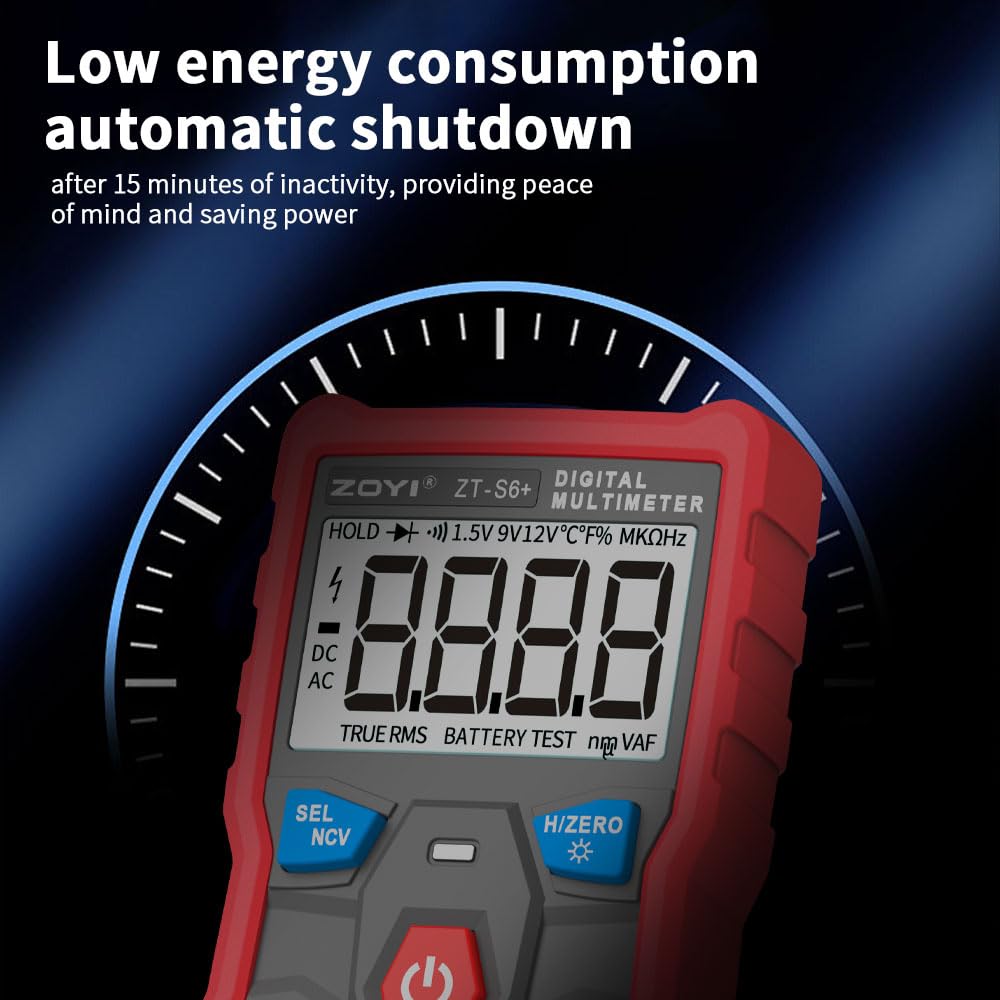
Image: Close-up of the ZOYI ZT-S6+ Multimeter display.
The backlit display provides clear visibility in various lighting conditions. Key indicators include:
- Measurement value and units (V, Ω, F, Hz, A, mA).
- AC/DC indication.
- TRUE RMS indicator.
- பேட்டரி நிலை காட்டி.
- HOLD function indicator.
அமைவு
பெட்டியில் என்ன இருக்கிறது
பிரித்தெடுத்தவுடன், பின்வரும் பொருட்கள் சேர்க்கப்பட்டுள்ளதா என சரிபார்க்கவும்:
- ZOYI ZT-S6+ Digital Multimeter
- Multimeter Test Probes (Red and Black)
- வெப்பநிலை ஆய்வு
- பேட்டரிகள்
- பயனர் கையேடு (இந்த ஆவணம்)
பேட்டரி நிறுவல்
The ZT-S6+ is powered by batteries. If batteries are not pre-installed or need replacement, follow these steps:
- மல்டிமீட்டர் அணைக்கப்பட்டுள்ளதையும், சோதனை லீட்கள் துண்டிக்கப்பட்டுள்ளதையும் உறுதிசெய்யவும்.
- சாதனத்தின் பின்புறத்தில் பேட்டரி பெட்டியின் அட்டையைக் கண்டறியவும்.
- தக்கவைக்கும் திருகு(களை) அவிழ்த்து, மூடியை அகற்றவும்.
- Insert new batteries, observing correct polarity (+ and -).
- பேட்டரி பெட்டியின் அட்டையை மாற்றி, அதை திருகு(கள்) மூலம் பாதுகாக்கவும்.
சோதனை தடங்களை இணைக்கிறது
துல்லியமான மற்றும் பாதுகாப்பான அளவீடுகளுக்கு சோதனை லீட்களின் சரியான இணைப்பு மிக முக்கியமானது.
- இணைக்கவும் கருப்பு test lead to the COM (பொது) பலா.
- பெரும்பாலான அளவீடுகளுக்கு (தொகுதிtage, resistance, capacitance, diode, continuity, frequency), connect the சிவப்பு test lead to the VΩHz பலா
- தற்போதைய அளவீடுகளுக்கு (Amps or milliamps), connect the சிவப்பு test lead to the நான் ஒரு பலா
Warning: Always ensure the red test lead is connected to the correct jack before making a measurement to prevent damage to the multimeter or personal injury.
இயக்க வழிமுறைகள்
பவர் ஆன்/ஆஃப்
அழுத்தவும் சக்தி button to turn the multimeter on. Press and hold the சக்தி button to turn it off. The device features an automatic shutdown function after 15 minutes of inactivity to conserve battery life.
Automatic Identification and Auto-Ranging

Image: The multimeter automatically identifying different measurement types.
The ZT-S6+ automatically identifies and measures AC/DC voltage, resistance, capacitance, continuity, and diodes. Simply connect the test leads to the circuit or component, and the multimeter will automatically select the appropriate measurement mode and range.

Image: Display in 'Auto' mode showing different measurement results.
தொடர்பு இல்லாத தொகுதிtagஇ (NCV) கண்டறிதல்

Image: NCV function in use, detecting voltage near a wire.
ஏசி மின்னழுத்தத்தைக் கண்டறியtage without direct contact:
- அழுத்தவும் SEL/NCV button to activate NCV mode.
- Move the top of the multimeter near the conductor or outlet.
- சாதனம் ஏசி மின்னழுத்தம் இருப்பதைக் குறிக்கும்.tage through an audible alarm and/or visual indicator on the display.
தரவு ஹோல்ட் செயல்பாடு

Image: The 'HOLD' function active on the multimeter display.
To freeze the current measurement on the display, press the H/ZERO button. The "HOLD" indicator will appear. Press the button again to release the hold and resume live measurements.
உண்மையான RMS அளவீடு

Image: Comparison of conventional and True RMS measurement methods.
The ZT-S6+ features True RMS measurement for AC voltage and current. This provides more accurate readings for non-sinusoidal waveforms, which are common in modern electronic devices.
எல்.ஈ.டி ஒளிரும் விளக்கைப் பயன்படுத்துதல்

Image: The LED flashlight in operation.
To activate the built-in LED flashlight, press the H/ZERO button for approximately 2 seconds. Press and hold again to turn it off. This feature is useful for illuminating dimly lit work environments.
Specific Measurement Exampலெஸ்

படம்: Examples of various measurements performed by the multimeter.
- தொகுதிtage அளவீடு (AC/DC): Connect test leads to the circuit in parallel. The multimeter will automatically detect AC or DC.
- எதிர்ப்பு அளவீடு: Ensure the circuit is de-energized. Connect test leads across the component.
- கொள்ளளவு அளவீடு: Ensure the capacitor is discharged before testing. Connect test leads across the capacitor.
- தொடர் சோதனை: For checking if a circuit is complete. A low resistance reading and an audible beep indicate continuity.
- டையோடு சோதனை: Measures the forward voltagஒரு டையோடின் இ துளி.
பராமரிப்பு
சுத்தம் செய்தல்
மல்டிமீட்டரை சுத்தம் செய்ய, மென்மையான துணியைப் பயன்படுத்தவும் d.ampened with mild detergent. Do not use abrasive cleaners or solvents. Ensure the device is off and disconnected from all circuits before cleaning.
பேட்டரி மாற்று
When the battery indicator appears on the display, replace the batteries as described in the "Battery Installation" section under Setup. Prompt battery replacement ensures accurate readings and proper device function.
சேமிப்பு
Store the multimeter in a cool, dry place, away from direct sunlight and extreme temperatures. If storing for an extended period, remove the batteries to prevent leakage.
சரிசெய்தல்
| பிரச்சனை | சாத்தியமான காரணம் | தீர்வு |
|---|---|---|
| Multimeter does not turn on. | செயலிழந்த அல்லது தவறாக நிறுவப்பட்ட பேட்டரிகள். | பேட்டரி துருவமுனைப்பை சரிபார்க்கவும்; பேட்டரிகளை மாற்றவும். |
| துல்லியமற்ற வாசிப்புகள். | Incorrect test lead connection; low battery; external interference. | Ensure leads are in correct jacks; replace batteries; move away from strong electromagnetic fields. |
| No display or partial display. | Low battery; internal fault. | Replace batteries. If problem persists, contact support. |
| தொடர்ச்சி சோதனை பீப் ஒலிக்கவில்லை. | திறந்த சுற்று; அதிக எதிர்ப்பு. | Verify the circuit is complete; check for breaks in wires or components. |
விவரக்குறிப்புகள்
| அம்சம் | விவரம் |
|---|---|
| மாதிரி | ZT-S6+ |
| காட்சி | 6000 Counts, Backlit LCD |
| அளவீட்டு வகை | உண்மை RMS |
| செயல்பாடுகள் | ஏசி/டிசி தொகுதிtage, Resistance, Capacitance, Continuity, Diode, NCV |
| தானியங்கி அம்சங்கள் | Auto-Identification, Auto-Ranging |
| சிறப்பு அம்சங்கள் | Data Hold, LED Flashlight, Automatic Shutdown (15 mins) |
| சக்தி ஆதாரம் | பேட்டரி மூலம் இயங்கும் |
| தயாரிப்பு பரிமாணங்கள் | 2.4 x 1.1 x 4.72 அங்குலம் |
| எடை | 8.36 அவுன்ஸ் |
உத்தரவாதம் மற்றும் ஆதரவு
ZOYI and ZOTEK manufacturers provide long-term technical support for the ZT-S6+ Digital Multimeter. For any questions or assistance regarding the use or functionality of your multimeter, please contact customer support.
தொடர்பு தகவல்:
- Refer to the packaging or official ZOYI webமிகவும் புதுப்பித்த தொடர்பு விவரங்களுக்கான தளம்.
- Online support may be available through the ZOYI official flagship store on Amazon or their dedicated support channels.
உத்திரவாதக் கோரிக்கைகளுக்காக உங்கள் வாங்கியதற்கான ஆதாரத்தை வைத்துக் கொள்ளவும்.


