1. அறிமுகம்
This user manual provides comprehensive instructions for the installation, operation, and maintenance of your NVIDIA RTX 5000 Ada Generation GPU. Designed for professional workflows, this GPU leverages the NVIDIA Ada Lovelace architecture to deliver exceptional performance for rendering, AI, graphics, and compute workloads. Please read this manual carefully before installing and using the product to ensure optimal performance and longevity.
2. தயாரிப்பு முடிந்துவிட்டதுview
The NVIDIA RTX 5000 Ada Generation GPU is a high-performance graphics card built for demanding professional applications. It features 100 third-generation RT Cores, 400 fourth-generation Tensor Cores, and 12,800 CUDA cores, coupled with 32 GB of GDDR6 graphics memory. This combination enables advanced AI graphics and petaFLOPS inferencing performance.
முக்கிய அம்சங்கள்:
- NVIDIA GPUDirect தொலைநிலை நேரடி நினைவக அணுகல் (RDMA) ஆதரவு
- NVIDIA Quadro Sync II இணக்கத்தன்மை
- ஸ்டீரியோ இணைப்புடன் 3D ஸ்டீரியோ ஆதரவு
- வீடியோ ஆதரவுக்கான NVIDIA GPUDirect
- என்விடியா மொசைக் தொழில்நுட்பம்
பெட்டியில் என்ன இருக்கிறது:
- NVIDIA 900-5G132-2540-000 RTX 5000 Ada Graphic Card - 32 GB GDDR6
தயாரிப்பு படங்கள்:

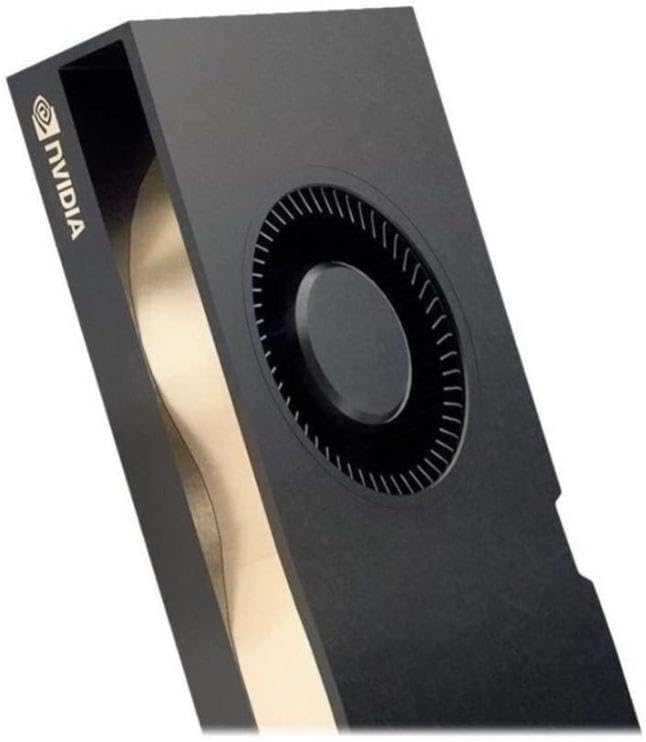
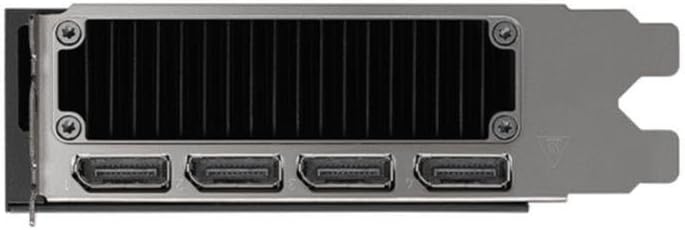
3. அமைவு மற்றும் நிறுவல்
Proper installation is crucial for the performance and stability of your NVIDIA RTX 5000 Ada GPU. Ensure your system meets the minimum requirements before proceeding.
கணினி தேவைகள்:
- PCI Express x16 slot on motherboard
- Adequate power supply unit (PSU) with required PCIe power connectors (refer to GPU specifications for exact wattage)
- Compatible operating system (Windows, Linux)
- Minimum 8GB system memory (RAM)
நிறுவல் படிகள்:
- உங்கள் அமைப்பைத் தயாரிக்கவும்: உங்கள் கணினியை அணைத்துவிட்டு அனைத்து கேபிள்களையும் துண்டிக்கவும். கணினி உறையைத் திறக்கவும்.
- PCIe ஸ்லாட்டைக் கண்டறியவும்: Identify an available PCI Express x16 slot on your motherboard. Remove any expansion slot covers if necessary.
- Insert the GPU: Carefully align the GPU with the PCIe slot and press down firmly until it is securely seated. Ensure the retention clip locks into place.
- பவர் இணைக்கவும்: Connect the required PCIe power cables from your power supply to the GPU's power connectors.
- Secure the GPU: Secure the GPU to the computer case using the screw or latch mechanism provided by your case.
- கேஸை மூடிவிட்டு மீண்டும் இணைக்கவும்: Close your computer case, reconnect all cables, and power on your system.
- இயக்கிகளை நிறுவவும்: Once the operating system loads, download and install the latest NVIDIA Quadro drivers from the official NVIDIA webதளம் (www.nvidia.com/drivers). Follow the on-screen instructions for driver installation.
4. இயக்க வழிமுறைகள்
After successful installation, your NVIDIA RTX 5000 Ada GPU is ready for operation. This section covers general usage and specific features.
NVIDIA Control Panel:
The NVIDIA Control Panel provides extensive options for configuring your GPU settings, including display resolution, refresh rates, 3D settings, and multi-display configurations. Access it by right-clicking on your desktop and selecting "NVIDIA Control Panel."
Multi-Display Setup (NVIDIA Mosaic Technology):
The NVIDIA RTX 5000 Ada supports multiple displays. Utilize NVIDIA Mosaic technology to seamlessly span applications across multiple high-resolution displays, creating a single large desktop. Refer to the NVIDIA Control Panel for Mosaic configuration options.
Professional Application Optimization:
For optimal performance in professional design, rendering, and simulation applications, ensure you are using the latest certified drivers. Many applications have specific GPU acceleration settings that can be configured within the application itself or via the NVIDIA Control Panel.
GPUDirect and Quadro Sync II:
Leverage NVIDIA GPUDirect for direct data transfer between GPUs and third-party devices, reducing CPU overhead. For advanced synchronization across multiple GPUs and displays, the RTX 5000 Ada is compatible with NVIDIA Quadro Sync II (sold separately).
5. பராமரிப்பு
Regular maintenance helps ensure the longevity and optimal performance of your GPU.
இயக்கி புதுப்பிப்புகள்:
Periodically check the official NVIDIA website for the latest driver updates. Keeping your drivers current can improve performance, add new features, and resolve compatibility issues.
சுத்தம்:
- தூசி அகற்றுதல்: Over time, dust can accumulate on the GPU's heatsink and fan, impeding cooling. With the system powered off and unplugged, use compressed air to gently clear dust from the fan blades and heatsink fins.
- மேற்பரப்பு சுத்தம்: Use a soft, dry, lint-free cloth to wipe the exterior surfaces of the GPU. Avoid using liquid cleaners directly on the card.
6. சரிசெய்தல்
This section addresses common issues you might encounter with your NVIDIA RTX 5000 Ada GPU.
காட்சி வெளியீடு இல்லை:
- Ensure the monitor cable is securely connected to both the GPU and the monitor.
- Verify that the GPU is fully seated in the PCIe slot and that all power connectors are properly attached.
- முடிந்தால் வேறு காட்சி கேபிள் அல்லது மானிட்டரைப் பயன்படுத்தி சோதிக்கவும்.
- Check your BIOS/UEFI settings to ensure the correct primary display adapter is selected (PCIe/Discrete GPU).
இயக்கி நிறுவல் சிக்கல்கள்:
- Download the latest drivers directly from the official NVIDIA webதளம்.
- இயக்கி நிறுவலின் போது வைரஸ் தடுப்பு மென்பொருளை தற்காலிகமாக முடக்கவும்.
- Use Display Driver Uninstaller (DDU) in Safe Mode to completely remove previous driver versions before attempting a clean installation.
Performance Problems or Crashes:
- Ensure your system's power supply unit (PSU) meets the recommended wattage for the GPU.
- Monitor GPU temperatures using monitoring software. Excessive heat can lead to throttling or instability. Ensure adequate case airflow.
- Verify that your operating system and applications are up to date.
- Run diagnostic tools (e.g., NVIDIA's built-in diagnostics or third-party stress tests) to identify potential hardware issues.
7. விவரக்குறிப்புகள்
The following table details the technical specifications of the NVIDIA RTX 5000 Ada Generation GPU.
| அம்சம் | விவரக்குறிப்பு |
|---|---|
| பிராண்ட் | என்விடியா |
| மாதிரி எண் | 900-5G132-2540-000 |
| கிராபிக்ஸ் கோப்ராசசர் | என்விடியா குவாட்ரோ ஆர்டிஎக்ஸ் 5000 |
| கிராபிக்ஸ் கார்டு ரேம் அளவு | 32 ஜிபி GDDR6 |
| நினைவக வேகம் | 2000 மெகா ஹெர்ட்ஸ் |
| GPU கடிகார வேகம் | 2550 மெகா ஹெர்ட்ஸ் |
| அதிகபட்ச திரை தெளிவுத்திறன் | 3840x2160 |
| வீடியோ வெளியீடு இடைமுகம் | டிஸ்ப்ளே போர்ட், HDMI |
| பொருளின் எடை | 1.32 பவுண்டுகள் |
| நிறம் | கருப்பு |
| முதல் தேதி கிடைக்கும் | டிசம்பர் 1, 2024 |
8. உத்தரவாதம் மற்றும் ஆதரவு
NVIDIA provides support for its products. For detailed warranty information and technical assistance, please refer to the official NVIDIA support resources.
அதிகாரப்பூர்வ ஆதரவு:
- NVIDIA Support Webதளம்: For drivers, FAQs, and troubleshooting guides, visit www.nvidia.com/support.
- தயாரிப்பு பதிவு: Register your product on the NVIDIA webபுதுப்பிப்புகளைப் பெறவும் உத்தரவாதக் கோரிக்கைகளை எளிதாக்கவும் தளம்.
நீட்டிக்கப்பட்ட பாதுகாப்புத் திட்டங்கள்:
Extended protection plans may be available for purchase to provide additional coverage beyond the standard manufacturer's warranty. Please check with your retailer or NVIDIA for details on available plans.
- 3 ஆண்டு பாதுகாப்புத் திட்டம்
- 4 ஆண்டு பாதுகாப்புத் திட்டம்
- முழுமையான பாதுகாப்பு (மாதாந்திர திட்டம்)


