அறிமுகம்
Thank you for choosing the North Spore Automated 'Boomr Bin' Mushroom Monotub Kit. This comprehensive system is designed to simplify the mushroom cultivation process by providing an automated environment for optimal growth. Please read this manual thoroughly before setup and operation to ensure proper use and maximize the performance of your kit.

படம் 1: மேல்view of the North Spore Automated 'Boomr Bin' Mushroom Monotub Kit, showing the monotub, FAE Fan Mini, Myco-Mister Mini humidifier, Monotub hose connector, Mycontroller humidity controller, and sheets of 1" and 2" monotub filters.
கிட் உள்ளடக்கங்கள்
கீழே பட்டியலிடப்பட்டுள்ள அனைத்து கூறுகளும் உங்கள் கிட்டில் உள்ளதா என்பதைச் சரிபார்க்கவும்:
- (1) Boomr Bin monotub
- (1) FAE Fan Mini with power control
- (1) Myco-Mister Mini humidifier with hose
- (1) Monotub hose connector
- (1) Mycontroller humidity controller (hygrometer)
- (1) Sheet of 1" monotub filters
- (1) Sheet of 2" monotub filters

Figure 2: The Myco-Mister Mini humidifier, Mycontroller humidity controller, and FAE Fan Mini, which are key automated components of the kit.
அமைவு வழிமுறைகள்
- Prepare the Monotub: Ensure the Boomr Bin monotub is clean and free of debris. The black base is designed to block light, aiding in colonization and preventing side pinning.
- Apply Filters: Attach the provided 1" and 2" monotub filters to the designated holes on the clear lid. These filters allow for gas exchange while maintaining a sterile environment.
- Install FAE Fan Mini: Secure the FAE Fan Mini to the designated opening on the monotub lid. Connect its power control. This fan facilitates fresh air exchange (FAE).
- Connect Myco-Mister Mini: Fill the Myco-Mister Mini humidifier with distilled water. Attach the hose to the humidifier and connect the other end to the monotub hose connector, ensuring a secure fit. Position the humidifier lower than the tub to prevent water dripping into the substrate.
- Set up Mycontroller Humidity Controller: Plug the Myco-Mister Mini humidifier into the Mycontroller humidity controller. Insert the humidity sensor probe into the monotub through a small opening or a dedicated port, ensuring it is suspended above the substrate.
- அடி மூலக்கூறைச் சேர்க்கவும்: Once the hardware is set up, carefully add your prepared mushroom substrate to the Boomr Bin. The bin's compact and durable design can hold up to 25 pounds of substrate.
- பாதுகாப்பான மூடி: Place the lid firmly onto the monotub. The extra-large latches with recessed grips will secure the lid, preventing it from popping off during transport or handling.

Figure 3: Close-up of the monotub lid showing the circular filter patches applied over the air exchange holes.

Figure 4: The FAE Fan Mini mounted on the monotub lid, responsible for circulating fresh air within the growing environment.
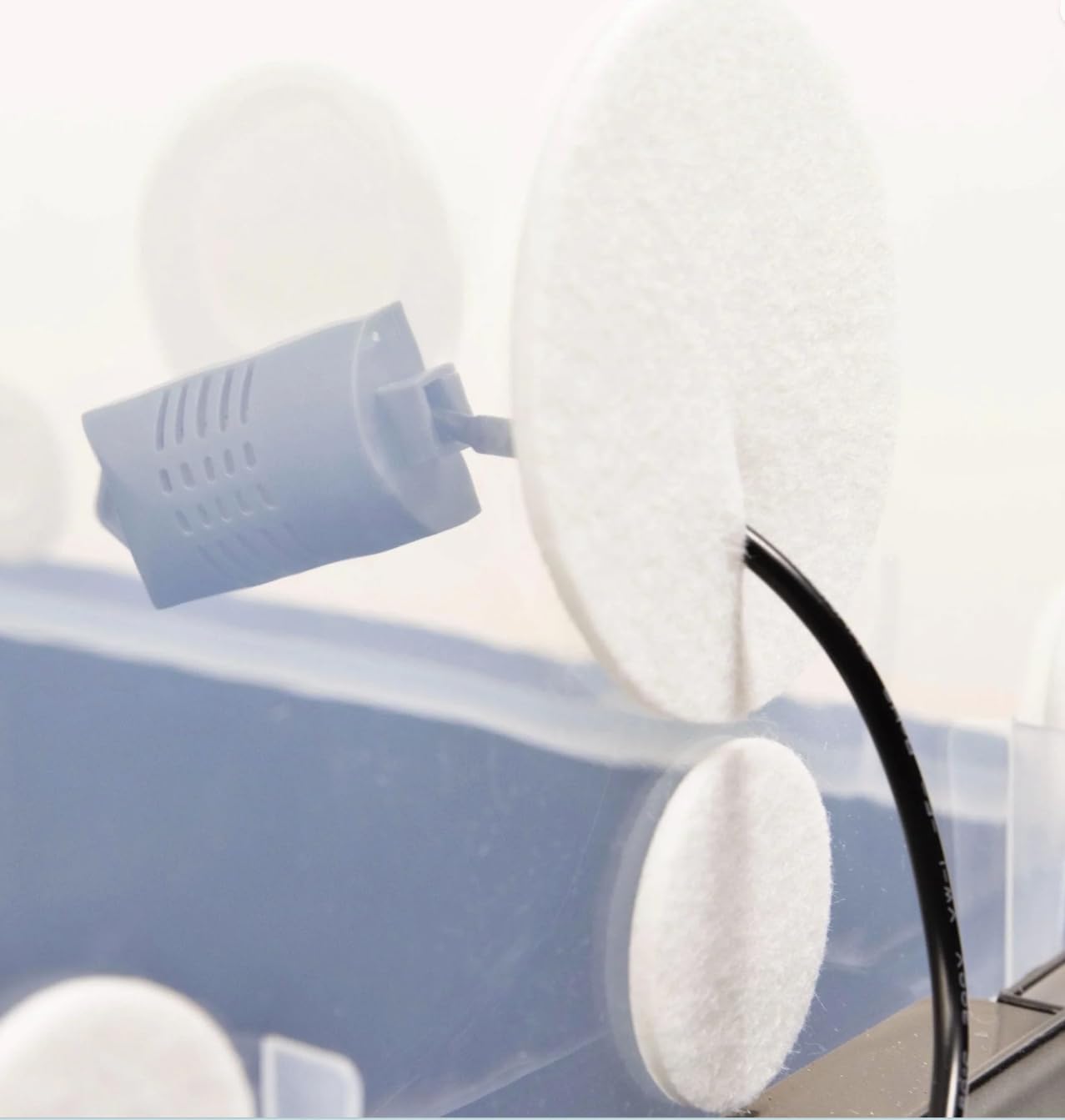
Figure 5: The humidity sensor probe positioned inside the monotub, providing real-time humidity readings to the Mycontroller.

படம் 6: ஏ view of the prepared substrate within the black base of the Boomr Bin, ready for inoculation.
இயக்க வழிமுறைகள்
Humidity Control with Mycontroller
The Mycontroller humidity controller allows you to set and maintain optimal humidity levels within the monotub.
- பவர் ஆன்: Plug the Mycontroller into a power outlet. The current humidity reading will be displayed.
- தேவையான ஈரப்பதத்தை அமைக்கவும்: Refer to the Mycontroller's specific instructions for setting the desired humidity percentage. The humidifier will activate automatically when the humidity drops below your set point and deactivate when it reaches the target.
- கண்காணிப்பு: Regularly check the Mycontroller display to ensure humidity levels are stable.
Fresh Air Exchange (FAE) with FAE Fan Mini
Proper FAE is crucial for mushroom development. The FAE Fan Mini provides controlled air circulation.
- பவர் ஆன்: Connect the FAE Fan Mini to its power source.
- Adjust Fan Speed/Timer: Use the power control to adjust the fan speed or set a timer for intermittent operation, depending on your cultivation needs. Consult mushroom-specific cultivation guides for optimal FAE schedules.

Figure 7: The Automated Boomr Bin in active use, demonstrating the humidifier hose and humidity controller connected, with mushrooms fruiting inside.
பராமரிப்பு
- Humidifier Water Refill: Regularly check the water level in the Myco-Mister Mini humidifier and refill with distilled water as needed.
- சுத்தம்: After each cultivation cycle, thoroughly clean the Boomr Bin, lid, and all components. The large rounded corners of the bin facilitate easy cleaning. Use a mild, non-abrasive disinfectant suitable for cultivation equipment.
- வடிகட்டி மாற்று: Replace the monotub filters as necessary, especially if they become clogged or damaged, to ensure proper air exchange.
- கூறு ஆய்வு: Periodically inspect all electrical components (FAE Fan Mini, Myco-Mister Mini, Mycontroller) for any signs of wear or damage.
சரிசெய்தல்
| பிரச்சனை | சாத்தியமான காரணம் | தீர்வு |
|---|---|---|
| Humidity not reaching set point | Humidifier out of water; hose kinked or disconnected; Mycontroller sensor faulty; humidifier malfunction. | Refill humidifier; check hose connections; verify Mycontroller sensor placement and function; test humidifier independently. |
| Excessive humidity/condensation | FAE Fan Mini not operating; FAE filters blocked; humidity set point too high. | Ensure FAE Fan Mini is powered and operating; check and replace filters if necessary; lower humidity set point on Mycontroller. |
| மின்விசிறி ஓடவில்லை | Power cable disconnected; fan malfunction. | Check power connections; test fan with a different power source if possible. |
| Substrate drying out | Humidity too low; excessive FAE. | Increase humidity set point; reduce FAE fan operation time or speed. |
விவரக்குறிப்புகள்
- தயாரிப்பு பரிமாணங்கள்: 22 x 15 x 11 அங்குலம்
- பொருளின் எடை: 11 பவுண்டுகள்
- உற்பத்தியாளர்: North Spore
- மாதிரி எண்: BUNDLE-BINTECH
- Monotub Capacity: Up to 25 pounds of substrate
- அம்சங்கள்: Recessed base for stacking, extra-large latches, large rounded corners for cleaning, black light-blocking base.
உத்தரவாதம் மற்றும் ஆதரவு
For warranty information and technical support, please contact North Spore directly through their official webஉங்கள் வாங்குதலுடன் வழங்கப்பட்ட வலைத்தளம் அல்லது தொடர்புத் தகவல். எந்தவொரு உத்தரவாதக் கோரிக்கைகளுக்கும் உங்கள் வாங்கியதற்கான ஆதாரத்தை வைத்திருங்கள்.
North Spore Mushroom Company
Seller ID: A2TRRHGHB7V044
For additional resources and cultivation tips, visit the North Spore Store on Amazon.


