அறிமுகம்
The MiBOXER PW5 5-in-1 LED Controller is designed for precise and convenient management of various LED lighting systems. It supports multiple LED types and offers dual wireless connectivity for seamless integration and control.
This manual provides essential information for the safe and efficient installation, operation, and maintenance of your PW5 LED Controller.
முக்கிய அம்சங்கள்
- 5-இன்-1 இணக்கத்தன்மை: Supports Single Color, Dual White (CCT), RGB, RGBW, and RGB+CCT LED setups.
- இரட்டை வயர்லெஸ் இணைப்பு: Features WiFi and 2.4GHz technology for stable operation and smart app integration.
- High Output Capacity: Handles up to 20A output, suitable for high-power LED installations.
- ஸ்மார்ட் கட்டுப்பாடு: Compatible with "Tuya Smart" app and third-party voice control systems like Alexa and Google Assistant.
- Color and Dimming Control: Offers 16 million colors, adjustable color temperature, brightness, and saturation.
- PUSH Dimming Support: Allows for flexible dimming control.
- நினைவக செயல்பாடு: Retains the last-used settings.
- பரந்த தொகுதிtagமின் வரம்பு: Operates on DC12-24V.
தொகுப்பு உள்ளடக்கங்கள்
- MiBOXER PW5 5-in-1 LED Controller
- பயனர் கையேடு

Image: The MiBOXER PW5 LED Controller shown alongside its retail packaging and a small instruction manual.
அமைவு மற்றும் நிறுவல்
பாதுகாப்பு முன்னெச்சரிக்கைகள்
- நிறுவலுக்கு முன் மின்சாரம் துண்டிக்கப்பட்டுள்ளதா என்பதை உறுதிப்படுத்தவும்.
- Install in a dry environment, away from moisture and extreme temperatures.
- சரியான தொகுதியை சரிபார்க்கவும்tage (DC12-24V) and current ratings for your LED strips and power supply.
- Do not exceed the maximum output current of 20A.
வயரிங் வரைபடம்
Connect your LED strips and power supply to the controller as shown in the diagram below. Ensure correct polarity for all connections.

Image: Detailed wiring diagram of the MiBOXER PW5 controller. It shows the V+ and V- input terminals, GND and PUSH dimming terminals, and output terminals labeled V+, W, WW, CW, R, G, B for various LED strip types. An indicator output mode table is also visible, showing White for Single Color, Yellow for Dual White, Red for RGB, Green for RGBW, and Blue for RGB+CCT.
- Connect the DC12-24V power supply to the INPUT V+ மற்றும் V- முனையங்கள்.
- Connect your LED strip(s) to the corresponding வெளியீடு terminals based on your LED type:
- ஒற்றை நிறம்: Connect to V+ and W (White)
- Dual White (CCT): Connect to V+, WW (Warm White), and CW (Cool White)
- RGB: Connect to V+, R (Red), G (Green), and B (Blue)
- RGBW: Connect to V+, R, G, B, and W (White)
- ஆர்ஜிபி+சிசிடி: Connect to V+, R, G, B, WW, and CW
- For PUSH dimming functionality, connect a compatible PUSH switch to the GND மற்றும் தள்ளு முனையங்கள்.
மவுண்டிங்
The controller is designed for tabletop mounting. Ensure it is placed on a stable, flat surface with adequate ventilation.

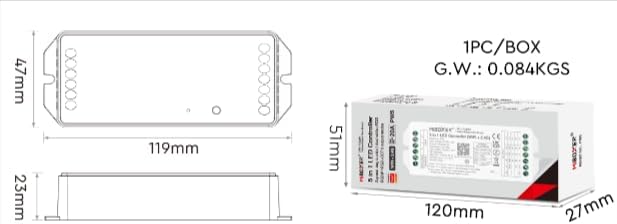
Image: Two diagrams illustrating the physical dimensions of the MiBOXER PW5 controller. The first shows a top-down view with a length of 119mm and width of 47mm. The second shows a side view with a height of 23mm, and also includes package dimensions of 120mm x 51mm x 27mm.
ஆபரேஷன்
Switching Output Modes
The PW5 controller supports 5 different output modes. To switch between these modes:
- அழுத்தவும் "செட்" button once to cycle through the output modes.
- The indicator light on the controller will change color to reflect the current mode:
- White: Single Color
- Yellow: Dual White
- Red: RGB
- Green: RGBW
- Blue: RGB+CCT
2.4G RF ரிமோட் கண்ட்ரோல்
The controller can be linked to a compatible 2.4G RF remote control (sold separately).
- To link: Power on the controller. Within 3 seconds, press the "ON" button on the remote control 3 times. The LED strip will flash to confirm successful linking.
- To unlink: Power on the controller. Within 3 seconds, press the "ON" button on the remote control 5 times. The LED strip will flash to confirm unlinking.
WiFi and App Control (Tuya Smart)
The PW5 controller integrates with the "Tuya Smart" app for advanced control via WiFi.
- Download the "Tuya Smart" app from your device's app store.
- உங்கள் Tuya Smart கணக்கில் பதிவு செய்யவும் அல்லது உள்நுழையவும்.
- To activate WiFi pairing mode: Long press the "செட்" button for 3 seconds until the indicator flashes quickly.
- In the Tuya Smart app, follow the instructions to add a new device. Select the appropriate lighting device type.
- Once connected, you can control brightness, color, color temperature, saturation, and set up group/multi-zone control.
- The app also supports music rhythm functions.
Voice Control (Alexa, Google Assistant)
After successful integration with the Tuya Smart app, you can link your account to voice assistants like Amazon Alexa or Google Assistant for hands-free control.
- அலெக்சா அல்லது கூகிள் ஹோம் செயலியைத் திறக்கவும்.
- "திறன்கள்" அல்லது "Google உடன் பணிபுரிகிறது" பகுதிக்குச் செல்லவும்.
- தேடுங்கள் and enable the "Tuya Smart" skill/service.
- Link your Tuya Smart account when prompted.
- Discover devices. Your MiBOXER PW5 controller should appear.
- இப்போது நீங்கள் குரல் கட்டளைகளைப் பயன்படுத்தலாம், அவை:
- "அலெக்சா, வாழ்க்கை அறை விளக்குகளை இயக்கு."
- "ஏய் கூகிள், சமையலறை விளக்குகளை நீல நிறத்தில் செட் பண்ணு."
- "Alexa, dim the bedroom lights to 50%."
பராமரிப்பு
- கட்டுப்படுத்தியை சுத்தமாகவும் தூசி இல்லாமல் வைத்திருக்கவும். சுத்தம் செய்ய மென்மையான, உலர்ந்த துணியைப் பயன்படுத்தவும்.
- கடுமையான இரசாயனங்கள் அல்லது சிராய்ப்பு கிளீனர்களைப் பயன்படுத்த வேண்டாம்.
- அதிக வெப்பத்தைத் தடுக்க சாதனத்தைச் சுற்றி சரியான காற்றோட்டத்தை உறுதி செய்யவும்.
- Regularly check wiring connections for security and integrity.
சரிசெய்தல்
| பிரச்சனை | சாத்தியமான காரணம் | தீர்வு |
|---|---|---|
| எல்.ஈ.டி ஒளிரவில்லை | No power to controller; incorrect wiring; faulty LED strip. | Check power supply connection; verify input/output wiring polarity; test LED strip with another power source. |
| ரிமோட் கண்ட்ரோல் வேலை செய்யவில்லை | Remote not linked; remote battery low; interference. | Re-link the remote control; replace remote battery; reduce interference sources. |
| பயன்பாட்டுக் கட்டுப்பாடு வேலை செய்யவில்லை | Controller not connected to WiFi; incorrect app settings; WiFi signal weak. | Ensure controller is in WiFi pairing mode and connected to your network; check app settings; move controller closer to WiFi router. |
| Incorrect colors or dimming | Wrong output mode selected; incorrect wiring for LED type. | Press "SET" button to cycle to the correct output mode; verify LED strip wiring matches the selected mode. |
விவரக்குறிப்புகள்
| மாதிரி எண் | PW5 |
| உள்ளீடு தொகுதிtage | DC12-24V |
| வெளியீடு மின்னோட்டம் | அதிகபட்சம் 20A |
| சேனல்களின் எண்ணிக்கை | 5 |
| இணைப்பு | WiFi, 2.4GHz RF |
| Control Distance (2.4G) | 30மீ |
| இயக்க வெப்பநிலை | -10°C முதல் 40°C வரை |
| பரிமாணங்கள் | 119மிமீ x 47மிமீ x 23மிமீ (தோராயமாக 4.68 x 1.85 x 0.9 அங்குலம்) |
| பொருளின் எடை | 3.2 அவுன்ஸ் (தோராயமாக 90 கிராம்) |
| உற்பத்தியாளர் | மிபாக்ஸர் |
உத்தரவாதம் மற்றும் ஆதரவு
For warranty information and technical support, please refer to the official MiBOXER webஉங்கள் தளத்தில் அல்லது உங்கள் சில்லறை விற்பனையாளரைத் தொடர்பு கொள்ளவும். உத்தரவாதக் கோரிக்கைகளுக்கு உங்கள் கொள்முதல் ரசீதை வைத்திருங்கள்.
மேலும் உதவிக்கு, நீங்கள் இங்கு வருகை தரலாம் MiBOXER Store on Amazon.


