1. அறிமுகம்
The LAUNCH X431 Creader 5011 V2 is an advanced 3-in-1 professional diagnostic tool designed for comprehensive Tire Pressure Monitoring System (TPMS) and On-Board Diagnostics (OBD2) functions. This device facilitates the activation, reading, relearning, and resetting of TPMS sensors operating at both 315MHz and 433MHz frequencies. Additionally, it offers full OBD2 diagnostic capabilities and 12 essential reset services, making it suitable for both automotive enthusiasts and professional mechanics.
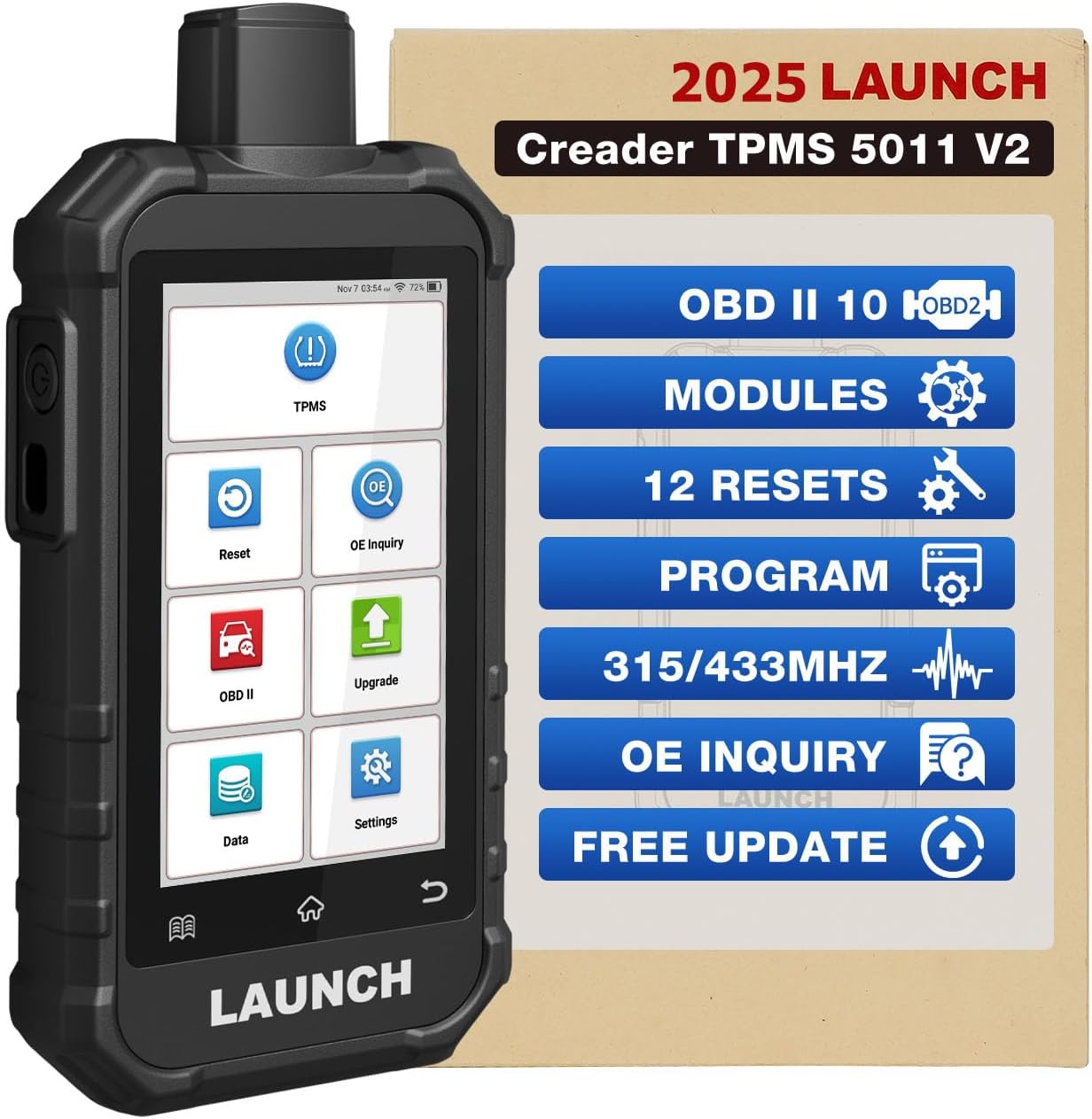
Image: The LAUNCH X431 Creader 5011 V2 diagnostic tool, showcasing its display and key functions.
2. பெட்டியில் என்ன இருக்கிறது
Upon unboxing your LAUNCH X431 Creader 5011 V2, please verify that all the following components are present:
- 1 x Creader TPMS 5011 V2 Diagnostic Tool
- 1 x Diagnostic Main Cable (OBD-II connection cable)
- 1 x டைப்-சி சார்ஜிங் கேபிள்
- 1 x விரைவு தொடக்க வழிகாட்டி

Image: A visual representation of the LAUNCH X431 Creader 5011 V2 package contents, including the device, cables, and quick start guide.
3. அமைவு மற்றும் ஆரம்ப கட்டமைப்பு
Before using the LAUNCH X431 Creader 5011 V2, follow these steps for initial setup:
- சாதனத்தை சார்ஜ் செய்தல்: Connect the Type-C charging cable to the device and a suitable power source. Ensure the device is fully charged before first use to maximize battery life. The device features a 6000mAh large-capacity battery.
- பவர் ஆன்: சாதனத்தை இயக்க ஆற்றல் பொத்தானை அழுத்திப் பிடிக்கவும்.
- மொழி தேர்வு: Upon first boot, you may be prompted to select your preferred language. The device supports 11 languages, including German, English, Spanish, French, Korean, Italian, Japanese, Traditional Chinese, Portuguese, Russian, and Arabic.
- வைஃபை இணைப்பு: Navigate to the settings menu and connect the device to a stable Wi-Fi network. This is crucial for software updates and online feedback features.
- மென்பொருள் புதுப்பிப்பு: It is highly recommended to perform a software update immediately after connecting to Wi-Fi. This ensures you have the latest features and vehicle compatibility. Updates are free for life.
4. இயக்க வழிமுறைகள்
The LAUNCH X431 Creader 5011 V2 offers a range of diagnostic and service functions. Navigate the 5-inch touch display (720*1280 pixels) to access different features.
4.1 TPMS Functions
This tool provides comprehensive TPMS capabilities for 315MHz and 433MHz sensors.
- Activate TPMS Sensors: Easily activate most OEM 315/433MHz TPMS sensors. The device can read tire temperature, tire pressure, battery condition, and sensor ID.
- TPMS மறுகற்றல்: Supports three relearn methods to integrate new sensor IDs with the vehicle's ECU:
- OBD மறுகற்றல்: Writes TPMS sensor IDs to the OBD module via the OBD connector.
- தானியங்கி மறு கற்றல்: Completes the relearn process by driving the vehicle.
- நிலையான மறுகற்றல்: Requires placing the vehicle in learn mode and following specific steps.
- TPMS Programming: Allows for unlimited repeated programming of sensor data. This tool is compatible exclusively with LAUNCH LTR-01/03 Sensors and other unencrypted sensors. Programming options include:
- தானியங்கி உருவாக்கம்: Generates new sensor IDs automatically.
- Manual Creation: Allows manual input of sensor IDs.
- OBD ID Copying: Copies existing sensor IDs from the vehicle's OBD system.
- Active ID Copying: Copies IDs from activated sensors.
- Batch Creation: Programs multiple sensors (up to 8) simultaneously.
- TPMS Diagnosis: Quickly and accurately diagnose the tire pressure system. This includes reading and clearing TPMS Diagnostic Trouble Codes (DTCs) and turning off the TPMS warning light.
- Check OE Number: Query original equipment (OE) part numbers for TPMS sensors.

Image: The device being used to activate a TPMS sensor, displaying sensor data such as temperature, pressure, battery, and ID.

Image: Illustration of the three TPMS relearn methods: OBD Relearn, Automatic Relearn, and Stationary Relearn.

Image: Screenshots demonstrating the various TPMS sensor programming methods available on the device, including auto create, manual create, copy by activation, and copy by OBD.
4.2 முழு OBD2 செயல்பாடுகள்
The device supports all 10 modes of OBD2 testing for comprehensive engine diagnostics.
- குறியீடுகளைப் படிக்கவும்: பொதுவான (P0, P2, P3, மற்றும் U0) மற்றும் உற்பத்தியாளர் சார்ந்த (P1, P3, மற்றும் U1) குறியீடுகளைப் பெறுகிறது.
- குறியீடுகளை அழிக்கவும்: Clears Diagnostic Trouble Codes (DTCs) and resets the Check Engine Light (MIL).
- நான்/எம் தயார்நிலை: உமிழ்வு கண்காணிப்பு அமைப்புகளின் தயார்நிலையைச் சரிபார்க்கிறது.
- தரவு ஸ்ட்ரீம்: Displays live data stream from the vehicle's sensors in text or graph format.
- ஃப்ரீஸ் ஃப்ரேம்: Views the snapshot of operating conditions at the time of an emission-related fault.
- O2 சென்சார் சோதனை: Retrieves O2 sensor monitor test results for the most recently completed tests from the vehicle’s on-board computer.
- விமானத்தில் கண்காணிப்பு சோதனை: உமிழ்வு தொடர்பான பவர்டிரெய்ன் கூறுகள் மற்றும் அமைப்புகளுக்கான முடிவுகளை மீட்டெடுக்கிறது.
- EVAP சிஸ்டம் சோதனை: வாகனத்தின் EVAP அமைப்பிற்கான கசிவு சோதனையைத் தொடங்குகிறது.
- வாகன தகவல்: வாகன அடையாள எண் (VIN), அளவுத்திருத்த ஐடி (CALID) மற்றும் அளவுத்திருத்த சரிபார்ப்பு எண் (CVN) ஆகியவற்றை மீட்டெடுக்கிறது.

Image: A visual list of the full OBDII functions supported by the device, including reading codes, O2 sensor test, erasing codes, and live data.
4.3 12 Hot Reset Services
The LAUNCH X431 Creader 5011 V2 provides 12 commonly used maintenance reset services:
- பிரேக் மீட்டமைப்பு: Resets the brake pad after replacement.
- எண்ணெய் மீட்டமைப்பு: எண்ணெய் மாற்றத்திற்குப் பிறகு எண்ணெய் ஆயுள் அமைப்பை மீட்டமைக்கிறது.
- Inject Reset: Codes new injector numbers to replace the previous ones when fitting new injectors or after the replacement is completed.
- பேட்டரி பொருத்தம்: Performs a reset on the vehicle battery monitoring unit.
- ஏபிஎஸ் இரத்தப்போக்கு: Bleeds the air from the brake system.
- த்ரோட்டில் மீட்டமைப்பு: Initializes the throttle actuators to the default state.
- DPF Reset: Performs DPF regeneration and clears DPF-related faults.
- Sunroof Reset: Initializes the sunroof control unit.
- Seats Calibration: Calibrates the electric seats.
- விண்டோஸ் அளவுத்திருத்தம்: Performs window initialization.
- SAS மீட்டமைப்பு (ஸ்டீயரிங் ஆங்கிள் சென்சார்): Resets the steering angle sensor.
- இடைநீக்க பொருத்தம்: Adjusts the vehicle height sensor for suspension systems.

Image: A graphic illustrating the 12 hot reset functions available on the LAUNCH X431 Creader 5011 V2, including SAS Reset, Brake Reset, Oil Reset, and more.
5. பராமரிப்பு
Proper maintenance ensures the longevity and optimal performance of your LAUNCH X431 Creader 5011 V2.
- மென்பொருள் புதுப்பிப்புகள்: Regularly check for and install free lifetime software updates via Wi-Fi. These updates introduce new features, improve compatibility, and fix bugs.
- சுத்தம்: Use a soft, dry cloth to clean the device's screen and body. Avoid abrasive cleaners or solvents that could damage the display or casing.
- பேட்டரி பராமரிப்பு: To preserve the 6000mAh battery's health, avoid extreme temperatures and prolonged periods of full discharge or full charge. Store the device with a partial charge if not in use for extended periods.
- சேமிப்பு: Store the device in a cool, dry place, away from direct sunlight and excessive dust.
6. சரிசெய்தல்
இந்தப் பிரிவு உங்கள் சாதனத்தில் நீங்கள் சந்திக்கக்கூடிய பொதுவான சிக்கல்களைக் கையாள்கிறது.
| பிரச்சனை | சாத்தியமான காரணம் | தீர்வு |
|---|---|---|
| சாதனம் இயங்கவில்லை. | குறைந்த பேட்டரி அல்லது பவர் பட்டன் பிரச்சனை. | Ensure the device is fully charged. Press and hold the power button for at least 5 seconds. If the issue persists, contact support. |
| Unable to activate TPMS sensor. | Sensor type incompatibility, incorrect activation procedure, or faulty sensor. | Ensure the sensor is a 315MHz or 433MHz type. Verify the sensor is not encrypted if it's not a LAUNCH LTR-01/03 sensor. Follow the activation steps precisely. Try activating from different angles or distances. Replace faulty sensors. |
| TPMS programming fails or vehicle does not recognize new sensors. | Incorrect programming method, sensor incompatibility, or vehicle relearn procedure not completed. | Confirm the sensor is compatible with the tool (LAUNCH LTR-01/03 or unencrypted). Ensure the correct programming method (Auto Create, Manual Create, OBD Copy, Active Copy) is used. Perform the appropriate TPMS relearn procedure (OBD, Automatic, or Stationary) after programming. |
| Slow operation or unresponsive screen. | Outdated software, excessive background processes, or temporary software glitch. | Perform a software update via Wi-Fi. Restart the device. Close any unnecessary applications if applicable. |
| Cannot connect to Wi-Fi or perform updates. | Weak Wi-Fi signal, incorrect password, or network issues. | Ensure you are within range of a strong Wi-Fi signal. Double-check the Wi-Fi password. Try connecting to a different Wi-Fi network. Restart your Wi-Fi router. |
| Diagnostic report generation or sharing issues. | No Wi-Fi connection, insufficient memory, or software bug. | Ensure the device is connected to Wi-Fi. Check available memory. Perform a software update. |
If you encounter issues not listed here or if the suggested solutions do not resolve the problem, please refer to the support section for further assistance.
7. விவரக்குறிப்புகள்
| அம்சம் | விவரம் |
|---|---|
| மாதிரி | LAUNCH X431 Creader 5011 V2 |
| காட்சி | 5-inch Touch-screen, 720*1280 pixels |
| இயக்க முறைமை | ஆண்ட்ராய்டு 8.1 |
| பேட்டரி திறன் | 6000mAh |
| நினைவகம் | 2 ஜிபி ரேம் + 32 ஜிபி சேமிப்பு |
| இணைப்பு | Wi-Fi (2.4G) |
| உள்ளீடு தொகுதிtage | 9-18V |
| பொருளின் எடை | 1.81 பவுண்டுகள் |
| தொகுப்பு பரிமாணங்கள் | 9.84 x 6.89 x 2.99 அங்குலம் |
| TPMS Sensor Compatibility | 315MHz and 433MHz (OEM, LAUNCH LTR-01/03, and other unencrypted sensors) |
| OBD2 நெறிமுறைகள் | அனைத்து OBDII இணக்கமான வாகனங்களும் |
| ஆதரிக்கப்படும் மொழிகள் | 11 languages (German, English, Spanish, French, Korean, Italian, Japanese, Traditional Chinese, Portuguese, Russian, Arabic) |
8. உத்தரவாதம் மற்றும் ஆதரவு
LAUNCH provides comprehensive support for the X431 Creader 5011 V2.
- உத்தரவாதம்: The product comes with a 2-year warranty from the date of purchase. Please retain your proof of purchase for warranty claims.
- தொழில்நுட்ப ஆதரவு: 7*24 technical support is available to assist with any operational or technical queries.
- மென்பொருள் புதுப்பிப்புகள்: Enjoy free lifetime software upgrades, ensuring your device remains up-to-date with the latest vehicle models and diagnostic features.
- ஆன்லைன் கருத்து: The device supports data feedback, allowing users to submit diagnostic reports and issues directly to LAUNCH for timely resolution.
For further assistance or to contact support, please visit the official LAUNCH webதளத்தில் அல்லது உங்கள் விரைவு தொடக்க வழிகாட்டியில் வழங்கப்பட்டுள்ள தொடர்புத் தகவலைப் பார்க்கவும்.


