1. அறிமுகம்
Thank you for choosing the Baseus 45W USB C Charger Block. This device is designed to provide efficient and fast charging for a wide range of compatible electronic devices. Please read this manual carefully to ensure proper usage and to maximize the product's lifespan.

Image 1.1: Two Baseus 45W USB C Charger Blocks and two USB-C to USB-C cables included in the package.
2. தயாரிப்பு அம்சங்கள்
- 45W ஃபாஸ்ட் சார்ஜிங்: Equipped with PPS/PD 3.0 technology, this charger delivers rapid power, capable of charging compatible devices like the iPhone 16 series and Galaxy S24 quickly. For Super Fast Charge 2.0, a 5A charging cable is required.
- சிறிய மற்றும் சிறிய வடிவமைப்பு: The charger block is significantly smaller than standard chargers, making it ideal for travel and saving space on power strips.
- Quad Thermal Management: Advanced cooling features including graphene application, scientific thermal layout, polymer silicon-based design, and 720K/h charging status monitoring ensure optimal heat dissipation and device protection.
- Powered by GaN6 Technology: Utilizes GaN6 chip technology for a 92% energy conversion rate, resulting in higher efficiency, lower operating temperatures, and a smaller physical size.
- பரந்த இணக்கத்தன்மை: Supports multiple fast charging protocols including PD3.0, PPS, QC3.0, FCP, SCP, and AFC, ensuring compatibility with a broad range of devices.

Image 2.1: Illustration of the 45W Super Fast Charging capability, showing a Samsung S24 Ultra reaching 61% charge in 30 minutes.

Image 2.2: Visual comparison demonstrating the compact size of the Baseus 45W charger, which is 46.66% smaller than typical chargers.

படம் 2.3: விரிவானது view of the Quad Thermal Management system, including graphene cooling and scientific thermal layout.

Image 2.4: Illustration of the GaN6 technology, showing a 92% energy conversion rate for enhanced efficiency.
3 அமைவு
- திறக்கவும்: Carefully remove the charger block and USB-C cable(s) from the packaging.
- ஆய்வு: Check the charger and cable for any visible damage. Do not use if damaged.
- சக்தியுடன் இணைக்கவும்: Plug the Baseus 45W USB C Charger Block into a standard wall outlet. Ensure the outlet is easily accessible.
4. இயக்க வழிமுறைகள்
- கேபிளை இணைக்கவும்: Insert one end of the USB-C cable into the USB-C port on the charger block.
- சாதனத்தை இணைக்கவும்: Insert the other end of the USB-C cable into the charging port of your compatible electronic device.
- சார்ஜ் செய்யத் தொடங்குங்கள்: The device should automatically begin charging. Monitor your device's screen for charging indicators.
- துண்டிக்கவும்: Once charging is complete, safely disconnect the cable from your device, then from the charger block, and finally unplug the charger from the wall outlet.

படம் 4.1: எ.கா.ample of the charger in use for office charging, powering a smartphone and a laptop.

படம் 4.2: எ.கா.ample of the charger in use for home charging, providing power for leisure activities.
5. இணக்கத்தன்மை
The Baseus 45W USB C Charger Block is compatible with a wide range of devices supporting USB-C charging and various fast charging protocols. Compatible devices include, but are not limited to:
- ஸ்மார்ட்போன்கள்: iPhone 12-16 Series (including Pro, Pro Max models), Galaxy S20-S24 Series, OnePlus 8 Pro, Google Pixel 6-8, Sony Xperia 5, Android phones.
- மாத்திரைகள்: iPad (various models).
- மடிக்கணினிகள்: MacBook Pro 2023, Lenovo ThinkPad T14, Dell XPS 13.
- Wearables & Accessories: Apple Watch, AirPods 2-3.

Image 5.1: Visual representation of the universal compatibility of the Baseus USB-C charger with various devices.
6. பாதுகாப்பு தகவல்
Your safety is a priority. The Baseus 45W USB C Charger Block incorporates multiple protection features to ensure safe and reliable charging:
- ஷார்ட் சர்க்யூட் பாதுகாப்பு
- மின்னல் எழுச்சி பாதுகாப்பு
- மின்னியல் பாதுகாப்பு
- ஓவர்-கரண்ட் பாதுகாப்பு
- அதிக சுமை பாதுகாப்பு
- அதிகப்படியான தொகுதிtagஇ பாதுகாப்பு
- Low Leakage Current Protection
- Flame-Retardant Shell
- தொகுதிtage Stabilization Protection
- Low EMI Protection
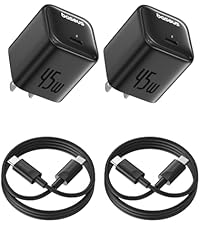
Image 6.1: Visual summary of the 10-point safety protection features integrated into the charger.
7. விவரக்குறிப்புகள்
| அம்சம் | விவரக்குறிப்பு |
|---|---|
| மாதிரி எண் | CCGAN45SECS |
| பிராண்ட் | பேசியஸ் |
| வாட்tage | 45 வாட்ஸ் |
| மொத்த USB போர்ட்கள் | 1 (யூ.எஸ்.பி வகை சி) |
| உள்ளீடு தொகுதிtage | 240 வோல்ட் |
| Ampஎரிச்சல் | 2.24 Amps |
| சிறப்பு அம்சங்கள் | Fast Charging, GaN6 Technology, Quad Thermal Management |
| இணைப்பு தொழில்நுட்பம் | USB |
| பொருளின் எடை | 8.8 அவுன்ஸ் |
| தொகுப்பு பரிமாணங்கள் | 7.05 x 4.37 x 1.54 அங்குலம் |
| உள்ளிட்ட கூறுகள் | யூ.எஸ்.பி-சி கேபிள் |
8. சரிசெய்தல்
- சாதனம் சார்ஜ் ஆகவில்லை:
- சார்ஜர் வேலை செய்யும் சுவர் கடையில் பாதுகாப்பாக செருகப்பட்டுள்ளதா என்பதை உறுதிப்படுத்தவும்.
- Verify the USB-C cable is firmly connected to both the charger and your device.
- Try using a different USB-C cable to rule out cable issues.
- Test the charger with a different compatible device to confirm charger functionality.
- மெதுவாக சார்ஜ் செய்தல்:
- Ensure your device supports 45W fast charging and the PPS/PD 3.0 protocol.
- For Super Fast Charge 2.0, use a 5A rated USB-C to USB-C cable.
- Close unnecessary applications on your device to reduce power consumption during charging.
- Avoid using your device intensively while charging for optimal speed.
- சார்ஜர் சூடாக உணர்கிறது:
- It is normal for the charger to become warm during operation, especially during fast charging.
- If the charger becomes excessively hot to touch, disconnect it immediately and contact customer support.
9. பராமரிப்பு
- சுத்தம்: சுத்தம் செய்வதற்கு முன் சார்ஜரை மின் இணைப்பிலிருந்து துண்டிக்கவும். மேற்பரப்பைத் துடைக்க மென்மையான, உலர்ந்த துணியைப் பயன்படுத்தவும். திரவ கிளீனர்கள் அல்லது ஏரோசோல்களைப் பயன்படுத்த வேண்டாம்.
- சேமிப்பு: நேரடி சூரிய ஒளி மற்றும் தீவிர வெப்பநிலையிலிருந்து விலகி குளிர்ந்த, உலர்ந்த இடத்தில் சார்ஜரை சேமிக்கவும்.
- கையாளுதல்: சார்ஜரை கீழே போடுவதையோ அல்லது வலுவான தாக்கங்களுக்கு ஆளாக்குவதையோ தவிர்க்கவும். சார்ஜரை பிரிக்கவோ அல்லது மாற்றவோ முயற்சிக்காதீர்கள்.
10. உத்தரவாதம் மற்றும் ஆதரவு
Baseus products are manufactured with high-quality standards. For warranty information, technical support, or any product-related inquiries, please refer to the warranty card included with your purchase or visit the official Baseus website. You may also contact Baseus customer service directly for assistance.


