1. அறிமுகம்
This manual provides comprehensive instructions for the Futanwei Screen Protector, designed specifically for the Nelpor G104 and QVEQ G104 Smartwatches. This product offers enhanced protection for your smartwatch screen against scratches, fingerprints, and minor impacts, while maintaining touch sensitivity and visual clarity.

Image: A Nelpor G104 Smartwatch with the Futanwei screen protector visibly applied, showcasing its clear and protective layer over the watch face.
2. தொகுப்பு உள்ளடக்கங்கள்
- 5 x Smartwatch Screen Protectors
3. இணக்கமான மாதிரிகள்
This screen protector is compatible with the following smartwatch models:
- Nelpor G104 Smartwatch (1.83 Inches)
- QVEQ G104 Smartwatch (1.83 Inches)
Note: This product is NOT compatible with FITVII H56 (1.7 Inches) Smart Watch or other devices not listed above.
4. பொருள்
The screen protector is made from high-quality Thermoplastic Polyurethane (TPU), offering flexibility and durability.
5 முக்கிய அம்சங்கள்
- Oleophobic & Hydrophobic: Features a specialized coating that repels sweat and oil residue, reducing fingerprints on the smartwatch screen.
- அதிக தொடு உணர்திறன்: Designed to maintain the original touch response of your smartwatch screen, allowing for comfortable and accurate interaction.
- Clear Picture Quality: With 99% high transparency and an ultra-thin design, the protector ensures bright and vibrant image quality, preserving the original visual experience.
- Bubble Self-healing Film: Engineered to allow small air bubbles that may appear immediately after application to naturally disappear within a few hours.
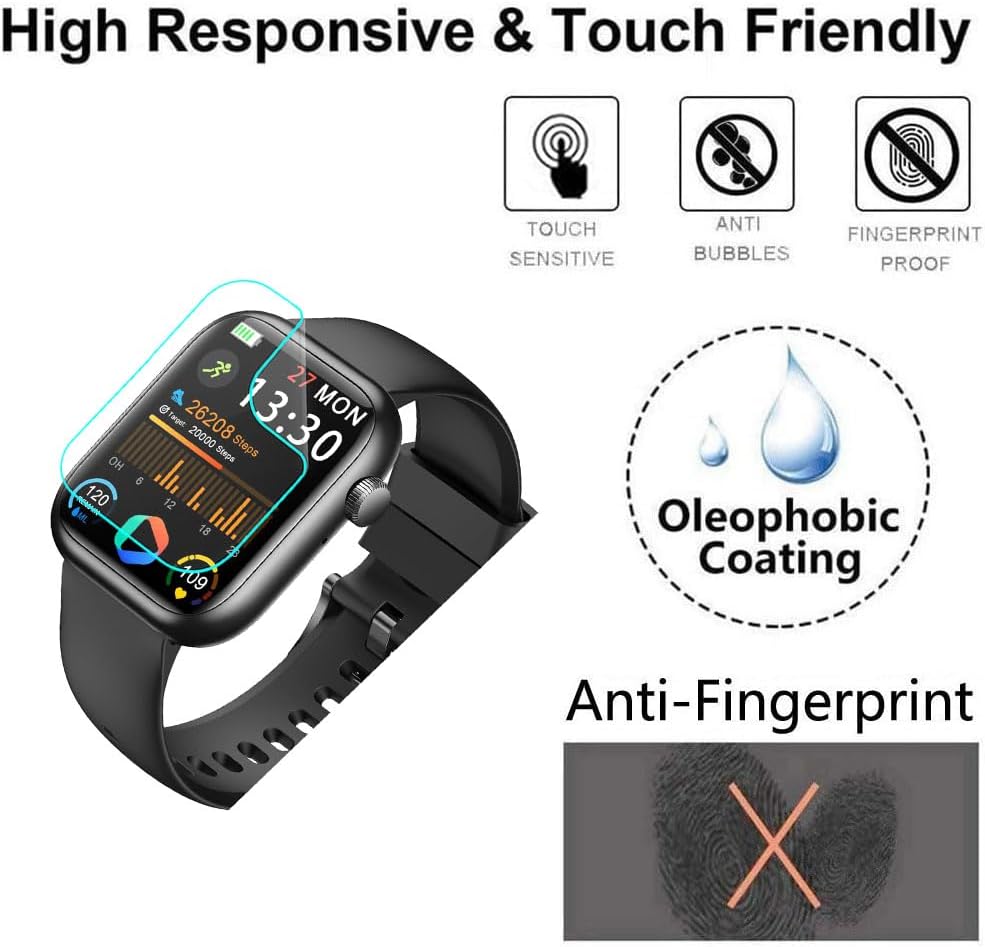
Image: A visual representation highlighting the key features of the screen protector, including touch sensitivity, anti-bubble properties, fingerprint resistance, and an oleophobic coating.
6. அமைவு மற்றும் நிறுவல் வழிகாட்டி
Follow these steps carefully for a bubble-free and precise application of the screen protector:
- படி 1: மேற்பரப்பை தயார் செய்யவும்
Wipe the surface of your smartwatch screen thoroughly with a dry cloth, followed by a wet cloth (if provided, or a slightly damp, lint-free cloth) to remove all dust, smudges, and debris. Ensure the screen is completely dry before proceeding. - Step 2: Remove Protective Layer
Carefully pull down the label or tab on the screen protector to begin peeling off the first protective layer. Avoid touching the adhesive side of the protector. - Step 3: Align and Place
Align the screen protector precisely with the edges and cutouts of your smartwatch screen. Once aligned, gently place the film onto the screen, starting from one edge and slowly lowering it. - Step 4: Press and Secure
Using a soft card or your finger, gently press the protective film from one side to the other, pushing out any air bubbles towards the edges. Apply even pressure to ensure full adhesion.
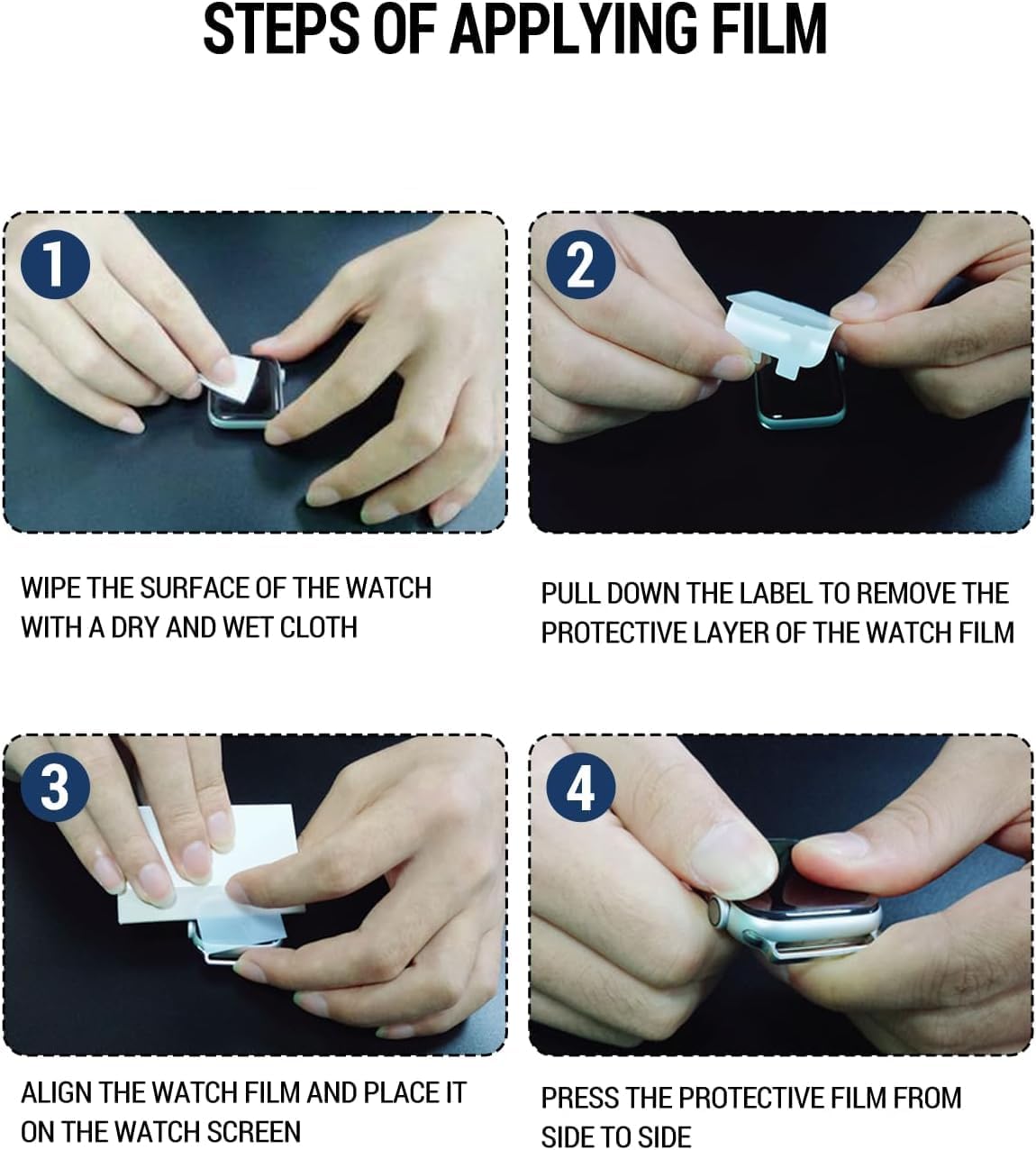
Image: A four-panel visual guide demonstrating the step-by-step process of applying the screen protector to a smartwatch, from cleaning to final adhesion.
7. இயக்க பரிசீலனைகள்
Once installed, the screen protector is designed to be virtually unnoticeable. It will not interfere with the touch functionality or display clarity of your Nelpor G104 or QVEQ G104 Smartwatch. Continue to operate your device as usual, enjoying the added layer of protection.
8. பராமரிப்பு
To maintain the clarity and effectiveness of your screen protector:
- மென்மையான, பஞ்சு இல்லாத துணியால் திரை பாதுகாப்பாளரை தவறாமல் சுத்தம் செய்யவும்.
- பிடிவாதமான கறைகளுக்கு, லேசாக dampதுணியை தண்ணீரில் அல்லது திரை-பாதுகாப்பான துப்புரவு கரைசலில் நனைக்கவும். கடுமையான இரசாயனங்களைத் தவிர்க்கவும்.
- Do not use abrasive materials or excessive force when cleaning, as this may damage the protector or the smartwatch screen.
9. சரிசெய்தல்
If you encounter any issues during or after installation, consider the following:
- நிறுவிய பின் குமிழ்கள்: Small air bubbles or wavy patterns may appear immediately after application. Due to the self-healing properties of the TPU material, these will typically disappear naturally within a few hours (up to 24-48 hours). Do not attempt to forcefully remove them with sharp objects.
- தூசிக்கு அடியில் பாதுகாப்பு: If dust particles are trapped under the protector, it indicates the screen was not thoroughly cleaned before application. Carefully peel back the protector slightly, use a dust-removal sticker or tape to lift the dust, and reapply.
- தவறான சீரமைப்பு: If the protector is misaligned, gently lift it from one corner and re-align it. The adhesive allows for minor adjustments during initial application.
- குறைக்கப்பட்ட தொடு உணர்திறன்: Ensure the protector is fully adhered to the screen without any lifted edges or large air pockets. If issues persist, ensure the protector is compatible with your specific smartwatch model.
10. விவரக்குறிப்புகள்
| பண்பு | விவரம் |
|---|---|
| தயாரிப்பு பரிமாணங்கள் | 3 x 2 x 0.5 அங்குலம் |
| பொருளின் எடை | 0.32 அவுன்ஸ் |
| பொருள் | தெர்மோபிளாஸ்டிக் பாலியூரிதீன் (TPU) |
| பினிஷ் வகை | பளபளப்பானது |
| உற்பத்தியாளர் | ஃபுடான்வெய் |
| முதல் தேதி கிடைக்கும் | பிப்ரவரி 10, 2025 |
11. உத்தரவாதத் தகவல்
No specific warranty information is provided in the product details. Please refer to the retailer's return policy or contact the seller directly for details regarding product warranty.
12. வாடிக்கையாளர் ஆதரவு
For any questions, concerns, or assistance with your Futanwei Screen Protector, please refer to the seller's contact information on the platform where the product was purchased. They will be able to provide further support and guidance.


