1. அறிமுகம்
Thank you for choosing the ZUMIMALL Dual Lens 2K Wireless Outdoor Security Camera. This manual provides detailed instructions for setting up, operating, and maintaining your camera to ensure optimal performance and security for your home or property. Please read this manual thoroughly before use and retain it for future reference.
2. பாதுகாப்பு தகவல்
- Ensure the camera is installed in a location where it is protected from extreme weather conditions beyond its IP65 rating.
- Use only the specified power adapter or solar panel for charging.
- சாதனத்தை நீங்களே பிரிக்கவோ அல்லது சரிசெய்யவோ முயற்சிக்காதீர்கள். உதவிக்கு வாடிக்கையாளர் ஆதரவைத் தொடர்பு கொள்ளவும்.
- கேமராவையும் அதன் துணைக்கருவிகளையும் குழந்தைகளுக்கு எட்டாதவாறு வைத்திருங்கள்.
- வலுவான காந்தப்புலங்கள் அல்லது குறுக்கீடு மூலங்களுக்கு அருகில் கேமராவை வைப்பதைத் தவிர்க்கவும்.
- உள்ளூர் விதிமுறைகளின்படி தயாரிப்பு மற்றும் பேட்டரியை பொறுப்புடன் அப்புறப்படுத்துங்கள்.
3. தொகுப்பு உள்ளடக்கங்கள்
அனைத்து கூறுகளும் உள்ளனவா மற்றும் நல்ல நிலையில் உள்ளனவா என்பதைச் சரிபார்க்கவும்:
- ZUMIMALL Dual Lens 2K Wireless Outdoor Security Camera
- 5W சோலார் பேனல்
- பெருகிவரும் அடைப்புக்குறி மற்றும் திருகுகள்
- USB சார்ஜிங் கேபிள்
- பயனர் கையேடு
4. தயாரிப்பு முடிந்துவிட்டதுview
The ZUMIMALL Dual Lens 2K Wireless Outdoor Security Camera offers advanced surveillance features with a focus on wide-area coverage and intelligent detection.

Image: The ZUMIMALL Dual Lens 2K Wireless Outdoor Security Camera, featuring a main PTZ camera unit, a separate smaller camera, and a solar panel for continuous power.
முக்கிய அம்சங்கள்:
- இரட்டை லென்ஸ் அமைப்பு: Combines a fixed lens and a rotating lens for simultaneous viewing of two different areas.
- 2K HD தெளிவுத்திறன்: Provides clear and detailed images and videos (3MP+3MP for a total of 6MP effective resolution).
- Wide Angle & PTZ: Offers a 220° ultra-wide-angle view from the fixed lens and 360° pan/tilt/zoom (PTZ) capabilities for comprehensive coverage.
- முழு வண்ண இரவு பார்வை: Equipped with white and infrared lamps, offering full-color, infrared, or smart night vision modes.
- சூரிய சக்தி: Includes a 5W solar panel and a built-in 10000mAh battery for continuous, uninterrupted operation.
- ஸ்மார்ட் AI கண்டறிதல்: Advanced AI can identify people, vehicles, pets, and packages, reducing false alerts.
- இருவழி பேச்சு: உள்ளமைக்கப்பட்ட மைக்ரோஃபோன் மற்றும் ஸ்பீக்கர் நிகழ்நேர தொடர்புக்கு அனுமதிக்கின்றன.
- 2.4GHz வைஃபை இணைப்பு: Ensures a stable and reliable wireless connection.
- IP65 வானிலை எதிர்ப்பு: பல்வேறு வெளிப்புற வானிலை நிலைகளைத் தாங்கும் வகையில் வடிவமைக்கப்பட்டுள்ளது.
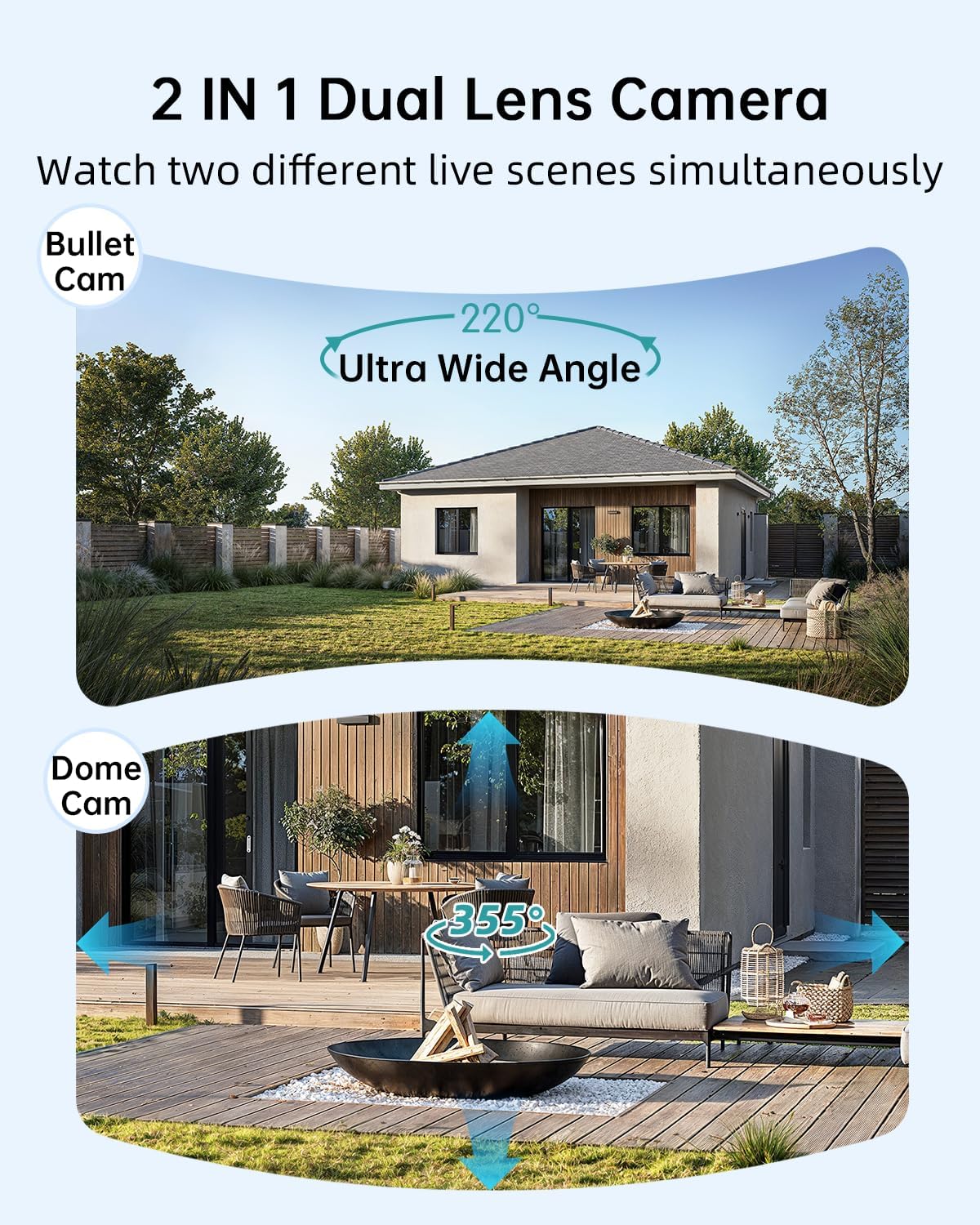
Image: Illustration of the dual-lens functionality, displaying a wide-angle 'Bullet Cam' view and a pan-tilt-zoom 'Dome Cam' view ஒரே நேரத்தில்.

Image: The ZUMIMALL camera connected to its 5W solar panel, highlighting its non-stop solar power capability and IP66 water resistance (note: product specification is IP65).

Image: A demonstration of the 2K ultra-colorful image quality, showing a clear view of a car's license plate at night, with indicators for 3MP FHD Image, 4X Digital Zoom, and 55FT Night Vision Range.

Image: The ZUMIMALL camera shown enduring heavy rain and snow, illustrating its IP65 waterproof rating and suitability for outdoor use in various weather conditions.
5 அமைவு
5.1 ஆரம்ப சார்ஜிங்
Before first use, fully charge the camera's built-in 10000mAh battery using the provided USB cable and a 5V/2A power adapter (not included). A full charge typically takes several hours.
5.2 செயலி பதிவிறக்கம் மற்றும் கணக்கு பதிவு
- Scan the QR code on the packaging or search for 'ZUMIMALL' in your mobile app store (iOS or Android).
- Download and install the ZUMIMALL app.
- பயன்பாட்டைத் திறந்து புதிய கணக்கைப் பதிவு செய்யவும் அல்லது உங்களிடம் ஏற்கனவே கணக்கு இருந்தால் உள்நுழையவும்.
5.3 Wi-Fi உடன் இணைக்கிறது
- Ensure your smartphone is connected to a 2.4GHz Wi-Fi network. The camera does not support 5GHz Wi-Fi.
- In the ZUMIMALL app, tap '+' to add a new device.
- Follow the on-screen instructions to power on the camera and enter Wi-Fi configuration mode.
- உங்கள் தொலைபேசித் திரையில் காட்டப்படும் QR குறியீட்டை கேமரா லென்ஸால் ஸ்கேன் செய்யவும்.
- Wait for the camera to connect to your Wi-Fi network. Once connected, you will hear a confirmation sound.
5.4 கேமரா மற்றும் சோலார் பேனலை பொருத்துதல்
The camera offers flexible installation options, including magnetic support and bracket support.

Image: Demonstrates two installation methods for the ZUMIMALL camera: a compact magnetic mount for easy placement and a more robust bracket mount for secure, permanent installation.
- ஒரு இடத்தை தேர்வு செய்யவும்: விரும்பியதை வழங்கும் இடத்தைத் தேர்ந்தெடுக்கவும் viewing angle, is within Wi-Fi range, and receives ampசூரிய பேனலுக்கு நேரடி சூரிய ஒளி.
- அடைப்புக்குறியை நிறுவவும்: Use the provided screws to securely attach the mounting bracket to a wall or ceiling.
- கேமராவை இணைக்கவும்: Secure the camera to the bracket. For magnetic support, simply attach the camera to the magnetic base.
- சூரிய பலகையை நிலைநிறுத்தவும்: Mount the 5W solar panel in a location that receives maximum direct sunlight throughout the day. Connect the solar panel cable to the camera's charging port.
- கோணத்தை சரிசெய்யவும்: விரும்பிய கண்காணிப்புப் பகுதியை உள்ளடக்கும் வகையில் கேமராவின் கோணத்தை சரிசெய்யவும்.
6. இயக்க வழிமுறைகள்
6.1 நேரலை View and Dual Lens Control
Open the ZUMIMALL app and select your camera to access the live view. The app will display two video feeds simultaneously from the fixed and PTZ lenses. You can switch between views or control the PTZ lens by swiping on the screen or using the directional controls within the app.
6.2 இரவு பார்வை முறைகள்
The camera offers three night vision modes, configurable in the app settings:
- முழு வண்ண இரவு பார்வை: Utilizes the built-in white light to provide color images in low-light conditions.
- அகச்சிவப்பு இரவு பார்வை: முழு இருளில் கருப்பு மற்றும் வெள்ளை படங்களுக்கு அகச்சிவப்பு LED களைப் பயன்படுத்துகிறது.
- ஸ்மார்ட் நைட் விஷன்: Automatically switches between infrared and full-color based on detected motion or ambient light.

Image: A comparison of night vision modes, showing a scene with a spotlight on (color night vision) and a spotlight off (infrared night vision), demonstrating the camera's ability to capture clear images in various low-light conditions.
6.3 ஸ்மார்ட் AI கண்டறிதல்
Configure AI detection settings in the app to receive alerts for specific events.

Image: An illustration of the camera's Intelligent AI Analysis feature, highlighting its capability to detect and differentiate between humans, packages, vehicles, and pets within the surveillance area.
- கண்டறிதல் வகைகள்: The camera can identify humans, vehicles, pets, and packages.
- எச்சரிக்கைகள்: When motion is detected, an alert notification will be sent to your smartphone.
- உணர்திறன்: Adjust motion detection sensitivity to minimize false alarms.
6.4 இருவழிப் பேச்சு
Use the two-way talk feature to communicate with visitors or deter intruders.

Image: Depicts scenarios where the two-way voice intercom is used, showing a user communicating with a delivery person at the door and a parent speaking to a child playing outside.
- நேரலையில் view, கேமராவின் ஸ்பீக்கர் வழியாகப் பேச மைக்ரோஃபோன் ஐகானைத் தட்டவும்.
- Release the icon to listen.
6.5 ரெக்கார்டிங் மற்றும் பிளேபேக்
The camera records events triggered by motion detection. Recordings are stored on a local SD card (not included) or in cloud storage (subscription may be required).
- பின்னணி: Access recorded videos through the 'Playback' section in the ZUMIMALL app.
- பதிவிறக்கம்: Download important video clips to your phone.
7. பராமரிப்பு
- சுத்தம்: கேமரா லென்ஸ் மற்றும் சோலார் பேனலை அவ்வப்போது மென்மையான, டி-ஷர்ட் மூலம் சுத்தம் செய்யவும்.amp cloth to ensure clear images and efficient solar charging. Do not use harsh chemicals.
- பேட்டரி பராமரிப்பு: For optimal battery life, avoid prolonged exposure to extreme temperatures. Ensure the solar panel is free from obstructions to maintain consistent charging.
- நிலைபொருள் புதுப்பிப்புகள்: Check the ZUMIMALL app regularly for firmware updates. Keeping your camera's firmware updated ensures the latest features and security enhancements.
8. சரிசெய்தல்
8.1 கேமரா வைஃபையுடன் இணைக்கப்படவில்லை.
- உங்கள் வைஃபை நெட்வொர்க் 2.4GHz என்பதை உறுதிப்படுத்தவும்.
- கேமரா இருக்கும் இடத்தில் வைஃபை சிக்னல் வலிமையைச் சரிபார்க்கவும்.
- உள்ளிட்ட வைஃபை கடவுச்சொல் சரியானதா என சரிபார்க்கவும்.
- உங்கள் ரூட்டரையும் கேமராவையும் மறுதொடக்கம் செய்யுங்கள்.
8.2 பேட்டரி விரைவாக தீர்ந்துவிடும்
- சூரிய ஒளி பல மணி நேரம் தினமும் நேரடி சூரிய ஒளியைப் பெறுவதை உறுதி செய்யவும்.
- Reduce motion detection sensitivity or frequency of recordings.
- அதிகப்படியான நேரலை இருக்கிறதா என்று சரிபார்க்கவும் view streaming, which consumes battery.
8.3 மோசமான படத் தரம்
- கேமரா லென்ஸை சுத்தம் செய்யவும்.
- கேமராவின் புலத்தில் எந்த தடைகளும் இல்லை என்பதை உறுதிப்படுத்திக் கொள்ளுங்கள். view.
- உங்கள் வைஃபை இணைப்பு வேகத்தைச் சரிபார்க்கவும்.
8.4 தவறான இயக்க எச்சரிக்கைகள்
- பயன்பாட்டில் இயக்கக் கண்டறிதல் உணர்திறனை சரிசெய்யவும்.
- Utilize AI detection filters (human, vehicle, pet, package) to ignore irrelevant motion.
- Ensure the camera is not pointing at busy public areas or moving foliage.
9. விவரக்குறிப்புகள்
| அம்சம் | விவரக்குறிப்பு |
|---|---|
| மாதிரி | B0F189QLFH |
| தீர்மானம் | 2K (3MP + 3MP Dual Lens) |
| புலம் View | 220° Ultra Wide Angle (fixed lens), 360° PTZ (rotating lens) |
| பேட்டரி திறன் | 10000mAh |
| சோலார் பேனல் சக்தி | 5W |
| Wi-Fi இணைப்பு | 2.4GHz (IEEE 802.11b/g/n) |
| வானிலை எதிர்ப்பு | IP65 |
| இரவு பார்வை | Full-Color, Infrared, Smart |
| கண்டறிதல் | Smart AI (Human, Vehicle, Pet, Package) |
| ஆடியோ | இரு வழி பேச்சு |
| உற்பத்தியாளர் | ஜுமிமால் |
| முதல் கிடைக்கும் தேதி | மார்ச் 12, 2025 |
10. உத்தரவாதத் தகவல்
ZUMIMALL products are covered by a limited warranty from the date of purchase. Please refer to the warranty card included with your product or visit the official ZUMIMALL webவிரிவான உத்தரவாத விதிமுறைகள் மற்றும் நிபந்தனைகளுக்கான தளம்.
11. வாடிக்கையாளர் ஆதரவு
If you encounter any issues or have questions regarding your ZUMIMALL camera, please contact our customer support team:
- மின்னஞ்சல்: support@zumimall.com (Example)
- Webதளம்: ZUMIMALL Official Store
Please have your model number (B0F189QLFH) and purchase information ready when contacting support.


