1. அறிமுகம்
Thank you for choosing the Hyundai 65-Inch Frameless WebOS 4K UHD Smart LED TV, Model L65HYNDA650. This manual provides essential information for the safe and efficient operation of your new television. Please read it thoroughly before use and retain it for future reference.
2. பாதுகாப்பு தகவல்
மின்சார அதிர்ச்சி, தீ அல்லது காயம் ஏற்படாமல் இருக்க பின்வரும் பாதுகாப்பு முன்னெச்சரிக்கை நடவடிக்கைகளை எப்போதும் கடைபிடிக்கவும்:
- மழை அல்லது ஈரப்பதத்திற்கு டிவியை வெளிப்படுத்த வேண்டாம்.
- டிவியைத் திறக்காதே casing; அனைத்து சேவைகளையும் தகுதிவாய்ந்த பணியாளர்களிடம் பரிந்துரைக்கவும்.
- டிவியைச் சுற்றி சரியான காற்றோட்டத்தை உறுதி செய்யவும்.
- மின்னல் தாக்கும் போது அல்லது நீண்ட நேரம் பயன்படுத்தப்படாத போது டிவியை கழற்றி விடுங்கள்.
- நேரடி சூரிய ஒளி, வெப்ப மூலங்கள் மற்றும் வலுவான காந்தப்புலங்களிலிருந்து டிவியை விலக்கி வைக்கவும்.
3. தொகுப்பு உள்ளடக்கங்கள்
தொகுப்பில் அனைத்து பொருட்களும் உள்ளதா என சரிபார்க்கவும்:
- Hyundai 65-Inch Smart LED TV
- மேஜிக் ரிமோட் கண்ட்ரோல்
- டிவி ஸ்டாண்ட் பாகங்கள்
- பயனர் கையேடு (இந்த ஆவணம்)
- பவர் கேபிள்
4. தயாரிப்பு முடிந்துவிட்டதுview
The Hyundai L65HYNDA650 is a 65-inch Frameless WebOS 4K UHD Smart LED TV designed for an immersive viewing experience. It features a high-resolution display, smart functionality powered by webOS 2.0, and versatile connectivity options.
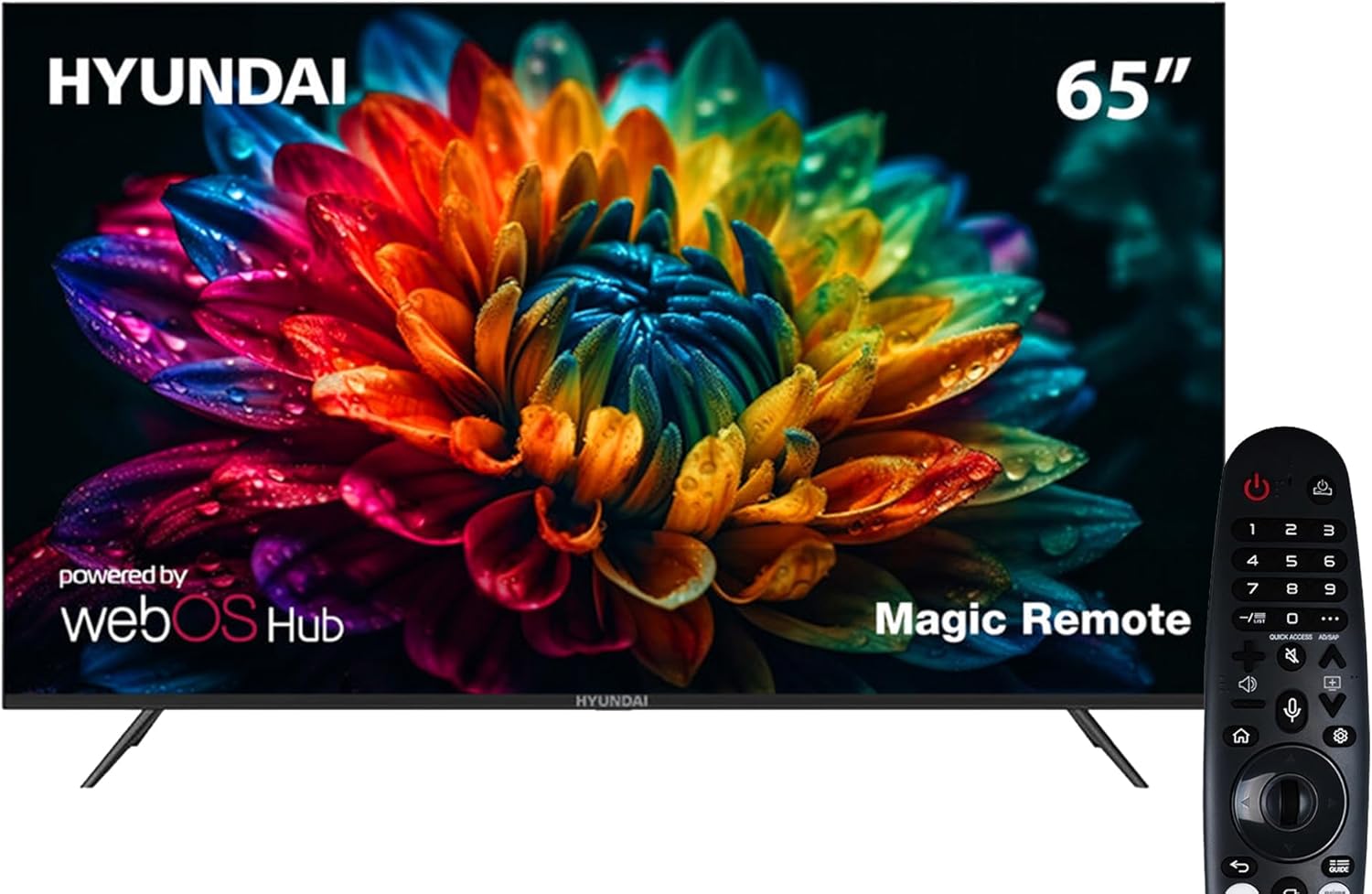
படம் 1: முன் view of the Hyundai 65-Inch Smart LED TV with the included Magic Remote.
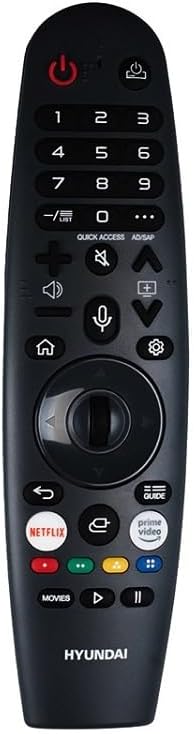
Image 2: The Hyundai Magic Remote Control, featuring dedicated buttons for smart functions and navigation.
5 அமைவு
5.1 பேக்கிங்
Carefully remove the TV from its packaging. It is recommended to have two people for this process due to the size and weight of the television.
5.2 ஸ்டாண்ட் நிறுவல்
டிவி ஸ்டாண்டை நிறுவ:
- கீறல்கள் ஏற்படாமல் இருக்க டிவி திரையை மென்மையான, தட்டையான மேற்பரப்பில் வைக்கவும்.
- டிவியின் அடிப்பகுதியில் நியமிக்கப்பட்ட இடங்களுடன் ஸ்டாண்ட் கூறுகளை சீரமைக்கவும்.
- Secure the stand using the provided screws. Ensure the stand is firmly attached before placing the TV upright.
5.3 பெரிஃபெரல்களை இணைக்கிறது
உங்கள் டிவி பல்வேறு இணைப்பு விருப்பங்களை வழங்குகிறது:
- HDMI போர்ட்கள் (x3): Connect external devices such as Blu-ray players, gaming consoles, or set-top boxes.
- USB போர்ட்கள் (x2): மீடியா பிளேபேக் அல்லது மென்பொருள் புதுப்பிப்புகளுக்கு USB சேமிப்பக சாதனங்களை இணைக்கவும்.
- ஆண்டெனா/கேபிள் உள்ளீடு: Connect your antenna or cable for the built-in T2/S2 receiver.
- Network (LAN/Wi-Fi): Connect to your home network for internet access and smart features.
- புளூடூத்: இணக்கமான ஆடியோ சாதனங்கள் அல்லது துணைக்கருவிகளுடன் இணைக்கவும்.
5.4 ஆரம்ப பவர் ஆன்
After connecting the power cable, press the power button on the TV or the Magic Remote. Follow the on-screen instructions for initial setup, including language selection (English, Arabic, French, German, Italian, Spanish, Dutch), network configuration, and channel scanning.
6. இயங்குகிறது
6.1 மேஜிக் ரிமோட் கண்ட்ரோல்
The Magic Remote allows intuitive control of your TV. Point and click, use the scroll wheel, or utilize voice commands for navigation. Specific buttons are available for quick access to popular streaming services and settings.
6.2 அடிப்படை டிவி செயல்பாடுகள்
- பவர் ஆன்/ஆஃப்: ரிமோட்டில் உள்ள ஆற்றல் பொத்தானை அழுத்தவும்.
- ஒலியளவு கட்டுப்பாடு: ஒலியளவை அதிகரிக்கும்/குறைக்கும் பொத்தான்களைப் பயன்படுத்தவும்.
- சேனல் தேர்வு: சேனல் மேல்/கீழ் பொத்தான்கள் அல்லது எண் அட்டையைப் பயன்படுத்தவும்.
- உள்ளீடு மூலம்: Press the 'Input' button to select between HDMI, USB, or TV tuner.
6.3 ஸ்மார்ட் அம்சங்கள் (webஓஎஸ் 2.0)
உங்கள் டிவி இயங்குகிறது webOS 2.0, providing a user-friendly smart TV experience:
- முகப்பு டாஷ்போர்டு: Access apps, connected devices, and settings from the customizable home screen.
- ஆப் ஸ்டோர்: கூடுதல் பயன்பாடுகளைப் பதிவிறக்கி நிறுவவும்.
- E-share / Screen Mirroring: Wirelessly share content from compatible mobile devices to your TV.
- புளூடூத் இணைப்பு: Connect Bluetooth headphones, soundbars, or other accessories.
7. பராமரிப்பு
7.1 டிவியை சுத்தம் செய்தல்
- திரை: மென்மையான, பஞ்சு இல்லாத துணியால் திரையை மெதுவாகத் துடைக்கவும். பிடிவாதமான அடையாளங்களுக்கு, சிறிது dampதுணியை தண்ணீர் அல்லது சிறப்பு திரை துப்புரவாளர் கொண்டு துடைக்கவும். திரவத்தை நேரடியாக திரையில் தெளிக்க வேண்டாம்.
- Casing: டிவியை துடைக்கவும் casinமென்மையான, உலர்ந்த துணியால் தேய்க்கவும். சிராய்ப்பு கிளீனர்கள் அல்லது கரைப்பான்களைப் பயன்படுத்துவதைத் தவிர்க்கவும்.
7.2 மென்பொருள் புதுப்பிப்புகள்
Periodically check for software updates through the TV's settings menu to ensure optimal performance and access to the latest features.
8. சரிசெய்தல்
நீங்கள் சிக்கல்களை எதிர்கொண்டால், பின்வரும் பொதுவான தீர்வுகளைப் பார்க்கவும்:
| பிரச்சனை | சாத்தியமான தீர்வு |
|---|---|
| சக்தி இல்லை | மின் கேபிள் பாதுகாப்பாக இணைக்கப்பட்டுள்ளதா மற்றும் மின் இணைப்பு செயல்படுகிறதா எனச் சரிபார்க்கவும். |
| படம் இல்லை, ஆனால் ஒலி உள்ளது. | சரியான உள்ளீட்டு மூலத்தைத் தேர்ந்தெடுத்துள்ளீர்களா எனச் சரிபார்க்கவும். வெளிப்புற சாதன இணைப்புகளைச் சரிபார்க்கவும். |
| ஒலி இல்லை, ஆனால் படம் உள்ளது. | Check volume level and mute settings. Ensure external audio devices are properly connected. |
| ரிமோட் கண்ட்ரோல் வேலை செய்யவில்லை | Replace batteries. Ensure no obstructions between the remote and the TV. Re-pair the Magic Remote if necessary. |
| Wi-Fi உடன் இணைக்க முடியவில்லை | Check your router and internet connection. Re-enter Wi-Fi password. Try restarting the TV and router. |
| Smart apps not loading | Ensure a stable internet connection. Try restarting the app or the TV. Check for software updates. |
9. விவரக்குறிப்புகள்
| அம்சம் | விவரம் |
|---|---|
| மாதிரி எண் | L65HYNDA650 |
| திரை அளவு | 65 அங்குலம் |
| காட்சி தொழில்நுட்பம் | LED |
| தீர்மானம் | 4K UHD (3840x2160) |
| புதுப்பிப்பு விகிதம் | 60 ஹெர்ட்ஸ் |
| ஸ்மார்ட் இயங்குதளம் | webOS 2.0 |
| ரேம் | 1.5 ஜிபி |
| சேமிப்பு | 8 ஜிபி |
| இணைப்பு | 3 HDMI, 2 USB, Bluetooth, Wi-Fi, E-share |
| உள்ளமைக்கப்பட்ட பெறுநர் | T2/S2 |
| ஆடியோ வெளியீடு | இரட்டை 8W ஸ்பீக்கர்கள் |
| தயாரிப்பு பரிமாணங்கள் (அளவு x அளவு x அளவு) | 8.4 x 147 x 84 செ.மீ |
| பொருளின் எடை | 21 கிலோ |
| சிறப்பு அம்சங்கள் | Frameless Design, Magic Remote, UHD 4K |
| மொழி ஆதரவு | English, Arabic, French, German, Italian, Spanish, Dutch |
10. உத்தரவாதம் மற்றும் ஆதரவு
Your Hyundai TV is covered by a manufacturer's warranty. Please refer to the warranty card included with your product for specific terms and conditions. For technical support or service inquiries, please contact your retailer or the authorized Hyundai service center in your region.


