1. அறிமுகம்
நன்றி, நன்றி.asing the SENCOR Soundbar SSB 4450BS. This soundbar is designed to deliver a powerful and immersive audio experience for your home entertainment system. This manual provides essential information for the safe and efficient use of your new soundbar, including setup, operation, maintenance, and troubleshooting.
தயாரிப்பைப் பயன்படுத்துவதற்கு முன் இந்தக் கையேட்டை முழுமையாகப் படித்து, எதிர்காலக் குறிப்புக்காக அதைத் தக்க வைத்துக் கொள்ளவும்.
2. பாதுகாப்பு வழிமுறைகள்
பாதுகாப்பான செயல்பாட்டை உறுதிசெய்து சேதத்தைத் தடுக்க, பின்வரும் பாதுகாப்பு முன்னெச்சரிக்கை நடவடிக்கைகளைக் கவனிக்கவும்:
- சக்தி ஆதாரம்: Connect the soundbar only to an AC power outlet that matches the voltage specified on the product label. Ensure the power plug is fully inserted.
- காற்றோட்டம்: Do not block any ventilation openings. Allow adequate space around the soundbar for proper airflow to prevent overheating.
- நீர் மற்றும் ஈரப்பதம்: Do not expose the soundbar to rain, moisture, dripping, or splashing. Do not place objects filled with liquids, such as vases, on the apparatus.
- வெப்ப ஆதாரங்கள்: ரேடியேட்டர்கள், வெப்பப் பதிவேடுகள், அடுப்புகள் அல்லது பிற உபகரணங்கள் (உட்பட) போன்ற வெப்ப மூலங்களிலிருந்து சவுண்ட்பாரை விலக்கி வைக்கவும். ampலிஃபையர்ஸ்) வெப்பத்தை உற்பத்தி செய்யும்.
- சுத்தம்: Unplug the soundbar from the power outlet before cleaning. Use a soft, dry cloth. Do not use liquid cleaners or aerosol cleaners.
- சேவை: இந்த தயாரிப்பை நீங்களே சர்வீஸ் செய்ய முயற்சிக்காதீர்கள். அனைத்து சர்வீஸ்களையும் தகுதிவாய்ந்த சர்வீஸ் பணியாளர்களிடம் பரிந்துரைக்கவும். கவர்களைத் திறப்பது அல்லது அகற்றுவது உங்களை ஆபத்தான மின்னழுத்தத்திற்கு ஆளாக்கக்கூடும்.tagஇ அல்லது பிற ஆபத்துகள்.
- இடம்: Place the soundbar on a stable, flat surface or mount it securely if using a wall mount (mounting hardware not included).
3. தொகுப்பு உள்ளடக்கங்கள்
கீழே பட்டியலிடப்பட்டுள்ள அனைத்து பொருட்களும் உங்கள் தொகுப்பில் சேர்க்கப்பட்டுள்ளதா என்பதை சரிபார்க்கவும்:
- SENCOR Soundbar SSB 4450BS
- ரிமோட் கண்ட்ரோல்
- Power Cable (EU plug)
- பயனர் கையேடு
4. தயாரிப்பு முடிந்துவிட்டதுview
4.1 Soundbar Front View

படம் 1: முன் view of the SENCOR Soundbar SSB 4450BS. The display shows 'bt' indicating Bluetooth mode.
The front panel features the SENCOR logo and a digital display that indicates the current input mode (e.g., 'bt' for Bluetooth, 'OPT' for Optical, 'AUX' for Auxiliary) and volume level.
4.2 Soundbar Rear View (துறைமுகங்கள்)

படம் 2: பின்புறம் view of the SENCOR Soundbar SSB 4450BS, illustrating the connectivity ports.
The rear panel typically includes various input ports for connecting to your television or other audio sources. These may include HDMI ARC, Optical, and AUX inputs, along with the power input.
4.3 தொலை கட்டுப்பாடு
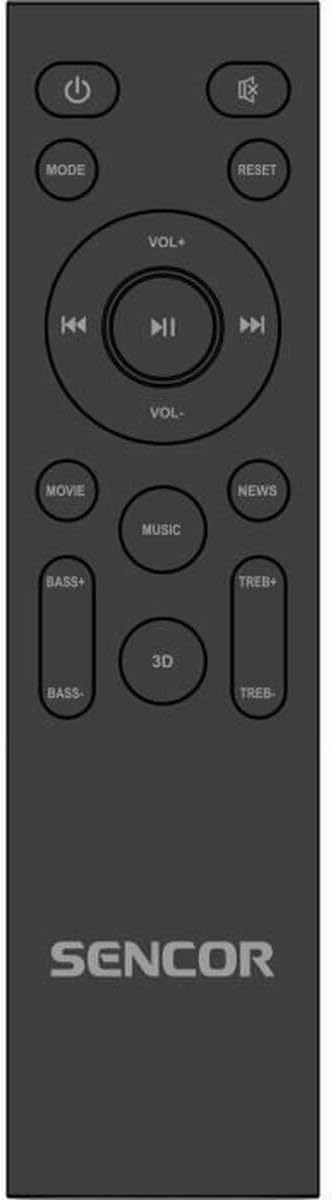
Figure 3: The remote control for the SENCOR Soundbar SSB 4450BS.
The remote control allows you to manage all functions of the soundbar from a distance. Key buttons include:
- சக்தி (⏻): சவுண்ட்பாரை ஆன் அல்லது ஆஃப் செய்யும்.
- பெறுக: Cycles through input sources (Bluetooth, Optical, AUX, HDMI ARC).
- VOL +/-: பிரதான ஒலி அளவை சரிசெய்கிறது.
- ⏮ / ⏸ / ⏭: Playback controls (Previous, Play/Pause, Next) for Bluetooth mode.
- MOVIE / MUSIC / NEWS / 3D: Selects predefined equalizer sound modes.
- பாஸ் +/-: பாஸ் அளவை சரிசெய்கிறது.
- TREB+/-: மும்மடங்கு அளவை சரிசெய்கிறது.
- மீட்டமை: Resets sound settings to default.
5 அமைவு
5.1 பேக்கிங் மற்றும் பிளேஸ்மெண்ட்
- Carefully remove the soundbar and all accessories from the packaging.
- Place the soundbar on a stable, flat surface in front of your TV, ensuring it does not obstruct the TV's remote sensor.
- Alternatively, the soundbar can be wall-mounted (mounting hardware not supplied). Ensure the wall can support the weight of the soundbar.
5.2 இணைக்கும் சக்தி
- Connect the power cable to the AC IN port on the back of the soundbar.
- மின் கேபிளின் மறுமுனையை பொருத்தமான சுவர் கடையில் செருகவும்.
5.3 ஆடியோ மூலத்துடன் இணைத்தல்
பின்வரும் இணைப்பு முறைகளில் ஒன்றைத் தேர்ந்தெடுக்கவும்:
5.3.1 HDMI ARC இணைப்பு (பரிந்துரைக்கப்படுகிறது)
- Connect an HDMI cable (not supplied) from the HDMI ARC port on your TV to the HDMI ARC port on the soundbar.
- உங்கள் டிவியின் HDMI ARC செயல்பாடு அதன் அமைப்புகளில் இயக்கப்பட்டிருப்பதை உறுதிசெய்யவும்.
5.3.2 ஒளியியல் இணைப்பு
- Connect an optical cable (not supplied) from the OPTICAL OUT port on your TV to the OPTICAL IN port on the soundbar.
- Ensure your TV's audio output is set to 'Optical' or 'PCM'.
5.3.3 AUX இணைப்பு
- Connect a 3.5mm audio cable (not supplied) from the headphone jack or AUX OUT port on your TV/device to the AUX IN port on the soundbar.
6. இயக்க வழிமுறைகள்
6.1 பவர் ஆன்/ஆஃப்
அழுத்தவும் சக்தி (⏻) button on the remote control or the soundbar's control panel to turn the unit on or off.
6.2 உள்ளீட்டு மூலத்தைத் தேர்ந்தெடுப்பது
அழுத்தவும் பயன்முறை button on the remote control repeatedly to cycle through the available input sources: Bluetooth (bt), Optical (OPT), AUX, HDMI ARC.
6.3 தொகுதி கட்டுப்பாடு
பயன்படுத்தவும் VOL+ மற்றும் VOL- buttons on the remote control to adjust the master volume. The current volume level will be displayed on the soundbar's front panel.
6.4 ப்ளூடூத் இணைத்தல்
- Switch the soundbar to Bluetooth mode by pressing the பயன்முறை button until 'bt' appears on the display. The 'bt' indicator will flash, signifying pairing mode.
- உங்கள் மொபைல் சாதனத்தில் (ஸ்மார்ட்போன், டேப்லெட், முதலியன) புளூடூத்தை இயக்கி, கிடைக்கக்கூடிய சாதனங்களைத் தேடுங்கள்.
- Select 'SENCOR SSB 4450BS' from the list of devices.
- Once paired, the 'bt' indicator will stop flashing and remain solid. You can now play audio from your device through the soundbar.
- பயன்படுத்தவும் ⏮ कालिका ⏮ कालिका कालिक का का का का का का (முந்தையது), ⏸ ⏸ कालिका कालिक स (Play/Pause), and ⏭ कालिका (Next) buttons on the remote for media control in Bluetooth mode.
6.5 Sound Modes and Adjustments
Use the dedicated buttons on the remote control to customize your audio experience:
- திரைப்படம்: Enhances dialogue and sound effects for films.
- இசை: இசையை இயக்க ஆடியோவை மேம்படுத்துகிறது.
- செய்திகள்: Clarifies speech for news broadcasts or podcasts.
- 3D: Creates a wider, more immersive soundstage.
- பாஸ் +/-: Increases or decreases the low-frequency sound output.
- TREB+/-: Increases or decreases the high-frequency sound output.
- மீட்டமை: Resets all sound settings (Bass, Treble, Sound Mode) to their factory defaults.
7. பராமரிப்பு
7.1 சுத்தம் செய்தல்
உங்கள் சவுண்ட்பாரின் தோற்றத்தையும் செயல்திறனையும் பராமரிக்க:
- சுத்தம் செய்வதற்கு முன் எப்போதும் பவர் அவுட்லெட்டிலிருந்து சவுண்ட்பாரை துண்டிக்கவும்.
- மேற்பரப்புகளைத் துடைக்க மென்மையான, உலர்ந்த, பஞ்சு இல்லாத துணியைப் பயன்படுத்தவும்.
- சிராய்ப்பு கிளீனர்கள், மெழுகுகள் அல்லது கரைப்பான்களைப் பயன்படுத்த வேண்டாம், ஏனெனில் அவை பூச்சுக்கு சேதம் விளைவிக்கும்.
- Gently clean the speaker grilles with a soft brush or vacuum cleaner with a brush attachment to remove dust.
7.2 சேமிப்பு
If you plan to store the soundbar for an extended period, unplug it from the power source and store it in a cool, dry place, preferably in its original packaging to protect it from dust and damage.
8. சரிசெய்தல்
If you encounter issues with your SENCOR Soundbar SSB 4450BS, refer to the following table for common problems and solutions:
| பிரச்சனை | சாத்தியமான காரணம் | தீர்வு |
|---|---|---|
| சக்தி இல்லை | மின் கேபிள் இணைக்கப்படவில்லை; மின் இணைப்பு செயல்பாட்டில் இல்லை. | மின் கேபிள் பாதுகாப்பாக இணைக்கப்பட்டுள்ளதா என்பதை உறுதிப்படுத்திக் கொள்ளுங்கள்; வேறு மின் நிலையத்தை முயற்சிக்கவும். |
| ஒலி இல்லை | Incorrect input source selected; Volume too low; Mute activated; Cable connection issue | Press MODE to select correct input; Increase volume; Check if mute is active; Reconnect audio cables securely. |
| புளூடூத் இணைக்கப்படவில்லை | Soundbar not in pairing mode; Device too far; Already connected to another device | Ensure soundbar is in 'bt' pairing mode (flashing 'bt'); Move device closer; Disconnect from other devices. |
| ரிமோட் கண்ட்ரோல் வேலை செய்யவில்லை | Batteries depleted; Obstruction between remote and soundbar; Remote sensor blocked | Replace batteries; Remove any obstructions; Ensure remote sensor on soundbar is clear. |
If the problem persists after trying these solutions, please contact SENCOR customer support.
9. விவரக்குறிப்புகள்
| அம்சம் | விவரக்குறிப்பு |
|---|---|
| மாதிரி | SSB 4450BS |
| பிராண்ட் | சென்சார் |
| பேச்சாளர் அதிகபட்ச வெளியீட்டு சக்தி | 200 வாட்ஸ் |
| தயாரிப்பு பரிமாணங்கள் (L x W x H) | 100 செ.மீ x 17.5 செ.மீ x 11 செ.மீ (தோராயமாக 39.4 x 6.9 x 4.3 அங்குலம்) |
| பொருளின் எடை | 4.4 கிலோ (தோராயமாக. 9.7 பவுண்ட்) |
| மவுண்டிங் வகை | டேப்லெட் மவுண்ட் |
| பிளக் வகை | EU பிளக் |
| ASIN | B0F2W9C18B |
| EAN / Item Model Number | 8590669354634 |
10. உத்தரவாதம் மற்றும் ஆதரவு
SENCOR products are manufactured to the highest quality standards. In the unlikely event of a defect, your product is covered by a limited warranty from the date of purchase. Please refer to the warranty card included with your product for specific terms and conditions.
For technical support, service inquiries, or to obtain replacement parts, please visit the official SENCOR website or contact your local SENCOR authorized service center. Keep your proof of purchase for warranty claims.
Webதளம்: www.sencor.com


