1. அறிமுகம்
This manual provides detailed instructions for the proper use and maintenance of your havit OWS915 Open Ear Headphones. Please read this manual thoroughly before using the product to ensure optimal performance and longevity. Keep this manual for future reference.
2. தொகுப்பு உள்ளடக்கங்கள்
கீழே பட்டியலிடப்பட்டுள்ள அனைத்து பொருட்களும் உங்கள் தொகுப்பில் சேர்க்கப்பட்டுள்ளதா என்பதை சரிபார்க்கவும்:
- havit OWS915 Open Ear Headphones (Left and Right earbuds)
- சார்ஜிங் கேஸ்
- USB சார்ஜிங் கேபிள்
- பயனர் கையேடு
Image: Contents of the havit OWS915 package, showing the earbuds, charging case, USB cable, and user manual.
3. தயாரிப்பு முடிந்துவிட்டதுview
The havit OWS915 headphones feature an open-ear design for comfort and situational awareness. Each earbud is lightweight (7.9 grams) and equipped with a flexible TPU ear hook for a secure fit. The charging case provides extended battery life.
முக்கிய கூறுகள்:
- காதணிகள்: Left and Right, with integrated ear hooks and touch control areas.
- சார்ஜிங் கேஸ்: Houses and charges the earbuds, with a USB-C charging port.
- LED குறிகாட்டிகள்: On earbuds and charging case for status updates.
- ஒலிவாங்கிகள்: Four built-in microphones with ENC technology for clear calls.
- பேச்சாளர்கள்: 14.2mm dynamic drivers for audio output.

Image: The havit OWS915 Open Ear Headphones and their charging case.

படம்: வெடித்தது view of the havit OWS915 earbud and charging case, detailing internal components and features.
4 அமைவு
4.1. ஹெட்ஃபோன்களை சார்ஜ் செய்தல்
Before first use, fully charge the headphones and charging case. Place the earbuds into the charging case. Connect the USB charging cable to the USB-C port on the case and to a power source. The LED indicator on the case will show charging status.
A full charge of the case takes approximately 2.5 hours. The earbuds provide up to 8.5 hours of playtime at 60% volume on a single charge, with the charging case extending total playtime to 64 hours.
Video: Demonstration of how to use the HAVIT LIFE app with wireless earbuds, including a visual of the charging indicator on the case.
4.2. புளூடூத் இணைத்தல்
To pair your havit OWS915 headphones with your device:
- சார்ஜிங் கேஸைத் திறக்கவும். இயர்பட்கள் தானாகவே இணைத்தல் பயன்முறைக்குச் செல்லும்.
- உங்கள் சாதனத்தில் (ஸ்மார்ட்போன், டேப்லெட், முதலியன), புளூடூத்தை இயக்கவும்.
- தேடுங்கள் "HAVIT OWS915" in the list of available Bluetooth devices.
- Select "HAVIT OWS915" to connect. A voice prompt will confirm successful pairing.
சாதனத்தில் புளூடூத் இயக்கப்பட்டிருந்தால், ஹெட்ஃபோன்களை கேஸிலிருந்து அகற்றும்போது கடைசியாக இணைக்கப்பட்ட சாதனத்துடன் தானாகவே மீண்டும் இணைக்கப்படும்.

Image: A diagram illustrating the Bluetooth 5.4 chip, emphasizing stable and easy pairing with various operating systems.
5. அணியும் வழிமுறைகள்
To ensure a comfortable and secure fit, follow these steps:
- இடது (L) மற்றும் வலது (R) இயர்பட்களை அடையாளம் காணவும்.
- Gently hook the earbud over your ear, positioning the speaker part towards your ear canal.
- Adjust the ear hook and earbud until it rests comfortably and securely on your ear. The flexible TPU material allows for slight adjustments.

Image: A visual guide demonstrating the correct method for wearing the havit OWS915 headphones.
6. ஹெட்ஃபோன்களை இயக்குதல்
6.1. தொடுதல் கட்டுப்பாடுகள்
The havit OWS915 headphones feature intuitive touch controls on each earbud:
- விளையாடு/இடைநிறுத்தம்: இயர்பட்டில் ஏதேனும் ஒன்றை இரண்டு முறை தட்டவும்.
- முந்தைய பாடல்: Touch and hold the left earbud for 1 second.
- அடுத்த பாடல்: Touch and hold the right earbud for 1 second.
- பதில்/முடிவு அழைப்பு: இயர்பட்டில் ஏதேனும் ஒன்றை இரண்டு முறை தட்டவும்.
- அழைப்பை நிராகரி: Touch and hold either earbud for 1 second.
- குரல் உதவியாளர்: Tap the left earbud thrice.
- விளையாட்டு முறை/இசை முறை: Tap the right earbud thrice.

Image: A visual representation of the touch control functions on the havit OWS915 earbuds.
6.2. HAVIT LIFE App
Enhance your listening experience by customizing settings via the HAVIT LIFE App:
- சமநிலை அமைப்புகள்: ஆடியோ ப்ரோவை சரிசெய்யவும்fileஉங்கள் விருப்பப்படி.
- Customize Touch Settings: Personalize earbud touch controls.
- Headphone Battery Display: பேட்டரி அளவைக் கண்காணிக்கவும்.
- விளையாட்டு முறை: Optimize audio for gaming with reduced latency.
- சாதனப் பெயரை மாற்று: Rename your headphones for easy identification.
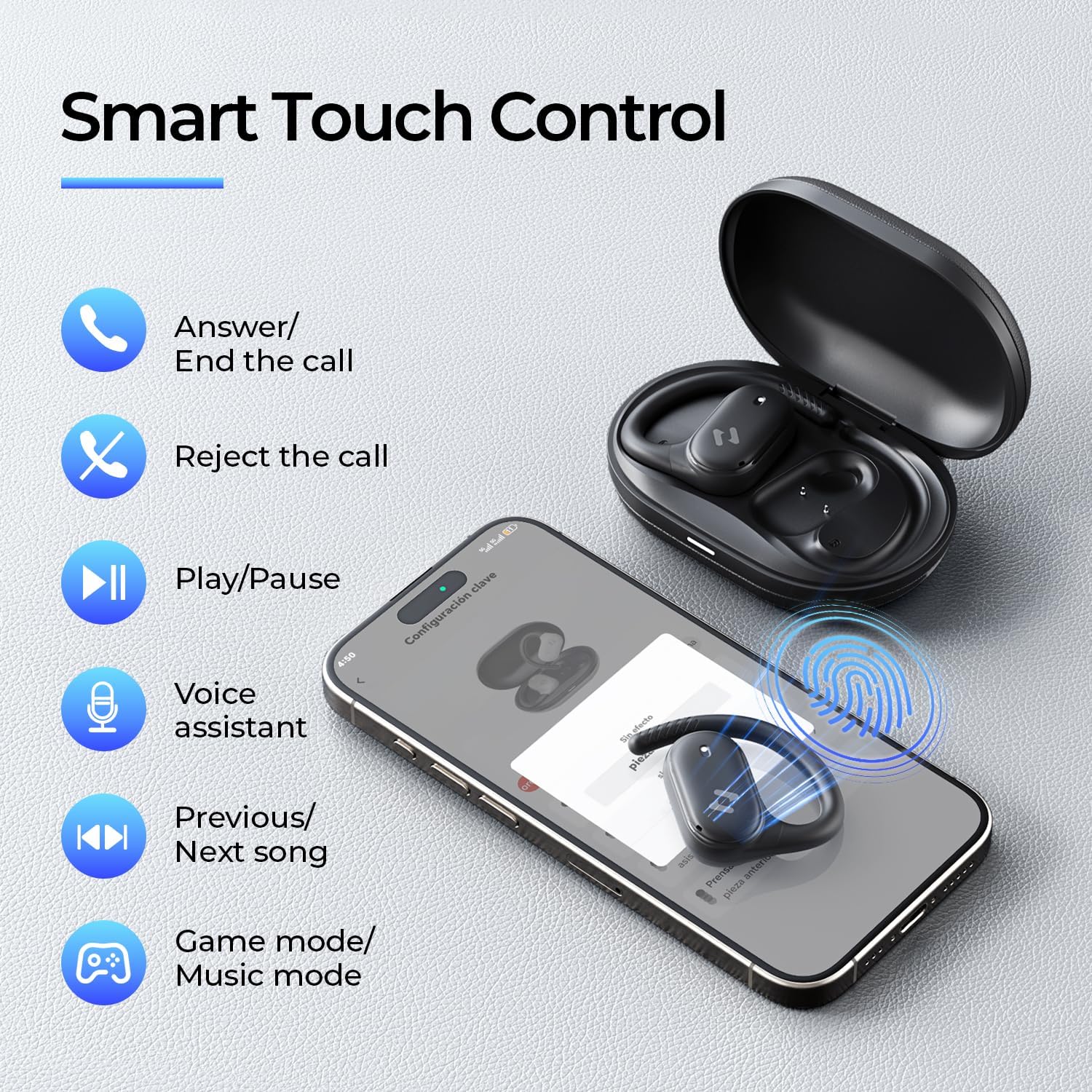
Image: Screenshots of the HAVIT LIFE App demonstrating various customization options.
Video: A guide on how to download, connect to, and customize settings within the HAVIT LIFE App.
7. பராமரிப்பு
உங்கள் ஹெட்ஃபோன்களின் செயல்திறன் மற்றும் தோற்றத்தைப் பராமரிக்க:
- சுத்தம்: Use a soft, dry cloth to clean the earbuds and charging case. Avoid using harsh chemicals or abrasive materials.
- சேமிப்பு: ஹெட்ஃபோன்களை தூசி மற்றும் சேதத்திலிருந்து பாதுகாக்க, பயன்பாட்டில் இல்லாதபோது அவற்றை சார்ஜிங் கேஸில் வைக்கவும்.
- பேட்டரி பராமரிப்பு: Charge the headphones regularly, even if not in frequent use, to prolong battery life. Avoid extreme temperatures.
- நீர் எதிர்ப்பு: The headphones are IPX5 waterproof, meaning they are resistant to sweat and splashes. Do not submerge them in water. Ensure they are dry before placing them back in the charging case.

Image: The havit OWS915 headphones demonstrating their IPX5 water resistance.
8. சரிசெய்தல்
If you encounter issues with your havit OWS915 headphones, refer to the following common solutions:
| பிரச்சனை | தீர்வு |
|---|---|
| சாதனத்துடன் இணைக்க முடியவில்லை | Ensure Bluetooth is enabled on your device. Make sure the earbuds are charged and in pairing mode. Try restarting your device and the headphones. |
| ஒலி அல்லது குறைந்த ஒலி இல்லை | Check the volume level on both your device and the headphones. Ensure the headphones are properly connected. Clean any debris from the speaker grilles. |
| இயர்பட்கள் சார்ஜ் செய்யவில்லை | Ensure the charging cable is securely connected to both the case and the power source. Check if the charging contacts on the earbuds and case are clean. Try a different charging cable or power adapter. |
| இணைப்பு நிலையற்றது | Ensure your device is within the Bluetooth range (10 meters). Avoid obstacles between the headphones and your device. Disconnect and re-pair the headphones. |
| HAVIT LIFE App connection fails | Ensure you have the latest version of the HAVIT LIFE App installed. Check your device's internet connection. Restart the app and your headphones. |
9. விவரக்குறிப்புகள்
| அம்சம் | விவரம் |
|---|---|
| மாதிரி பெயர் | OWS915 |
| புளூடூத் பதிப்பு | 5.4 |
| புளூடூத் வரம்பு | 10 மீட்டர் |
| பேட்டரி ஆயுள் (இயர்பட்ஸ்) | 8.5 மணிநேரம் (60% தொகுதி) |
| மொத்த விளையாட்டு நேரம் (கேஸுடன்) | 64 மணிநேரம் |
| சார்ஜிங் கேஸ் பேட்டரி | 1000mAh |
| சார்ஜிங் கேஸ் நேரம் | 2.5 மணிநேரம் |
| ஆடியோ டிரைவர் அளவு | 14.2 மில்லிமீட்டர்கள் |
| நீர் எதிர்ப்பு நிலை | IPX5 (நீர்ப்புகா) |
| பொருளின் எடை (இயர்பட்ஸ்) | 7.9 கிராம் (ஒவ்வொன்றும்) |
| பொருள் | PC+ABS+TPU |
| கட்டுப்பாட்டு முறை | பயன்பாடு, தொடுதல் |
| சத்தம் கட்டுப்பாடு | None (Features ENC for calls) |
| அதிர்வெண் பதில் | 20 KHz |
| உணர்திறன் | 118 டி.பி |
| மின்மறுப்பு | 32 ஓம்ஸ் |
10. உத்தரவாதம் மற்றும் ஆதரவு
Your havit OWS915 Open Ear Headphones come with a standard manufacturer's warranty. Please refer to the warranty card included in your package for specific terms and conditions. For technical support or customer service inquiries, please contact havit customer support through their official webதளம் அல்லது உங்கள் உத்தரவாத ஆவணத்தில் வழங்கப்பட்ட தொடர்புத் தகவல்.
11. முக்கியமான பாதுகாப்பு தகவல்
- செவிப்புலன் பாதுகாப்பு: To protect your hearing, avoid listening at high volume levels for extended periods.
- சுற்றுச்சூழல் விழிப்புணர்வு: The open-ear design allows you to hear your surroundings. However, always exercise caution when using headphones in situations requiring full attention, such as driving or cycling.
- குழந்தைகள்: Keep the headphones and accessories out of reach of children under three years of age to prevent choking hazards.
- சார்ஜ்: வழங்கப்பட்ட சார்ஜிங் கேபிள் மற்றும் சான்றளிக்கப்பட்ட பவர் அடாப்டரை மட்டும் பயன்படுத்தவும். சாதனம் ஈரமாக இருந்தால் அதை சார்ஜ் செய்ய முயற்சிக்காதீர்கள்.
- பிரித்தல்: Do not attempt to disassemble or modify the headphones or charging case, as this may void the warranty and cause damage.


