1. அறிமுகம்
இந்த கையேடு உங்கள் SMSL AS400 பவரின் அமைப்பு, செயல்பாடு மற்றும் பராமரிப்புக்கான விரிவான வழிமுறைகளை வழங்குகிறது. Ampஆயுள் DAC தலையணி Amp. Please read this manual thoroughly before using the product to ensure proper function and longevity.
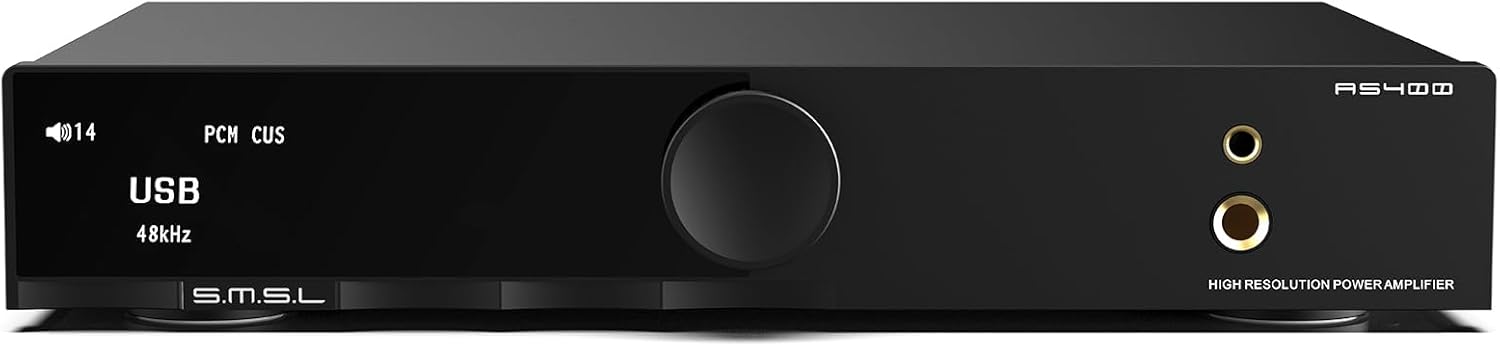
படம் 1: முன் view of the SMSL AS400 unit.
2. தயாரிப்பு அம்சங்கள்
- சக்திவாய்ந்த வெளியீடு: Integrates Cirrus Logic CS43131 DAC, Infineon MA5332MS digital amplifier, and XMOS XU-316. Supports PCM up to 32-bit/768kHz and DSD up to DSD256. Delivers 165W x 165W output (4Ω) with 0.003% THD+N distortion.
- 2.1 Subwoofer System: Features a dedicated subwoofer output for easy integration into a 2.1 channel audio system, providing enhanced bass.
- HDMI ARC TV Connection: Equipped with an HDMI (ARC) port for direct connection to compatible TVs, enabling synchronized audio and video.
- எம்எம் ஃபோனோ ப்ரீampஆயுள்: Built-in low-noise MM phono stage for turntables, ensuring high-quality vinyl playback.
- ஆடியோ தனிப்பயனாக்கம்: Offers 8 EQ settings (Direct, Tone, SDB, Bass, Super Bass, Rock, Soft, Clear) and 5 digital filters (Fast, Phase Compensation, Slow and Low Latency, Slow and Phase Compensation, Non-Oversampலிங்).
- விரிவான இணைப்பு: Multiple input options including HDMI (ARC), Bluetooth, USB, Optical, Coaxial, Phono, and I2S. Features 4.4mm and 6.35mm headphone outputs.

படம் 2: மேல்view of SMSL AS400 key features.
3. தொகுப்பு உள்ளடக்கங்கள்
தொகுப்பில் அனைத்து பொருட்களும் உள்ளதா என சரிபார்க்கவும்:
- SMSL AS400 Unit
- ஏசி பவர் கேபிள்
- USB கேபிள்
- HDMI கேபிள்
- புளூடூத் ஆண்டெனா
- ரிமோட் கண்ட்ரோல்
- பயனர் கையேடு (இந்த ஆவணம்)
- சேவை அட்டை
4. தயாரிப்பு முடிந்துவிட்டதுview
4.1 முன் குழு
Figure 3: Front panel layout.
- காட்சி திரை: தற்போதைய உள்ளீட்டைக் காட்டுகிறது, sample rate, volume, and menu options.
- செயல்பாட்டு குமிழ்: Press to enter the menu, hold to exit the menu, rotate to change values or volume.
- 4.4 மிமீ ஹெட்ஃபோன் ஜாக்: Balanced headphone output.
- 6.35மிமீ ஹெட்ஃபோன் வெளியீடு: Standard headphone output.
4.2 பின்புற பேனல்

Figure 4: Rear panel layout with input/output labels.
- PHONO Input (L/R): For connecting turntables with MM cartridges. Includes a grounding terminal.
- AUX Input (L/R): Standard analog RCA input.
- SW OUT (Subwoofer Output): செயலில் உள்ள ஒலிபெருக்கியை இணைப்பதற்கு.
- கோஆக்சியல் உள்ளீடு: டிஜிட்டல் கோஆக்சியல் ஆடியோ உள்ளீடு.
- HDMI (ARC) உள்ளீடு: For connecting to a TV's Audio Return Channel port.
- யூ.எஸ்.பி உள்ளீடு: For connecting to a computer or other USB audio source.
- ஆப்டிகல் உள்ளீடு: டிஜிட்டல் ஆப்டிகல் ஆடியோ உள்ளீடு.
- புளூடூத் ஆண்டெனா: For wireless Bluetooth audio reception.
- SPEAKERS OUT (L/R): Speaker terminals for passive speakers.
- ஏசி பவர் உள்ளீடு: மின் கேபிளை இணைப்பதற்காக.
5 அமைவு
5.1 ஸ்பீக்கர்களை இணைக்கிறது
- Ensure the AS400 is powered off.
- உங்கள் செயலற்ற ஸ்பீக்கர்களை இணைக்கவும் பேச்சாளர்கள் terminals on the rear panel. Ensure correct polarity (+ to + and - to -) for both left and right channels.
5.2 ஹெட்ஃபோன்களை இணைக்கிறது
- Connect your headphones to either the 4.4மிமீ ஹெட்ஃபோன் ஜாக் அல்லது தி 6.35மிமீ ஹெட்ஃபோன் வெளியீடு முன் குழுவில்.
5.3 ஆடியோ மூலங்களை இணைத்தல்
Connect your desired audio sources to the corresponding input ports on the rear panel:
- USB: Connect to a computer using the provided USB cable.
- புளூடூத்: Attach the Bluetooth antenna. Select Bluetooth input on the device and pair with your source device.
- ஆப்டிகல்/கோஆக்சியல்: Connect digital audio sources like CD players or media streamers.
- ஆர்.சி.ஏ (AUX): Connect analog audio sources like CD players or other audio devices.
- ஃபோனோ: Connect a turntable with an MM cartridge. Ensure the turntable's ground wire is connected to the AS400's grounding terminal.
- HDMI (ARC): Connect to your TV's HDMI ARC port using a compatible HDMI cable.
5.3.1 HDMI ARC Connection Details

Figure 5: HDMI ARC connection setup.
To connect an ARC compatible TV:
- Connect an HDMI cable (19-pin, with HDMI logo indicating ARC compatibility) from your TV's HDMI (ARC) port to the AS400's HDMI (ARC) input.
- Ensure the TV's HDMI IN port is labeled "ARC" or "eARC/ARC". If the port does not support ARC, this function cannot be used.
- You may need to adjust TV settings for ARC. Refer to your TV's user manual.
- This product supports digital audio input via HDMI ARC, not video input.
- If your TV does not support ARC, connect the TV's audio output (Optical, Coaxial, or AUX) to the corresponding input on the AS400.
- Due to ARC input protocol, the AS400's volume cannot be adjusted by the TV remote, nor does it support synchronous power on/off.
- When using HDMI ARC, confirm the TV's audio output format is PCM.
Video 1: Demonstration of HDMI ARC connection to a TV.
6. இயக்க வழிமுறைகள்
6.1 அடிப்படை செயல்பாடு
- பவர் ஆன்/ஆஃப்: Use the power switch on the rear panel or the remote control.
- ஒலியளவு கட்டுப்பாடு: Rotate the function knob on the front panel or use the volume buttons on the remote.
- உள்ளீடு தேர்வு: Press the function knob to enter the menu, then rotate to select 'Input'. Alternatively, use the input selection buttons on the remote.
6.2 மெனு வழிசெலுத்தல்
The function knob is used for menu navigation:
- அழுத்தவும்: Enter the menu or confirm a selection.
- பிடி: தற்போதைய மெனுவிலிருந்து வெளியேறவும்.
- சுழற்று: Scroll through menu options or adjust values.
6.3 EQ and Filter Settings

Figure 6: Menu options for EQ and tone control.
Access the 'SETUP MENU' by pressing the function knob. Navigate to 'EQ', 'Treble', 'Bass', or 'Filter' to customize your audio experience:
- EQ முறைகள்: Select from Direct, Tone, SDB, Bass, Super Bass, Rock, Soft, and Clear.
- வடிப்பான்கள்: Choose from Fast, Phase Compensation, Slow and Low Latency, Slow and Phase Compensation, and Non-Oversampலிங்
6.4 MQA Playback

Figure 7: MQA and MQA-CD support.
The AS400 supports full MQA and MQA-CD decoding, allowing for native playback of MQA streams/files and MQA-CDs. Connect your MQA-enabled source via USB, Optical, or Coaxial inputs for high-resolution audio.
காணொளி 2: முடிந்ததுview of the SMSL AS400's features and functionality.
7. விவரக்குறிப்புகள்

படம் 8: விரிவான தயாரிப்பு விவரக்குறிப்புகள்.
| அம்சம் | விவரக்குறிப்பு |
|---|---|
| உள்ளீடு | RCA / BT / USB / ஆப்டிகல் / கோஆக்சியல் / ஃபோனோ / I2S |
| THD+N | 0.003% |
| Output Power (RMS) STEREO | 4Ω: 165W x 2, 8Ω: 85W x 2 |
| Input Sensitivity/Input Impedance | 280mV/22kΩ |
| USB இணக்கத்தன்மை | விண்டோஸ் 7 / 8 / 8.1 / 10 / 11, மேக் ஓஎஸ்எக்ஸ், லினக்ஸ் |
| பிட் ஆழம் | USB: 1bit, 16-32bit; Optical/Coaxial: 1bit, 16-32bit |
| எஸ்.என்.ஆர் | 107dB |
| சேனல் பிரிப்பு | 98dB |
| USB பரிமாற்றம் | ஒத்திசைவற்ற பரிமாற்றம் |
| மின் நுகர்வு | 40W (சாதாரண அளவு) |
| MQA குறிவிலக்கி | USB / ஆப்டிகல் / கோஆக்சியல் |
| MQA-CD டிகோடர் | ஆப்டிகல் / கோஆக்சியல் |
| Sampலிங் விகிதம் | PCM: 44.1-768kHz (USB), 44.1-192kHz (Optical/Coaxial); DSD: 2.8224-11.2896MHz (USB), DSD64(DoP) (Optical/Coaxial) |
| அளவு (WxHxD) | 210.4 x 46 x 254 மிமீ |
| பொருளின் எடை | 1.568 கிலோ / 3.46 பவுண்டுகள் |
| பொருள் | அலுமினியம் அலாய் |
| தொகுதிtage | 220 வோல்ட் |
8. சரிசெய்தல்
8.1 HDMI ARC Function
- Q1: The ARC input is connected to the TV, but the TV does not recognize the device or there is no sound.
A1: The ARC input needs to be connected to the HDMI ARC interface of the TV. The output mode of the TV should be set to "ARC/ARC+TV speakers". - Q2: இந்த தயாரிப்பின் ஒலியளவை டிவி ரிமோட் கண்ட்ரோல் சரிசெய்ய முடியுமா?
A2: ஒத்துழைக்கவில்லை. - கேள்வி 3: டிவியை ஆன்/ஆஃப் செய்த பிறகு தயாரிப்பு ஆன்/ஆஃப் ஆகுமா?
A3: ஆதரிக்கப்படவில்லை. HDMI ARC உள்ளீட்டைப் பயன்படுத்தும் போது, டிவி அணைக்கப்பட்டு, மீண்டும் இயக்கப்படும் போது இந்தத் தயாரிப்பை மறுதொடக்கம் செய்ய வேண்டும். - கேள்வி 4: டிவியை தயாரிப்புடன் இணைத்த பிறகு ஒலி இல்லை என்றால் நான் என்ன செய்ய வேண்டும்?
A4: இந்த தயாரிப்பைப் பயன்படுத்தும்போது, டிவியின் ஆடியோ வெளியீட்டு வடிவம் PCM என்பதை உறுதிப்படுத்தவும். - கேள்வி 5: இது டிவி செட்-டாப் பாக்ஸுடன் இணைப்பதை ஆதரிக்கிறதா?
A5: ஒத்துழைக்கவில்லை.
8.2 பொதுச் சரிசெய்தல்
- சக்தி இல்லை: Ensure the AC power cable is securely connected to both the AS400 and a working power outlet. Check the power switch on the rear panel.
- No Sound from Speakers/Headphones: Verify the correct input source is selected. Check all cable connections. Ensure volume is not muted or set too low. Confirm speakers/headphones are properly connected.
- சிதைந்த ஒலி: Check cable connections for looseness or damage. Ensure the audio source is not overdriving the input. Try a different audio source or cable.
- புளூடூத் இணைப்புச் சிக்கல்கள்: Ensure the Bluetooth antenna is attached. Confirm the AS400 is in Bluetooth pairing mode and your device's Bluetooth is enabled and searching. Try unpairing and re-pairing the device.
9. பராமரிப்பு
- சுத்தம்: Use a soft, dry cloth to clean the unit. Avoid using liquid cleaners or solvents.
- இடம்: Place the unit on a stable, level surface with adequate ventilation. Avoid direct sunlight, heat sources, and excessive moisture.
- சக்தி: Disconnect the power cable from the wall outlet if the unit will not be used for an extended period.
10. உத்தரவாதம் & ஆதரவு
For warranty information and technical support, please refer to the service card included in your package or contact the manufacturer directly. Keep your purchase receipt as proof of purchase for warranty claims.


