1. அறிமுகம்
The SMSL AS400 is a versatile audio device combining a Digital-to-Analog Converter (DAC), a headphone ampலிஃபையர் (HPA), மற்றும் ஒரு சக்தி ampஆயுள்AMP) into a single unit. Designed for high-fidelity audio reproduction, it supports various input sources and offers powerful output for both speakers and headphones. This manual provides detailed instructions for the proper setup, operation, and maintenance of your AS400 unit.

Figure 1.1: The SMSL AS400 functions as a DAC, Headphone Amplifier, and Power Ampஆயுள்.
2. பாதுகாப்பு தகவல்
- மின்சாரம்: வழங்கப்பட்ட பவர் அடாப்டரை மட்டும் பயன்படுத்தவும்.tage உங்கள் உள்ளூர் மின்சார விநியோக விவரக்குறிப்புகளுடன் பொருந்துகிறது.
- காற்றோட்டம்: காற்றோட்ட திறப்புகளைத் தடுக்க வேண்டாம். அதிக வெப்பமடைவதைத் தடுக்க அலகு சுற்றி போதுமான காற்றோட்டத்தை உறுதி செய்யவும்.
- ஈரப்பதம்: Keep the unit away from water, moisture, and high humidity environments.
- சுத்தம்: சுத்தம் செய்வதற்கு முன் மின்சாரத்தை துண்டிக்கவும். உலர்ந்த, மென்மையான துணியைப் பயன்படுத்தவும். திரவ அல்லது ஏரோசல் கிளீனர்களைப் பயன்படுத்த வேண்டாம்.
- சேவை: இந்த தயாரிப்புக்கு நீங்களே சேவை செய்ய முயற்சிக்காதீர்கள். தகுதிவாய்ந்த சேவை ஊழியர்களுக்கு அனைத்து சேவைகளையும் பார்க்கவும்.
- இடம்: யூனிட்டை ஒரு நிலையான, சமமான மேற்பரப்பில் வைக்கவும். வெப்ப மூலங்களுக்கு அருகில் அல்லது நேரடி சூரிய ஒளியில் வைப்பதைத் தவிர்க்கவும்.
3. தொகுப்பு உள்ளடக்கங்கள்
தொகுப்பில் அனைத்து பொருட்களும் உள்ளதா என சரிபார்க்கவும்:
- SMSL AS400 யூனிட்
- ரிமோட் கண்ட்ரோல் (RC-8A)
- பவர் கேபிள்
- USB கேபிள்
- புளூடூத் ஆண்டெனா
- பயனர் கையேடு (இந்த ஆவணம்)
4. தயாரிப்பு முடிந்துவிட்டதுview
4.1 முன் குழு

Figure 4.1: Front Panel of the SMSL AS400 and included remote control.

Figure 4.2: Front Panel Component Identification.
- காட்சி திரை: தற்போதைய உள்ளீட்டைக் காட்டுகிறது, sample விகிதம், அளவு மற்றும் மெனு விருப்பங்கள்.
- Remote Window: ரிமோட் கண்ட்ரோலுக்கான அகச்சிவப்பு ரிசீவர்.
- செயல்பாட்டு குமிழ்:
- Press: Enter menu / OK
- Hold: Exit menu
- Rotate: Change value / Volume control
- 4.4 மிமீ ஹெட்ஃபோன் ஜாக்: சமச்சீர் ஹெட்ஃபோன் வெளியீடு.
- 6.35மிமீ ஹெட்ஃபோன் வெளியீடு: Unbalanced headphone output.
4.2 பின்புற பேனல்

Figure 4.3: Rear Panel Component Identification.
- கிரவுண்டிங் டெர்மினல்: For connecting a turntable ground wire.
- ஃபோனோ உள்ளீடு: RCA inputs for turntables with MM cartridges.
- LINE Input (AUX): RCA analog input for external audio sources.
- கோஆக்சியல் உள்ளீடு: டிஜிட்டல் ஆடியோ உள்ளீடு.
- SW அவுட் (முன்amp): ஒலிபெருக்கி முன் வெளியீடு.
- USB உள்ளீடு (PRE): USB-B input for connecting to a computer or other digital source.
- ஒளியியல் உள்ளீடு: டிஜிட்டல் ஆடியோ உள்ளீடு.
- HDMI (ARC) உள்ளீடு: Audio Return Channel for connecting to a TV.
- புளூடூத் ஆண்டெனா: For wireless Bluetooth connectivity.
- Left/Right Channel Output: செயலற்ற ஸ்பீக்கர்களுக்கான ஸ்பீக்கர் டெர்மினல்கள்.
- ஏசி பவர் உள்ளீடு: மின் கேபிளை இங்கே இணைக்கவும்.
4.3 ரிமோட் கண்ட்ரோல் (RC-8A)
படம் 4.4: ரிமோட் கண்ட்ரோல் செயல்பாடுகள்.
- பவர் ஆன்/ஆஃப்: யூனிட்டை ஆன் அல்லது ஆஃப் செய்கிறது.
- மேல் கீழ்: மெனு விருப்பங்களுக்குச் செல்லவும் அல்லது அமைப்புகளைச் சரிசெய்யவும்.
- மெனு/சரி: Enters the main menu or confirms a selection.
- FN (Function): Enters the secondary interface for additional settings.
- உள்ளீடு தேர்ந்தெடு: கிடைக்கக்கூடிய உள்ளீட்டு மூலங்கள் வழியாக சுழற்சி செய்கிறது.
- முடக்கு: ஆடியோ வெளியீட்டை ஒலியடக்குகிறது அல்லது ஒலியடக்குகிறது.
- வெளியீட்டு மாறுதல்: ஸ்பீக்கர் மற்றும் ஹெட்ஃபோன் வெளியீடுகளுக்கு இடையில் மாறுகிறது.
- தொகுதி +/-: வெளியீட்டு அளவை சரிசெய்கிறது.
5 அமைவு
5.1 ஸ்பீக்கர்களை இணைக்கிறது
- AS400 அணைக்கப்பட்டுள்ளதா என்பதை உறுதிப்படுத்தவும்.
- Connect your passive speakers to the Left and Right Channel Output terminals on the rear panel. Ensure correct polarity (+ to + and - to -).
- If using a powered subwoofer, connect it to the SW Out (Preamp) port using an RCA cable.
5.2 ஆடியோ மூலங்களை இணைத்தல்
The AS400 supports multiple input types:
- USB: Connect a computer or other USB audio source to the USB Input (PRE) port using the provided USB cable.
- ஆப்டிகல்/கோஆக்சியல்: Connect digital audio sources (e.g., CD player, game console) to the Optical or Coaxial Input ports.
- RCA (LINE): Connect analog audio sources (e.g., media player) to the LINE Input (AUX) ports.
- ஃபோனோ: Connect a turntable with an MM cartridge to the PHONO Input ports. Ensure the turntable's ground wire is connected to the Grounding Terminal on the AS400.
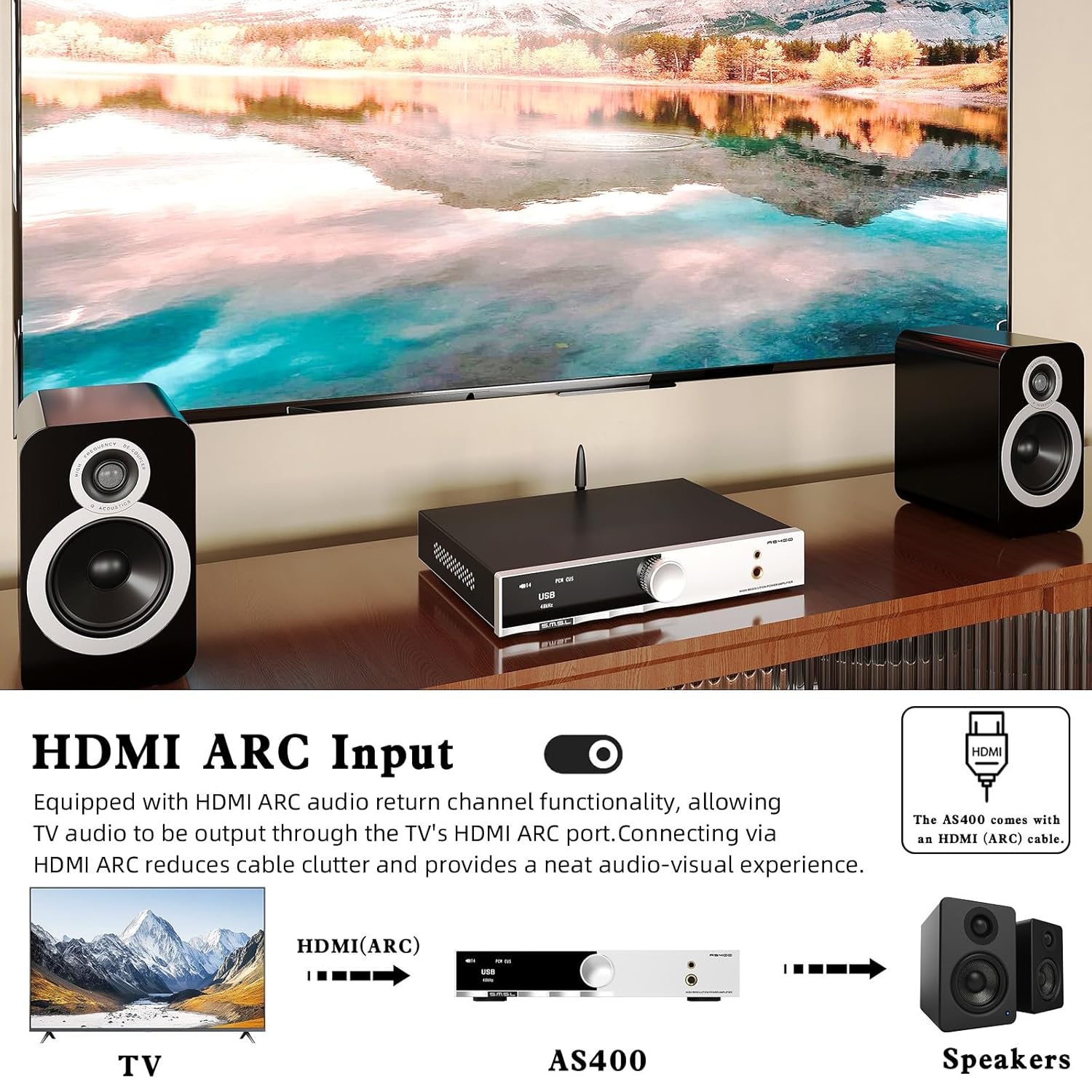
- HDMI (ARC): Connect your TV's HDMI ARC port to the AS400's HDMI (ARC) Input for TV audio output.
- புளூடூத்: Screw the Bluetooth antenna onto its designated port for wireless connectivity.

Figure 5.1: HDMI ARC and Bluetooth Connectivity.
5.3 மின் இணைப்பு
- Connect the power cable to the AC Power Input on the rear panel of the AS400.
- மின் கேபிளின் மறுமுனையை பொருத்தமான சுவர் கடையில் செருகவும்.
6. இயக்க வழிமுறைகள்
6.1 பவர் ஆன்/ஆஃப்
Press the Power ON/OFF button on the remote control or the function knob to turn the unit on or off.
6.2 உள்ளீடு தேர்வு
Use the 'Input Select' button on the remote or rotate the function knob to cycle through available inputs (USB, Optical, Coaxial, RCA, PHONO, HDMI ARC, Bluetooth).
6.3 தொகுதி கட்டுப்பாடு
Adjust the volume using the 'Volume +/-' buttons on the remote or by rotating the function knob.
6.4 மெனு வழிசெலுத்தல் மற்றும் அமைப்புகள்
Press the function knob or the 'MENU/OK' button on the remote to enter the main menu. Use the 'Up/Down' buttons or rotate the knob to navigate. Press 'MENU/OK' to select an option. Hold the function knob or press the 'FN' button to exit the menu.
Key menu options include:
- உள்ளீடு: Selects the active audio input.
- வெளியீடு: ஸ்பீக்கர் மற்றும் ஹெட்ஃபோன் வெளியீடுகளுக்கு இடையில் மாறுகிறது.
- ஈக்யூ: Select from 8 preset EQ modes (Direct, Bass, Rock, etc.) to tailor sound.
- பாஸ்/டிரெபிள்: Adjust bass and treble levels for personalized sound.
- வடிகட்டி: Select from 5 PCM digital filters.
- நிறம்: Change the display screen color.
- BT Clear: Clears paired Bluetooth devices.

Figure 6.1: Setup Menu and Sound Customization Options.
6.5 ப்ளூடூத் இணைத்தல்
- புளூடூத் ஆண்டெனா இணைக்கப்பட்டுள்ளதா என்பதை உறுதிப்படுத்தவும்.
- AS400 இல் உள்ளீட்டு மூலமாக 'புளூடூத்' என்பதைத் தேர்ந்தெடுக்கவும்.
- On your mobile device, search for Bluetooth devices and select 'SMSL AS400'.
- Once paired, audio from your device will stream to the AS400.
- To clear paired devices, navigate to 'BT Clear' in the menu.
6.6 MQA/MQA-CD Playback
The AS400 supports MQA and MQA-CD decoding. When playing MQA content via USB, Optical, or Coaxial inputs, the display will indicate MQA status, ensuring studio-quality audio reproduction.
7. பராமரிப்பு
- சுத்தம்: அலகின் வெளிப்புறத்தைத் துடைக்க மென்மையான, உலர்ந்த துணியைப் பயன்படுத்தவும். சிராய்ப்பு கிளீனர்கள் அல்லது கரைப்பான்களைத் தவிர்க்கவும்.
- தூசி: Regularly dust the unit, especially around ventilation areas, to prevent dust buildup.
- இணைப்புகள்: அனைத்து கேபிள் இணைப்புகளும் பாதுகாப்பாக இருப்பதை உறுதிசெய்ய அவ்வப்போது அவற்றைச் சரிபார்க்கவும்.
- சேமிப்பு: யூனிட்டை நீண்ட நேரம் சேமித்து வைத்தால், அதை மின் இணைப்பிலிருந்து துண்டித்து, குளிர்ந்த, உலர்ந்த இடத்தில் சேமிக்கவும்.
8. சரிசெய்தல்
If you encounter issues with your AS400, please refer to the following common problems and solutions:
| பிரச்சனை | சாத்தியமான காரணம் | தீர்வு |
|---|---|---|
| சக்தி இல்லை | Power cable disconnected; power outlet faulty. | மின் கேபிள் இணைப்பைச் சரிபார்க்கவும்; வேறு அவுட்லெட்டை முயற்சிக்கவும். |
| ஒலி வெளியீடு இல்லை | Incorrect input selected; volume too low; speakers/headphones not connected; output mode incorrect. | Verify input source; increase volume; check speaker/headphone connections; ensure correct output mode (speaker/headphone) is selected in the menu. |
| புளூடூத் இணைப்பு நிலையற்றது | Antenna not connected; interference; device too far. | Ensure Bluetooth antenna is securely attached; move device closer to AS400; clear paired devices via 'BT Clear' in menu and re-pair. |
| Subwoofer output is weak or not triggering. | Subwoofer sensitivity setting; AS400 subwoofer output level. | Adjust the gain/volume setting on your powered subwoofer. Ensure the subwoofer is powered on. Note that the AS400's subwoofer output is a pre-out and its level is tied to the main volume. |
| சிதைந்த ஒலி | Input signal too high; faulty cable; speaker impedance mismatch. | Reduce input source volume; check/replace cables; ensure speaker impedance is within AS400's supported range. |
இந்த தீர்வுகளை முயற்சித்த பிறகும் சிக்கல் தொடர்ந்தால், வாடிக்கையாளர் ஆதரவைத் தொடர்பு கொள்ளவும்.
9. விவரக்குறிப்புகள்

படம் 9.1: விரிவான தயாரிப்பு விவரக்குறிப்புகள்.
| அம்சம் | விவரக்குறிப்பு |
|---|---|
| உள்ளீடுகள் | RCA / BT / USB / Optical / Coaxial / Phono / I²S / HDMI (ARC) |
| THD+N | 0.003% |
| வெளியீட்டு சக்தி (RMS) | 165W x2 (4Ω), 85W x2 (8Ω) |
| உள்ளீடு உணர்திறன் / மின்மறுப்பு | 280mV/22kΩ |
| பரிமாணங்கள் (WxHxD) | 210.4 x 46 x 254 மிமீ |
| எடை | 1.57 கிலோ (3.46 பவுண்ட்) |
| USB இணக்கத்தன்மை | விண்டோஸ் 7 / 8 / 8.1 / 10 / 11, மேக் ஓஎஸ்எக்ஸ், லினக்ஸ் |
| பிட் ஆழம் | யூ.எஸ்.பி: 1பிட், 16-32பிட்; ஆப்டிகல்/கோஆக்சியல்: 1பிட், 16-32பிட் |
| எஸ்.என்.ஆர் | 107dB |
| சேனல் பிரிப்பு | 98dB |
| USB பரிமாற்றம் | ஒத்திசைவற்ற பரிமாற்றம் |
| மின் நுகர்வு | 40W (சாதாரண அளவு) |
| MQA குறிவிலக்கி | USB / ஆப்டிகல் / கோஆக்சியல் |
| MQA-CD டிகோடர் | ஆப்டிகல் / கோஆக்சியல் |
| Sampஇணைப்பு விகிதம் (USB) | PCM: 44.1-768kHz; DSD: 2.8224-11.2896MHz |
| Sampling Rate (Optical/Coaxial) | PCM: 44.1-192kHz; DSD: DSD64 (DoP) |
10. உத்தரவாதம் மற்றும் ஆதரவு
The SMSL AS400 comes with a standard manufacturer's warranty. Please refer to the warranty card included in your package for specific terms and conditions, including warranty period and coverage.
For technical support, troubleshooting assistance beyond this manual, or warranty claims, please contact your authorized SMSL dealer or visit the official SMSL webதொடர்பு தகவலுக்கான தளம்.
உத்தரவாத நோக்கங்களுக்காக உங்கள் கொள்முதல் ஆதாரத்தை வைத்திருங்கள்.


