1. அறிமுகம்
Thank you for choosing the Sainlogic SA9 Plus Smart WiFi Weather Station. This manual provides essential information for the proper setup, operation, and maintenance of your device. The SA9 Plus offers comprehensive indoor and outdoor weather monitoring, AI-powered forecasts via the Weatherseed app, and robust connectivity options.
2. பெட்டியில் என்ன இருக்கிறது
Please ensure all components are present before proceeding with the setup:
- காட்சி கன்சோல்
- Integrated Outdoor Transmitter (7-in-1 Multi-function Sensor)
- Indoor Thermo-Hygrometer Sensor
- பவர் அடாப்டர்
- கால் பொருத்துதல் (துருவ செருகலுடன்)
- மவுண்டிங் பிராக்கெட் பின் தட்டு (துருவ மவுண்ட்)
- பெருகிவரும் துருவ
- 2x Pole Mounting Nuts (M3) / Bolts (03)
- 4x Pole Mounting Nuts (M5) / Bolts (05)
- 4x தட்டுதல் திருகுகள்
- பயனர் கையேடு
3. தயாரிப்பு முடிந்துவிட்டதுview
The Sainlogic SA9 Plus Weather Station consists of a main display console and an integrated outdoor multi-function sensor, complemented by an indoor thermo-hygrometer. The outdoor sensor measures UV/sunlight, wind speed/direction, rainfall, temperature, humidity, and pressure with laboratory-grade accuracy.
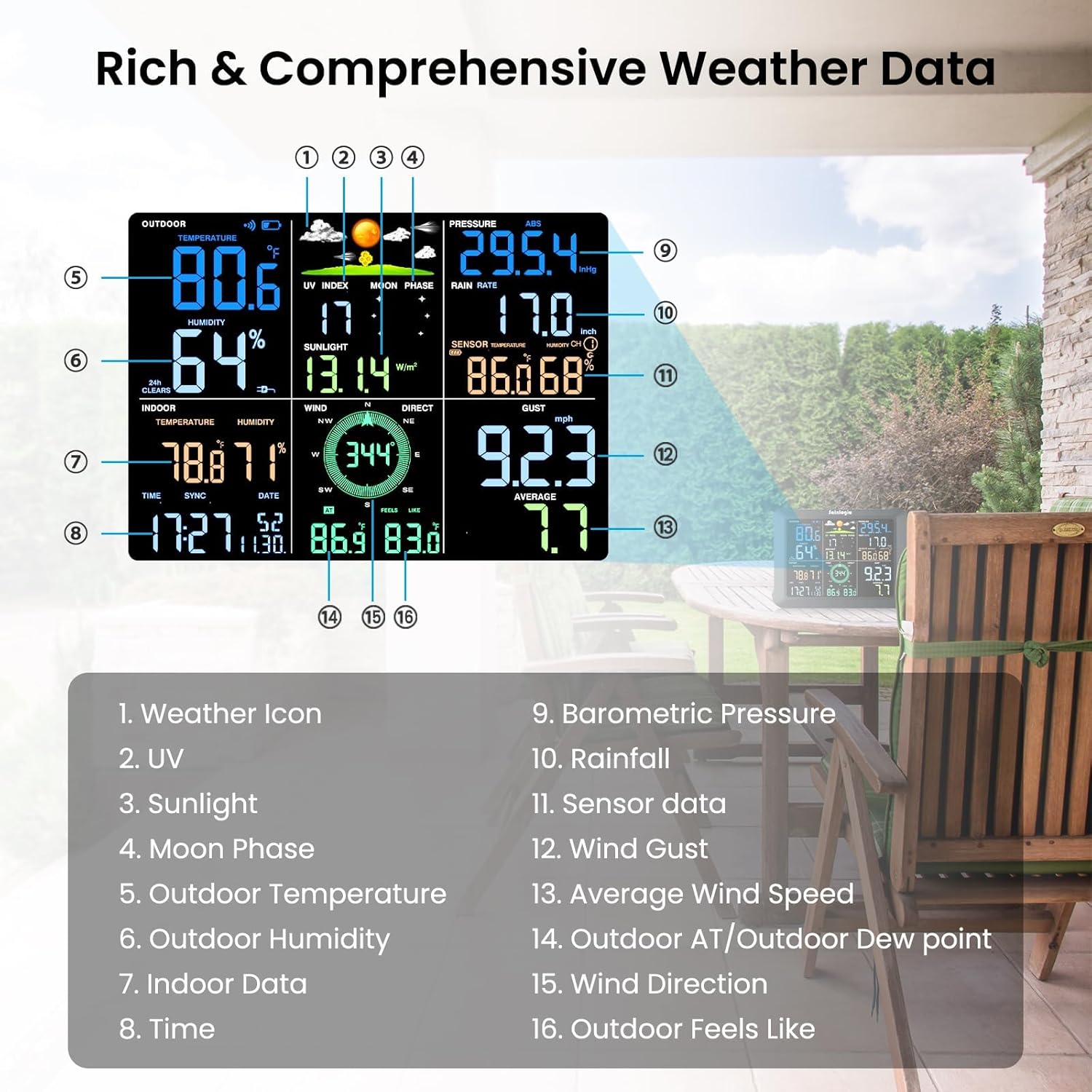
படம் 1: Sainlogic SA9 Plus Display Console showing various weather data points and their corresponding labels.

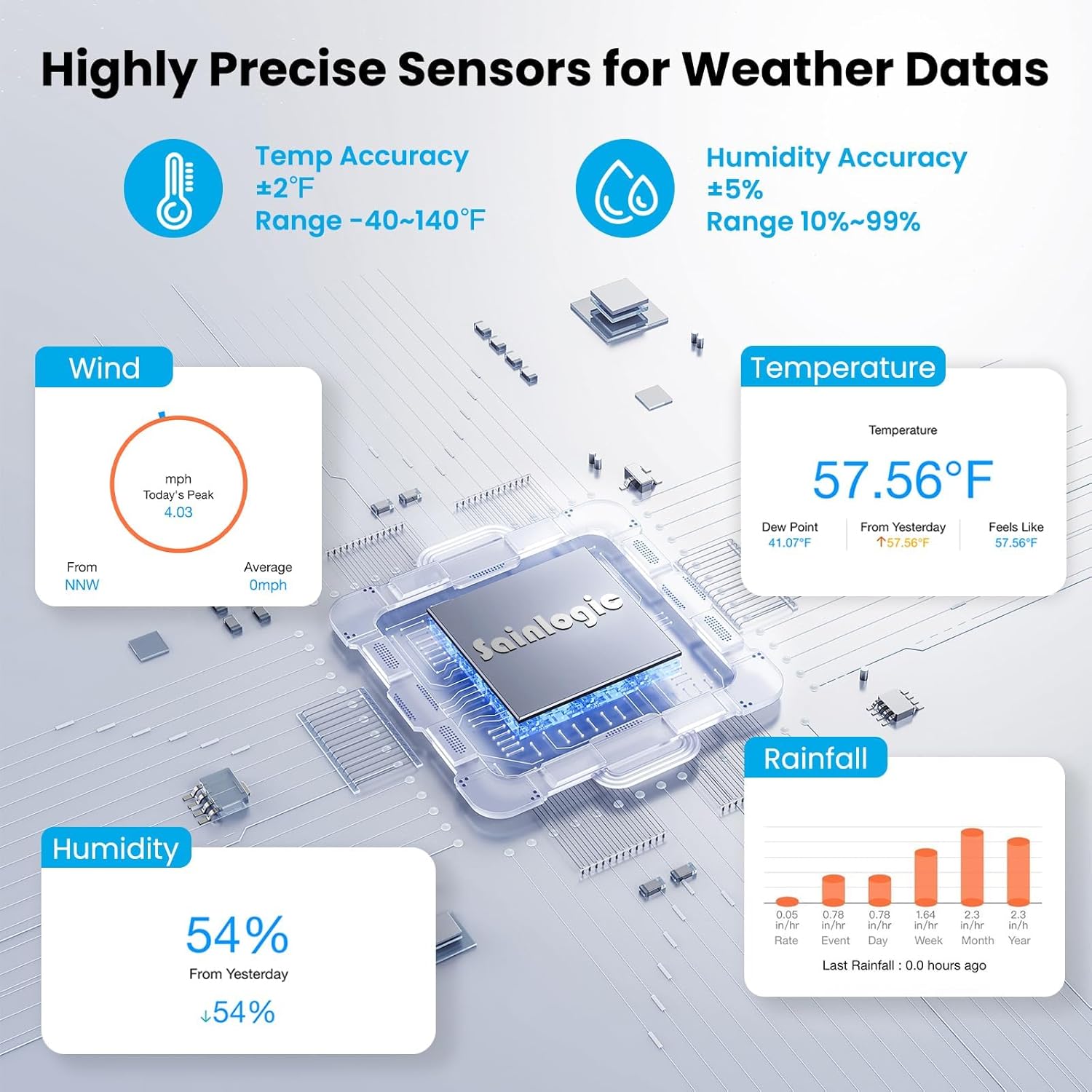
படம் 2: விரிவான view of the precise sensors for temperature, humidity, wind, and rainfall measurement.
4. அமைவு & நிறுவல்
4.1. வெளிப்புற சென்சார் அசெம்பிளி
The outdoor sensor is designed for easy assembly and installation. Refer to the diagram below for component identification and mounting options.

படம் 3: வெடித்தது view of the outdoor sensor, showing individual components for assembly.
4.2. மவுண்டிங் விருப்பங்கள்
The outdoor sensor can be mounted in various ways to ensure optimal data collection. Choose a location free from obstructions for accurate wind and rain measurements. Ensure the sensor is level using the integrated bubble level.

படம் 4: Illustrations of different mounting configurations: on top, on a pole (top), on the side, and on a pole (side).
4.3. ஆரம்ப பவர்-அப்
- Insert 3 AA batteries (not included) into the outdoor sensor's battery compartment.
- Plug the power adapter into the display console.
- The display console will automatically search for the outdoor sensor. Allow a few minutes for the sensors to synchronize.
5. App Connection & Features
The Sainlogic SA9 Plus connects to the Weatherseed app for enhanced features and remote monitoring.
5.1. Connecting to the Weatherseed App
- Download the 'Weatherseed' app from your device's app store.
- புதிய சாதனத்தைச் சேர்க்க, பயன்பாட்டைத் திறந்து, திரையில் உள்ள வழிமுறைகளைப் பின்பற்றவும்.
- The station supports WiFi and Bluetooth connectivity for easy pairing.

படம் 5: Weatherseed AI app interface displaying 24/7 forecasts and instant alerts.
5.2. பயன்பாட்டு அம்சங்கள்
- 24/7 AI-Powered Forecasts: Receive high-precision forecasts for 24 hours and 7 days.
- உடனடி எச்சரிக்கைகள்: Get App/Email notifications for temperature or humidity changes exceeding custom thresholds.
- 2-Year Historical Data: View, download, and export historical weather data in Excel format (up to 30 days per export).
- Weather Underground (WU) Integration: Optionally connect to Weather Underground services within the app.
படம் 6: Weatherseed app's data export feature, allowing users to analyze historical weather trends.
6. Operating the Display Console
The 8.5-inch large color LCD display provides clear and comprehensive weather information at a glance. It features enlarged, bold fonts and a 3-level adjustable backlight for easy readability.
6.1. Displayed Information
The console displays a wide range of data, including:
- Indoor/Outdoor Temperature and Humidity
- காற்றின் வேகம் மற்றும் திசை
- மழை தரவு
- UV and Sunlight Index
- டூ பாயிண்ட்
- பாரோமெட்ரிக் அழுத்தம்
- சந்திரன் கட்டம்
- நேரம் மற்றும் தேதி
Refer to Figure 1 in the Product Overview section for a visual guide to the display layout.
7. விவரக்குறிப்புகள்
| அம்சம் | விவரம் |
|---|---|
| மாதிரி எண் | SA9 Plus |
| தயாரிப்பு பரிமாணங்கள் | 1 x 6.7 x 5.2 அங்குலம்; 6.66 பவுண்டுகள் |
| பேட்டரிகள் தேவை | 3 AA batteries (for outdoor sensor) |
| பொருள் | அக்ரிலோனிட்ரைல் புடாடீன் ஸ்டைரீன் (ABS) |
| இணைப்பு தொழில்நுட்பம் | புளூடூத், வைஃபை |
| வெப்பநிலை துல்லியம் | ±2°F (-40°F to 140°F) |
| ஈரப்பதம் துல்லியம் | ±5% RH (10%-99% RH) |
| Rainfall Precision | ±1mm (under 15mm) / ±7% (beyond 15mm up to 9999mm) |
| சிறப்பு அம்சங்கள் | 2-Year Data Storage & Export, Accurate AI Weather Forecast, Customizable Alerts |
8. சரிசெய்தல்
If you encounter any issues with your Sainlogic SA9 Plus Weather Station, please consider the following general troubleshooting steps:
- No Data on Display: Ensure both the outdoor sensor and display console have fresh batteries and are powered on. Check that the outdoor sensor is within range of the display console.
- தவறான வாசிப்புகள்: Verify that the outdoor sensor is installed in an unobstructed location and is level. Ensure no debris is blocking the rain gauge or wind sensors.
- பயன்பாட்டு இணைப்புச் சிக்கல்கள்: Confirm your WiFi network is 2.4GHz. Restart your router, display console, and mobile device. Re-attempt the pairing process in the Weatherseed app.
- Data Export Problems: Ensure your app is connected to the internet and the data range selected for export is within the 2-year limit and 30-day per export restriction.
9. உத்தரவாதம் & ஆதரவு
Sainlogic is committed to providing quality products and excellent customer service.
9.1. உத்தரவாதத் தகவல்
Your Sainlogic SA9 Plus Weather Station comes with a standard warranty. Please refer to the warranty card included in your product packaging for details on how to register and potentially extend your warranty.
9.2. வாடிக்கையாளர் ஆதரவு
For any questions or assistance, please contact Sainlogic customer support through the following channels:
- தொலைபேசி ஆதரவு: Available Monday through Friday, 10:00 AM to 6:00 PM (Eastern Time) for immediate assistance.
- மின்னஞ்சல் ஆதரவு: Expect a reply within 24 hours on weekdays and within 48 hours on weekends.
- அதிகாரி Webதளம்: Visit the Sainlogic official website for additional guides and support resources.
- Weatherseed App: Access after-sales support directly within the application for instant help.


