1. அறிமுகம்
நன்றி, நன்றி.asing the Monster S350 Bluetooth Speaker. This portable wireless speaker features a touch screen, Bluetooth 6.0 connectivity, and support for TF cards, offering a versatile audio experience. This manual provides detailed instructions for setup, operation, maintenance, and troubleshooting to ensure optimal performance and longevity of your device.
2. பாதுகாப்பு தகவல்
- ஸ்பீக்கரை தீவிர வெப்பநிலை, நேரடி சூரிய ஒளி அல்லது அதிக ஈரப்பதத்திற்கு வெளிப்படுத்த வேண்டாம்.
- பேச்சாளரைக் கீழே தள்ளுவதையோ அல்லது வலுவான தாக்கங்களுக்கு உட்படுத்துவதையோ தவிர்க்கவும்.
- ஸ்பீக்கரை தண்ணீர் மற்றும் பிற திரவங்களிலிருந்து விலக்கி வைக்கவும்.
- ஸ்பீக்கரை நீங்களே பிரிக்கவோ, சரிசெய்யவோ அல்லது மாற்றவோ முயற்சிக்காதீர்கள். தேவைப்பட்டால் தகுதிவாய்ந்த சேவை பணியாளர்களைத் தொடர்பு கொள்ளவும்.
- வழங்கப்பட்ட சார்ஜிங் கேபிள் அல்லது அதற்கு சமமானதை மட்டும் பயன்படுத்தவும்.
- உள்ளூர் விதிமுறைகளின்படி பேட்டரிகளை அப்புறப்படுத்துங்கள். எரிக்க வேண்டாம்.
3. தொகுப்பு உள்ளடக்கங்கள்
பின்வரும் பொருட்களுக்கு தொகுப்பைச் சரிபார்க்கவும்:
- Monster S350 Bluetooth Speaker
- USB சார்ஜிங் கேபிள்
- பயனர் கையேடு
4. தயாரிப்பு முடிந்துவிட்டதுview
Familiarize yourself with the components of your Monster S350 speaker.

படம் 4.1: முன் view of the Monster S350 Bluetooth Speaker, showcasing its retro design and touch screen.

படம் 4.2: Close-up of the speaker's top controls, illustrating the long press function for power and swipe gestures for volume adjustment.
கட்டுப்பாடுகள் மற்றும் துறைமுகங்கள்:
- பவர்/வால்யூம் நாப்: Long press to turn on/off. Swipe up to increase volume, swipe down to decrease volume.
- தொடுதிரை காட்சி: For navigation, settings, and displaying information.
- TF அட்டை ஸ்லாட்: Insert a TF (microSD) card for local music playback.
- USB-C சார்ஜிங் போர்ட்: ஸ்பீக்கரை சார்ஜ் செய்ததற்காக.
5 அமைவு
5.1 ஸ்பீக்கரை சார்ஜ் செய்தல்
- Connect the USB charging cable to the speaker's USB-C port.
- கேபிளின் மறுமுனையை USB பவர் அடாப்டருடன் (சேர்க்கப்படவில்லை) அல்லது கணினியின் USB போர்ட்டுடன் இணைக்கவும்.
- The charging indicator on the screen will show the charging status. A full charge typically takes approximately 2-3 hours.
5.2 பவர் ஆன்/ஆஃப்
- பவர் ஆன் செய்ய: Long press the Power/Volume knob until the screen lights up.
- பவர் ஆஃப் செய்ய: Long press the Power/Volume knob until the screen turns off.
5.3 ப்ளூடூத் இணைத்தல்
Pair your Monster S350 with a Bluetooth-enabled device.
- Ensure the speaker is powered on and within range of your Bluetooth device (e.g., smartphone, tablet).
- உங்கள் புளூடூத் சாதனத்தில், புளூடூத்தை இயக்கி, கிடைக்கும் சாதனங்களைத் தேடவும்.
- Select "Monster S350" from the list of found devices.
- Once paired, the speaker will indicate a successful connection, and you can begin playing audio.

படம் 5.1: The speaker displaying its Bluetooth connection status alongside a smartphone's Bluetooth settings.
5.4 TF கார்டு பிளேபேக்
Play music directly from a TF (microSD) card.
- ஸ்பீக்கர் அணைக்கப்பட்டுள்ளதை உறுதிசெய்யவும்.
- Insert a TF card (up to 32GB, formatted to FAT32) into the TF card slot until it clicks into place.
- Power on the speaker. The speaker will automatically detect the TF card and switch to local music playback mode, or you can select it from the touch screen menu.

படம் 5.2: Demonstrating the insertion of a TF card into the speaker's dedicated slot for local music playback.
6. இயக்க வழிமுறைகள்
6.1 அடிப்படை ஆடியோ பிளேபேக்
- விளையாடு/இடைநிறுத்தம்: Tap the play/pause icon on the touch screen.
- அடுத்த ட்ராக்: Swipe right on the touch screen or tap the next track icon.
- முந்தைய ட்ராக்: Swipe left on the touch screen or tap the previous track icon.
- ஒலியளவு கட்டுப்பாடு: Swipe up on the Power/Volume knob to increase volume, swipe down to decrease volume. Alternatively, adjust volume via the connected Bluetooth device.
6.2 தொடுதிரையைப் பயன்படுத்துதல்
The full-color touchscreen display allows for intuitive navigation and access to various features.
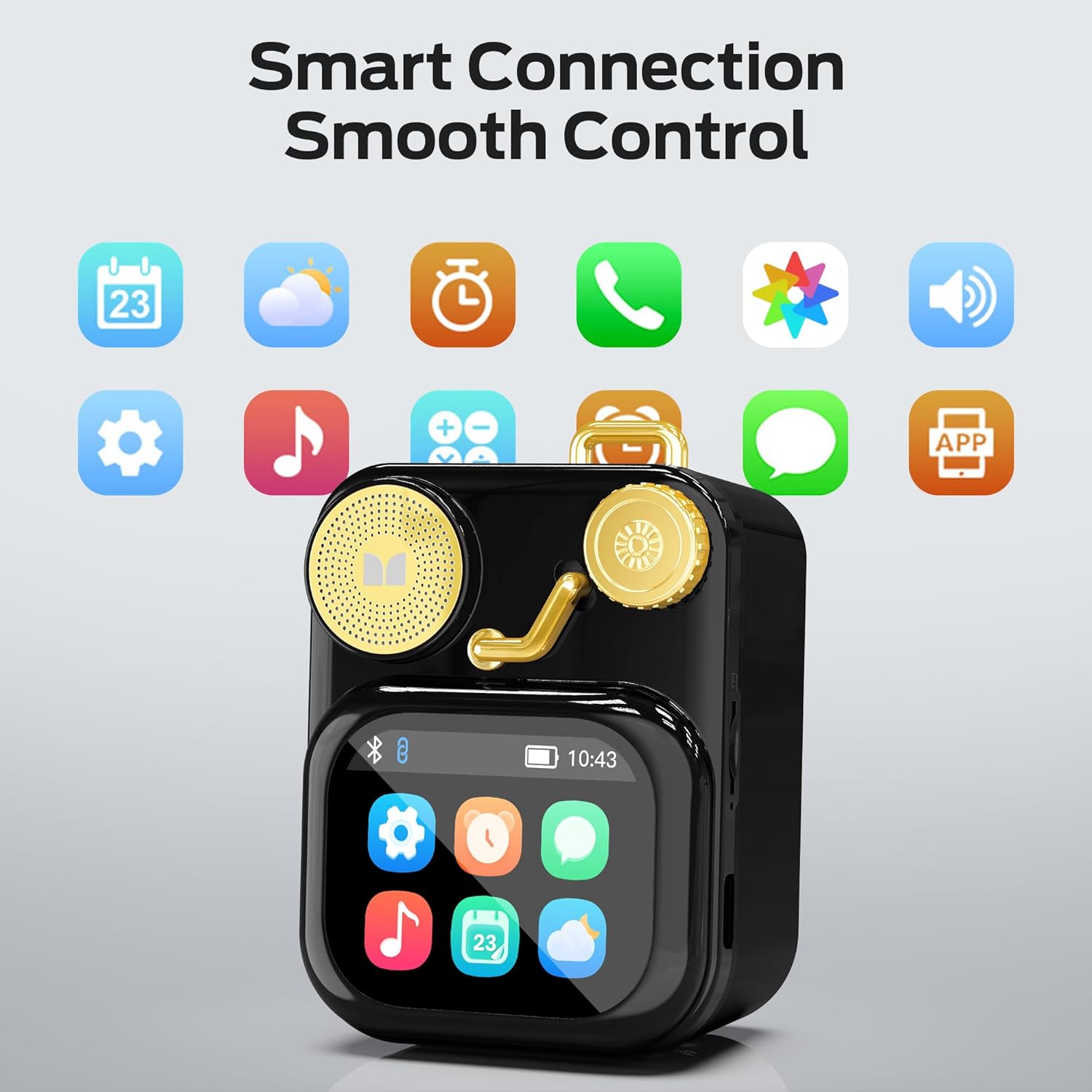
படம் 6.1: The speaker's touch screen displaying various application icons for smart features.
- வழிசெலுத்தல்: Swipe left/right or up/down to browse through menus and options.
- தேர்வு: அதைத் தேர்ந்தெடுக்க ஒரு ஐகான் அல்லது விருப்பத்தைத் தட்டவும்.
- அமைப்புகள்: Access system settings, Bluetooth options, display preferences, and more through the settings icon.
6.3 ஸ்மார்ட் அம்சங்கள்
When connected to a compatible smartphone via Bluetooth and the companion app (if available), the speaker can display various smart features:

படம் 6.2: Examples of smart features displayed on the speaker's screen, including notifications, weather, lyrics, and Bluetooth call information.
- மொபைல் அறிவிப்புகள்: Receive alerts for messages and other app notifications.
- பாடல் தகவல்: Display song titles and artist information during playback.
- அலாரங்கள்: Set and manage alarms directly from the speaker.
- வானிலை அறிவிப்புகள்: View நிகழ்நேர வானிலை தகவல்.
- வெள்ளை இரைச்சல்: Access soothing white noise sounds for relaxation.
7. பராமரிப்பு
7.1 சுத்தம் செய்தல்
- ஸ்பீக்கரின் மேற்பரப்பை மென்மையான, உலர்ந்த, பஞ்சு இல்லாத துணியால் துடைக்கவும்.
- Do not use abrasive cleaners, alcohol, or chemical solvents, as these may damage the finish.
- துறைமுகங்களை தூசி மற்றும் குப்பைகள் இல்லாமல் வைத்திருங்கள்.
7.2 சேமிப்பு
- நேரடி சூரிய ஒளி மற்றும் அதிக வெப்பநிலையிலிருந்து விலகி குளிர்ந்த, உலர்ந்த இடத்தில் ஸ்பீக்கரை சேமிக்கவும்.
- If storing for an extended period, charge the battery to approximately 50% every three months to preserve battery life.
8. சரிசெய்தல்
If you encounter issues with your Monster S350 speaker, refer to the following solutions:
| பிரச்சனை | சாத்தியமான காரணம் | தீர்வு |
|---|---|---|
| ஸ்பீக்கர் இயக்கப்படவில்லை. | பேட்டரி தீர்ந்து விட்டது. | வழங்கப்பட்ட USB கேபிளைப் பயன்படுத்தி ஸ்பீக்கரை சார்ஜ் செய்யவும். |
| பேச்சாளரிடமிருந்து எந்த சத்தமும் இல்லை. | Volume is too low or muted. Device not paired. | Increase speaker volume. Ensure Bluetooth device is paired and playing audio. |
| புளூடூத் வழியாக இணைக்க முடியவில்லை. | Speaker is not in pairing mode. Device is out of range. Interference. | Ensure speaker is on and Bluetooth is enabled. Move devices closer. Turn off other Bluetooth devices. |
| TF கார்டு இசை ஒலிக்கவில்லை. | அட்டை சரியாகச் செருகப்படவில்லை. ஆதரிக்கப்படவில்லை. file format. Corrupted card. | Reinsert TF card. Ensure music files are in a supported format (e.g., MP3). Try a different TF card. |
| Smart features not working. | Not connected to companion app. App issues. | Ensure the speaker is connected to the companion app on your smartphone. Check app permissions and updates. |
9. விவரக்குறிப்புகள்
Technical details of the Monster S350 Bluetooth Speaker:
- மாதிரி பெயர்: S350
- பிராண்ட்: அசுரன்
- பொருள்: உலோகம்
- நிறம்: கருப்பு
- தயாரிப்பு பரிமாணங்கள்: 12.5D x 10.5W x 5.4H சென்டிமீட்டர்கள் (தோராயமாக 4.9 x 4.1 x 2.1 அங்குலம்)
- பொருளின் எடை: 160 கிராம்கள் (தோராயமாக 0.35 பவுண்டுகள்)
- இணைப்பு தொழில்நுட்பம்: புளூடூத் 6.0
- பேச்சாளர் அதிகபட்ச வெளியீட்டு சக்தி: 10 வாட்ஸ்
- ஆடியோ வெளியீட்டு முறை: ஸ்டீரியோ
- மவுண்டிங் வகை: டேப்லெட்
- பேட்டரி: 1 லித்தியம் அயன் பேட்டரி (சேர்க்கப்பட்டுள்ளது)
- TF அட்டை ஆதரவு: Yes (up to 32GB, FAT32 format recommended)

படம் 9.1: Diagram illustrating the internal woofer for deep bass and tweeter for crisp highs, contributing to the speaker's audio quality.
10. உத்தரவாதம் மற்றும் ஆதரவு
For warranty information or technical support, please refer to the documentation included with your purchase or contact Monster customer service. Keep your proof of purchase for warranty claims.
வாடிக்கையாளர் சேவை தொடர்பு: Please visit the official Monster website or refer to your product packaging for the most current support contact information.


