1. தயாரிப்பு முடிந்துவிட்டதுview
The ANRAN Dual-Lens Solar Security Camera (Model Q7M2) is a 100% wire-free outdoor surveillance solution designed for home security. It features an innovative dual-lens system, solar power for continuous operation, and advanced detection capabilities.

Image 1.1: ANRAN Dual-Lens Solar Security Camera with integrated solar panel and mobile application view.
2 முக்கிய அம்சங்கள்
- இரட்டை-லென்ஸ் அமைப்பு: Features a wide-angle fixed lens for constant area monitoring and a remote-controlled PTZ (Pan-Tilt-Zoom) lens for detailed views.
- 3MP தெளிவுத்திறன்: தெளிவான மற்றும் விரிவான foo ஐ வழங்குகிறதுtage.
- Solar Powered & 100% Wire-Free: Equipped with a high-efficiency solar panel for continuous charging, eliminating the need for external power cables.
- வாழ்க View & இருவழிப் பேச்சு: Monitor real-time footage and communicate via the built-in microphone and speaker using the ANRAN app.
- வண்ண இரவு பார்வை: Built-in spotlight activates for full-color night vision, offering more detail than standard black-and-white.
- ஸ்மார்ட் மனித கண்டறிதல்: AI filters alerts by distinguishing people, pets, and vehicles (optional subscription required for AI function).
- IP66 வானிலை எதிர்ப்பு: Designed to withstand harsh outdoor elements.
- நெகிழ்வான சேமிப்பு: Supports local storage via microSD card (up to 128GB, not included) or optional cloud storage.

Image 2.1: Illustration of the camera's dual-lens system, showing a fixed wide-angle view and a pan-tilt-zoom lens for flexible monitoring.

படம் 2.2: விரிவானது view of the dual-lens functionality, highlighting the fixed wide-angle lens for key areas and the rotating PTZ lens for dynamic coverage.
3. பெட்டியில் என்ன இருக்கிறது
- 1x Dual Lens Camera
- 1x பெருகிவரும் அடைப்புக்குறி
- 1x ஸ்க்ரூ பேக்
- 1x சோலார் பேனல்
- 1x வகை C கேபிள்

Image 3.1: All components included in the product package.
4. அமைவு வழிகாட்டி
4.1 ஆரம்ப சார்ஜிங்
Before first use, fully charge the camera's internal battery using the provided Type C cable. Locate the USB-C charging port under the rubber cover on the camera's underside. A red indicator light will show charging in progress, which will change once fully charged.
4.2 மைக்ரோ எஸ்டி கார்டு நிறுவல் (விரும்பினால்)
For local video storage, insert a microSD card (up to 128GB, not included) into the TF card slot located next to the USB-C port. Ensure the rubber cover is securely closed after installation to maintain weather resistance.

Video 4.1: Demonstrates how to charge the ANRAN solar security camera via USB-C and install a microSD card.
4.3 பெருகிவரும் வழிமுறைகள்
The camera comes with a versatile mounting bracket. Use the provided screw pack and, if necessary, the positioning sticker to drill holes. Secure the bracket to the wall or ceiling. The camera can then be attached to the bracket, allowing for flexible angle adjustments. Ensure the solar panel is positioned to receive maximum sunlight for optimal charging.

Image 4.2: Step-by-step guide for installing the camera's mounting bracket.
Video 4.2: Demonstrates an easy security camera mounting option.
4.4 ஆப் நிறுவல் மற்றும் இணைத்தல்
Download the ANRAN app from your smartphone's app store. Follow the in-app instructions to pair your camera with your 2.4GHz WiFi network. This will enable live viewing, remote control, and access to all smart features.
Video 4.3: Shows how the ANRAN app works to monitor the camera and change settings.
5. இயக்க வழிமுறைகள்
5.1 நேரலை View & Two-Way Talk
Access the ANRAN app to view வாழ்க footage from both lenses. Use the directional controls to pan and tilt the PTZ lens. The two-way audio feature allows you to speak through the camera's speaker and hear audio from its microphone.

Image 5.1: Demonstrates motion detection alerts and two-way talk functionality via the mobile app.
5.2 இயக்கக் கண்டறிதல் & எச்சரிக்கைகள்
The camera features smart human detection to minimize false alarms. When motion is detected, you will receive instant notifications on your smartphone. The camera can also activate a siren and spotlights for active deterrence.

Image 5.2: Visual representation of smart PIR motion sensing and instant alerts.
5.3 இரவு பார்வை
The camera offers both full-color night vision (activated by built-in spotlights) and infrared black-and-white night vision. You can configure your preferred night vision mode through the app.

Image 5.3: Demonstrates the clarity of color night vision compared to infrared night vision.

Image 5.4: Illustrates the difference between color night vision and infrared night vision modes.
5.4 சேமிப்பக விருப்பங்கள்
Recorded videos can be stored locally on a microSD card (up to 128GB) or uploaded to the cloud with an optional subscription. Local storage does not incur additional costs.

Image 5.5: Visual representation of local microSD card storage and optional cloud storage.
6. பராமரிப்பு
6.1 சோலார் பேனல் இடம்
For optimal performance, ensure the solar panel is installed in a location that receives direct sunlight for several hours each day. This will keep the internal battery charged and ensure continuous operation.

Image 6.1: Illustration of the solar panel providing power to the camera.
6.2 வானிலை எதிர்ப்பு
The camera has an IP66 waterproof rating, making it suitable for outdoor use in various weather conditions, including rain, sun, and extreme temperatures.
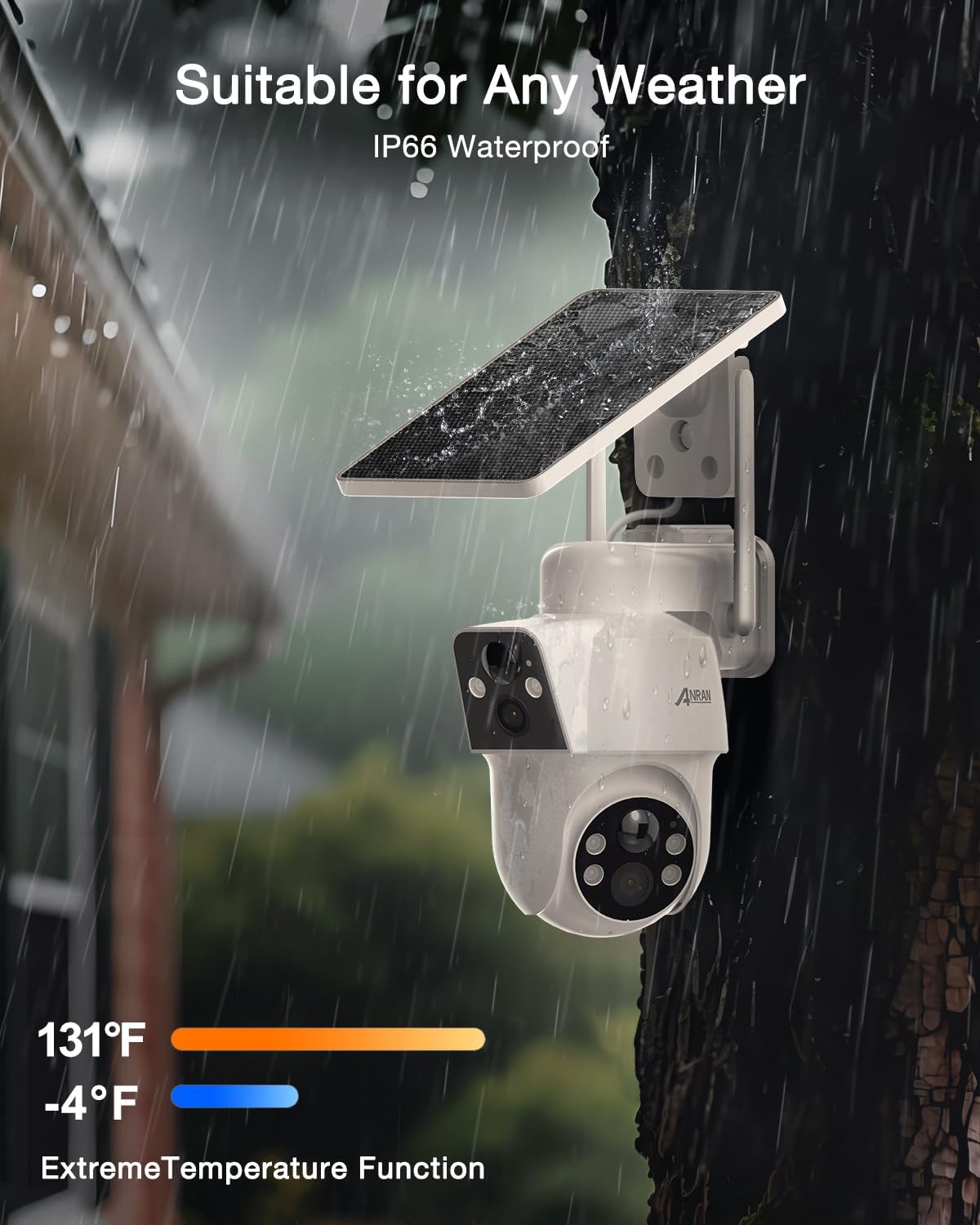
Image 6.2: The camera's IP66 weatherproof design ensures durability in all weather conditions.
7. சரிசெய்தல்
- மின்சாரம்/சார்ஜிங் இல்லை: Ensure the solar panel is clean and receives adequate direct sunlight. Verify the USB-C cable is properly connected for initial charging.
- வைஃபை இணைப்புச் சிக்கல்கள்: Ensure the camera is within range of a 2.4GHz WiFi network. Reset the camera using the reset button (located under the rubber cover) and attempt pairing again.
- தவறான இயக்க எச்சரிக்கைகள்: Adjust the sensitivity settings for motion detection within the ANRAN app. Consider enabling the AI human detection feature (if subscribed) to filter out non-human movements.
- மோசமான இரவுப் பார்வை: Check if the built-in spotlights are obstructed. Ensure the camera lens is clean. Adjust night vision settings in the app.
- மைக்ரோ எஸ்டி கார்டு பதிவு செய்யவில்லை: Ensure the microSD card is correctly inserted and formatted within the app. Check if the card is full.
8. விவரக்குறிப்புகள்
| அம்சம் | விவரம் |
|---|---|
| மாதிரி பெயர் | Q7M2 |
| எஃபெக்டிவ் ஸ்டில் ரெசல்யூஷன் | 3 எம்.பி |
| வீடியோ பிடிப்பு தீர்மானம் | 4K (Output) |
| சிறப்பு அம்சம் | இரட்டை லென்ஸ் |
| சக்தி ஆதாரம் | சூரிய சக்தியில் இயங்கும் |
| இணைப்பு தொழில்நுட்பம் | வயர்லெஸ் (2.4GHz வைஃபை) |
| சர்வதேச பாதுகாப்பு மதிப்பீடு | IP66 |
| Viewing கோணம் | 360 Degrees (PTZ) |
| நைட் விஷன் ரேஞ்ச் | 55 அடி |
| ஃபிளாஷ் நினைவக ஆதரவு அளவு அதிகபட்சம் | 128 ஜிபி (மைக்ரோ எஸ்டி) |
| பொருளின் எடை | 2.05 பவுண்டுகள் |
| தயாரிப்பு பரிமாணங்கள் | 1 x 1 x 1 அங்குலம் |
9. உத்தரவாதம் மற்றும் ஆதரவு
Thank you for choosing ANRAN! We are committed to providing excellent customer service and support.
- உத்தரவாதம்: Your product includes an extended one-year warranty. Please register your product within 10 days of purchase to ensure your warranty is fully activated.
- தொழில்நுட்ப ஆதரவு: We offer lifetime technical support for your ANRAN device.
- வாடிக்கையாளர் சேவை: 24/7 online customer service is available to assist you with any questions or concerns.
தொடர்பு தகவல்:
- Webதளம்: www.anran-cctv.com
- மின்னஞ்சல்: support@anran-cctv.com
- சமூக ஊடகங்கள்: @AnranTechnology

Image 9.1: ANRAN customer support details for assistance.


