1. அறிமுகம்
This manual provides essential information for the proper setup, operation, and maintenance of your MERACH Replacement Remote Control. This remote is specifically designed for use with MERACH Vibration Platform Fitness Equipment models CV30 pro, CV30, CV40, 2398, 2398slim, and 2440. Please read these instructions thoroughly before use to ensure optimal performance and longevity of your device.
என்ன சேர்க்கப்பட்டுள்ளது:
- 1 x MERACH Replacement Remote Control
2. தயாரிப்பு முடிந்துவிட்டதுview
The MERACH Replacement Remote Control features a simple, intuitive design for easy operation of your vibration platform. Familiarize yourself with the buttons and their functions.

படம் 1: முன் view of the MERACH Replacement Remote Control, showing the ON/OFF, AUTO, UP, and DOWN buttons.
பொத்தான் செயல்பாடுகள்:
- ஆன்/ஆஃப்: Powers the vibration platform on or off.
- ஆட்டோ: Activates the automatic program mode on the vibration platform.
- உ.பி (+): Increases the vibration intensity or time setting.
- கீழ் (-): Decreases the vibration intensity or time setting.
3. அமைவு மற்றும் இணைத்தல்
Before using your new remote control, you may need to install batteries and pair it with your MERACH Vibration Platform.
3.1 பேட்டரி நிறுவல்
The remote control typically requires two AAA batteries (not included). To install:
- ரிமோட் கண்ட்ரோலின் பின்புறத்தில் பேட்டரி பெட்டியின் அட்டையைக் கண்டறியவும்.
- அம்புக்குறி சுட்டிக்காட்டிய திசையில் அட்டையை ஸ்லைடு செய்யவும்.
- Insert two AAA batteries, ensuring the correct polarity (+ and -) as marked inside the compartment.
- பேட்டரி பெட்டியின் அட்டையை அது பாதுகாப்பாக இடத்தில் கிளிக் செய்யும் வரை மாற்றவும்.
3.2 Pairing Instructions
If your remote control does not immediately operate your vibration platform, it may need to be paired. The pairing process is designed to be straightforward:
- Ensure your MERACH Vibration Platform is powered on and in standby mode.
- அழுத்திப் பிடிக்கவும் ஆன்/ஆஃப் button on the remote control for approximately 3-5 seconds.
- Observe the indicator light on the remote (if present) or the display on your vibration platform. A successful pairing is usually indicated by a flash of light or a confirmation message on the platform's screen.
- Release the button. Test the remote control by pressing other function buttons.
If pairing is unsuccessful, repeat the steps. Ensure there are no obstructions between the remote and the vibration platform during the pairing process.
4. இயக்க வழிமுறைகள்
Once paired, the remote control allows you to manage your MERACH Vibration Platform conveniently.
- பவர் ஆன்/ஆஃப்: அழுத்தவும் ஆன்/ஆஃப் button once to turn the vibration platform on or off.
- Select Auto Mode: அழுத்தவும் ஆட்டோ button to cycle through or activate the pre-programmed automatic workout modes on your platform. Refer to your vibration platform's manual for details on specific auto modes.
- Adjust Intensity/Time: பயன்படுத்தவும் உ.பி (+) button to increase the vibration intensity level or workout duration. Use the கீழ் (-) button to decrease the vibration intensity level or workout duration.
5. பராமரிப்பு
Proper care ensures the longevity and functionality of your remote control.
- சுத்தம்: Wipe the remote control with a soft, dry cloth. Do not use abrasive cleaners or immerse it in water.
- சேமிப்பு: நேரடி சூரிய ஒளி மற்றும் தீவிர வெப்பநிலையிலிருந்து விலகி, குளிர்ந்த, உலர்ந்த இடத்தில் ரிமோட்டை சேமிக்கவும்.
- பேட்டரி மாற்று: If the remote's response becomes sluggish or the indicator light (if any) dims, replace the batteries. Remove batteries if the remote will not be used for an extended period to prevent leakage.
6. சரிசெய்தல்
If you encounter issues with your remote control, refer to the following common solutions:
| பிரச்சனை | சாத்தியமான காரணம் | தீர்வு |
|---|---|---|
| ரிமோட் பதிலளிக்கவில்லை | செயலிழந்த அல்லது தவறாக நிறுவப்பட்ட பேட்டரிகள். | சரியான துருவமுனைப்பை உறுதிசெய்து, பேட்டரிகளை புதியவற்றால் மாற்றவும். |
| ரிமோட் பதிலளிக்கவில்லை | Remote not paired with the vibration platform. | பிரிவு 3.2 இல் உள்ள இணைத்தல் வழிமுறைகளைப் பின்பற்றவும். |
| ரிமோட் பதிலளிக்கவில்லை | Obstruction between remote and platform sensor. | Ensure a clear line of sight between the remote and the vibration platform. |
| வரையறுக்கப்பட்ட வரம்பு | Weak batteries or environmental interference. | Replace batteries. Reduce potential sources of interference (e.g., other electronic devices). |
7. விவரக்குறிப்புகள்
- பிராண்ட்: மெராக்
- மாதிரி எண்: 2398-XPJ048 அறிமுகம்
- இணக்கமான சாதனங்கள்: MERACH Vibration Platform (Models CV30 pro, CV30, CV40, 2398, 2398slim, 2440)
- சக்தி ஆதாரம்: 2 x AAA பேட்டரிகள் (சேர்க்கப்படவில்லை)
- சிறப்பு அம்சம்: இலகுரக
- நிறம்: வெள்ளை
- ஆதரிக்கப்படும் சாதனங்களின் அதிகபட்ச எண்ணிக்கை: 1
8. இணக்கமான மாதிரிகள்
This MERACH Replacement Remote Control is compatible with the following MERACH Vibration Platform Fitness Equipment models:
- MERACH CV30 pro
- மெராச் சிவி30
- மெராச் சிவி40
- MERACH 2398
- MERACH 2398slim
- MERACH 2440
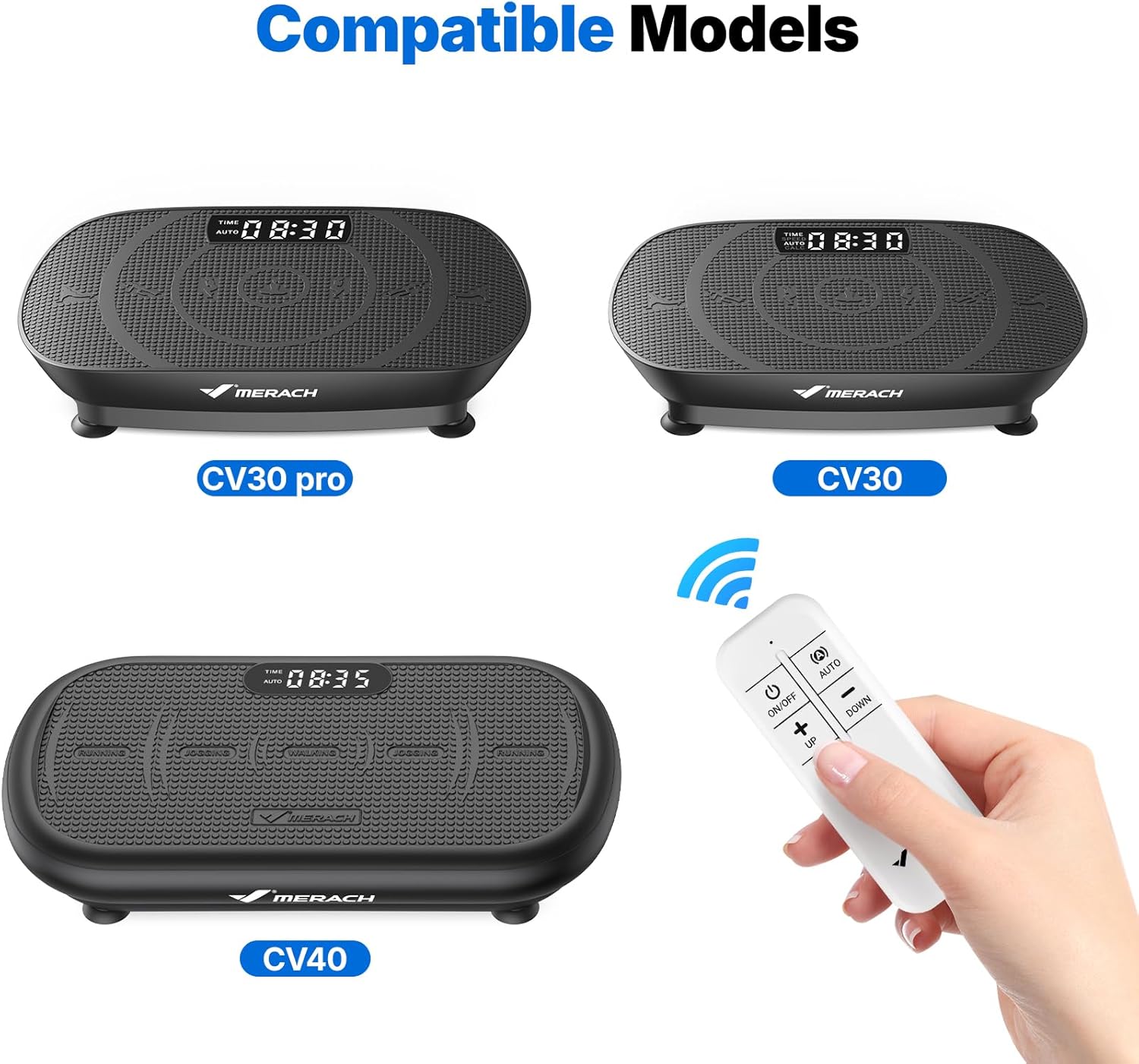
Image 2: Visual representation of compatible MERACH Vibration Platform models (CV30 pro, CV30, CV40) and the remote control.
9. ஆதரவு
For further assistance, technical support, or warranty information, please visit the official MERACH website or contact MERACH customer service directly. Keep your product model number (2398-XPJ048) handy when seeking support.
கூடுதல் தகவல்களையும் ஆதரவு வளங்களையும் இங்கே காணலாம் அமேசானில் MERACH ஸ்டோர்.


