1. அறிமுகம்
This manual provides detailed instructions for the safe and effective operation of your Neoteck 6000 Counts Digital Multimeter, Model VC746A. This True RMS (Root Mean Square) multimeter is designed for measuring AC/DC voltage, AC/DC current, resistance, diode, continuity, frequency, duty cycle, capacitance, and temperature. It features auto-ranging, a large backlit display, and Non-Contact Voltage (NCV) detection, making it suitable for both professional and DIY electrical tasks.
2. பாதுகாப்பு தகவல்
Always read and understand all safety warnings and operating instructions before using this instrument. Failure to observe safety warnings can result in serious injury or death.
- This multimeter is CE certified and rated to CAT III 600V. Adhere to these safety ratings.
- மதிப்பிடப்பட்ட தொகுதியை விட அதிகமாக விண்ணப்பிக்க வேண்டாம்tage between the terminals or between any terminal and earth ground.
- தொகுதியுடன் பணிபுரியும் போது எச்சரிக்கையுடன் பயன்படுத்தவும்tag30V AC RMS, 42V பீக் அல்லது 60V DC க்கு மேல். இந்த தொகுதிகள்tagஒரு அதிர்ச்சி ஆபத்தை ஏற்படுத்துகிறது.
- செயல்பாடுகள் அல்லது வரம்புகளை மாற்றுவதற்கு முன் எப்போதும் சோதனை லீட்களை சுற்றுகளிலிருந்து துண்டிக்கவும்.
- Ensure the test leads are in good condition, without damaged insulation.
- துல்லியமான அளவீடுகளை உறுதி செய்ய குறைந்த பேட்டரி காட்டி தோன்றும்போது உடனடியாக பேட்டரிகளை மாற்றவும்.
- மீட்டர் சேதமடைந்ததாகத் தோன்றினால் அல்லது கேஸ் திறந்திருந்தால் அதை இயக்க வேண்டாம்.
3. தொகுப்பு உள்ளடக்கங்கள்
உங்கள் தொகுப்பில் அனைத்து பொருட்களும் உள்ளதா என சரிபார்க்கவும்:
- 1 x Neoteck 6000 Counts Digital Multimeter (VC746A)
- 1 x ஜோடி டெஸ்ட் லீட்கள்
- 1 x Temperature Probe (K-Type Thermocouple)
- 1 x Pair of Alligator Clips
- 1 x ஸ்க்ரூடிரைவர்
- 2 x 1.5V AA பேட்டரிகள்
- 1 x சேமிப்பு பை
- 1 x பயனர் கையேடு (இந்த ஆவணம்)

படம் 3.1: Complete Neoteck VC746A Digital Multimeter kit. This image displays the full kit contents: the Neoteck VC746A multimeter, a pair of test leads, a temperature probe, alligator clips, a screwdriver, two 1.5V AA batteries, and a storage bag, all ready for immediate use.
4. தயாரிப்பு முடிந்துவிட்டதுview
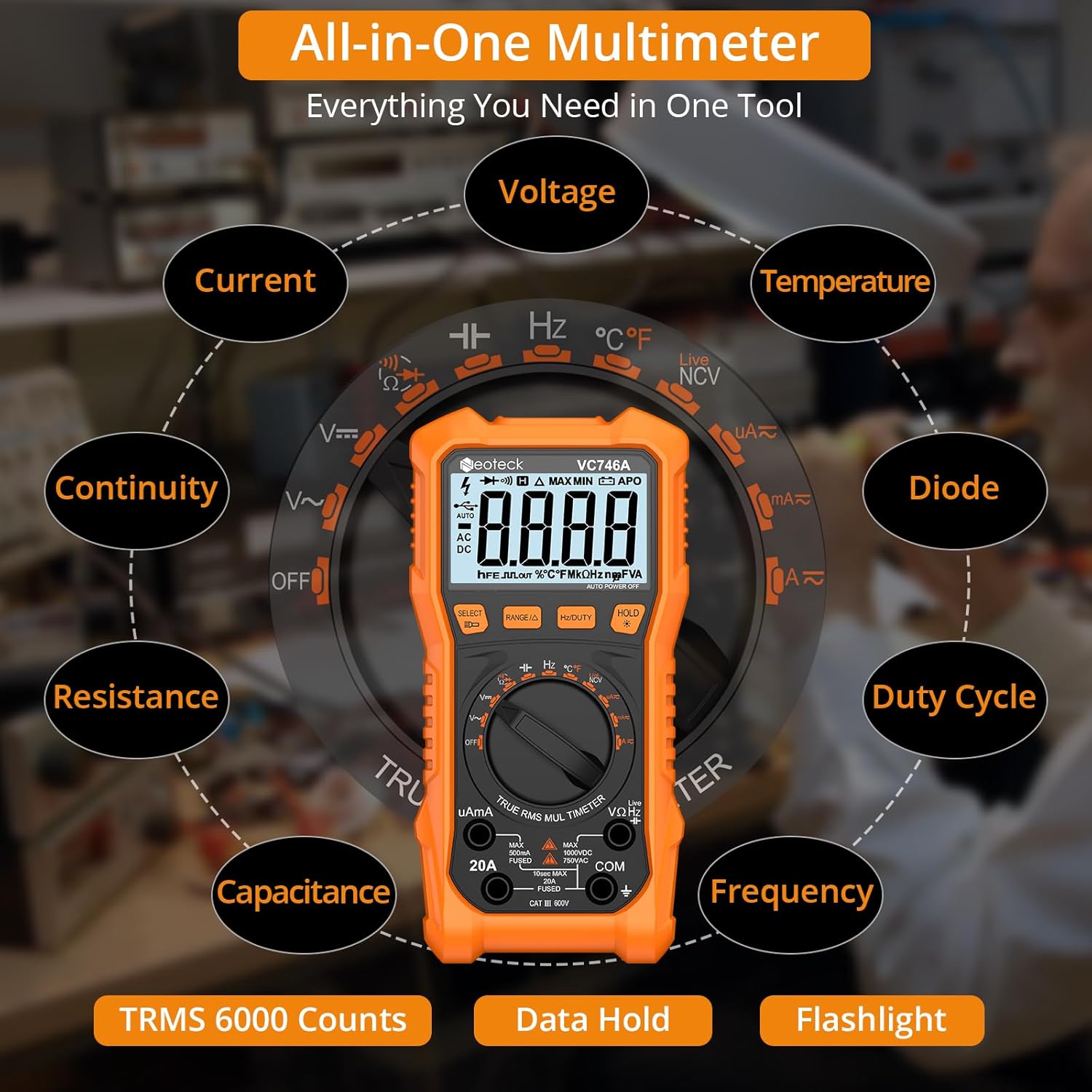
The Neoteck VC746A Digital Multimeter is designed for ease of use and accuracy. Key features include a 6000-count display, True RMS measurement capability, and auto-ranging for simplified operation. It also incorporates a large backlit screen and a built-in flashlight for visibility in low-light conditions.

படம் 4.1: Neoteck VC746A Multimeter with highlighted functions. This image illustrates the Neoteck VC746A Digital Multimeter highlighting its comprehensive range of measurement capabilities, including voltage, current, resistance, capacitance, temperature, frequency, duty cycle, non-contact voltage (NCV), live wire detection, diode test, and continuity.

படம் 4.2: Multimeter display and controls. The multimeter's clear 3.5-inch backlit display shows a 6000-count reading, making it easy to read in various lighting conditions. A voltage warning icon enhances safety during measurements.
5 அமைவு
5.1 பேட்டரி நிறுவல்
The multimeter requires two 1.5V AA batteries (included). To install or replace batteries:
- Ensure the multimeter is turned OFF and test leads are disconnected.
- மீட்டரின் பின்புறத்தில் பேட்டரி பெட்டி அட்டையைக் கண்டறியவும்.
- பேட்டரி கவரில் உள்ள திருகுகளை தளர்த்த, சேர்க்கப்பட்டுள்ள ஸ்க்ரூடிரைவரைப் பயன்படுத்தவும்.
- Remove the cover and insert the two AA batteries, observing correct polarity (+/-).
- பேட்டரி அட்டையை மாற்றி, திருகு மூலம் பாதுகாக்கவும்.
5.2 சோதனை லீட்களை இணைத்தல்
Connect the test leads to the appropriate input jacks on the multimeter:
- செருகவும் சிவப்பு test lead into the VΩHz தொகுதிக்கான ஜாக்tage, எதிர்ப்பு, அதிர்வெண், மின்தேக்கம், டையோடு மற்றும் தொடர்ச்சி அளவீடுகள்.
- செருகவும் கருப்பு test lead into the COM (common) jack for all measurements.
- For current measurements (up to 20A), insert the சிவப்பு test lead into the 20A பலா
- For microampere/milliampere current measurements, insert the சிவப்பு test lead into the uAmA பலா
6. இயக்க வழிமுறைகள்
Turn the rotary switch to select the desired measurement function. The meter will automatically select the appropriate range (auto-ranging) for most functions.
வீடியோ 6.1: Neoteck 6000 Counts Digital Multimeter Demonstration. This video demonstrates the key features and operational procedures of the Neoteck 6000 Counts Digital Multimeter, including DC voltage measurement, resistance testing, diode and continuity checks, temperature measurement, and non-contact voltagஇ கண்டறிதல்.
6.1 DC தொகுதிtagஇ அளவீடு
- ரோட்டரி சுவிட்சை அமைக்கவும் V~ position. The meter will default to DC voltagமின் அளவீடு.
- சிவப்பு சோதனை லீடை சுற்றுகளின் நேர்மறை (+) பக்கத்திற்கும், கருப்பு சோதனை லீடை எதிர்மறை (-) பக்கத்திற்கும் இணைக்கவும்.
- தொகுதியைப் படியுங்கள்tagகாட்சியில் இ மதிப்பு.
6.2 ஏசி தொகுதிtagஇ அளவீடு
- ரோட்டரி சுவிட்சை அமைக்கவும் V~ நிலை.
- அழுத்தவும் தேர்ந்தெடுக்கவும் AC தொகுதிக்கு மாறுவதற்கான பொத்தான்tage measurement (indicated by 'AC' on the display).
- ஏசி தொகுதி முழுவதும் சோதனை லீட்களை இணைக்கவும்.tagமின் ஆதாரம்.
- தொகுதியைப் படியுங்கள்tagகாட்சியில் இ மதிப்பு.
6.3 எதிர்ப்பு அளவீடு
- ரோட்டரி சுவிட்சை அமைக்கவும் Ω நிலை.
- சோதனைக்கு உள்ளான சுற்று சக்தியற்றதா என்பதை உறுதிப்படுத்தவும்.
- அதன் எதிர்ப்பை அளவிட, கூறு முழுவதும் சோதனை லீட்களை இணைக்கவும்.
- காட்சியில் எதிர்ப்பு மதிப்பைப் படியுங்கள்.
6.4 டையோடு சோதனை
- ரோட்டரி சுவிட்சை அமைக்கவும் Ω நிலை.
- அழுத்தவும் தேர்ந்தெடுக்கவும் button until the diode symbol (→|) காட்சியில் தோன்றும்.
- சிவப்பு சோதனை லீடை டையோடின் அனோடுடனும், கருப்பு சோதனை லீடை கேத்தோடுடனும் இணைக்கவும்.
- காட்சி முன்னோக்கி தொகுதியைக் காண்பிக்கும்tage drop. Reverse the leads; the display should show 'OL' (Open Line) for a good diode.
6.5 தொடர்ச்சி சோதனை
- ரோட்டரி சுவிட்சை அமைக்கவும் Ω நிலை.
- அழுத்தவும் தேர்ந்தெடுக்கவும் தொடர்ச்சி சின்னம் வரை பொத்தான் ()))) காட்சியில் தோன்றும்.
- சுற்று அல்லது பாகத்தின் குறுக்கே சோதனை லீட்களை இணைக்கவும்.
- If continuity exists (resistance below approximately 50Ω), the buzzer will sound.
6.6 NCV (தொடர்பு இல்லாத தொகுதிtage) & Live Wire Detection
This feature allows for safe detection of AC voltagநேரடி தொடர்பு இல்லாமல் இ.
- ரோட்டரி சுவிட்சை அமைக்கவும் NCV/LIVE நிலை.
- மல்டிமீட்டரின் மேல் முனையை கடத்தி அல்லது கடையின் அருகே நகர்த்தவும்.
- The meter will beep and the LED indicator will flash, with faster beeping and flashing indicating higher voltage.
படம் 6.1: NCV detection in progress. This image demonstrates the Non-Contact Voltage (NCV) feature of the multimeter, allowing for safe detection of live wires without direct contact. The device provides sound and visual warnings.
6.7 வெப்பநிலை அளவீடு
- ரோட்டரி சுவிட்சை அமைக்கவும் ° C/° F நிலை.
- Insert the K-type thermocouple probe into the VΩHz and COM jacks, observing polarity.
- Place the tip of the thermocouple on or in the object whose temperature is to be measured.
- Read the temperature on the display. Press தேர்ந்தெடுக்கவும் செல்சியஸ் மற்றும் பாரன்ஹீட் இடையே மாற.
6.8 மற்ற செயல்பாடுகள்
- மின்னோட்ட அளவீடு (ஏசி/டிசி): பொருத்தமானதைத் தேர்ந்தெடுக்கவும் uAmA or 20A range. Connect the meter in series with the circuit.
- கொள்ளளவு அளவீடு: என்பதைத் தேர்ந்தெடுக்கவும் கொள்ளளவு position. Connect the leads across the capacitor.
- Frequency/Duty Cycle: என்பதைத் தேர்ந்தெடுக்கவும் ஹெர்ட்ஸ்/% position. Connect the leads to the signal source.
- டேட்டா ஹோல்ட்: அழுத்தவும் பிடி திரையில் தற்போதைய வாசிப்பை உறைய வைக்க பொத்தானை அழுத்தவும். விடுவிக்க மீண்டும் அழுத்தவும்.
- பின்னொளி/ஃப்ளாஷ்லைட்: அழுத்தவும் ஒளி button to turn on the backlight. Hold the ஒளி button to activate the flashlight.

படம் 6.2: Multimeter with foldable stand and probe holders. The image highlights the thoughtful design of the multimeter, including a protective rubber case for durability, integrated pen holders for convenience, and a foldable kickstand for stable tabletop measurements.
7. பராமரிப்பு
7.1 சுத்தம் செய்தல்
விளம்பரத்துடன் வழக்கைத் துடைக்கவும்amp துணி மற்றும் லேசான சோப்பு. சிராய்ப்பு பொருட்கள் அல்லது கரைப்பான்களைப் பயன்படுத்த வேண்டாம். முனையங்களை அழுக்கு மற்றும் ஈரப்பதத்திலிருந்து சுத்தமாக வைத்திருங்கள்.
7.2 பேட்டரி மாற்று
Refer to Section 5.1 for battery replacement instructions. Always replace both batteries at the same time with new 1.5V AA batteries.
7.3 உருகி மாற்று
If the current measurement function fails, the fuse may need replacement. Fuse replacement should only be performed by qualified personnel. Refer to the specifications for the correct fuse type.
8. சரிசெய்தல்
- மீட்டர் இயக்கப்படவில்லை: பேட்டரிகள் சரியாக நிறுவப்பட்டுள்ளதா மற்றும் போதுமான சார்ஜ் உள்ளதா என சரிபார்க்கவும். தேவைப்பட்டால் மாற்றவும்.
- No reading or 'OL' displayed (except for diode reverse bias): Ensure test leads are properly connected to the correct jacks and making good contact with the circuit. Verify the function and range are appropriate for the measurement.
- தவறான அளவீடுகள்: Check battery level. Ensure test leads are not damaged. Avoid strong electromagnetic interference.
- மின்னோட்ட அளவீடு வேலை செய்யவில்லை: Check the fuse. If blown, replace with the specified type.
9. விவரக்குறிப்புகள்
| அளவுரு | மதிப்பு |
|---|---|
| மாதிரி எண் | வி.சி 746 ஏ |
| காட்சி | 6000 எண்ணிக்கைகள் |
| டிசி தொகுதிtage | 1000V வரை |
| ஏசி தொகுதிtage | 750V வரை |
| DC மின்னோட்டம் | 20A வரை |
| ஏசி நடப்பு | 20A வரை |
| எதிர்ப்பு | 60MΩ வரை |
| கொள்ளளவு | 60mF வரை |
| அதிர்வெண் | 10MHz வரை |
| வெப்பநிலை | -20°C முதல் 1000°C / -4°F முதல் 1832°F வரை |
| பாதுகாப்பு மதிப்பீடு | கேட் III 600 வி |
| சக்தி ஆதாரம் | 2 x 1.5V AA பேட்டரிகள் |
| தயாரிப்பு பரிமாணங்கள் | 7.48 x 3.54 x 1.77 அங்குலம் |
| பொருளின் எடை | 1.06 பவுண்டுகள் (480 கிராம்) |
10. உத்தரவாதம் மற்றும் ஆதரவு
Neoteck products are designed for reliability and performance. For any questions, technical support, or warranty inquiries, please contact Neoteck customer service through the retailer where the product was purchased or visit the official Neoteck webஉத்தரவாத சரிபார்ப்புக்காக உங்கள் கொள்முதல் ரசீதை வைத்திருங்கள்.


