1. அறிமுகம்
The DREAME X60 Max Ultra Complete is an advanced robotic cleaning device designed to provide comprehensive vacuuming and mopping for your home. Featuring an ultra-thin design, powerful suction, intelligent navigation, and a multifunctional dock, this robot simplifies your cleaning routine. This manual provides essential information for setup, operation, maintenance, and troubleshooting to ensure optimal performance of your device.
2. தயாரிப்பு முடிந்துவிட்டதுview
The DREAME X60 Max Ultra Complete integrates cutting-edge technology for superior cleaning. Its ultra-thin profile allows it to access hard-to-reach areas, while dual AI cameras and proactive illumination ensure precise navigation and obstacle avoidance. The enhanced DuoBrush system delivers powerful suction and tangle-free performance. The robot also features hot water mopping and a 10-in-1 multifunctional dock for automated maintenance.

Figure 1: DREAME X60 Max Ultra Complete Robot Vacuum showcasing its ultra-thin design for reaching under furniture.
Video 1: "Super-slim, super-smart, DREAME X60 Max Ultra Complete" - An overview of the robot's slim design and smart features.
3 அமைவு
3.1 அன்பாக்சிங் மற்றும் ஆரம்ப வேலை வாய்ப்பு
Carefully remove all components from the packaging. Place the multifunctional dock against a wall with at least 0.5 meters of clear space on either side and 1.5 meters in front for optimal robot navigation. Ensure the dock is connected to a power outlet.
Video 2: "UNBOXING DREAME X60 Max Ultra Complete" - Visual guide for unboxing and setting up the robot vacuum.
3.2 தண்ணீர் தொட்டி நிரப்புதல்
Open the top cover of the multifunctional dock. Remove the clean water tank and fill it with clean tap water. For optimal mopping performance, you may add a compatible cleaning solution to the designated compartment. Reinsert the tank securely.

Figure 2: The multifunctional dock with its clean and dirty water tanks visible.
3.3 Dust Bag Installation
The dock comes with a dust bag pre-installed. Ensure it is correctly seated. The robot will automatically empty its dustbin into this bag after each cleaning cycle.
3.4 மாப் பேட் இணைப்பு
Attach the mop pads to the bottom of the robot. They are magnetically attached for easy installation and removal. Ensure they are securely fastened before operation.
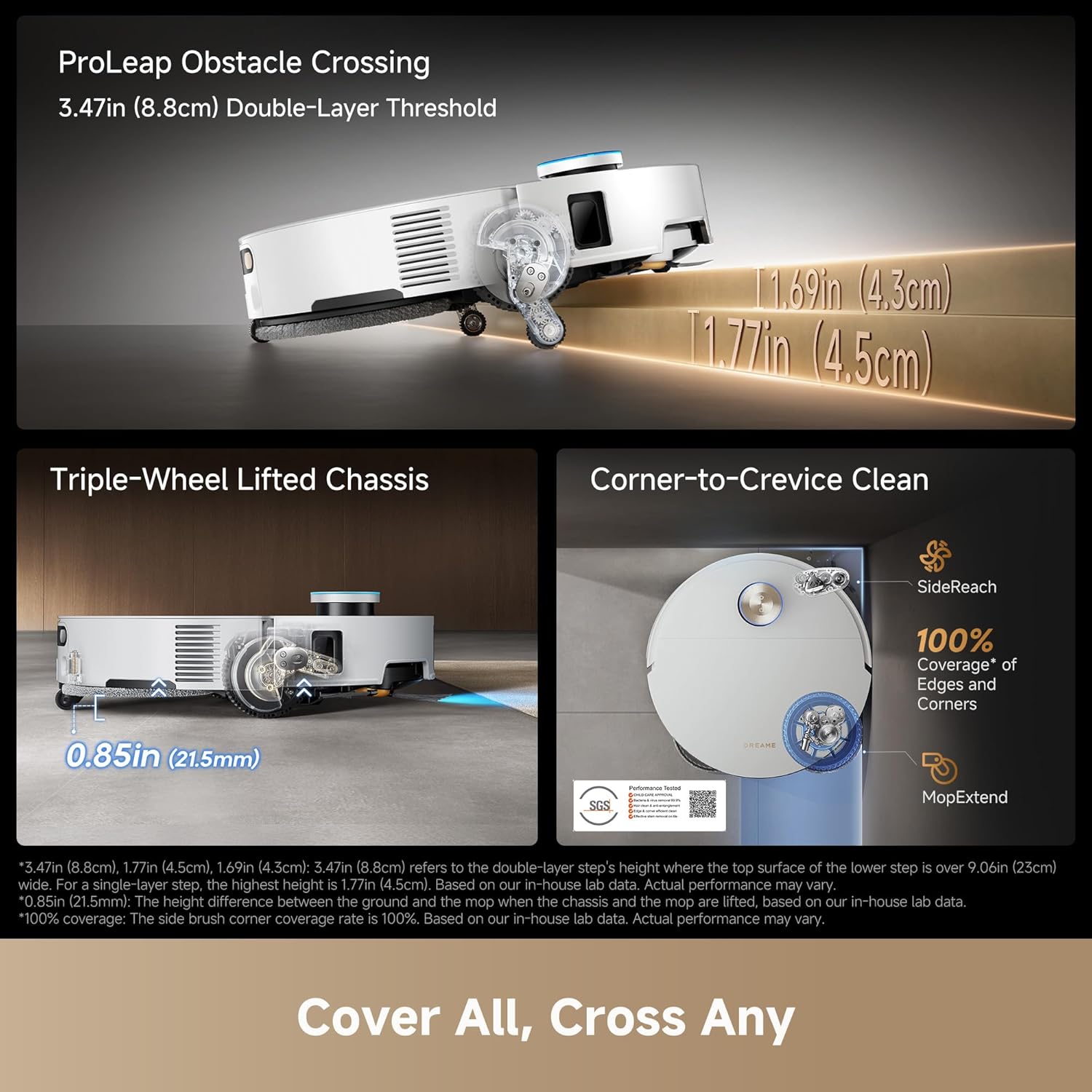
Figure 3: The underside of the robot showing the mop pads and main brushes.
3.5 பயன்பாட்டு இணைப்பு
Download the DREAMEHOME app from your mobile app store. Follow the in-app instructions to connect your robot vacuum to your 2.4G WiFi network. The app allows for advanced customization and control.
4 அம்சங்கள்
- அல்ட்ரா மெல்லிய வடிவமைப்பு: At just 3.13 inches (7.95 cm) slim, the X60 Ultra can easily glide under sofas and beds, reaching hidden dust in low spaces.
- அறிவார்ந்த தடைகளைத் தவிர்ப்பது: Equipped with dual AI cameras and proactive illumination, it detects over 280 types of obstacles, adapting cleaning modes and navigating with precision.
- Powerful Suction with DuoBrush: Features a retractable pressure plate and an enhanced DuoBrush that boosts suction to 35,000Pa, effectively lifting deeply embedded dust and hair with tangle-free performance.
- MopExtend RoboSwing & SideReach: Intelligently detects steps up to 3.15 inches (8 cm) and utilizes MopExtend RoboSwing to reach into corners and beneath furniture, while SideReach effectively cleans along edges and tight spots.
- Hot Water Mopping: Dual omni-scrub mop pads press with 15N force and spin at 230RPM, using 104°F (40°C) hot water to deeply clean uneven floors and remove stubborn grease.
- 10-in-1 Multifunctional Dock: Offers 212°F (100°C) hot-water mop washing, hot-air drying, 100-day dust disposal, and a dual-solution compartment for comprehensive cleaning routine management.
- App-Driven Customization: Tailor every clean to your home via the cleaning app, including carpet modes, pet-friendly avoidance, privacy protection, and voice commands.

Figure 4: Robot vacuum equipped with dual AI cameras for precise obstacle avoidance.

Figure 5: The powerful 35,000Pa suction and DuoBrush system for deep cleaning.

Figure 6: MopExtend RoboSwing and SideReach features for thorough edge and corner cleaning.
5. இயக்க வழிமுறைகள்
5.1 Starting and Stopping a Clean
To start a cleaning cycle, press the power button on the robot or use the 'Clean' button in the DREAMEHOME app. To pause or stop, press the power button again or use the app. The robot will return to the dock automatically when cleaning is complete or battery is low.
5.2 துப்புரவு முறைகள்
Select from various cleaning modes in the DREAMEHOME app:
- வெற்றிடம் மட்டும்: அனைத்து வகையான தரைகளிலும் உள்ள உலர்ந்த குப்பைகளுக்கு.
- துடைப்பான் மட்டும்: கடினமான தரைகளை ஈரமாக சுத்தம் செய்வதற்கு.
- வெக் & மாப்: ஒரே நேரத்தில் வெற்றிடமாக்கல் மற்றும் துடைத்தல்.
- Mop After Vac: Completes a full vacuum cycle before starting a mop cycle.
5.3 திட்டமிடல் மற்றும் தனிப்பயனாக்கம்
Use the DREAMEHOME app to set cleaning schedules, define no-go zones, create virtual walls, and customize cleaning preferences for specific rooms or areas. You can also adjust suction power, mop dampness, and mop pressure.
5.4 குரல் கட்டுப்பாடு
The robot supports voice commands through compatible smart home assistants like Amazon Alexa and Google Home. Link your DREAMEHOME account to your smart assistant for hands-free control.
6. பராமரிப்பு
Regular maintenance ensures the longevity and optimal performance of your DREAME X60 Max Ultra Complete.
6.1 Multifunctional Dock Maintenance
- தூசி பை: The dock's dust bag can hold debris for up to 100 days. Replace it when the app indicates it's full.
- தண்ணீர் தொட்டிகள்: Regularly empty the dirty water tank and refill the clean water tank. The dock features auto-refilling capabilities for the robot's internal water tank.
- துடைப்பான் கழுவுதல் & உலர்த்துதல்: The dock automatically washes the mop pads with 212°F (100°C) hot water and dries them with hot air to prevent odors and maintain hygiene.

Figure 7: The 10-in-1 multifunctional dock handles various maintenance tasks automatically.

Figure 8: Hot water mop washing feature of the dock.
6.2 ரோபோ கூறு சுத்தம் செய்தல்
- முக்கிய தூரிகைகள்: The tangle-free DuoBrush design minimizes hair wrapping. Periodically remove and clean the main brushes to ensure efficient debris pickup.
- பக்கவாட்டு தூரிகை: பக்கவாட்டு தூரிகையில் சிக்கிய முடி அல்லது குப்பைகள் ஏதேனும் இருக்கிறதா என்று சரிபார்த்து, தேவைக்கேற்ப சுத்தம் செய்யவும்.
- துடைப்பான் பட்டைகள்: While the dock self-cleans, occasionally remove and hand-wash the mop pads for thorough cleaning.
- சென்சார்கள்: Wipe the cliff sensors, obstacle avoidance sensors, and charging contacts with a dry cloth to remove dust and ensure proper function.
7. சரிசெய்தல்
If you encounter issues with your DREAME X60 Max Ultra Complete, refer to the DREAMEHOME app for specific error messages and troubleshooting steps. Common issues and solutions include:
- ரோபோ சார்ஜ் செய்யவில்லை: Ensure the robot is correctly docked and the charging contacts on both the robot and dock are clean.
- மோசமான சுத்தம் செயல்திறன்: Check if the dust bag is full, water tanks are filled, brushes are clean, and mop pads are properly attached.
- வழிசெலுத்தல் பிழைகள்: Clean all sensors on the robot. Ensure there are no new obstacles or changes in the environment that might confuse the robot.
- பயன்பாட்டு இணைப்புச் சிக்கல்கள்: Verify your WiFi network is 2.4G and the signal is strong. Restart the robot and your router if necessary.
8. விவரக்குறிப்புகள்
| பிராண்ட் | டிரீம் |
| மாதிரி பெயர் | DREAME X60 Max Ultra Complete |
| பொருள் மாதிரி எண் | RLX87DE |
| நிறம் | வெள்ளை |
| தயாரிப்பு பரிமாணங்கள் | 18"லி x 18"அங்குலம் x 26"அங்குலம் |
| பொருளின் எடை | 51.9 பவுண்டுகள் |
| பேட்டரி ஆயுள் | 180 நிமிடங்கள் |
| தொகுதிtage | 110 வோல்ட் (ஏசி) |
| சக்தி ஆதாரம் | கம்பியூட்டப்பட்ட மின்சாரம் |
| வடிகட்டி வகை | துணி |
| மேற்பரப்பு பரிந்துரை | Wood, Hard tile, Carpet, Marble |
9. உத்தரவாதம் மற்றும் ஆதரவு
The DREAME X60 Max Ultra Complete comes with up to a 3-Year Product Warranty. For detailed information on warranty coverage, please refer to the warranty card included in your package or contact DREAME customer support. Additionally, a 30-day easy return policy is available for eligible purchases. Dedicated customer support is available for any queries or assistance.


