


frient ஸ்மார்ட் பிளக் மினி

தயாரிப்பு விளக்கம்
Frient' Smart Plug Mini என்பது புத்திசாலித்தனமான ரிமோட் மூலம் கட்டுப்படுத்தப்படும் அடாப்டர் ஆகும்.
Smart Plug Mini ஆனது மின் நுகர்வுகளைக் கண்காணித்து, உலகம் முழுவதிலுமிருந்து - அல்லது படுக்கையிலிருந்து எந்தச் சாதனத்தையும் உடனடியாக ஆன் மற்றும் ஆஃப் செய்ய பயனரை அனுமதிக்கிறது.
ஸ்மார்ட் பிளக் மினி பல்வேறு பதிப்புகளில் கிடைக்கிறது.
தற்காப்பு நடவடிக்கைகள்
- தயாரிப்பு லேபிளை அகற்ற வேண்டாம், ஏனெனில் அதில் முக்கியமான தகவல்கள் உள்ளன.
- ஸ்மார்ட் பிளக்கிற்கு நீண்ட ஆயுளைத் தக்கவைக்க அதிகபட்ச சுமைகளை அடிக்கடி ஆன் அல்லது ஆஃப் செய்வதைத் தவிர்க்கவும்.
- ஸ்மார்ட் ப்ளக்கில் எந்த திரவமும் சேராமல் கவனமாக இருங்கள், ஏனெனில் அது உபகரணங்களை சேதப்படுத்தும்.
- சாதனம் சமிக்ஞையாகப் பயன்படுத்தப்பட்டால் ampஆயுள், தயவுசெய்து சாதனத்தை மத்திய சாதனம் மற்றும் சென்சார் (களுக்கு) இடையில் வைக்கவும்.
தொடங்குதல்
- ஸ்மார்ட் பிளக் மினியை மின் நிலையத்துடன் இணைக்கவும்.
- ஸ்மார்ட் பிளக் மினி இப்போது ஜிக்பீ நெட்-வொர்க்கை சேர்வதற்கு (15 நிமிடங்கள் வரை) தேடத் தொடங்கும்.
- சாதனங்களில் சேர்வதற்கு ஜிக்பீ நெட்வொர்க் திறந்திருப்பதை உறுதிசெய்து, ஸ்மார்ட் பிளக் மினியை ஏற்றுக்கொள்ளும்.
- ஸ்மார்ட் பிளக் மினி நெட்வொர்க்கைத் தேடும் போது, எல்இடி பட்டன் சிவப்பு நிறத்தில் ஒளிரும்.
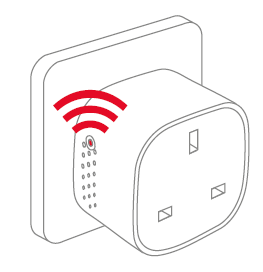
குறிப்பு: பட்டனை அழுத்தினால் ஸ்மார்ட் பிளக் மினி ஆன் ஆகும். LED விளக்கு ஒரே நேரத்தில் சிவப்பு மற்றும் பச்சை நிறத்தில் ஒளிரத் தொடங்குகிறது. சாதனம் நெட்வொர்க்கைத் தேடும் போது, இது ஆரஞ்சு/மஞ்சள் நிறமாகத் தோன்றும். - LED பட்டன் ஒளிரும் போது, ஸ்மார்ட் பிளக் மினி ஜிக்பீ நெட்வொர்க்கில் வெற்றிகரமாக சேர்ந்தது.
வேலை வாய்ப்பு
- ஸ்மார்ட் பிளக்கை வீட்டிற்குள் 0-50°C வெப்பநிலையில் வைக்கவும்.
- சாதனம் சமிக்ஞையாகப் பயன்படுத்தப்பட்டால் ampஆயுள், தயவுசெய்து சாதனத்தை மத்திய சாதனம் மற்றும் சென்சார் (களுக்கு) இடையில் வைக்கவும்.
மீட்டமைத்தல்
உங்கள் ஸ்மார்ட் ப்ளக் மினியை வேறொரு நுழைவாயிலுடன் இணைக்க விரும்பினால், அசாதாரண நடத்தையை அகற்ற தொழிற்சாலை மீட்டமைப்பைச் செய்ய வேண்டியிருந்தால் அல்லது திரட்டப்பட்ட பதிவேடுகள் மற்றும் பதிவுகளை மீட்டமைக்க வேண்டியிருந்தால், மீட்டமைப்பு தேவை.
மீட்டமைப்பதற்கான படிகள்
- ஸ்மார்ட் பிளக் மினியை மின் நிலையத்துடன் இணைக்கவும்.
- சாதனத்தில் உள்ள பொத்தானை அழுத்திப் பிடிக்கவும்.
- சிவப்பு எல்.ஈ.டி தொடர்ந்து ஒளிரும் வரை பொத்தானை அழுத்திப் பிடித்து, பின்னர் பொத்தானை விடுங்கள்.

- மறுபதிப்புக்குப் பிறகுasing the button, the red LED will stay on for 2-5 seconds. During that time, the device must not be switched off or unplugged.
முறைகள்
கேட்வே பயன்முறையைத் தேடுகிறது
- ஒவ்வொரு நொடியும் ஒரு சிவப்பு LED ஒளிரும்

இயல்பான பயன்முறை
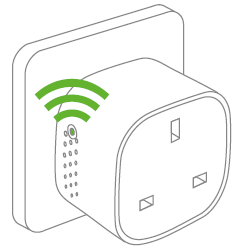
க்ரீன் எல்இடி என்றால் ஸ்மார்ட் பிளக் வெளியீடு செயலில் உள்ளது (ரிலே உள்ளது). LED பொத்தானை அழுத்துவதன் மூலம் ரிலேவை ஆன் மற்றும் ஆஃப் செய்யலாம்.
பயன்முறை முடக்கு
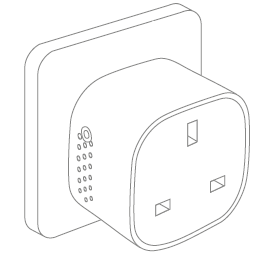
எல்இடி பட்டனில் வெளிச்சம் இல்லாதபோது, ரிலே ஆஃப் ஆகிறது (வெளியீடு இல்லை) என்று அர்த்தம். LED பொத்தானை அழுத்துவதன் மூலம் ரிலேவை ஆன் மற்றும் ஆஃப் செய்யலாம்.
தவறு கண்டறிதல்
• மின்சாரம் செயலிழந்தால், மின்சாரம் செயலிழக்கப்படுவதற்கு முன்பு இருந்த ஆன்/ஆஃப் நிலைக்கு சாதனம் தன்னை மீட்டெடுக்கும்.
• மோசமான அல்லது பலவீனமான சிக்னல் ஏற்பட்டால், ஸ்மார்ட் பிளக் மினி அல்லது உங்கள் கேட்வேயின் இருப்பிடத்தை மாற்றவும்.
• நுழைவாயிலுக்கான தேடலின் நேரம் முடிந்துவிட்டால், LED பட்டனை சிறிது அழுத்தினால் அது மீண்டும் தொடங்கும்.
மற்ற தகவல்கள்
• Smart Plug Mini ஆனது 10 A தொடர்ச்சியான சுமை மற்றும் 16 A (~3500 W) குறுகிய நேர சுமைக்கு மதிப்பிடப்பட்டுள்ளது.
• சுமை 16 A ஐ விட அதிகமாக இருந்தால் அல்லது உட்புற வெப்பநிலை அதிகமாக இருந்தால் அது தானாகவே அணைக்கப்படும்.
• மின்சாரம் செயலிழந்தால், மின்சாரம் செயலிழக்கப்படுவதற்கு முன்பு இருந்த ஆன்/ஆஃப் நிலைக்கு சாதனம் தன்னை மீட்டெடுக்கும்.
அகற்றல்
வாழ்க்கையின் முடிவில் தயாரிப்பை சரியாக அப்புறப்படுத்துங்கள். இது மறுசுழற்சி செய்ய வேண்டிய மின்னணு கழிவுகள்.
CE சான்றிதழ்
இந்தத் தயாரிப்பில் ஒட்டப்பட்டுள்ள CE குறியானது, தயாரிப்புக்கு பொருந்தும் ஐரோப்பிய வழிகாட்டுதல்களுடன் இணங்குவதையும், குறிப்பாக, இணக்கமான தரநிலைகள் மற்றும் விவரக்குறிப்புகளுடன் இணங்குவதையும் உறுதிப்படுத்துகிறது.
உத்தரவுகளுக்கு இணங்க
• ரேடியோ கருவி இயக்கம் (RED) 2014/53 / EU
• குறைந்த தொகுதிtagமின் உத்தரவு (2014/35/EU)
• RoHS Directive 2015/863 / EU திருத்தம் 2011/65 / EU
பிற சான்றிதழ்கள்
ஜிக்பீ ஹோம் ஆட்டோமேஷன் 1.2 சான்றிதழ்
அனைத்து உரிமைகளும் பாதுகாக்கப்பட்டவை.
இந்த கையேட்டில் தோன்றக்கூடிய எந்த பிழைகளுக்கும் frient எந்தப் பொறுப்பையும் ஏற்காது. மேலும், இங்கு விவரிக்கப்பட்டுள்ள வன்பொருள், மென்பொருள் மற்றும் / அல்லது விவரக்குறிப்புகளை எந்த நேரத்திலும் முன்னறிவிப்பின்றி மாற்றுவதற்கான உரிமையை ஃப்ரியண்ட் கொண்டுள்ளது, மேலும் இங்கு உள்ள தகவல்களைப் புதுப்பிக்க ஃப்ரியண்ட் எந்த உறுதிப்பாட்டையும் செய்யவில்லை. இங்கு பட்டியலிடப்பட்டுள்ள அனைத்து வர்த்தக முத்திரைகளும் அந்தந்த உரிமையாளர்களுக்கு சொந்தமானவை.
ஆவணங்கள் / ஆதாரங்கள்
 | ஸ்மார்ட் பிளக் மினி |
குறிப்புகள்
- frient - சென்சார்கள், அலாரங்கள், ஸ்மார்ட் பிளக்குகள் - வீட்டு பராமரிப்பு மற்றும் பாதுகாப்புwww.frient.com
- பயனர் கையேடுmanual.tools
The socket SH-P01 stopped working after about a year of use. Does not start despite resetting. The LED remains completely dark. Also the same thing happened with SH-P01E about 2 years ago.
Replaced with new SH-P01 sockets. Load Max230VAC/ 1A. The new sockets work flawlessly in the same WiFi network. The devices have a CE mark, but not from an inspection body
எண்?
Pistorasia SH-P01 lakkasi toimimasta noin vuoden käytön jälkeen. Ei käynnisty resetoinnista huolimatta. LED pysyy täysin pimeänä. Myös sama tapahtui SH-P01E noin 2-vuotta sitten.
Korvattu uusilla SH-P01 pistorasioilla. Kuomitus Max230VAC/ 1A. Uudet pistorasiat toimivat samassa WiFi-verkossa moitteettomasti. Laitteissa on CE-merkintä, mutta ei tarkastuslaitoksen
numeroa ?
Replaced with new SH-P01 sockets. Load Max230VAC/ 1A. The new sockets work flawlessly in the same WiFi network. The devices have a CE mark, but not from an inspection body
எண்?
Pistorasia SH-P01 lakkasi toimimasta noin vuoden käytön jälkeen. Ei käynnisty resetoinnista huolimatta. LED pysyy täysin pimeänä. Myös sama tapahtui SH-P01E noin 2-vuotta sitten.
Korvattu uusilla SH-P01 pistorasioilla. Kuomitus Max230VAC/ 1A. Uudet pistorasiat toimivat samassa WiFi-verkossa moitteettomasti. Laitteissa on CE-merkintä, mutta ei tarkastuslaitoksen
numeroa ?
Why has my Smart Plug Mini stopped working with a dark LED, and why is there no inspection body number next to the CE mark?
Based on the frient Smart Plug Mini manual, if the LED remains completely dark and the device does not respond to a factory reset, it likely indicates a hardware failure or a triggered safety cutoff. Please note the following regarding your SH-P01 model:
Since your new units work on the same network with the same 1A load, and the old units remain unresponsive, we recommend contacting frient support or your retailer for warranty claims, as the manual does not provide further repair steps for a non-responsive LED.
Read the full Q&A page